How to Write a Microsoft DSC Resource in Go in Under 100 Lines
How to Write a Microsoft DSC Resource in Go in Under 100 Lines
Date: 2026-08-17
Master Microsoft Desired State Configuration in Go with just 63 lines by leveraging the DSC Go Resource Development Kit. Skip boilerplate, focus on logic.
Tags: ["Microsoft DSC", "Go", "DevOps", "Infrastructure as Code"]
The complexity of writing custom Microsoft Desired State Configuration (DSC) resources has long been a barrier for many developers. While DSC’s declarative model is powerful for enforcing system configurations, the protocol’s intricate plumbing — handling JSON over commands, managing exit codes, producing manifests — often turns resource development into tedious boilerplate work.
Fortunately, recent efforts have made significant strides to simplify this. Among them, the dsc-go-rdk (Resource Development Kit) for Go abstracts away all the protocol noise, letting you write a fully functional DSC resource in under 100 lines of code. In this post, we’ll unpack what’s required by Microsoft’s DSC protocol, see how the Go RDK handles this complexity, and walk through writing a minimal, idiomatic DSC resource managing a file’s contents.
You’ll learn not only how to get started quickly but also gain insight into the protocol’s mechanics. We’ll explore schema generation, implementing resource operations (Get, Set, Delete), manifest generation, and how to drive and debug the resource manually — all culminating in a smooth integration with the DSC engine.
Architecture Overview
┌─────────────────────────────────────────────┐
│          Microsoft Desired State             │
│          Configuration Engine                │
│                                             │
│ • Invokes resource executables               │
│ • Passes JSON input/output                    │
│ • Manages resource discovery via manifests   │
└─────────────────────────────────────────────┘
                    │
                    ↓
┌─────────────────────────────────────────────┐
│           DSC Go Resource Development Kit   │
│─────────────────────────────────────────────│
│ • Abstracts DSC protocol plumbing            │
│ • Generates JSON Schema & manifest            │
│ • Handles method dispatch (Get, Set, Delete) │
│ • Maps errors to exit codes                    │
└─────────────────────────────────────────────┘
                    │
                    ↓
┌─────────────────────────────────────────────┐
│          Custom DSC Resource (File Example)  │
│─────────────────────────────────────────────│
│ • Models desired state as struct              │
│ • Implements typed handler methods            │
│ • Minimal Go code focused on domain logic     │
└─────────────────────────────────────────────┘
Key Technical Observations
-
Protocol is JSON Command-Based — DSC resources communicate via JSON input and output over command-line invocations, requiring strict conformance to a nuanced contract for methods like
get,set,test,delete, andexport. -
Boilerplate Complexity is Significant — Parsing input flags and JSON, generating manifests with embedded schemas, logging with JSON to STDERR, and mapping errors to specific exit codes are tedious but necessary plumbing that distracts from resource logic.
-
RDK Abstracts Protocol Details Elegantly — The Go RDK lets you declare your resource’s state as a plain Go struct with tags for JSON schema generation, and implement only the methods you care about (
Gettable,Settable, etc.). It handles command dispatch, input/output framing, and manifest generation seamlessly. -
Idempotency & Error Handling Built-in — The library enforces best practices such as treating “not found” states as valid absence (not error), making
Deleteidempotent, and correctly translating Go errors into DSC exit codes. -
Manifest Generation as Build Step — The manifest JSON describing the resource's capabilities and schema is generated by the binary itself, avoiding drift and manual upkeep.
-
Engine-Agnostic Development and Debugging — Since the resource speaks the protocol directly, you can debug and test all operations from your shell without relying on the DSC engine.
How It Works
Step 1: Model the State as a Struct
The DSC resource's state is modeled as a Go struct. This struct defines the fields representing the desired and actual configuration, decorated with JSON tags to control schema generation.
type File struct {
    dsc.ExistProperty
    Path    string `json:"path" description:"Absolute path of the file to manage."`
    Content string `json:"content,omitempty" description:"The text the file should contain."`
}
- The
dsc.ExistPropertyembed defines a canonical_existboolean to indicate if an instance should exist. - The required
Pathproperty is enforced by omittingomitempty. - Optional properties like
Contenthaveomitemptyto make them not required. - Descriptions become part of the generated JSON Schema for documentation and validation.
Running dscfile schema outputs the resource’s JSON Schema automatically, ensuring the manifest and engine are always in sync:
{
  "$schema": "https://json-schema.org/draft/2020-12/schema",
  "type": "object",
  "additionalProperties": false,
  "required": ["path"],
  "properties": {
    "_exist":  { "type": "boolean", "default": true, "description": "Indicates whether the instance should exist." },
    "path":    { "type": "string", "description": "Absolute path of the file to manage." },
    "content": { "type": "string", "description": "The text the file should contain." }
  }
}
Step 2: Implement the Operations You Care About
You implement typed methods on a handler struct. Only Get is mandatory; others like Set and Delete are opt-in.
type Handler struct{}

func (Handler) Get(_ context.Context, in File) (File, error) {
    if in.Path == "" {
        return in, dsc.NewExitCodeErrorf(dsc.ExitInvalidInput, "path is required")
    }
    data, err := os.ReadFile(in.Path)
    if errors.Is(err, fs.ErrNotExist) {
        return dsc.NotFound(in, "Go.Resource/File", in.Path)
    }
    if err != nil {
        return in, err
    }
    return File{Path: in.Path, Content: string(data)}, nil
}

func (Handler) Set(_ context.Context, desired File) (File, error) {
    if err := os.WriteFile(desired.Path, []byte(desired.Content), 0o644); err != nil {
        return desired, err
    }
    return File{Path: desired.Path, Content: desired.Content}, nil
}

func (Handler) Delete(_ context.Context, in File) error {
    if err := os.Remove(in.Path); err != nil && !errors.Is(err, fs.ErrNotExist) {
        return err
    }
    return nil
}
- The
Getmethod returns a DSC-recognized "not found" state when the file is absent — a crucial distinction from erroring out. Setwrites the file content to disk.Deleteis idempotent, succeeding even if the file is already gone.- Errors propagate and map transparently to DSC’s exit code specification.
- The lack of a
Testmethod here means the DSC engine will synthesize one via comparingGetoutput to the desired state.
| Interface | Manifest Capability |
|---|---|
Gettable (required) |
get |
Settable |
set |
Testable |
test |
Deletable |
delete |
Exportable |
export |
Step 3: Declare the Resource
In main.go, wrap your types and handlers using the RDK’s MustResource constructor specifying identity and behavior.
func main() {
    r := dsc.MustResource[File](Handler{}, dsc.ResourceConfig{
        Type:        "Go.Resource/File",
        Version:     "0.1.0",
        Description: "Manages the content of a text file.",
        Tags:        []string{"file", "demo"},
        SetReturn:   dsc.SetReturnStateAndDiff,
    })
    r.Main("dscfile")
}
- The
Typefollows the pattern<owner>[.<group>][.<area>]/<name>. - The semantic
Versionensures proper versioning in DSC. SetReturnStateAndDiffinstructs the library to automatically calculate and report changed properties by calling yourGetbefore and after yourSet.- A single call to
r.Main("dscfile")drives the entire CLI interface, including subcommands (get,set,manifest), input parsing, output formatting, and error handling.
Step 4: Drive the Protocol by Hand
Before involving the DSC engine, you can build and run the binary directly to test operations:
go build -o dscfile.exe .

# Check a non-existent file's state
.\dscfile.exe get --input '{"path":"C:/temp/test.txt"}'
# {"_exist":false,"path":"C:/temp/test.txt"}

# Create/Update the file
.\dscfile.exe set --input '{"path":"C:/temp/test.txt","content":"hello dsc"}'
# {"path":"C:/temp/test.txt","content":"hello dsc"}
# ["content","path"]

# Update content property alone
.\dscfile.exe set --input '{"path":"C:/temp/test.txt","content":"hello again"}'
# {"path":"C:/temp/test.txt","content":"hello again"}
# ["content"]

# Delete the file (prints nothing by contract)
.\dscfile.exe delete --input '{"path":"C:/temp/test.txt"}'
The diff arrays reported after set calls demonstrate the RDK’s internal logic to detect and report changed properties automatically based on state comparisons.
Note: Inputs can be piped to the binary, and detailed debug logs are toggled with environment variables like
DSC_TRACE_LEVEL=debug.
Step 5: Generate the Manifest
The manifest JSON file is essential for DSC engine discovery and integration. Your binary can generate it on demand:
.\dscfile.exe manifest --out-dir .
# Creates go.resource.file.dsc.resource.json in the directory
You add the binary's directory to the DSC engine resource path environment variable:
$env:DSC_RESOURCE_PATH = (Get-Location).Path
dsc resource list Go.Resource/File
Now the DSC engine can consume your resource, running commands such as:
dsc resource test -r Go.Resource/File --input '{"path":"C:/temp/dsc.txt","content":"managed by dsc"}'
# "inDesiredState":false,"differingProperties":["_exist"]

dsc resource set -r Go.Resource/File --input '{"path":"C:/temp/dsc.txt","content":"managed by dsc"}'
# "changedProperties":["content","path"]

dsc resource test -r Go.Resource/File --input '{"path":"C:/temp/dsc.txt","content":"managed by dsc"}'
# "inDesiredState":true,"differingProperties":[]
The engine uses your resource’s manifest to invoke methods properly, falling back to synthetic testing where no explicit Test method exists.
Quick Tips & Tricks
-
Leverage Struct Tags for Schema Control
Useomitemptyon JSON tags to mark fields optional in the schema; omit it to mark required fields. Adddescriptiontags to improve schema documentation automatically. -
Return NotFound Correctly in Get
When representing an absent resource instance (like a missing file), returndsc.NotFound(...)instead of an error. This distinction is vital for idempotency and correct engine behavior. -
Idempotency in Delete
Always ensure yourDeletemethod succeeds even if the resource does not exist by checking forfs.ErrNotExist. This avoids failing repeated cleanup runs. -
Use the
SetReturnStateAndDiffOption
Trust the RDK to internally callGetbefore and afterSetto generate changed property lists automatically, reducing your code complexity and improving reliability. -
Debug Without Installing DSC Engine
Since the resource binary speaks the protocol, develop and test entirely standalone by invoking it directly with JSON inputs. -
Regenerate Manifest on Every Build
Include manifest generation as a build step to avoid drift and errors loading your resource in DSC.
Conclusion
Writing a Microsoft DSC resource from scratch has traditionally involved juggling low-level protocol details that distract from the actual configuration logic. With the Go dsc-go-rdk, the barrier to entry drops dramatically — you model your resource state as a simple struct, implement a few typed methods, and lean on the RDK for all the protocol chores. The entire resource fits neatly in well under 100 lines, yet integrates fully with the DSC ecosystem.
This approach accelerates creation and maintenance of robust, maintainable DSC resources, making infrastructure-as-code more approachable for Go developers. As DSC continues to evolve alongside modern DevOps practices, toolkits like this promise to keep custom resource development both efficient and coherent across languages.
Whether you extend this simple file resource or build complex DSC modules, understanding the underlying protocol combined with this RDK pattern will save time and reduce bugs. The DSC landscape is moving towards convention and automation — and now is a great time to bring Go into the fold.
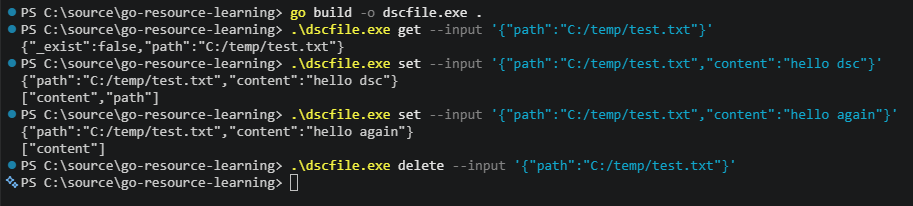
Figure: Example of driving the dscfile.exe resource CLI with JSON inputs and outputs — source: idontlikeai.dev
References
- How to write a Microsoft DSC resource in Go in under 100 lines - idontlikeai.dev — Original article detailing the Go RDK and resource example
- DSC-Go-RDK GitHub Repository — The Go Resource Development Kit implemented for DSC
- Microsoft DSC GitHub — Core DSC engine and protocol documentation
- OpenDSC for .NET — Similar RDK concept implemented for .NET developers
- DscResource.Base PowerShell Variant — Exploration of resource development in PowerShell
- Go 1.26 Release Notes — Required minimum Go version for the RDK

Figure: Automatic JSON Schema and manifest emission by dscfile.exe binary — source: idontlikeai.dev