Unlocking Productivity with Microsoft 365 Copilot Cowork in Frontier
Unlocking Productivity with Microsoft 365 Copilot Cowork in Frontier
Date: 2026-04-01
Discover how Copilot Cowork transforms complex, multi-step workflows into seamless collaboration powered by AI in Microsoft 365 Frontier.
Tags: ["Microsoft 365 Copilot", "AI productivity", "Copilot Cowork", "Frontier Program"]
Microsoft 365 Copilot has revolutionized how we engage with everyday work tasks by blending AI capabilities directly into familiar apps. Yet, many professional scenarios demand more than quick answers or single-step tasks—they require persistent, multi-phase collaboration spanning days or weeks. This is where Copilot Cowork shines.
Recently made available through the Frontier program, Copilot Cowork addresses the challenge of long-running, multi-step workflows in Microsoft 365. It empowers teams to coordinate, track progress, and automate complex sequences across apps like Word, Excel, Outlook, and SharePoint—right where work happens. As AI assists not only with content generation but also project orchestration, knowledge work is poised to become fundamentally more efficient.
In this post, we'll explore the capabilities of Copilot Cowork and offer practical tips to get the most from this new phase of AI-assisted collaboration.
Architecture Overview
- Enterprise data sources
- Foundry platform
- AI applications
Key Technical Observations
-
Multi-Phase Workflow Intelligence: Copilot Cowork is designed specifically for long-running workflows that require AI to remember context and state across multiple sessions, unlike earlier Copilot features focused on single interactions.
-
Cross-App AI Integration: AI seamlessly bridges core Microsoft 365 apps—Word, Excel, Outlook, SharePoint—enabling generation, review, and updates of content and data within native user interfaces.
-
Contextual Knowledge Harnessing: Copilot leverages SharePoint-managed documents and organizational knowledge bases in real time, helping synthesize complex materials and generate informed outputs while keeping everything compliant and secure.
-
Progress Tracking & Dynamic Suggestions: Through real-time monitoring of project milestones and deliverables, Copilot Cowork proactively suggests next steps, email drafts, and data analyses that keep work moving forward without administrative overhead.
-
Security & Identity-Aware AI: Built on enterprise-grade authentication and data protection, Copilot respects user roles and permissions, ensuring generated content and intelligence respects compliance boundaries—a critical factor for corporate deployment.
-
Frontier Program Deployment: The Frontier initiative enables rapid access and feedback gathering on cutting-edge capabilities from Microsoft 365 Copilot, ensuring real-world optimization before broad release.
How It Works
Initiating Complex Workflows
Users start by defining the objectives of a multi-step project—such as launching a campaign, preparing a quarterly financial review, or managing research deliverables. Copilot Cowork then breaks down the workflow into actionable tasks distributed across the relevant apps. For example, it may create task lists, prepare drafts, and draft project update emails in Outlook.
Continuous Context Management
Unlike short interactions, Copilot Cowork operates over days or weeks, maintaining persistent context about project progress. Internally, this is managed through stateful orchestration layers that sync with users' calendars, emails, and document repositories, updating status and dependencies.
This approach ensures AI outputs continually align with evolving project realities rather than static snapshots.
AI-Powered Content Generation & Collaboration
Copilot Cowork deploys large language models to generate business documents, analyze Excel data trends, and draft professional communications. This is tightly integrated into the Microsoft 365 UI, so users edit AI suggestions in context without export/import friction.
Real-Time Progress Tracking and Insights
Data from project plans, document edits, and communication threads is aggregated to provide intuitive progress dashboards and actionable insights, allowing teams to identify blockers early or redistribute effort dynamically.
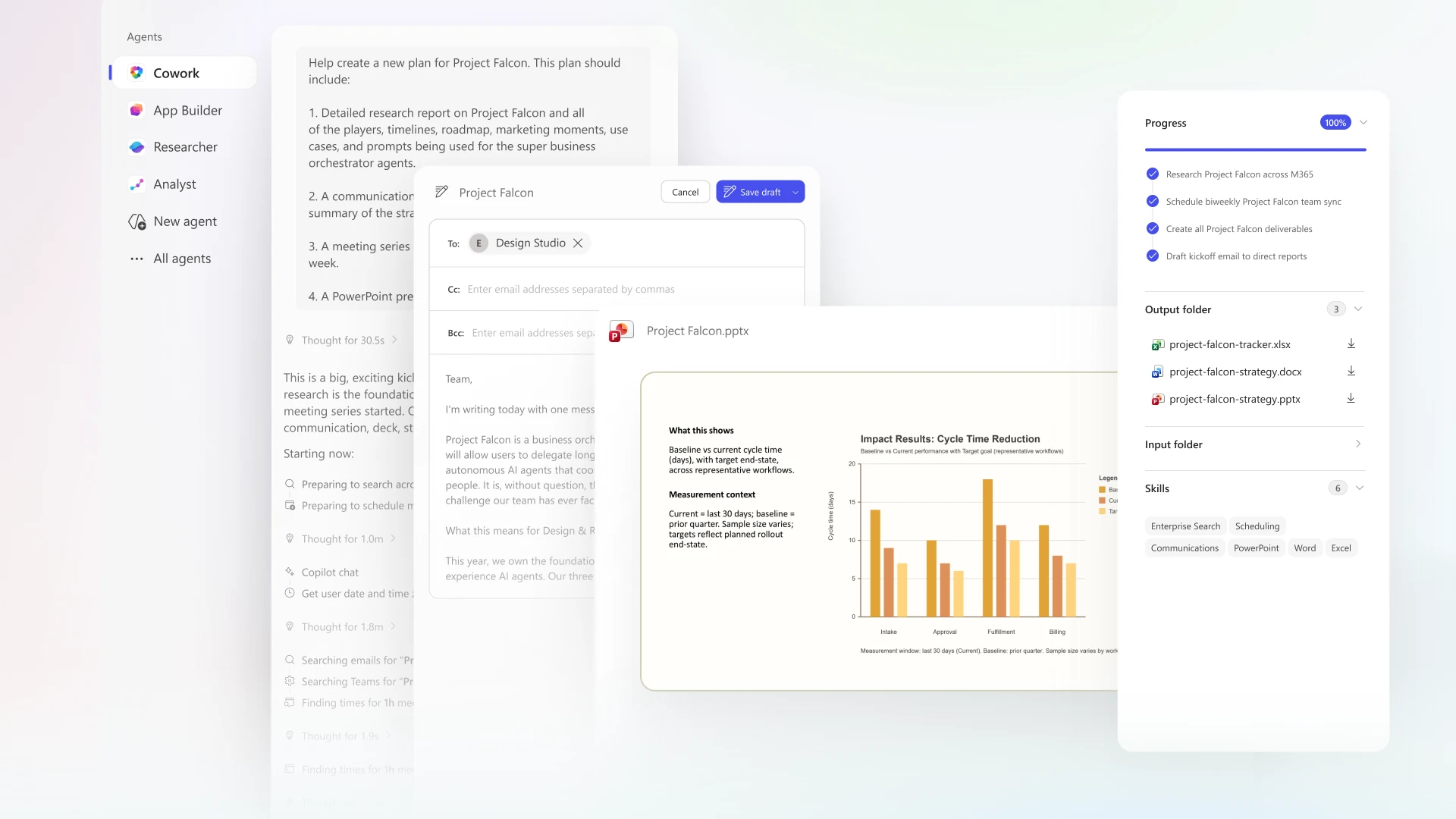
Multi-modal Copilot Cowork outputs showcasing AI-generated emails and project analytics — Source: Microsoft 365 Blog
Quick Tips & Tricks
-
Leverage SharePoint as a Knowledge Hub — Store project documents and data centrally in SharePoint to maximize Copilot’s contextual understanding and output relevance.
-
Use Copilot Drafts as Starting Points — Treat AI-generated drafts in Word or Outlook as foundations to accelerate editing rather than final versions to fine-tune tone and detail.
-
Embrace Multi-Modal Inputs — Supplement AI queries with relevant emails, Excel files, or PowerPoint decks to enhance the quality and accuracy of AI recommendations.
-
Participate in the Frontier Program Feedback — As Copilot Cowork evolves, user feedback helps shape future capabilities—actively engage for tailored experiences and early access.
-
Mind Security Boundaries — Always confirm AI suggestions comply with internal policies by ensuring proper permission management in Microsoft 365.
Conclusion
Copilot Cowork marks a significant step forward in AI-powered productivity, focusing on the often-overlooked complexity of long-term, multi-step workflows. By embedding deeply into Microsoft 365’s ecosystem, it provides actionable, intelligent assistance that spans apps, users, and days, transforming how work gets done.
As the Frontier program rolls Copilot Cowork out widely, organizations gain a powerful ally that not only enhances individual productivity but fundamentally reshapes team collaboration. This initiative sets a promising trajectory for AI’s role in enterprise knowledge work—moving beyond isolated tasks to orchestrated, adaptive workflows.
Stay tuned as Microsoft continues to refine Copilot Cowork, pushing the boundaries of AI-driven productivity and delivering even richer, integrated experiences across the entire Microsoft 365 landscape.
References
- Copilot Cowork: Now available in Frontier | Microsoft 365 Blog — Official announcement and overview.