Unlocking Productivity with GPT-5.2 in Microsoft 365 Copilot
Unlocking Productivity with GPT-5.2 in Microsoft 365 Copilot
Date: 2026-03-17
Explore how Microsoft integrates GPT-5.2 into Microsoft 365 Copilot to revolutionize workplace AI, driving deeper insights, smarter automation, and seamless collaboration.
Tags: ["Microsoft365", "AI", "Copilot", "GPT-5.2", "Automation"]
Microsoft’s integration of OpenAI’s GPT-5.2 into Microsoft 365 Copilot marks a significant leap forward for AI-powered productivity tools. By embedding this advanced large language model deeply into everyday apps like Word, Excel, and Outlook, Microsoft is reshaping how professionals create, analyze, and collaborate across the digital workplace.
This update is not just a version bump—it’s an evolution enabling richer, more nuanced AI interactions that understand context better, generate more accurate content, and empower users with enhanced automation and decision-making assistance. For enterprises and individuals alike, GPT-5.2 unlocks new possibilities to work faster and smarter within the Microsoft 365 ecosystem.
In this post, we’ll explore the architecture behind Microsoft 365 Copilot with GPT-5.2, unpack key technical insights, walk through how it works under the hood, and share practical tips for developers and users to leverage this cutting-edge AI integration effectively.
Architecture Overview
┌────────────────────────────────────────────┐
│Architecture                                │
├────────────────────────────────────────────┤
│• Enterprise data sources                   │
│• Foundry platform                          │
│• AI applications                           │
└────────────────────────────────────────────┘
Key Technical Observations
-
GPT-5.2’s Enhanced Contextual Understanding — Microsoft’s integration benefits from GPT-5.2’s improved ability to process longer and more complex enterprise document contexts, enabling nuanced responses that respect organizational style and content specifics.
-
Deep Application Embedding — Unlike standalone chatbots, GPT-5.2 is embedded natively within core Microsoft 365 apps. This tight coupling enhances relevance by leveraging live user context such as document content, calendar events, and collaborative threads.
-
Multi-Modal Access via Copilot Studio — The new Microsoft Copilot Studio acts as a hub for building AI Agents that extend GPT-5.2’s reasoning into automation workflows, bridging language understanding with system actions like scheduling, data analysis, and task tracking.
-
Adaptive User Experience Modes — Users can select response modes (e.g., Quick, More, Think Deeper) allowing GPT-5.2 to calibrate between speed and depth of output, optimizing Copilot for diverse productivity scenarios from brief emails to strategic reports.
-
Privacy & Security-First Integration — Copilot respects enterprise data governance, running GPT-5.2 inference in a secured environment with strict access controls, ensuring sensitive data never leaves Microsoft’s compliant infrastructure.
-
Continuous Learning via Feedback Loops — Interactive user feedback is incorporated to fine-tune Copilot’s outputs, improving relevance and reducing hallucinations over time, which is critical when deploying GPT models in professional settings.
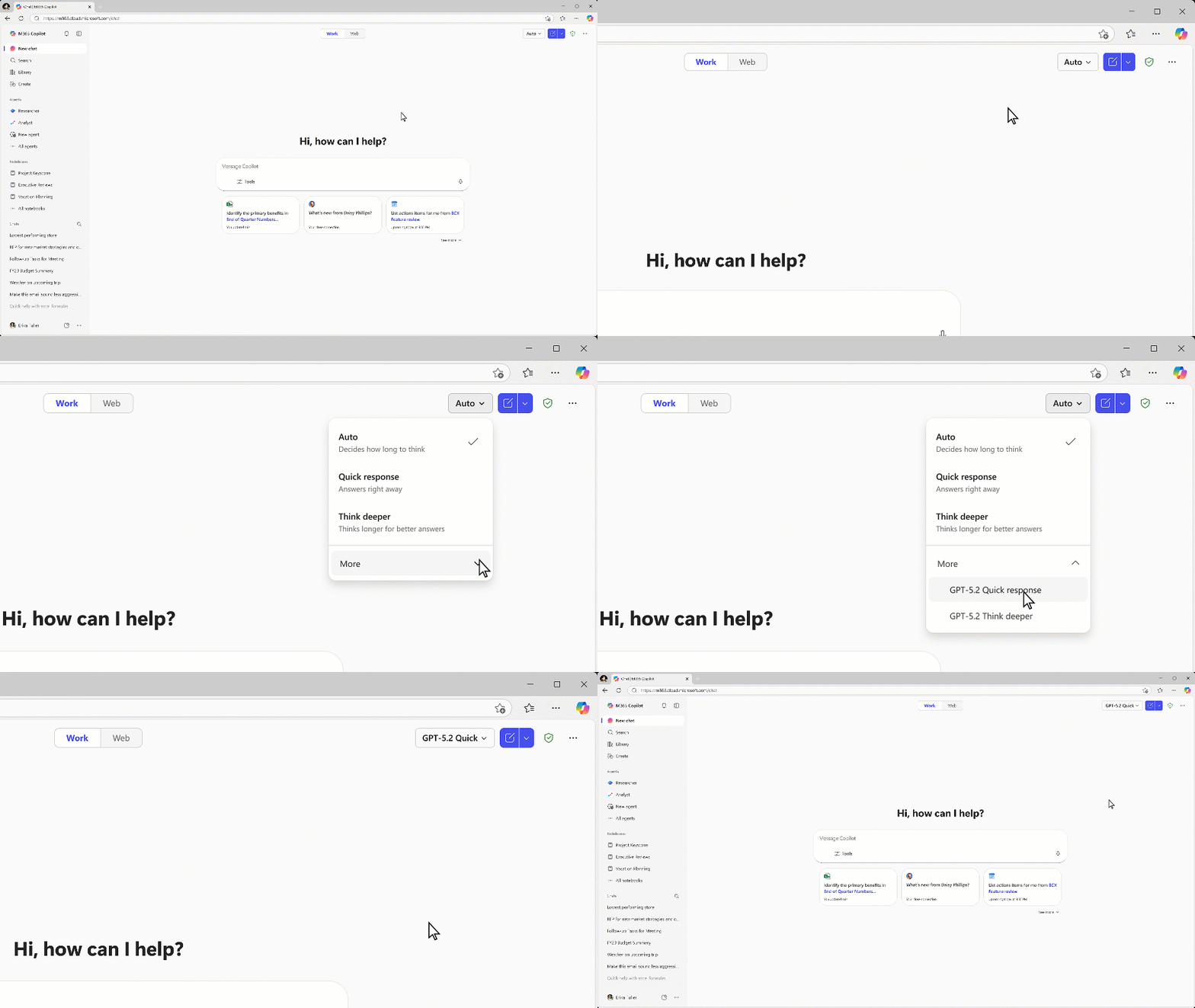
Demonstration of AI response mode selection in Microsoft Copilot using GPT-5.2. Courtesy Microsoft.
How It Works: The Workflow Behind Microsoft 365 Copilot with GPT-5.2
1. Contextual Data Aggregation
When a user invokes Copilot in an app—say, drafting a business proposal in Word—the platform gathers relevant contextual data from the current document, recent communications, calendar events, and organizational insights stored in SharePoint or OneDrive. This rich context primes the GPT-5.2 model to generate highly tailored suggestions.
2. Query Processing & Reasoning
The core GPT-5.2 model processes the prompt combined with the contextual input. Improvements in GPT-5.2 include optimized memory handling for longer inputs and better comprehension of enterprise jargon and domain-specific language patterns. The AI applies multi-turn reasoning to iteratively refine outputs based on user interaction.
3. Response Calibration & Tailoring
Copilot’s adaptive modes allow users to control output style and depth. For example, ‘Quick response’ yields brief and actionable answers, while ‘Think deeper’ provokes complex, analytical content. This mode is communicated to GPT-5.2 via system-level instructions to influence generation parameters.
4. Integration with Automation Agents
Via Microsoft Copilot Studio, users and developers can configure AI Agents that translate GPT-5.2 responses into automated workflows—such as populating a project plan from natural language directives or analyzing data trends in Excel with Copilot assistance.
5. Secure Output Delivery & Feedback
Completed outputs appear inline within the application UI, ready for user approval and edits. Usage data and explicit feedback signals feed back into Microsoft’s continuous learning pipeline to improve accuracy, relevance, and user trust over time.
// Example: Simple prompt construction incorporating document context
const userPrompt = `Draft a 200-word executive summary based on this document:
${document.content}

Focus on key milestones and risks.`;

const response = await gpt5_2.generateResponse(userPrompt, {
  mode: "Think deeper",
  maxTokens: 400,
});
console.log(response.text);
Quick Tips & Tricks
-
Leverage Response Modes — Experiment with Copilot’s response modes to find the right balance between quick summaries and in-depth analysis, especially when managing diverse tasks from emails to strategic planning.
-
Build Custom AI Agents in Copilot Studio — Use the Studio to automate repetitive workflows by defining triggers and actions that incorporate GPT-5.2’s natural language understanding.
-
Integrate Copilot in Teams for Collaborative AI — Embed Copilot chat sessions within Microsoft Teams channels to enable AI-powered brainstorming directly alongside conversations.
-
Secure Sensitive Data Access — Ensure your organization configures appropriate access controls in Microsoft 365 to keep GPT-5.2-powered outputs compliant with corporate policies.
-
Provide Feedback to Improve AI — Use the inline feedback tools in Copilot to flag inaccuracies or unwanted suggestions, helping refine the model’s behavior tailored to your enterprise.
-
Combine Copilot with Power Platform Tools — Augment GPT-5.2 outputs with Power Automate and Power Apps for end-to-end digital transformation scenarios.
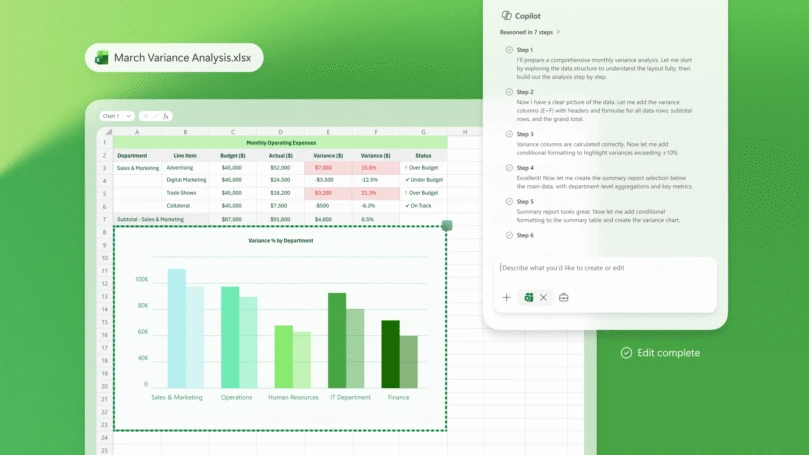
Copilot analyzing business data in Excel through AI-assisted insights. Courtesy Microsoft.
Conclusion
Microsoft’s integration of GPT-5.2 into Microsoft 365 Copilot exemplifies the next phase in AI-powered productivity, delivering smarter, context-aware assistance embedded deeply in applications employees use every day. This fusion of advanced language modeling with enterprise-grade security and tailored user experiences sets a new standard for AI-enabled work.
As AI continues evolving, Microsoft’s approach of combining robust model capabilities with adaptive user control and automation extensibility offers a scalable blueprint for organizations ready to harness the full potential of generative AI in practical, trustworthy ways. GPT-5.2 in Microsoft 365 Copilot isn’t just about making work easier—it’s about transforming how we create, collaborate, and innovate.
References
- Available today: GPT-5.2 in Microsoft 365 Copilot | Microsoft 365 Blog — Official announcement by Microsoft.
- Meet Copilot | Microsoft 365 — Explore Microsoft 365 Copilot capabilities and features.
- Microsoft Copilot Studio | Microsoft — Build and manage AI agents powered by GPT models.
- Microsoft Excel — Office app where Copilot enables advanced AI-assisted data analysis.
- Microsoft Teams | Microsoft — Collaboration platform with integrated AI chat via Copilot.
 Microsoft Copilot Logo
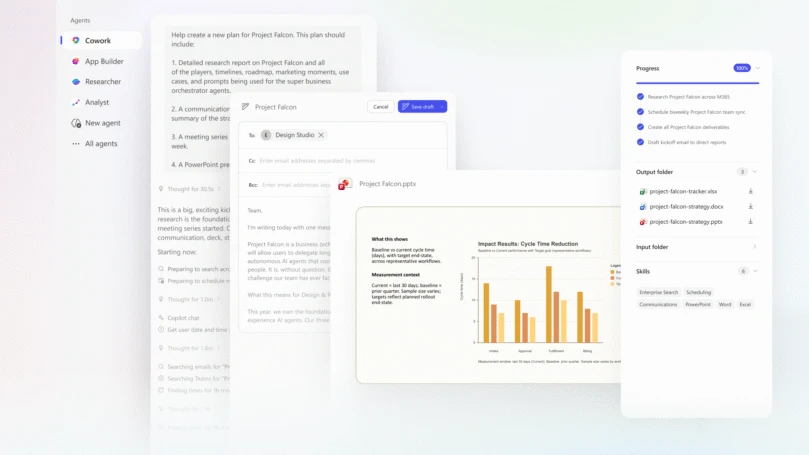
Copilot Cowork facilitates collaborative project work with AI-powered assistance. Courtesy Microsoft.
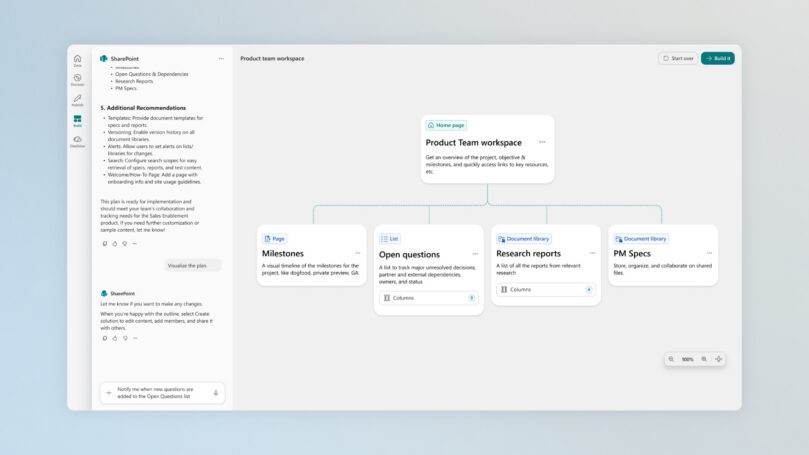
SharePoint workspace integrates with Copilot to surface knowledge and drive AI-powered collaboration. Courtesy Microsoft.

Jared Spataro, Chief Marketing Officer, AI at Work, Microsoft