Unlocking Adaptive Automation with Copilot Studio’s May 2026 Update
Unlocking Adaptive Automation with Copilot Studio’s May 2026 Update
Date: 2026-05-29
Discover how Microsoft Copilot Studio’s latest update brings computer-using agents, a revamped workflows experience, and real-time voice interactions to revolutionize enterprise automation.
Tags: ["Copilot Studio", "Automation", "AI Agents", "Workflows", "Voice AI"]
Automation at scale often bumps against unpredictable interfaces, legacy systems without APIs, and disconnected workflows that frustrate teams trying to innovate. Microsoft’s Copilot Studio May 2026 update directly addresses these challenges by introducing computer-using agents generally available for enterprise-grade UI automation, alongside a redesigned workflows experience and capabilities for real-time voice agents.
In this post, we’ll unravel the key innovations behind Copilot Studio’s new release, explore how it empowers organizations to build adaptable, connected AI systems that can interact naturally with real-world software, automate unstructured tasks, and enrich customer voice experiences. Whether you’re building scalable automations or modernizing legacy processes, these updates help bridge longstanding gaps between rigid automation and flexible AI-driven workflows.
We’ll cover the architecture behind these updates, highlight real-world success stories like Graebel’s relocation workflow automation, dissect the new interoperability frameworks, and offer practical tips for developers looking to harness these capabilities effectively.
Architecture Overview
┌────────────────────────────────────────────┐
│Architecture                                │
├────────────────────────────────────────────┤
│• Enterprise data sources                   │
│• Foundry platform                          │
│• AI applications                           │
└────────────────────────────────────────────┘
Key Technical Observations
-
Computer-Using Agents Bridge Legacy and Modern Systems — By interacting with desktop and web interfaces directly through the UI, these agents eliminate reliance on brittle scripts or unavailable APIs, enabling automation in notoriously challenging environments.
-
Unified Visual Workflow Designer Simplifies Complexity — The redesigned workflow experience consolidates agent operations, AI-powered actions, and business logic onto a single canvas, improving clarity, debugging, and iterative development.
-
Agent Nodes Enable Seamless AI-Logic Integration — Instead of rigid if-then decisions, workflows can invoke agent nodes that reason contextually, orchestrate external tools, or retrieve knowledge dynamically, significantly enhancing workflow adaptability.
-
Work IQ’s REST API and MCP Support Foster Interoperability — These extensibility features reduce custom integration overhead by standardizing how agents communicate with existing enterprise tooling, improving scalability across diverse ecosystems.
-
Agent-to-Agent Communication Now Generally Available — Supporting agent collaboration and task delegation allows building multi-agent systems that work together horizontally, expanding automation capabilities beyond isolated single-agent scenarios.
-
Real-Time Voice Agents with Context-Preserving Escalation — Integrated in Dynamics 365 Contact Center, these voice agents elevate customer interactions by identifying callers, managing contextual conversations, taking actions mid-call, and handing off with seamless context preservation.
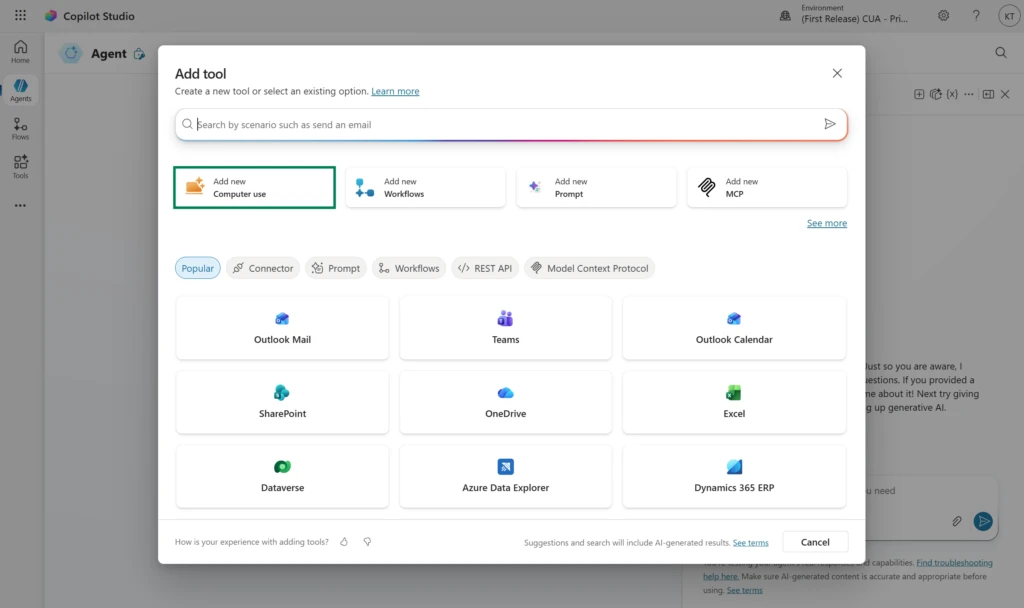
How It Works: Adaptive Automation with Computer-Using Agents and Workflows
Building Resilient UI Automation with Computer-Using Agents
Traditional robotic process automation struggles when UI elements shift or vendor portals update unexpectedly—automation breaks, requiring costly manual fixes. Copilot Studio’s computer-using agents overcome this by:
- Executing actions directly through UI interaction rather than brittle scripted APIs.
- Combining AI models suited to different automation scenarios to improve reliability.
- Securely managing credentials to comply with enterprise governance.
- Embedding these agents as nodes within multi-step workflows, allowing them to trigger and respond dynamically.
For instance, an agent can navigate a vendor portal that lacks APIs by reading screens, clicking buttons intelligently, filling forms, and responding to error states—all guided by AI rather than fixed scripts.
Visual Workflow Orchestration: Structure Meets Adaptability
The new visual workflow designer unifies deterministic orchestration and AI-powered adaptive steps.
- Drag-and-drop nodes build end-to-end business processes.
- Inline configuration and node-level testing enable faster iteration.
- AI-powered actions like classification, content generation, and reasoning steps coexist alongside standard logic.
- Agent nodes bridge gaps where simple if-then logic is insufficient, invoking reasoning and knowledge retrieval dynamically.
This design addresses the practical need for workflows that remain maintainable as underlying systems evolve or when business logic becomes too complex for traditional automation tools.
Scaling Automation with Work IQ and Agent Interoperability
As teams deploy specialized agents across business units, sharing context and coordinating tasks without custom development is vital. Work IQ’s new REST API, CLI support, and adoption of the Model Context Protocol enable:
- Standardized remote context sharing between agents and enterprise services.
- Easier integration of Copilot Studio agents with Microsoft 365, Dataverse, and third-party systems.
- Agent-to-agent messaging that supports collaborative workflows and delegation among bots.
These interoperability layers reduce costly point-to-point integrations, accelerating enterprise adoption of adaptive AI automation.
Enriching Customer Voice Experiences with Intelligent Agents
Modernizing voice channels is notoriously difficult. Copilot Studio’s real-time voice agents, integrated with Dynamics 365 Contact Center, enable:
- Natural, context-aware voice conversations that understand caller identity and intent.
- Action-taking mid-call to address routine requests without human intervention.
- Seamless escalation to human agents while preserving conversation context.
- Server-to-server (S2S) voice integrations to connect with operational backends.
A new governance guide ensures teams deploy voice agents responsibly with robust monitoring, secure escalation, and operational readiness protocols.

Quick Tips & Tricks
-
Leverage Agent Nodes to Incorporate AI Reasoning in Workflows
Use agent nodes when your business logic requires contextual reasoning or multi-source knowledge retrieval beyond simple conditional branches. -
Embed Computer-Using Agents to Automate Tough UI-Only Processes
When APIs aren’t available, build agents that operate through UI navigation and interaction to automate manual workflows reliably. -
Use Work IQ’s REST API and CLI for Integration Automation
Automate deployment, monitoring, and operational workflows programmatically to scale agent ecosystems without manual overhead. -
Implement Agent-to-Agent Messaging for Collaborative Tasks
Design agent systems where bots can delegate, share context, and orchestrate workflows dynamically to maximize operational efficiency. -
Apply Robust Governance to Real-Time Voice Agents
Follow Copilot Studio’s voice agent governance guide to prevent escalation failings, ensure compliance, and protect customer trust. -
Test Workflows with Node-Level Validation
Use the redesigned workflow designer’s inline and node-specific testing features to catch errors early and speed iteration cycles.
Conclusion
Microsoft Copilot Studio’s May 2026 update marks a pivotal advance toward adaptive, scalable enterprise automation. By making computer-using agents generally available, introducing a unified workflows experience, and enhancing interoperability via Work IQ, organizations can now automate messy, unpredictable processes with AI and UI dexterity.
Real-world success stories like Graebel demonstrate that combining UI automation, agent reasoning, and workflow orchestration unlocks substantial reductions in manual effort while boosting accuracy and speed. Furthermore, the addition of real-time voice agents seamlessly extends natural, context-rich AI interactions into customer service.
Looking ahead, the emphasis on agent collaboration, extensibility, and governance solidifies Copilot Studio as a foundational platform for building responsive, connected AI systems that evolve alongside your business needs.