Bringing Trusted AI-Powered Search Into Microsoft Copilot
Bringing Trusted AI-Powered Search Into Microsoft Copilot
Date: 2026-03-17
Discover how Microsoft Copilot combines AI intelligence with transparent, trusted search sources to deliver clarity, control, and confidence in every answer.
Tags: ["AI", "Microsoft Copilot", "Search", "Human-Centered AI", "Trust"]
At the heart of every search is a fundamental human need: to satisfy curiosity and find trustworthy information efficiently. Microsoft’s latest Copilot update embraces this instinct by merging powerful AI with transparent search results, delivering answers you can rely on—and explore further. As AI assistants grow in influence, ensuring users maintain clear visibility into where information originates is not optional; it’s essential to building trust and promoting freedom of inquiry.
Microsoft’s Copilot platform now brings the best of AI search directly inside its experience. This means when you ask Copilot questions, whether for quick facts or complex guidance, you no longer get just an AI-generated summary but also clear, clickable citations and an aggregated list of source references. This innovation enhances transparency, letting users dive deeper into the origins of answers—a critical step toward human-centered AI that empowers rather than overrides user control.
In this post, we’ll explore how Microsoft has architected Copilot’s enhanced search experience, the design principles driving trust and freedom, and the exciting new features that make finding and verifying information smarter and safer. We’ll also unpack how these changes support a healthy digital ecosystem for publishers and content creators.

Microsoft Copilot's AI search interface with rich citations. Image courtesy of the Microsoft Copilot Blog.
Architecture Overview
┌───────────────────────────────┐
│       User Interaction        │
├───────────────────────────────┤
│ • Questions & Queries         │
│ • Feedback & Exploration      │
└──────────────┬────────────────┘
               │
               ↓
┌───────────────────────────────┐
│      Copilot AI Engine        │
├───────────────────────────────┤
│ • Generative AI Response      │
│ • Contextual Understanding   │
│ • Dynamic Citation Integration│
└──────────────┬────────────────┘
               │
               ↓
┌───────────────────────────────┐
│      AI-Powered Search        │
├───────────────────────────────┤
│ • Bing Search Infrastructure  │
│ • Indexing & Retrieval         │
│ • Source Aggregation & Curation│
└──────────────┬────────────────┘
               │
               ↓
┌───────────────────────────────┐
│    Publisher Content & Web     │
├───────────────────────────────┤
│ • Trusted Websites            │
│ • Verified Data Sources       │
│ • Publisher APIs & Feeds      │
└───────────────────────────────┘
This layered design ensures that Copilot responses combine cutting-edge AI generation with the deep integration of real-world search data, closely linking each answer to its verified source.
Key Technical Observations
-
Integrated Citation Transparency — Unlike typical black-box AI answers, Copilot embeds clickable, publisher-level citations directly in responses, fostering trust and allowing users to validate information with a single click.
-
Adaptive Response Mode — The system intelligently switches between concise answers for simple queries and rich, in-depth summaries for complex or analytical questions, maintaining relevance without overwhelming users.
-
Side-by-Side Source Explorer — The aggregated “Show all” sources pane empowers users to simultaneously view AI-generated summaries alongside the full list of underlying references—a novel UI pattern blending search with generative AI.
-
Human-Centered Control Philosophy — The architecture emphasizes user freedom and clarity rather than AI authority, demonstrating Microsoft's explicit commitment to human-centered AI design principles.
-
Publisher Ecosystem Support — By prominently highlighting sources and providing easy publisher access, Copilot respects intellectual property and nurtures a sustainable digital content ecosystem.
-
Seamless Multi-Platform Availability — Updates are available across copilot.com, mobile apps on iOS and Android, and the new “Copilot Mode” in Microsoft Edge browser, showing strategic investment in consistent, cross-device user experiences.
How It Works
1. Query Reception and Interpretation
When a user submits a query—whether a fact, recommendation, or complex instruction—Copilot AI first interprets the intent using natural language understanding models. This enables the system to determine if a simple answer suffices or if a deeper dive is required.
2. Hybrid AI and Search Orchestration
Based on the query type, Copilot orchestrates a hybrid response:
- It calls Bing’s powerful search APIs to retrieve a curated set of relevant web results from trusted publishers and indexed sources.
- Simultaneously, the generative AI synthesizes an informative summary or direct answer.
This orchestration balances accuracy, breadth, and relevance.
3. Dynamic Citation Integration
Rather than producing an opaque answer, Copilot dynamically integrates explicit citations tied to the AI-generated content. The response footer lists the sources, which are also accessible in an expandable right-pane. These references are both clickable and concise, allowing users to verify claims smoothly.
4. Dedicated Search Mode Option
For users who want full search capabilities, a “Search” mode is available within Copilot. This switches the UI to show richer, more contextual search results alongside AI assistance, blending familiar search navigation with intelligent summarization.
5. Continuous Feedback and Learning
User interactions such as clicks on citations, follow-up queries, and engagement signals feed back into improvement pipelines, helping refine source relevance, AI interpretation, and user satisfaction.
// A conceptual snippet: building response with citations (TypeScript-like pseudocode)
async function generateCopilotResponse(query: string) {
  const searchResults = await bingSearchAPI(query, { trustedSourcesOnly: true });
  const aiSummary = await aiModel.generateSummary(query, searchResults);

  return {
    answer: aiSummary.text,
    citations: searchResults.map(result => ({
      title: result.title,
      url: result.link,
      snippet: result.snippet,
    })),
  };
}
This approach ensures that the AI's output remains grounded in verifiable external content.
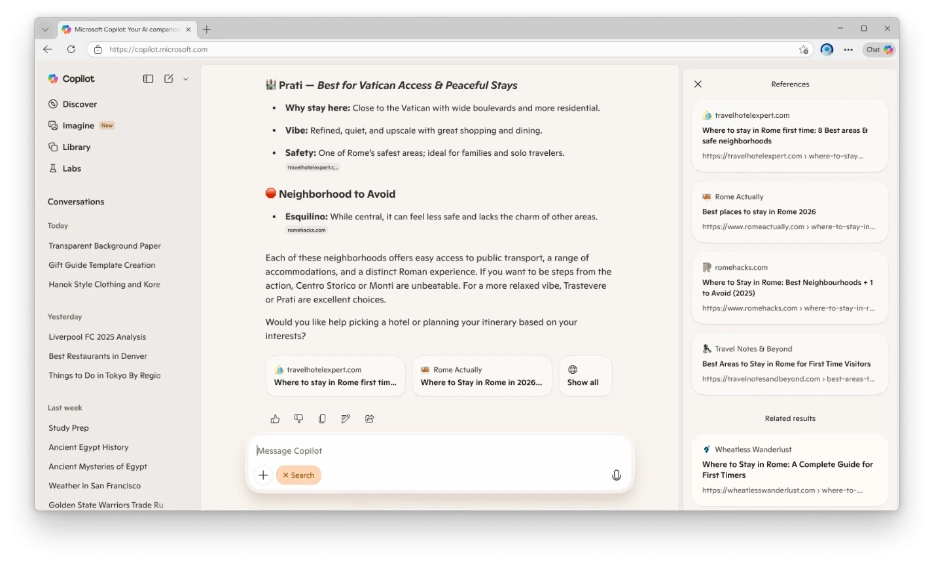
Example: Copilot providing travel advice with clear source citations. Image credit: Microsoft Copilot Blog.
Quick Tips & Tricks
-
Explore Sources Side-by-Side — Use the “Show all” panel to review all reference links side-by-side with AI answers; this helps verify claims quickly without leaving the Copilot interface.
-
Leverage Search Mode for Deep Research — When in doubt or tackling a complex problem, switch to Copilot's dedicated Search mode for richer, more navigable results combined with AI summaries.
-
Use Citations to Gauge Reliability — Pay attention to sources cited by Copilot; trusted, well-known publishers usually indicate higher quality answers.
-
Try Copilot Across Platforms — Take advantage of Copilot on the web, mobile, and in Microsoft Edge to maintain seamless workflow transitions between devices.
-
Provide Feedback to Improve Accuracy — Your interactions—clicks on sources, correction prompts, follow-ups—help Microsoft refine both AI understanding and search result relevance.
-
Combine with Microsoft 365 Tools — Integrate your Copilot search experience within Microsoft 365 apps for productivity—embedding verified data directly into your documents, email, or presentations.

Using Copilot’s Search mode on a mobile device to find local recommendations. Image source: Microsoft Copilot Blog.
Conclusion
Microsoft Copilot’s integration of advanced AI with transparent, source-driven search marks a significant step toward trustworthy, human-centered AI experiences. By prioritizing clear citations, user control, and adaptive responses, Copilot enables users to satisfy their curiosity faster while understanding exactly where answers come from. This synergy of generative AI and traditional search empowers users with both speed and depth.
Looking forward, the commitment to supporting a healthy web ecosystem alongside continuous refinement of AI capabilities suggests evolving value for end users and publishers alike. As Copilot spreads across platforms and contexts, it’s shaping a future where AI acts as both an intelligent assistant and a transparent guide through the vast information landscape.
References
-
Bringing the best of AI search to Copilot | Microsoft Copilot Blog — Primary source for Copilot’s AI search enhancements feature announcement.
-
Try Copilot Today — Access the latest Copilot capabilities across devices.
-
New: Copilot Mode in Microsoft Edge — Explore seamless AI search directly in the Edge browser.
-
Microsoft AI — Learn more about Microsoft’s AI platform and initiatives.
-
Copilot Privacy & Security — Understand how Copilot maintains data security and user trust.
-
Copilot Blog — Stay updated with ongoing innovations and features.