Transforming Workflows with Microsoft Copilot Studio: November 2025 Updates
Transforming Workflows with Microsoft Copilot Studio: November 2025 Updates
Date: 2026-03-17
Discover how Microsoft Copilot Studio’s November 2025 updates empower intelligent AI agents with GPT-5 Chat, human-in-the-loop workflows, and enterprise-grade governance.
Tags: ["Microsoft Copilot Studio", "GPT-5", "AI Agents", "Automation", "Enterprise AI"]
Microsoft Copilot Studio took a leap forward in November 2025, introducing groundbreaking capabilities that accelerate the transition from basic automation to intelligent, agent-driven business transformation. Organizations now can build and govern AI agents more easily, leveraging the latest GPT-5 Chat models and a powerful set of tools intended to streamline workflows, facilitate human judgment integration, and scale AI safely across enterprises.
This update reflects a shift in how enterprises conceive automation — not merely as scripted tasks but as a collaborative system where AI agents handle complexity and human experts provide oversight and contextual judgment. In this post, we’ll explore the major new features in Microsoft Copilot Studio, including GPT-5 Chat readiness, seamless agent prototyping, human-in-the-loop capabilities, and new knowledge source integrations like SharePoint and OneNote.
We’ll also unpack the architecture supporting these innovations, highlight technical insights valuable for developers and admins, and share practical tips to maximize your Copilot Studio experience.
Architecture Overview
┌─────────────────────────────┐
│   Enterprise Data           │
├─────────────────────────────┤
│ • SharePoint & Outlook      │
│ • OneNote & Microsoft 365  │
│ • Directory & CRM Systems   │
└─────────────────────────────┘
              ↓
┌─────────────────────────────┐
│   Microsoft Copilot Studio  │
├─────────────────────────────┤
│ • Agent Builder             │
│ • GPT-5 Model Access       │
│ • Model Context Protocol   │
│ • Human-in-the-loop (HITL) │
│ • Governance & Analytics   │
└─────────────────────────────┘
              ↓
┌─────────────────────────────┐
│   AI-Powered Applications   │
├─────────────────────────────┤
│ • Employee Self-Service     │
│ • Autonomous Agents         │
│ • Document & Workflow Gen   │
└─────────────────────────────┘
This architecture illustrates how Microsoft Copilot Studio acts as the central platform connecting diverse enterprise data sources with intelligent AI agents. The Studio manages agent lifecycle, model selection (including GPT-5 Chat), workflow orchestration with human oversight, and governance layers — delivering AI applications that augment employee productivity and decision-making.
Abstract depiction of Copilot Studio’s November 2025 updates. Source: Microsoft Copilot Blog
Key Technical Observations
-
Production-Ready GPT-5 Chat Deployment: The general availability of GPT-5 Chat in EU and US empowers makers to build agents with improved responsiveness and instruction-following, enabling robust, real-world applications such as high-volume employee support or detailed process guidance.
-
Human-in-the-Loop (HITL) Integration: Introducing HITL capabilities allows agents to pause workflows and request human input via structured Outlook forms, ensuring critical judgments or approvals are incorporated seamlessly in automated processes without breaking flow.
-
Model Context Protocol (MCP) Expansion: Deep integration with over 1,400 systems using MCP, Power Platform connectors, and Microsoft Graph reduces context switching and data silo challenges by unifying enterprise data access for agents.
-
Unified Agent Governance with Microsoft Agent 365: The centralized control plane provides real-time threat detection through Microsoft Defender, identity oversight via Microsoft Entra Agent ID, and full compliance with audit trails — scaling AI agent deployment without sacrificing governance.
-
Seamless Agent Portability From Prototype to Production: The “Copy to Copilot Studio” feature lets makers prototype agents in the lightweight Agent Builder experience inside Microsoft 365 Copilot and then upgrade them into enterprise-governed Copilot Studio agents, avoiding costly rebuilds.
-
Rich Knowledge Source Integration: Extending grounding sources to include SharePoint with metadata filtering, People data for live directory information, and OneNote pages as living project notes gives agents richer contextual understanding to improve answer precision and relevance.
How It Works: From Idea to Intelligent Agent
1. Prototyping and Model Choice in Agent Builder
Makers start quickly in Microsoft 365 Copilot’s Agent Builder, designing agents using natural language interfaces that leverage GPT-5 Chat for superior accuracy. They can toggle experimental GPT-5.2 models to preview advanced capabilities such as enhanced code generation and multilingual support.
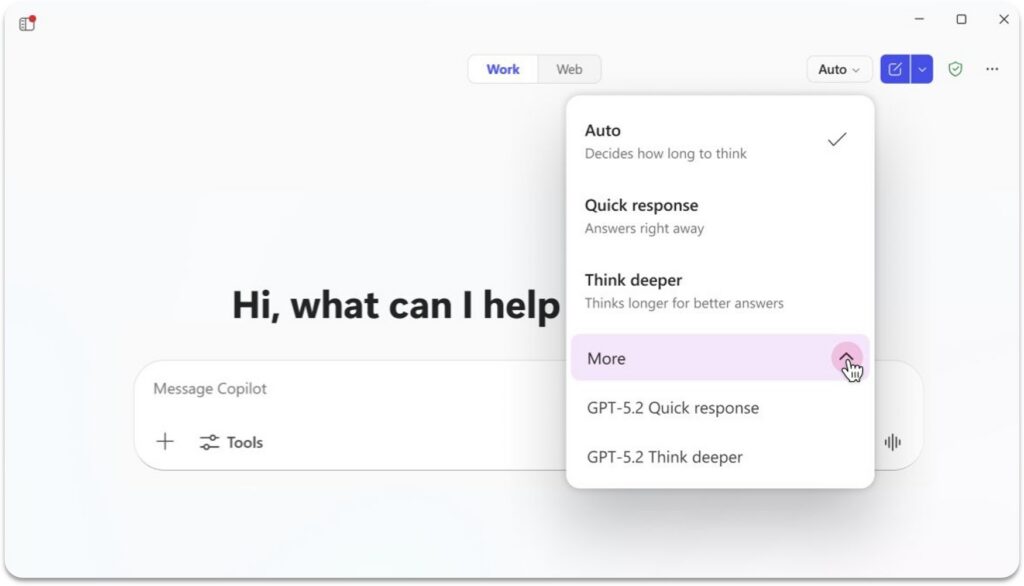
Selecting GPT-5.2 models for agent responses in Agent Builder. Source: Microsoft Copilot Blog
2. Transitioning Agents from Agent Builder to Copilot Studio
Once satisfied with a prototype, makers use the “Copy to Copilot Studio” feature to port their agent to a full-featured environment. Here, governance, analytics, expanded connectors, lifecycle management, and publishing options become available to enterprise teams.
3. Enhancing Agents with Human-in-the-Loop (HITL)
Agents can now pause their autonomous execution to request human input via Outlook forms—configured easily within Copilot Studio as “request for information” actions. This human judgment step integrates directly into workflows without interrupting the process, ideal for scenarios needing explicit approval or ambiguous data clarification.
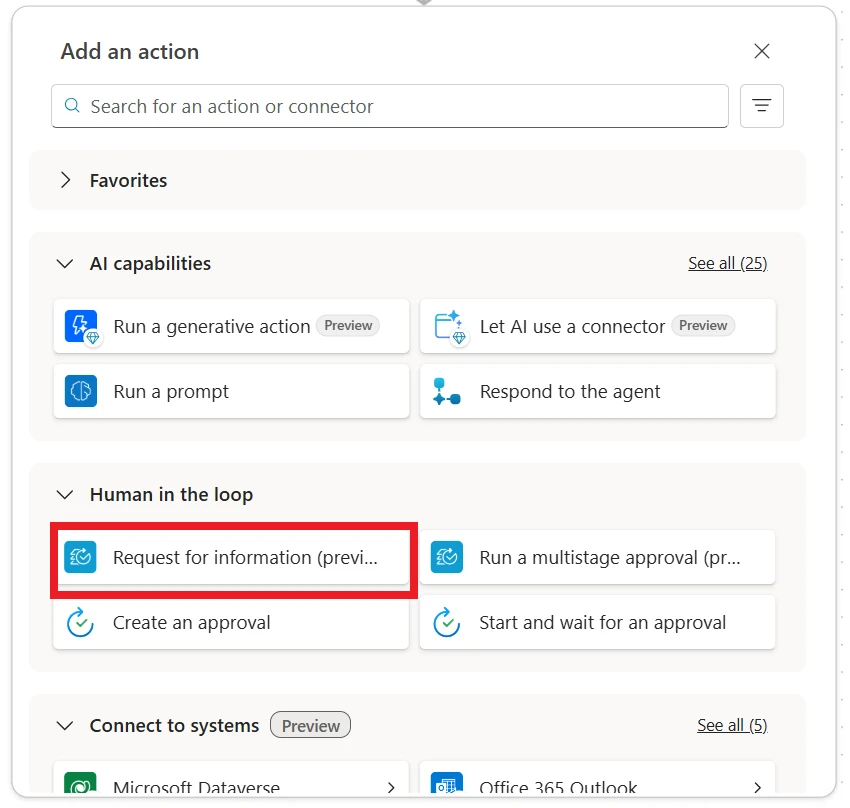
HITL configured to request information from a person during agent execution. Source: Microsoft Copilot Blog
4. Grounding Agents in Diverse Enterprise Knowledge Sources
Agents ground their understanding via multiple curated sources:
-
SharePoint content is surfaced with enhanced ranking and metadata filtering (e.g., by file name, owner, modification date) to locate relevant documents efficiently in content-heavy environments.
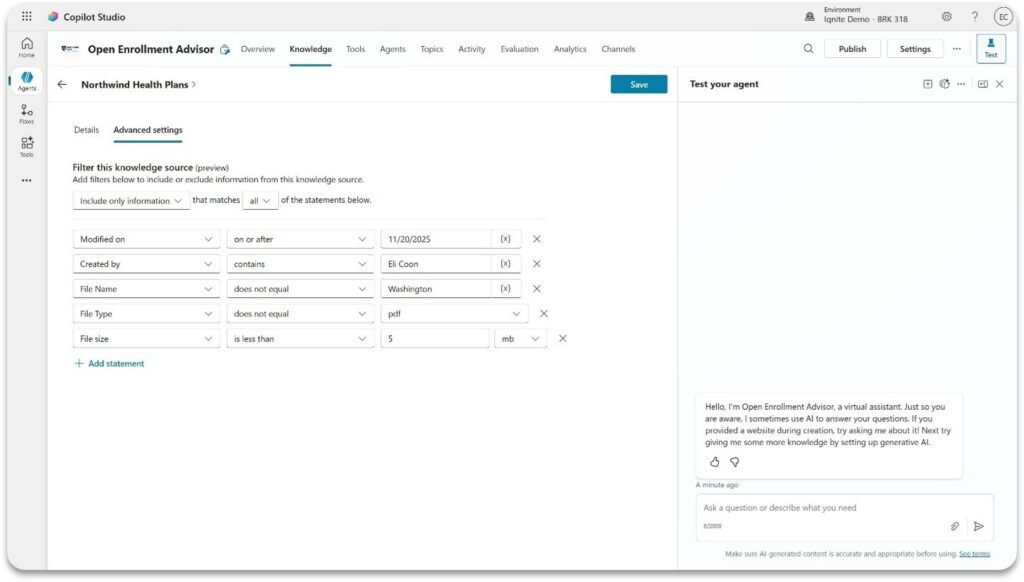
Filtering SharePoint content by metadata inside Copilot Studio. Source: Microsoft Copilot Blog -
People as a knowledge source leverages live directory info to answer organizational queries accurately, eliminating manual list upkeep.
- OneNote integration brings meeting notes, project plans, and brainstorming sessions directly into the agent’s knowledge base for ongoing context awareness.
5. Delivering AI-Powered Applications and Workflow Automation
From employee self-service portals (handling HR and IT inquiries) to complex document and presentation generation, Copilot Studio agents automate processes using natural language and rich output capabilities. For example, agents can draft polished reports, create Excel charts, and build PowerPoint decks on request, replacing manual content creation tasks with frictionless AI generation.
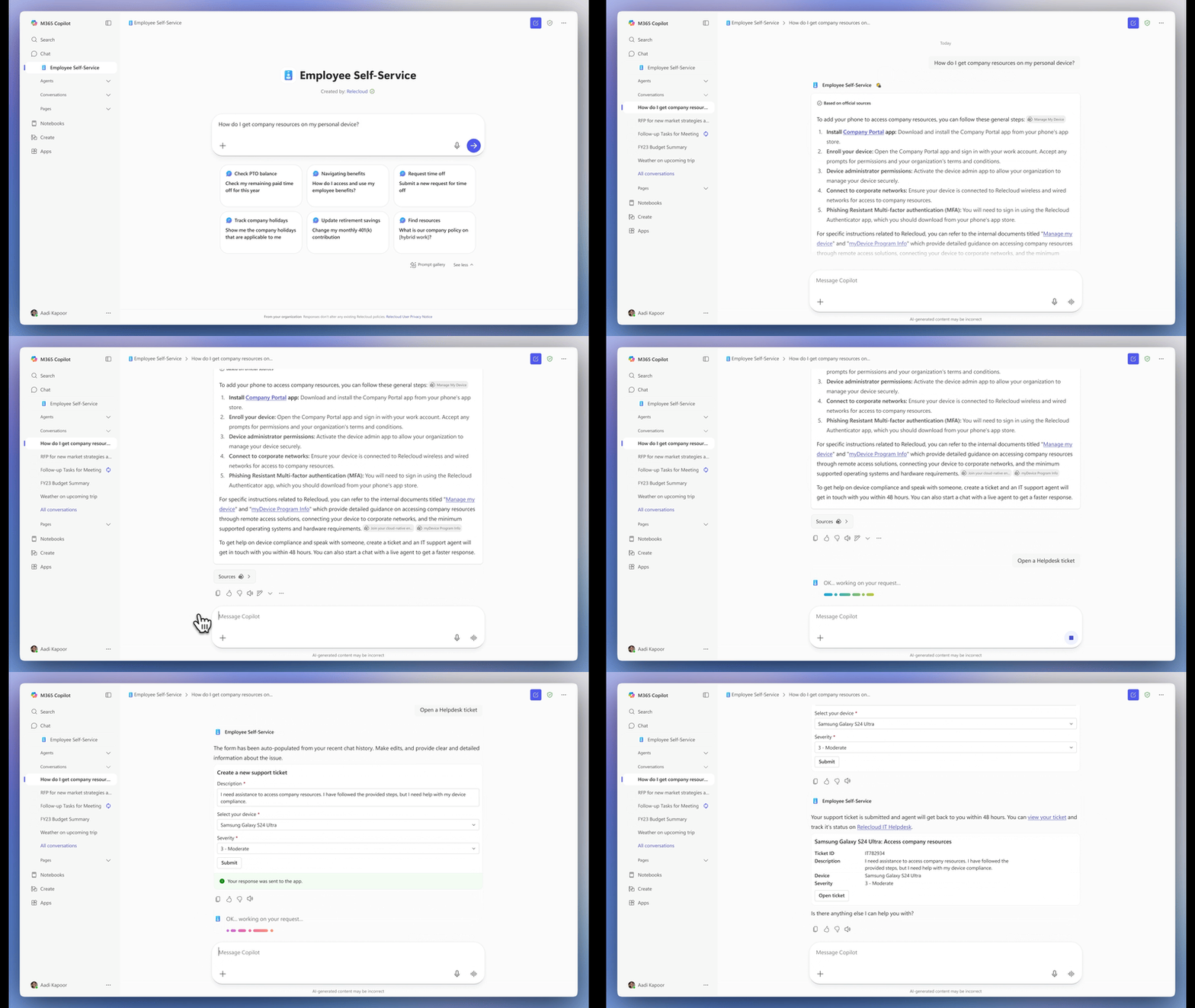
Conversation with the Employee Self-Service Agent automating common HR/IT support. Source: Microsoft Copilot Blog
Quick Tips & Tricks
-
Enable GPT-5 Chat for Production-Grade Agents
Activate GPT-5 Chat on your agents’ overview page to boost responsiveness and accuracy in live workloads, especially for high-volume and mission-critical scenarios. -
Leverage Human-in-the-Loop to Manage Risk
Use the HITL feature to insert controlled human approvals at critical workflow junctures, balancing automation speed with compliance and correctness. -
Use Action Groups to Accelerate Outlook and SharePoint Integration
Add curated tool groups instead of individual actions to streamline agent setup and maintain consistent workflows across communication and content management. -
Ground Agents with Metadata Filtering in SharePoint
Configure metadata filters such as filename, owner, or last modified date to restrict knowledge retrieval and improve answer precision. -
Prototype Quickly and Scale Seamlessly
Start agents in the lightweight Agent Builder and script the “copy to Copilot Studio” step to evolve prototypes into enterprise-ready solutions without rewriting logic. -
Include People as a Knowledge Source for Organizational Queries
Ground agents in live directory data to deliver reliable employee, team, and reporting line information without manual list maintenance.
Conclusion
The November 2025 updates to Microsoft Copilot Studio mark a notable evolution from simple automation to intelligent agent-driven workflows grounded in human judgment and enterprise governance. With GPT-5 Chat now production-ready, seamless agent prototyping, and expanded knowledge integrations, organizations can build sophisticated AI agents that deliver measurable outcomes faster and safer than ever.
Human-in-the-loop and enriched grounding across diverse systems unlock flexibility and precision, while centralized governance platforms ensure scale does not come at the cost of security or compliance. As Copilot Studio continues to mature, it promises to redefine how work gets designed and automated—where AI handles complexity, humans provide critical judgment, and businesses operate with renewed speed and clarity.
The future of work is agentic, and Microsoft Copilot Studio stands at its foundation.
References
-
What’s New in Microsoft Copilot Studio: November 2025 — Official Microsoft Copilot blog post detailing November 2025 updates.
-
Microsoft 365 Copilot — Overview and resources for Microsoft 365 Copilot.
-
Model Context Protocol (MCP) in Copilot Studio — Documentation on MCP integrations.
-
Employee Self-Service Agent announcement — Details on the Employee Self-Service Agent.
-
People as a Knowledge Source — Guide to enabling live directory data for agents.
-
Copilot Studio Agent Academy — Training resources for agent makers.
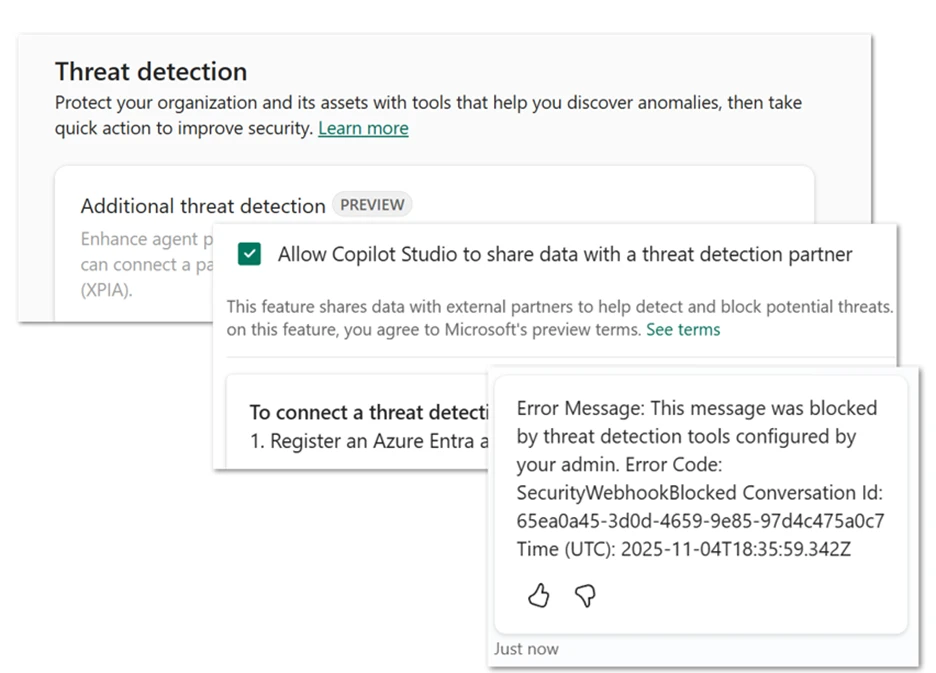
Copilot Studio’s real-time threat detection powered by Microsoft Defender. Source: Microsoft Copilot Blog
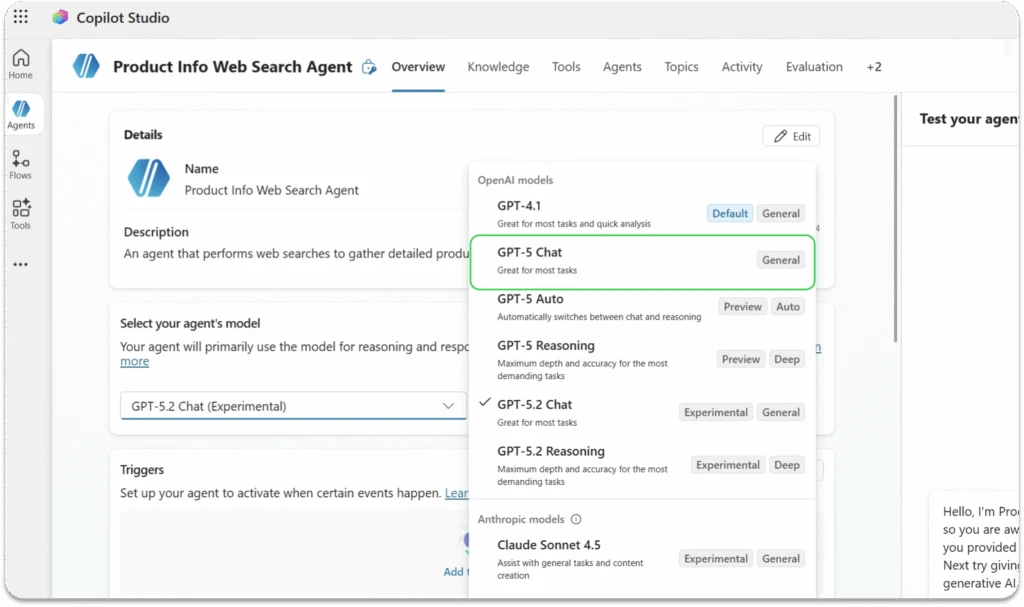
Visual representation of GPT-5 capabilities. Source: Microsoft Copilot Blog

Choosing GPT-5.2 experimental models within Copilot Studio agents. Source: Microsoft Copilot Blog

Copilot Studio agents analyzing business data with Excel integration. Source: Microsoft Copilot Blog
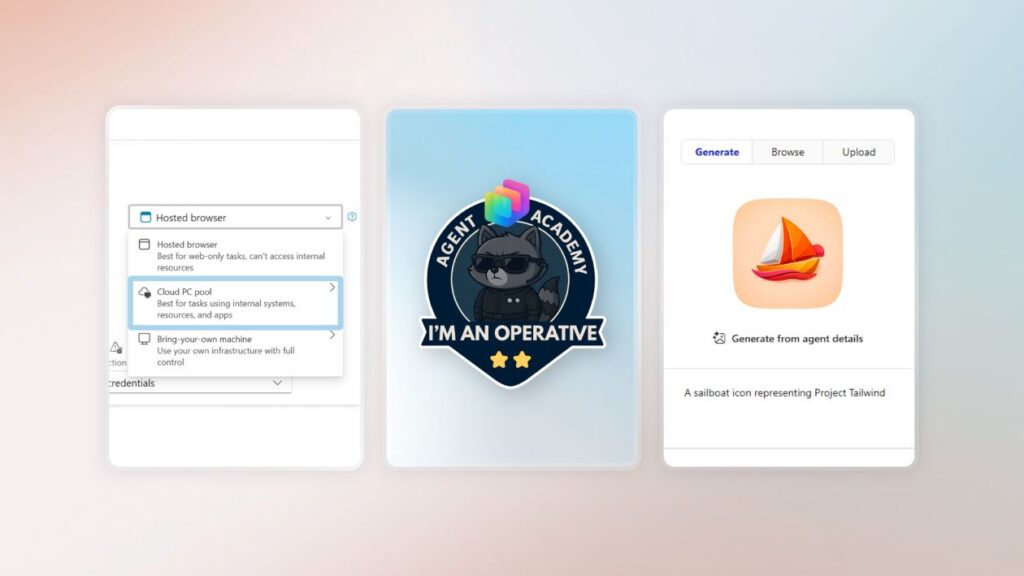
Copilot Studio UI elements including the Agent Academy badge and AI-generated agent icons. Source: Microsoft Copilot Blog

Makers collaborating over agent workflows. Source: Microsoft Copilot Blog

User engaging with Microsoft Copilot on personal device. Source: Microsoft Copilot Blog

Nitasha Chopra, contributor to Copilot Studio updates. Source: Microsoft Copilot Blog