Scaling AI Agent Adoption in 2026 with Microsoft Copilot Studio’s 6 Core Capabilities
Scaling AI Agent Adoption in 2026 with Microsoft Copilot Studio’s 6 Core Capabilities
Date: 2026-03-17
Discover how Microsoft Copilot Studio empowers organizations to operationalize AI agents at scale with six foundational capabilities that balance agility and control.
Tags: ["Microsoft Copilot", "AI Agents", "Automation", "Enterprise AI", "Copilot Studio"]
Adoption of AI agents has moved beyond experimentation to become a critical driver of operational efficiency and business value. While early AI agents were narrow, manually triggered, and siloed, 2025 marked a turning point where organizations demanded agents that do not just assist but own entire workflows end to end. This evolution has unlocked new possibilities for optimizing complex processes and scaling automation.
At the heart of this transformation is Microsoft Copilot Studio, which in 2026 emerges as the platform defining how enterprises scale agent adoption with governance, flexibility, and measurable impact. Organizations shifting from isolated pilots to integrated agent ecosystems unlock productivity gains by enabling seamless coordination between agents, empowering broad participation, and maintaining control over operational and security policies.
In this post, we dive deep into the six core capabilities Microsoft highlights for scaling AI agents in 2026. We explain their significance, illustrate real-world use cases, and analyze how Copilot Studio makes deliberate, controlled agent adoption achievable at an enterprise scale.
Architecture Overview
┌─────────────────────────────────────────────┐
│          Enterprise Data & Knowledge        │
├─────────────────────────────────────────────┤
│  • Business Intent & Context                 │
│  • Internal Policies & Knowledge Bases      │
│  • Operational & SaaS Systems                │
└─────────────────────────────────────────────┘
                   ↓
┌─────────────────────────────────────────────┐
│           Microsoft Copilot Studio          │
├─────────────────────────────────────────────┤
│  • Natural Language Agent Creation Interface│
│  • Agent Flow & Workflow Engine              │
│  • Multi-Agent Coordination (Agent2Agent)   │
│  • Flexible Model Selection & Management     │
│  • System Access via Computer Use Protocol   │
│  • Lifecycle & Governance Management         │
└─────────────────────────────────────────────┘
                   ↓
┌─────────────────────────────────────────────┐
│          Enterprise AI Agents & Apps        │
├─────────────────────────────────────────────┤
│  • Employee Assistive Agents                 │
│  • Automated Workflow Executors              │
│  • Multi-Agent Collaborative Systems         │
│  • Business Outcome-Oriented Automation       │
└─────────────────────────────────────────────┘
Copilot Studio acts as the central platform converting natural language intent into operational agents that span multiple systems, coordinate complex tasks, and scale without compromising governance.
Photo Credit: Microsoft Copilot Blog
Key Technical Observations
-
Natural Language-Driven Agent Creation: Copilot Studio and Microsoft 365 Copilot Chat remove the traditional technical barrier by allowing users to describe agent tasks conversationally—drastically expanding who can build agents beyond developers to business users.
-
End-to-End Workflow Ownership: Agents now fully automate multi-step workflows with conditional branching, validations, and escalations, significantly reducing manual handoffs and decision bottlenecks.
-
Multi-Agent Coordination (Agent2Agent Protocol): The emergence of agent collaboration protocols enables composing specialized agents to delegate subtasks and synchronize actions, mirroring team dynamics and enhancing scalability.
-
Flexible Model Ecosystem: Integration with Anthropic models, Microsoft Foundry’s thousand-strong model catalog, and bring-your-own-model options ensures the right model fit for varying use cases—from complex reasoning to high-throughput tasks.
-
Cross-System Action via Model Context Protocol & Computer Use: Agents bridge the gap between recommendations and actions by autonomously operating across SaaS tools and internal systems, updating records and triggering workflows without human intervention.
-
Enterprise-Grade Governance & Lifecycle Management: Built-in agent evaluations, usage tracking, cost monitoring, and admin controls empower organizations to scale innovation without losing visibility or control.
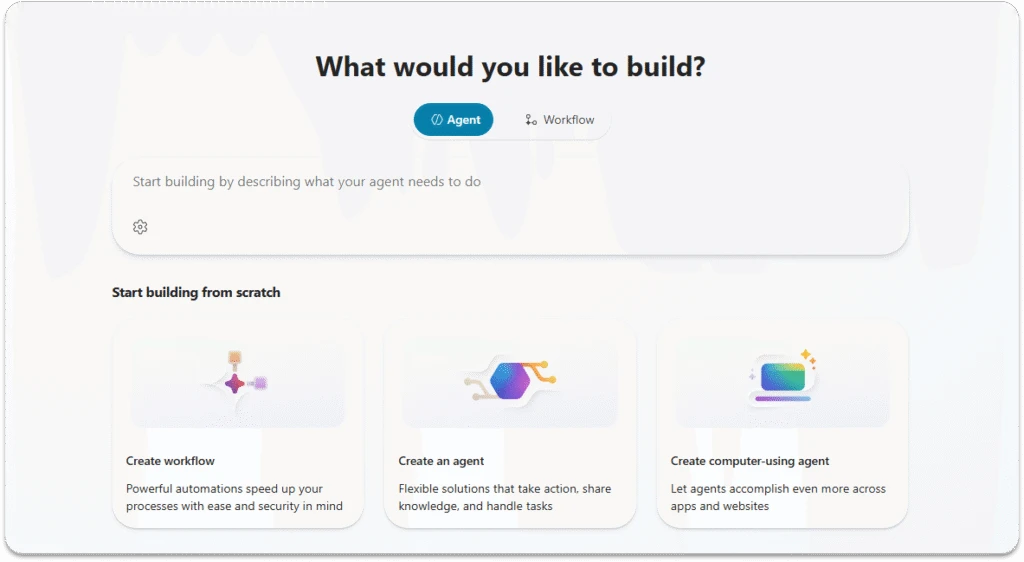
Copilot Studio conversational agent creation interface — Microsoft Copilot Blog
How It Works: Operationalizing Agent Adoption with Copilot Studio
1. Intent-to-Agent Conversion via Natural Language
Traditionally, translating business needs into automated agents required coding expertise and lengthy development cycles. Copilot Studio overturns this by using underlying large language models (LLMs) to interpret user-described intent and transform it into agent logic within a no-code/low-code environment.
This shift democratizes AI agent creation. For example, a sales operations manager can instruct an agent to monitor pipeline changes and flag stalled deals using plain language. Behind the scenes, the agent uses preconfigured domain knowledge and decision rules to execute the tasks autonomously.
2. End-to-End Workflow Automation with Agent Flows
Agents can now assume ownership over entire repeatable processes such as expense approvals or onboarding workflows. Using flow-building capabilities and specialized workflow agents, Copilot Studio links steps together, applies validation rules, and only escalates exceptions to humans.
For instance, an expense reimbursement agent might guide an employee through form submission, validate compliance against multiple jurisdictions’ policies, route approvals via connected HR and finance systems, and automatically trigger reimbursements—all without manual intervention.
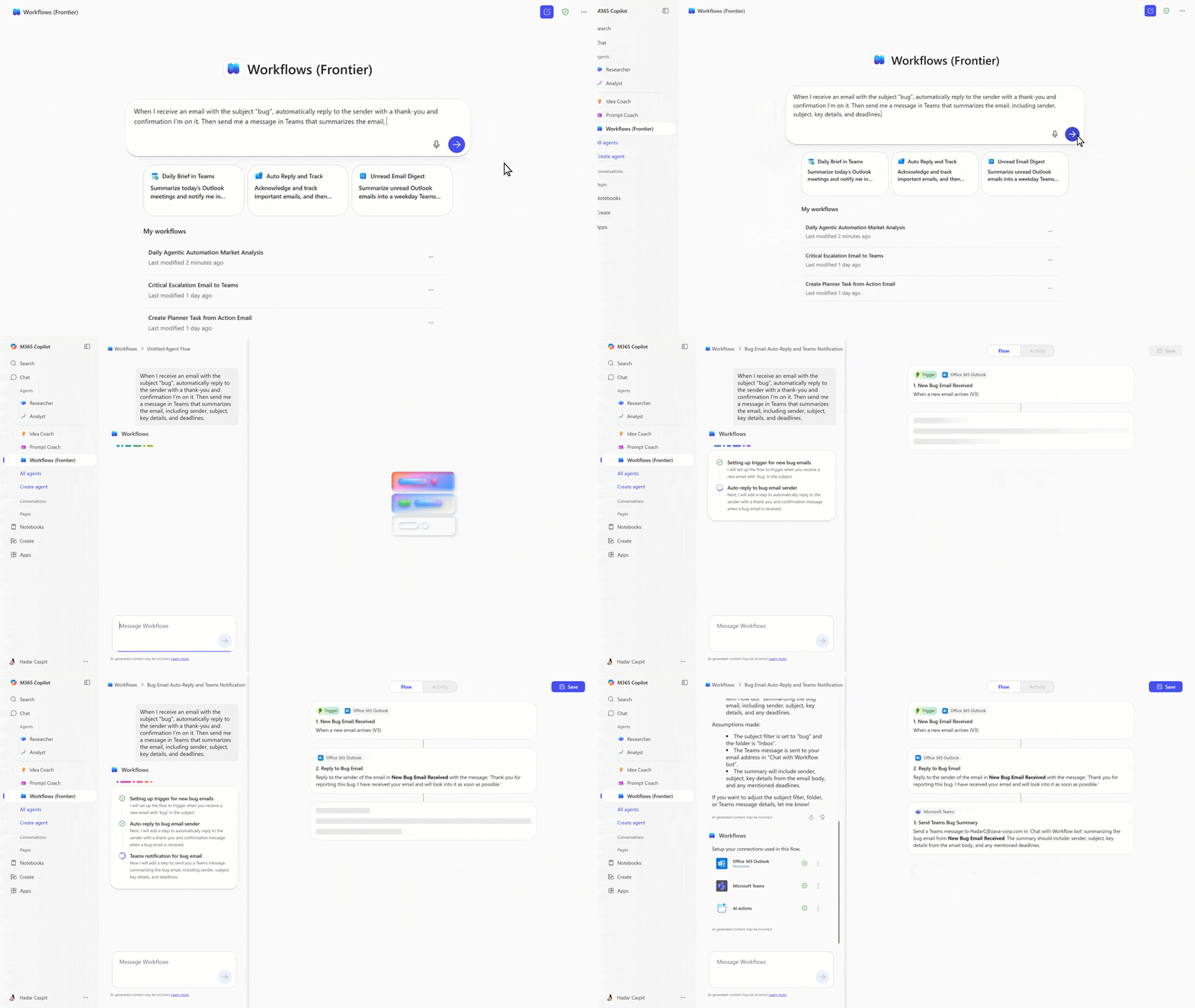
Example workflow automation by a Workflows Agent — Microsoft Copilot Blog
3. Coordinating Multiple Specialized Agents
Complex business outcomes often require expertise from parallel domains and systems. The Agent2Agent (A2A) protocol enables agents to communicate, delegate, and collaboratively solve problems as a cohesive multi-agent system.
Consider a manufacturing scenario where one agent interprets internal safety regulations, another consults equipment manuals, a third taps supplier expertise, and a coordinating agent routes inquiries to the right source dynamically. This modular design improves maintainability and mirrors human team structures.
4. Model Flexibility Tailored to Use Cases
Not all agent workloads are equal. Copilot Studio supports multiple AI models allowing selection optimized for reasoning, chat, or cost efficiency. Organizations can also onboard custom models ensuring regulatory and compliance demands are met.
This flexibility allows running compliance-critical agents on highly auditable models while deploying scalable agents for routine high-volume tasks without friction.
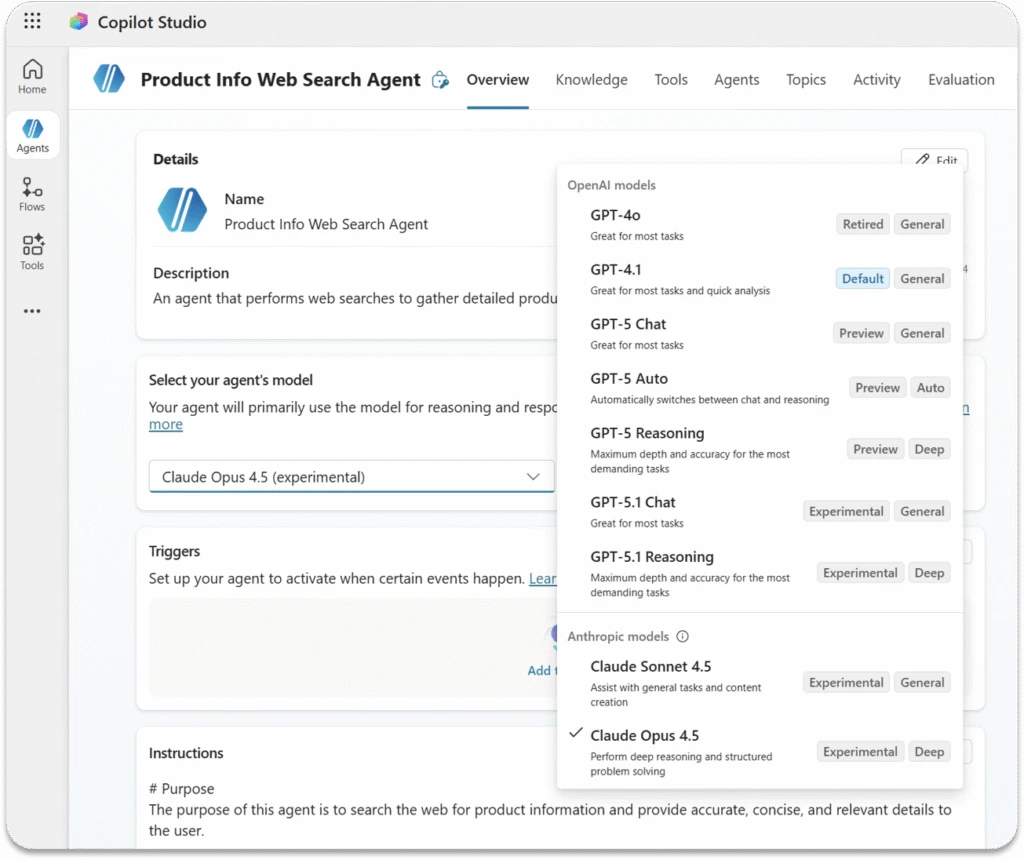
Diverse model selection in Copilot Studio — Microsoft Copilot Blog
5. Autonomous Multi-System Action Using MCP & Computer Use
Historically, AI agents suggested actions but stopped short of executing them across tools. Microsoft’s Model Context Protocol (MCP) combined with computer use empowers agents to traverse UI or API boundaries, update records, submit tickets, and notify stakeholders with full context.
For example, an operations agent can detect a supply chain signal, file a remediation ticket in the tracking system, and alert the team—all autonomously reducing response time and operational friction.
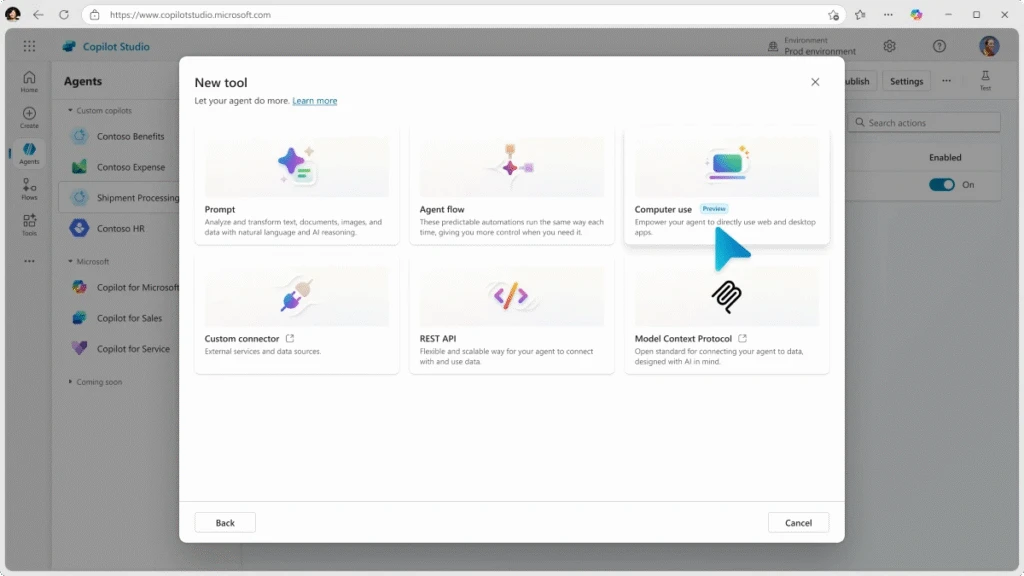
Computer use functionality giving agents cross-system execution capabilities — Microsoft Copilot Blog
6. Lifecycle Management and Governance at Scale
With increasing agent complexity and volume, maintaining security, cost controls, and quality is paramount. Copilot Studio integrates lifecycle tools like agent evaluations with scoring on test cases, usage analytics, and admin controls that enforce policy compliance without hampering creativity.
IT teams gain visibility into which agents run in which environments, associated costs, and performance metrics, enabling proactive governance alongside business-led innovation.
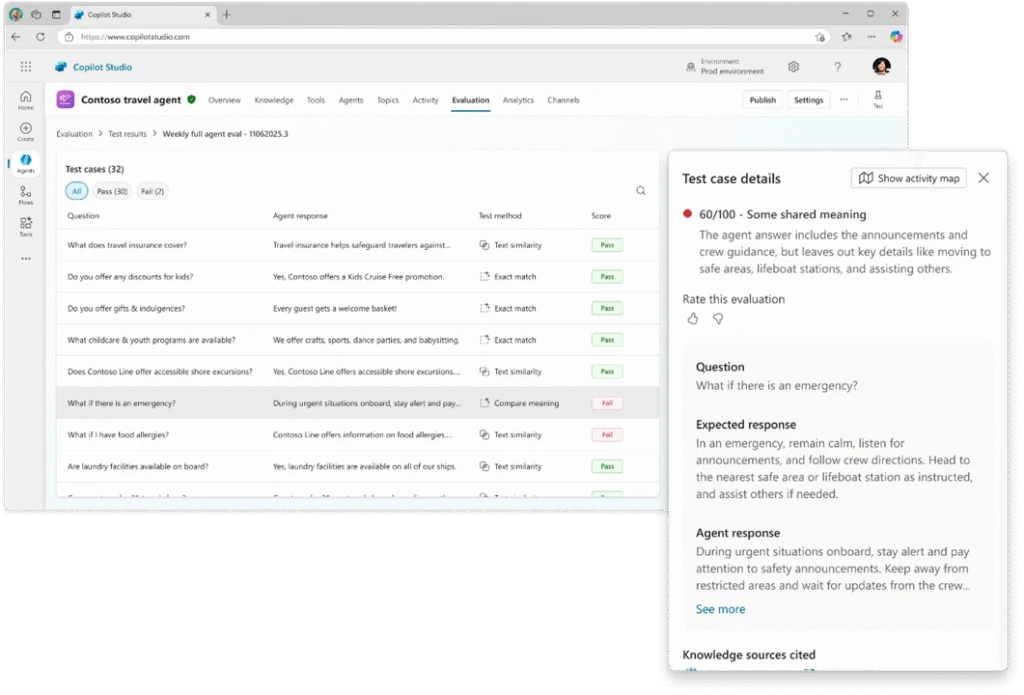
Agent evaluation interface in Copilot Studio — Microsoft Copilot Blog
Quick Tips & Tricks
-
Empower Business Users with Conversational Agent Creation
Leverage Copilot Studio’s natural language interface to enable non-technical team members like sales or HR managers to define agent tasks—speeding up adoption and reducing IT bottlenecks. -
Design Workflows That Minimize Human Escalation
Build agents that handle the bulk of validation and approvals but escalate only when judgment or exceptions arise. This balance frees up human attention for high-value decisions. -
Modularize Complex Tasks into Multi-Agent Systems
Split processes into specialized agents collaborating via Agent2Agent protocols rather than monolithic automations — this improves maintainability and scalability. -
Match AI Models to Workload Needs
Utilize model flexibility in Copilot Studio to assign sensitive or complex reasoning to auditable models while reserving high-volume tasks for cost-efficient ones. -
Use Computer Use Protocol to Close the Action Loop
Instead of just generating recommendations, configure agents to autonomously act across enterprise SaaS and internal systems to automate follow-ups and updates. -
Implement Governance Early with Lifecycle Tools
Adopt agent evaluation and monitoring tools to continuously assess agent performance and usage. Transparency fosters trust and aligns innovation with compliance.
Conclusion
Microsoft Copilot Studio’s six core capabilities mark a new era where AI agents are no longer experimentations but pivotal operational tools that transform workflows end to end. By enabling anyone to create intelligent agents, orchestrating multi-agent collaboration, providing flexible model management, empowering agents to act autonomously across systems, and embedding governance controls, organizations can unlock sustainable adoption at scale.
Looking ahead, the key to success is deliberate execution that balances empowerment and oversight—scaling agent adoption not by sheer numbers but by embedding AI into how work gets reliably done. With Copilot Studio, enterprises gain the foundation to turn AI’s potential into measurable, lasting business value.
References
-
6 core capabilities to scale agent adoption in 2026 | Microsoft Copilot Blog — Original source article describing the key capabilities.
-
Microsoft Copilot Studio homepage — Explore the platform for agent building and management.
-
Agent2Agent (A2A) Protocol Overview — Information on multi-agent coordination technologies.
-
Model Context Protocol (MCP) in Copilot Studio — Technical documentation on protocols enabling agent-system interactions.
-
Microsoft 365 Copilot — Integration of Copilot across Microsoft 365 productivity tools.
-
Get started with AI for your business — Guidance on deploying AI including Copilot agents in organizations.
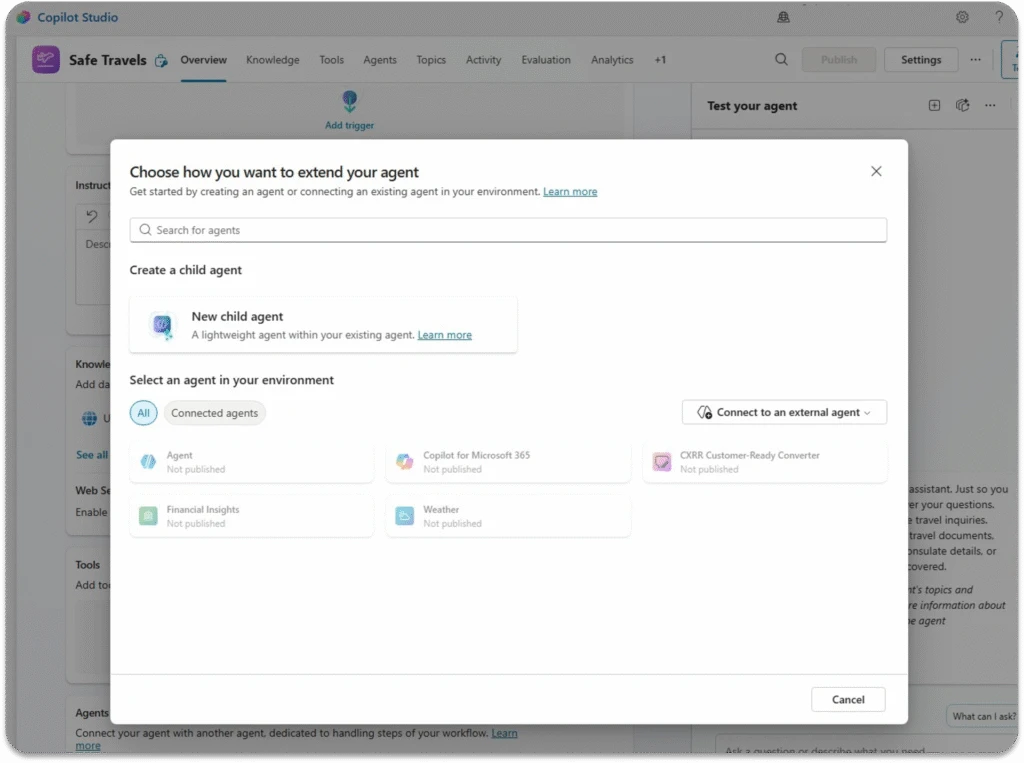
Multi-agent composition interface in Copilot Studio — Microsoft Copilot Blog

Collaborative agent development in progress — Microsoft Copilot Blog