Powering Frontier Transformation with Microsoft 365 Copilot and AI Agents
Powering Frontier Transformation with Microsoft 365 Copilot and AI Agents
Date: 2026-03-18
Explore Wave 3 of Microsoft 365 Copilot featuring Copilot Cowork, multi-model intelligence, and AI agents designed to transform enterprise productivity with embedded, agentic AI.
Tags: ["Microsoft 365", "Copilot", "AI Agents", "Enterprise AI", "Productivity"]
The evolution of AI in the workplace has reached a new milestone with Microsoft's latest Wave 3 release of Microsoft 365 Copilot. For many enterprises, unlocking AI’s full potential means embedding it deeply and seamlessly into daily workflows to act as proactive collaborators rather than just reactive assistants. This transformation—what Microsoft calls a “frontier transformation”—ushers in a new era of productivity where AI agents and multi-model intelligence work side-by-side with humans to get real work done.
Microsoft 365 Copilot’s Wave 3 introduces features such as Copilot Cowork, which allows humans and AI agents to coordinate effortlessly, and multi-model intelligence, enabling the integration of diverse AI models tailored to specific enterprise needs. Additionally, the new Agent 365 capabilities embed intelligent agents within familiar productivity applications like Excel, Word, and Outlook to automate complex workflows. This post dives into the core concepts, technical design insights, and practical tips for leveraging these advancements.
Read on to discover how Microsoft 365 Copilot is redefining collaboration, the underlying platform powering these capabilities, and how enterprises can accelerate digital transformation through agentic AI.
Architecture Overview
The platform integrates enterprise data sources such as Excel, SharePoint, OneDrive, Teams, and Outlook with the Microsoft 365 Frontier AI platform. This platform hosts multi-model AI intelligence, agent orchestration logic, and enterprise governance mechanisms. The AI agents and copilots then integrate with Microsoft 365 applications, enabling users to tap into AI capabilities directly where they work.

Image: Copilot analyzing business data in Excel — Microsoft 365 Blog
Key Technical Observations
-
Embedded multi-model intelligence — Wave 3 leverages multiple specialized AI models operating in concert. Microsoft’s platform dynamically routes queries to distinct models optimized for language, code, decision support, and data analysis, improving accuracy and context-awareness.
-
Agent 365 capabilities — Agent 365 enables the creation, configuration, and deployment of intelligent agents tailored to diverse tasks, embedded in apps with coherent user experiences.
-
Enterprise security and governance — Microsoft’s platform is designed for strict compliance with enterprise security policies, data residency requirements, and auditing, ensuring trustworthiness in regulated industries.
-
Copilot Cowork as agentic collaboration — Copilot Cowork treats AI as an autonomous partner that coordinates dialog, manages project assets, and delivers actionable outputs in real time, effectively becoming a team member.
-
Integration within core productivity apps — Wave 3 embeds agents directly in Word, Excel, PowerPoint, and Outlook, preserving users’ natural workflows and reducing friction.
-
Scalable cloud-native architecture — The AI platform runs in Microsoft’s cloud environments with elastic scalability, supporting demanding and latency-sensitive AI workloads.
How It Works: Under the Hood of Copilot and Agents
Copilot Cowork: Redefining Collaboration
Copilot Cowork enables human users and AI agents to share the same workspace dynamically. It monitors ongoing conversations, project artifacts, and communications to proactively suggest relevant information or draft content. For example, in a Teams meeting chat, Copilot Cowork might generate a project progress summary including charts and open action items, all based on real-time signals and data from underlying Microsoft 365 sources.
This approach relies on multi-model intelligence, which analyzes text, spreadsheet data, calendar events, and emails to understand context. The agents continuously learn from user feedback to improve outputs and reduce noise. This turns AI from a tool users have to summon into an active, context-aware collaborator.
AI Agents Embedded in Productivity Apps
Microsoft 365’s Agent 365 capabilities allow specialized AI agents to be embedded inside applications like Excel and Word. These agents perform complex tasks: generating financial projections from raw data, drafting legal briefings from case files, or automating routine email responses in Outlook.
For example, in Excel, an AI agent can detect patterns within datasets, create weighted forecasts using advanced ML models, and visualize outputs—all triggered via natural language commands. The integration allows the agent to access workbook context fully, weaving AI deep into workflows without requiring users to switch apps.
This modular approach maintains control over data access, enables extensibility, and allows organizations to customize agents for their domain expertise.
Enterprise-Ready AI Platform
Behind the scenes, the platform orchestrates requests through secure, compliant channels, ensuring data privacy as per enterprise policies. It balances loads across multiple AI models and manages updates without disrupting end-user experiences.
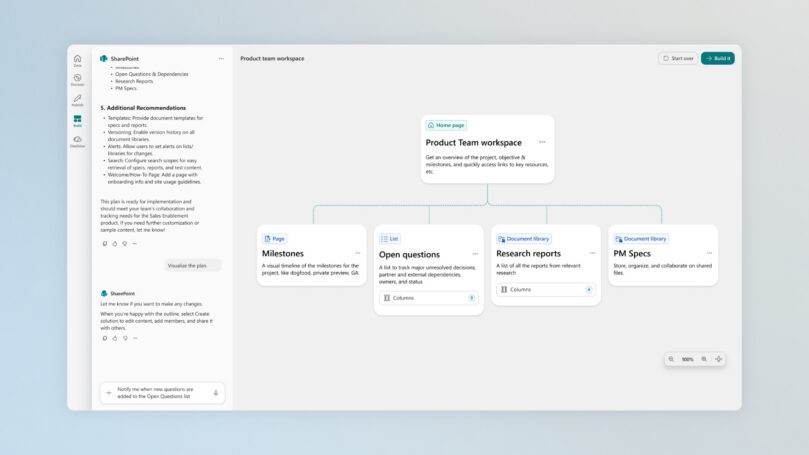
Screenshot: SharePoint Product Team workspace — Microsoft 365 Blog
Quick Tips & Tricks
-
Leverage Copilot Cowork for project management
Use Copilot Cowork to generate status updates, track milestones, and flag open questions within team chats, reducing manual coordination overhead. -
Embed agents early in core documents
Integrate AI agents inside frequently used Excel or Word templates to automate data analysis or content generation from the start. -
Customize Agent 365 capabilities via configuration
Tailor agent behavior—add custom domain knowledge, workflows, or compliance rules to fit your enterprise’s needs. -
Use Microsoft’s cloud environments for compliance
For sensitive data or regulated industries, deploy AI models within Microsoft cloud options to ensure data residency and governance controls. -
Train your team on AI prompt guidelines
Encourage users to adopt the Daily Prompt Guide to maximize interaction quality with Copilot and agents. -
Monitor agent outputs for quality feedback loops
Review AI-generated suggestions regularly, feeding corrections back into model tuning to improve reliability.
Conclusion
Microsoft 365 Copilot Wave 3 marks a significant step in enterprise AI by shifting from AI as a passive assistant to AI as an active, embedded collaborator. With Copilot Cowork, multi-model intelligence, and Agent 365 capabilities, the platform is built to meet frontline transformation requirements—helping organizations accelerate productivity, collaboration, and innovation.
This integrated, secure, and scalable approach empowers enterprises to harness agentic AI deeply within daily workflows while maintaining control, compliance, and extensibility. Microsoft’s frontier platform illustrates the future of workplace intelligence: AI not just working for users, but working with them.
References
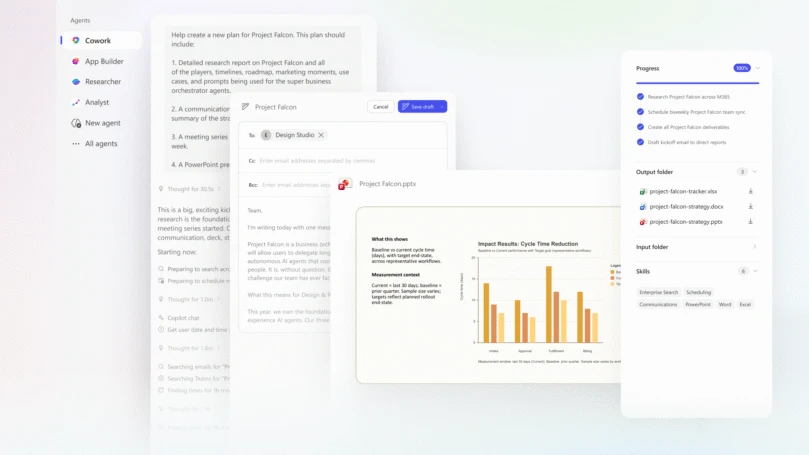
Image: Copilot Cowork outputs in action — Microsoft 365 Blog

Image: Jared Spataro, Chief Marketing Officer, AI at Work, Microsoft