The Next Measure of AI Momentum: Work Transformed with Microsoft 365 Copilot
The Next Measure of AI Momentum: Work Transformed with Microsoft 365 Copilot
Date: 2026-08-01
Microsoft 365 Copilot is drastically transforming how work gets done, with rising adoption, multistep AI workflows, and customer success stories showing AI’s real-world impact.
Tags: ["AI", "Copilot", "Microsoft 365", "Enterprise AI", "Productivity"]
The integration of AI into day-to-day work environments is no longer a futuristic concept—it's a rapidly expanding reality. Businesses worldwide are realizing that AI’s true value lies not just in isolated tools but in transforming how work is performed at scale. Microsoft’s recently shared telemetry data and customer insights from Microsoft 365 Copilot reveal a compelling narrative: AI is reshaping workflows across industries, dramatically changing the way teams collaborate and produce results.
Microsoft 365 Copilot, embedded within familiar productivity apps like Word, Excel, Outlook, and Teams, is proving that AI momentum is best measured in work transformed—the tangible improvements in productivity, complexity of use, and specialized workflows powered by AI assistance. This post explores Microsoft's latest findings, architectural principles behind Copilot’s success, and practical insights for adopting AI-powered productivity tools in enterprise environments.
If you’re curious how AI assistants are becoming indispensable work collaborators rather than just interesting gadgets, this deep dive into Microsoft 365 Copilot’s journey provides a clear view of the present state and future possibilities.
Architecture Overview
┌─────────────────────────────────────────────┐
│            Enterprise Data                   │
├─────────────────────────────────────────────┤
│  • User Activity Telemetry                   │
│  • Enterprise Content & Knowledge Base      │
│  • Application Usage Metrics                 │
└─────────────────────────────────────────────┘
                  ↓
┌─────────────────────────────────────────────┐
│        Microsoft 365 Copilot Platform        │
├─────────────────────────────────────────────┤
│  • AI Model Integration (GPT-4 and beyond)  │
│  • Contextual Data Embeddings & Retrieval    │
│  • Workflow Orchestration & Multistep Agents│
│  • Security, Compliance & Privacy Controls   │
└─────────────────────────────────────────────┘
                  ↓
┌─────────────────────────────────────────────┐
│          Productivity Applications           │
├─────────────────────────────────────────────┤
│  • Word, Excel, PowerPoint                    │
│  • Outlook, Teams, SharePoint                 │
│  • Specialized AI Agents (Copilot Cowork,    │
│    Microsoft Scout)                           │
└─────────────────────────────────────────────┘
                  ↓
┌─────────────────────────────────────────────┐
│              End Users / Organizations       │
├─────────────────────────────────────────────┤
│  • Employees leveraging AI for daily tasks   │
│  • Teams collaborating on multistep workflows│
│  • Decision-makers transforming insights     │
└─────────────────────────────────────────────┘
This layered architecture supports seamless, secure AI integration layered atop the productivity ecosystem. The platform leverages telemetry and graph data to deliver contextual AI responses and supports complex workflows that span multiple apps and organizational domains.

Microsoft 365 Copilot enhancing teamwork in real time — Source: Microsoft 365 Blog
Key Technical Observations
-
Massive Scale Telemetry Driving AI Evolution — Microsoft 365 Copilot has surpassed 30 million paid seats, with telemetry showing nearly a doubling year-over-year of AI conversation frequency. This massive scale enables rapid iterative improvement of AI capabilities based on real-world interaction data.
-
Multistep AI Workflows Are Becoming the Norm — Nearly 49% of Copilot Cowork workflows are multistep sequences, indicating users rely on chaining AI-driven operations across documents and collaboration platforms, reflecting a shift toward advanced automation within office productivity.
-
Deep Specialization Embedded in Industry Scenarios — Copilot isn't a generic AI assistant; it is customized for roles and tasks at scale, like advanced financial modeling in Excel, customer engagement in Teams, promoting domain expertise and reducing context switching.
-
Robust Privacy and Compliance Embedded — Copilot’s AI accesses corporate data within stringent privacy and compliance boundaries. This built-in trust framework is key for enterprise adoption and enables AI-driven innovation without compromising security.
-
AI Agents Orchestrated for Seamless User Experience — Microsoft Scout and Copilot Cowork illustrate a trend toward personal AI agents that proactively assist across contexts, not just reactive prompt-response scenarios, improving productivity and collaboration fluidity.
-
Cloud-Native, Distributed System Architecture — Leveraging Microsoft’s cloud, Copilot integrates AI models via APIs with robust scalability and resilience, supporting global organizations with minimal latency and maximum uptime.
How It Works: Under the Hood of Microsoft 365 Copilot
Telemetry-Driven AI Enhancement
Microsoft collects anonymized telemetry on user interactions, including:
- Frequency and nature of AI interactions
- Workflow complexity and multistep usage patterns
- Application-specific AI usage data (Word, Excel, Teams)
This data feeds continuous AI model retraining and feature refinement to tailor Copilot responses, improving contextual relevance and accuracy.
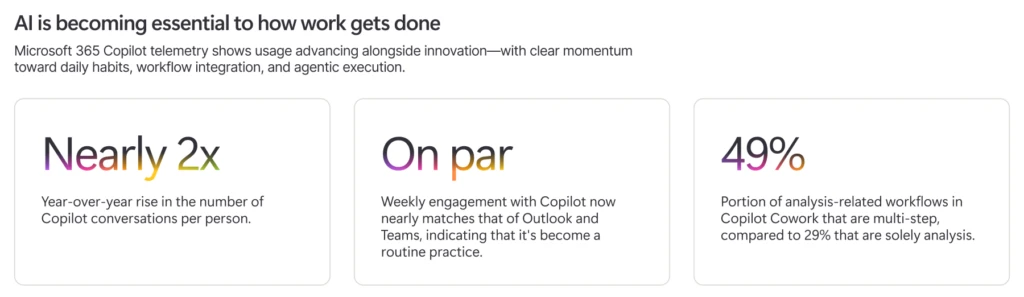
Telemetry shows huge Copilot engagement growth — Source: Microsoft 365 Blog
Contextual Data Integration and Embeddings
Copilot integrates with enterprise content repositories, leveraging semantic search and vector embeddings to retrieve relevant information dynamically. This allows AI to not only generate natural language responses but ground them in up-to-date corporate knowledge and data.
For example, Copilot uses:
- Azure Cognitive Search embeddings for enterprise documents
- Microsoft Graph data for user activity and context awareness
to tailor suggestions and summaries in productivity apps.
Multistep Workflow Orchestration
Beyond simple prompt-response, Copilot supports multistep workflows which might include:
- Drafting a report in Word from data pulled in Excel and Outlook calendar events
- Scheduling collaborative calls in Teams based on project status extracted from SharePoint
- Automating data analysis sequences with natural language instructions
This orchestration requires coordination between AI agents and application APIs, managed by a workflow engine that sequences AI calls and user inputs seamlessly.
Deployment Across Microsoft 365 Suite
Copilot embeds naturally into Microsoft 365 apps, delivering AI assistance without disrupting user workflows:
- Word: Summarize documents, generate content, review drafts
- Excel: Advanced data analysis, scenario modeling, financial close support
- Outlook: Prioritized inbox management, draft email generation
- Teams: Meeting summaries, action item follow-ups, collaborative drafting
This deep integration drives immediate productivity benefits, meeting users where they work.

AI-assisted advanced financial analysis with Excel Copilot — Source: Microsoft 365 Blog
Quick Tips & Tricks
-
Leverage Multistep AI Workflows — Use Copilot Cowork to chain AI commands across apps, automating complex business processes and saving manual switching between tools.
-
Customize AI for Your Domain — Take advantage of Copilot’s specialization features to teach it industry or role-specific knowledge, improving relevance and accuracy in outputs.
-
Integrate Corporate Data Securely — Setup and maintain compliance boundaries to allow Copilot access to relevant enterprise data while preserving data privacy and governance.
-
Combine AI Agents for Proactivity — Deploy AI assistant agents like Microsoft Scout alongside Copilot to get proactive insights and reminders based on your work context.
-
Train Users on Prompt Engineering — Encourage teams to craft precise natural language prompts for Copilot to maximize the quality and usefulness of AI-generated outputs.
-
Monitor Telemetry to Optimize Usage — Use Microsoft 365 admin insights to track Copilot adoption and workflow success, iterating on training and AI configurations accordingly.

Copilot Cowork enabling rich multistep workflow orchestration — Source: Microsoft 365 Blog
Conclusion
Microsoft 365 Copilot’s journey from launch to enterprise staple illustrates how AI momentum is best measured by transforming work itself. Elevated engagement, deep domain task support, and seamless cross-application workflows demonstrate AI’s genuine productivity impact.
As organizations continue to adopt Copilot, the trajectory points toward more personal AI agents, richer context integration, and increasingly autonomous workflows — pushing the boundaries of what human-AI collaboration can achieve in modern enterprises.
The future of work will be defined by AI transforming tasks into effortless, intelligent collaborations. Microsoft 365 Copilot is a leading example of this transformation in action today.
References
- The next measure of AI momentum is work transformed - Microsoft 365 Blog — Original article detailing Microsoft 365 Copilot’s AI impact and telemetry insights
- Meet Microsoft 365 Copilot — Official Microsoft Copilot product page
- Copilot Cowork is now generally available — Announcement and features of Copilot Cowork for multistep workflows
- Introducing Microsoft Scout: Your always-on personal agent — Overview of AI assistant agents enhancing productivity
- Microsoft 365 Product Explorer — Comprehensive list of Microsoft apps integrated with AI