Inside the New Microsoft 365 Copilot Design: Faster, Smarter, and More Adaptive
Inside the New Microsoft 365 Copilot Design: Faster, Smarter, and More Adaptive
Date: 2026-05-29
Explore how Microsoft’s redesigned 365 Copilot delivers a faster AI-driven experience with adaptive tools and clearer workflows—bringing human intention effortlessly to outcome.
Tags: ["Microsoft 365", "AI", "Copilot", "Productivity"]
Microsoft 365 Copilot has redefined the way AI empowers productivity, but with its latest redesign, the experience takes a significant leap forward. Users no longer just interact with AI assistants; they move fluidly from intention to outcome thanks to adaptive tools and clearer AI-powered workflows integrated deeply into the Microsoft 365 ecosystem.
This post unpacks the newly introduced design for Microsoft 365 Copilot revealed on May 28, 2026. We break down the fresh architectural approach, explore the technical insights behind the speed and fluidity improvements, and reveal how this redesign advances AI-assisted productivity. Whether you're a software architect, AI enthusiast, or enterprise user, you'll gain a clear understanding of how Microsoft is evolving the Copilot experience to better fit the flow of work.
Grab your favorite beverage and let’s dive into the new Copilot, where design and performance converge to move together in perfect harmony.
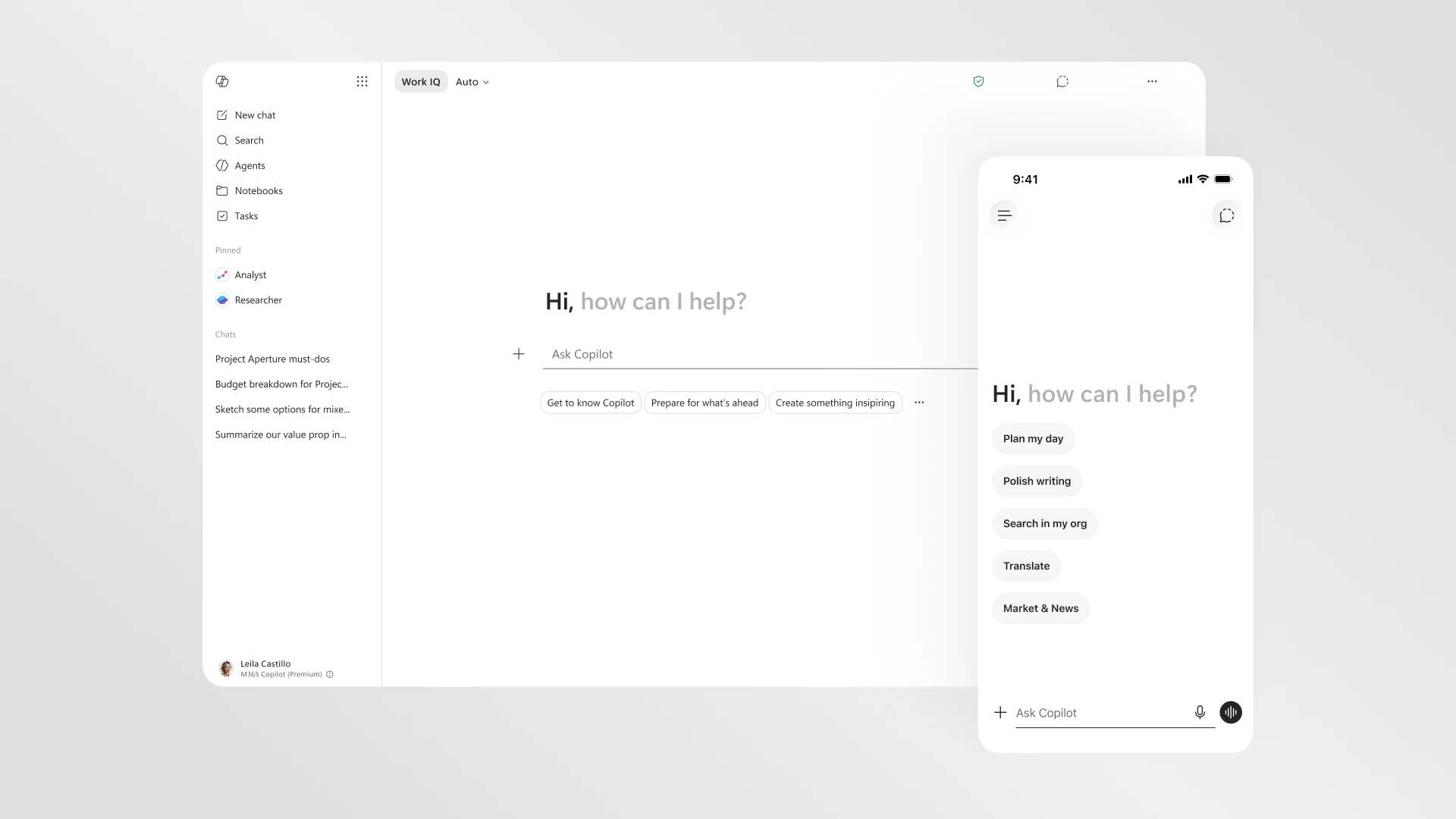
The redesigned Microsoft 365 Copilot experience delivers faster and clearer AI workflows. Source: Microsoft 365 Blog
Architecture Overview
The new Microsoft 365 Copilot experience integrates advanced AI capabilities with Microsoft’s established productivity ecosystem to empower seamless user workflows. The design philosophy emphasizes a cohesive, agentic AI experience that moves with the user across Microsoft 365 apps, delivering faster, clearer, and more adaptive AI-powered workflows.
This layered approach ensures that Copilot's AI capabilities effectively harness vast enterprise content while delivering low-latency, context-sensitive assistance across productivity apps.
Key Technical Observations
-
Prompt as Canvas Reimagines Interaction — The new design leverages a “prompt as canvas” UI paradigm allowing users to frame queries and interact with AI conversationally within a fluid, dynamic interface rather than static dialogs.
-
Unified, Agentic AI Across Apps — Copilot now functions as a cohesive agent architecture, sharing context and state across Word, Excel, PowerPoint, Outlook, and Teams. This unification elevates productivity scenarios across tasks, communications, and content creation.
-
Performance-First Engineering — Microsoft emphasized latency reduction extensively, incorporating smart caching layers and asynchronous update mechanisms. The redesigned experience “moves together” with users’ work, reducing friction between intent and AI response.
-
Adaptive & Intelligent Workflow Tools — Copilot offers adaptive tools tailored to the user’s role, document type, and real-time editing context, which continuously evolve through embedded machine learning.
-
Robust Security and Compliance Integration — Copilot accesses sensitive organizational data securely aligned with Microsoft’s compliance frameworks, ensuring enterprise-grade governance while delivering personalized AI recommendations.
-
Extensible Studio for Customization — The redesigned Copilot Studio supports easier workflow customization and agent governance, allowing businesses to build domain-specific AI agents that comply with corporate policies.

Copilot Studio improvements enable streamlined workflows and governance. Source: Microsoft 365 Blog
How It Works: Under the Hood of the New Copilot Experience
The Prompt as Canvas Interaction Model
One of the standout innovations is the shift from static prompt inputs to a “prompt as canvas” approach, which serves as an interactive workspace for users to compose, edit, and refine AI-driven queries in real time. Instead of typing a prompt and waiting for a single block of generated text, users now benefit from a dynamic interface that renders AI responses segmented by logic, allowing them to accept, modify, or expand sections iteratively.
This design boosts clarity by expressing AI outputs in actionable chunks rather than long, opaque paragraphs, improving user agency.
AI Agent Unification and Context Sharing
Microsoft 365 Copilot’s underlying AI agents connect through a unified platform layer, which transparently manages context synchronization between apps. For example, an agenda created in Outlook can dynamically inform a PowerPoint presentation outline, while notes taken in Teams contribute to Excel data insights — all orchestrated by a single agent fabric.
This architecture benefits from unified APIs to access content from various M365 services and context synchronization services running in the Copilot platform.
Performance Optimizations
To tackle latency, Copilot uses intelligent caching of frequently requested data slices and incremental AI inference. These optimizations mean responses arrive faster as the system anticipates likely user queries and prefetches responses or partial computations.
The platform also employs asynchronous updates, decoupling heavy AI processing from user interactions without blocking workflows. This “moves together” with the user, keeping the experience fluid.
Quick Tips & Tricks
-
Use Copilot Studio to Customize Agents for Your Team — Build domain-specific AI assistants that align with your industry jargon and workflows to boost relevance and adoption.
-
Leverage Adaptive Tools — Take advantage of context-aware templates and editing aids within Copilot to speed up repetitive documents, reports, and analyses.
-
Explore Prompt as Canvas for Complex Tasks — When handling multi-part requests like business proposals, use the dynamic prompt editing features to iterate and refine AI-generated content easily.
-
Secure Sensitive Data with Built-in Governance — Trust the enterprise-grade compliance within Copilot to safeguard data while enabling personalized AI suggestions.
-
Use the Unified AI Agent Across Apps — Start a project in Outlook, review in Teams, finalize in PowerPoint — allow Copilot’s context sharing to streamline your workflow.
-
Keep Your Microsoft 365 Apps Updated — The new Copilot experience relies on the latest app versions, so regularly updating ensures access to all new AI features and optimizations.
Conclusion
Microsoft 365 Copilot’s new design represents a shift toward more agentic, adaptive, and performant AI assistance integrated deeply across the productivity suite. By moving from static prompts to fluid canvases and unifying AI agents across apps, Microsoft is making AI a seamless partner in work rather than a separate tool.
This evolution embodies a future where AI assists not only by answering prompts but by deeply understanding context and workflow intent, thus helping users transition effortlessly from ideas to outcomes. As Microsoft continues to refine these capabilities and introduce richer customization options, the productivity and collaboration landscape is poised for significant transformation.
Embracing these advances today will position organizations and individuals to harness AI’s full potential across the Microsoft 365 ecosystem.

The new Copilot experience integrates AI suggestions seamlessly into daily workflows. Source: Microsoft 365 Blog
References
- Introducing a new design for Microsoft 365 Copilot | Microsoft 365 Blog — The authoritative source presenting the redesign and enhancements.
This blog post is based on and credits the original Microsoft 365 Blog article linked above.