Migrating from Global Personal Access Tokens in Azure DevOps Services Before December 1, 2026
Migrating from Global Personal Access Tokens in Azure DevOps Services Before December 1, 2026
Date: 2026-08-10
Microsoft is retiring global Personal Access Tokens in Azure DevOps Services this December. Here’s a practical migration guide to switch to service connections and avoid last-minute disruptions.
Tags: ["Azure DevOps", "DevOps Security", "Azure Entra", "Personal Access Tokens"]
Azure DevOps has long relied on Personal Access Tokens (PATs) to authenticate pipelines and cross-organization automation. But as security demands evolve, Microsoft is deprecating global PATs that span multiple organizations—effective December 1, 2026. This retirement means teams using global PATs need to migrate or risk broken pipelines and failed automation right before their deadlines.
While the new Azure DevOps service connection feature promises per-pipeline permissions and eliminates token rotation, Microsoft’s announcement missed emphasizing the timetable and migration traps. If your pipelines still depend on a global PAT, this post breaks down exactly how to confirm if you are impacted, and how to migrate your pipelines smoothly to the new identity-based service connections with minimal friction.
This detailed guide covers everything from identifying global tokens to updating your YAML pipelines, plus pitfalls to watch for — ensuring your CI/CD workflows stay secure and operational well past December.
Architecture Overview
┌─────────────────────────────────────────────┐
│            Azure DevOps Organizations        │
├─────────────────────────────────────────────┤
│  • Multiple Organizations                    │
│  • Repositories & Pipelines                   │
│  • Existing Global PATs (deprecated)          │
└─────────────────────────────────────────────┘
                   ↓
┌─────────────────────────────────────────────┐
│         Microsoft Entra Identity Platform    │
├─────────────────────────────────────────────┤
│  • Service Principals                         │
│  • Managed Identities                         │
│  • Token Issuance & Federation Control       │
└─────────────────────────────────────────────┘
                   ↓
┌─────────────────────────────────────────────┐
│         Azure DevOps Service Connections     │
├─────────────────────────────────────────────┤
│  • Per-Pipeline Scoped Permissions           │
│  • Audit Trails & Least Privilege Access     │
│  • Replace Global PATs                        │
└─────────────────────────────────────────────┘
                   ↓
┌─────────────────────────────────────────────┐
│            Pipelines & Automation            │
├─────────────────────────────────────────────┤
│  • YAML Pipelines Updated                     │
│  • Token Management Eliminated                │
│  • OAuth and SSH (future phases)              │
└─────────────────────────────────────────────┘
This flow illustrates how authentication is moving from a shared, global token model toward scoped Azure Entra identities integrated via service connections — drastically improving security posture and traceability.
Source: I don’t like AI blog by Gijs Reijn
Key Technical Observations
-
Global PATs target multiple organizations only: Personal Access Tokens are "global" only when they cross organization boundaries. Tokens scoped to a single organization remain supported after the December 1 deadline.
-
Token lifetime dictates identity choice: Service principals provide tokens valid for about one hour, suitable for short builds. Managed identities last 24 hours and are essential for long-running pipelines that might exceed an hour.
-
Critical pitfalls when registering service connections: The service principal’s object ID must be retrieved from Enterprise Applications—not App Registrations. Confusing these leads to hard-to-debug permission errors.
-
Licensing cost is per identity per organization: Each service principal or managed identity consumes a license for every organization it connects to. Reusing identities wisely is recommended to avoid costly overprovisioning.
-
YAML pipelines require explicit service connection references: Legacy PAT variables must be replaced by named service connections in task inputs, including feed URLs for package authenticators like npm, Maven, and Pip.
-
Preview limitations remain: Service connections cannot yet replace all authentication mechanisms, such as creating PATs or SSH keys, supporting OAuth, or handling cross-cloud sovereignty restrictions.
How It Works
Step 1: Confirm if You Are Affected by the Deadline
Not everyone using PATs is impacted. To check if your tokens are global:
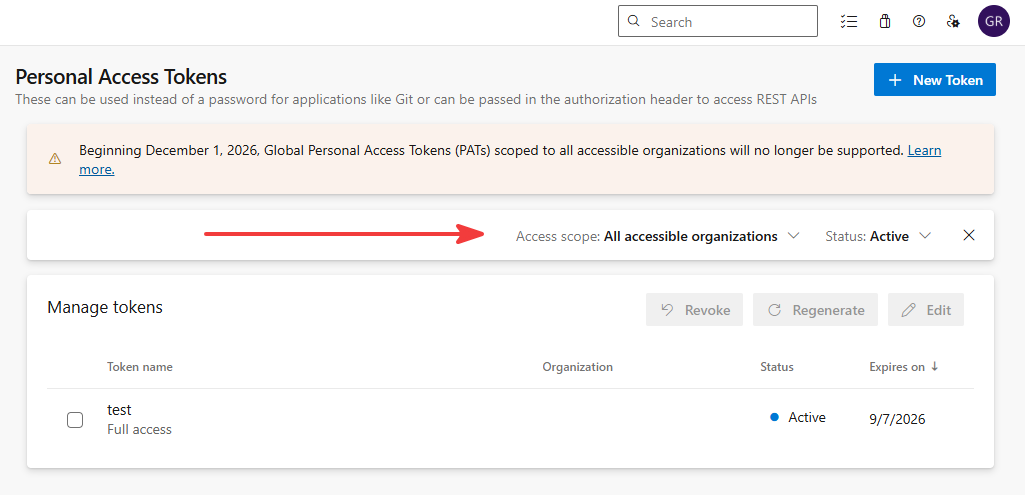
- Navigate to User Settings → Personal Access Tokens in Azure DevOps.
- Global PATs show multiple target organizations.
- Use the PAT Lifecycle Management API for exact scopes:
curl -H "Authorization: Bearer <entra-token>" \
  "https://dev.azure.com/<org>/_apis/tokens/pats?api-version=7.1-preview.1"
Tokens constrained to one organization continue working post-December without changes. However, global PATs crossing boundaries must be migrated.
Also audit your pipeline environment variables, repos, and config files for embedded PAT references:
- Variable groups and secret variables
- Key Vault-linked variable groups
- Git remotes with credentials in URLs
- Config files like
.npmrcandnuget.configchecked into repos AZURE_DEVOPS_EXT_PATenvironment variable
Any reference crossing organizations needs replacement.
Step 2: Decide on Service Principal vs. Managed Identity
Creating a service connection requires a valid Microsoft Entra identity already set up externally. Choose between:
- Service Principal: Tokens expire hourly. Fine for builds under 60 minutes.
- Managed Identity: Tokens last 24 hours. Essential for longer builds or Azure-hosted agents, removing credential rotation hassle.
Watch for tenant-level settings blocking multi-tenant apps or workload identity federation, which require Azure Entra admin adjustments:
AADSTS70052: No multitenant app registrations; useAzureADMyOrgand one connection per tenant.AADSTS700223 / AADSTS700238: Workload identity federation disabled at tenant level.
Step 3: Register Service Connection Correctly
Common traps when adding a service principal or managed identity as a service connection:
- Use Enterprise Applications to find Object IDs; app registration IDs won’t work.
- Stakeholder licenses don’t allow repo access; error messages can be misleading.
- Each identity consumes a license per organization; avoid creating per-pipeline principals unnecessarily.
- Assign minimal necessary permissions; typically "Reader" for projects plus feed or repo rights where needed.
Microsoft’s official tutorial on adding DevOps Entra service connections covers these procedures precisely.
Step 4: Update Your YAML Pipeline Code
Replace PAT variables in your pipeline YAML with references to the new service connections. For example:
Before (using PAT variable):
variables:
  - group: shared-secrets      # holds GLOBAL_PAT

steps:
  - script: |
      dotnet nuget add source https://pkgs.dev.azure.com/platform-engineering/_packaging/shared/nuget/v3/index.json \
        --name shared --username az --password $(GLOBAL_PAT) --store-password-in-clear-text
      dotnet restore
After (using service connection):
resources:
  repositories:
    - repository: platform-templates
      type: git
      endpoint: platform-connection
      name: 'platform/build-templates'
      ref: refs/heads/main

steps:
  - task: NuGetAuthenticate@1
    inputs:
      nuGetServiceConnections: 'platform-connection'

  - task: DotNetCoreCLI@2
    inputs:
      command: 'restore'
      projects: '**/*.csproj'
Keep in mind:
- The feedUrl input is mandatory for
npmAuthenticate@0,PipAuthenticate@1, andMavenAuthenticate@0tasks when using service connections. - For REST or CLI tasks, use the
connectionTypeparameter to reference the Azure DevOps service connection for automatic authentication. - The Azure DevOps resource ID GUID
499b84ac-1321-427f-aa17-267ca6975798is the resource to request tokens for withaz account get-access-token.
Refer to this mapping of tasks to their connection inputs:
| Task | Input Name |
|---|---|
| NuGetAuthenticate@1 | nuGetServiceConnections |
| npmAuthenticate@0, PipAuthenticate@1, MavenAuthenticate@0 | azureDevOpsServiceConnection or workloadIdentityServiceConnection (alias) |
| AzureCLI@3 | connectionType: 'azureDevOps' + azureDevOpsServiceConnection |
| InvokeRESTAPI@1 | connectionType: 'connectedServiceNameAzureDevOps' + serviceConnection |
| repository resource | endpoint: |
Quick Tips & Tricks
-
Audit your tokens scope first — Don’t scramble migrating if your PATs are already scoped to a single organization.
-
Prefer managed identities if build durations may exceed 60 minutes — You’ll avoid token expiration mid-run.
-
Use Enterprise Applications for object IDs, not App Registrations — This subtle distinction can save hours troubleshooting permissions.
-
Assign least privilege permissions — Over-permissioning introduces risk and licensing cost.
-
Replace all PAT usage sites — Variable groups, environment variables, git remotes, and config files included.
-
Test pipelines incrementally — Swap authentication in one pipeline before rolling out en masse.
Conclusion
Microsoft’s retirement of global Personal Access Tokens signals a major shift in Azure DevOps security and authentication strategy. The new service connection mechanism, powered by Azure Entra identities, delivers improved security, auditability, and better lifecycle management aligned with modern DevOps practices.
Teams that rely on multi-organization PATs must take action before the December 1 deadline. Following a deliberate migration path—auditing tokens, choosing the right identity type, configuring service connections properly, and updating pipelines—can save downtime and frustration.
This migration is also a stepping stone toward a fully zero-PAT future in Azure DevOps. While service connections remain in preview with limitations, their continuous evolution will eventually replace legacy token patterns for all automation scopes.
References
- Your global Personal Access Token dies on December 1 in Azure DevOps Services: Here's the migration — Original deep-dive blog post by Gijs Reijn
- Azure DevOps CLI: Authenticate with the AZURE_DEVOPS_EXT_PAT environment variable — Microsoft documentation on PAT env var
- Microsoft Entra Service Principal and Managed Identity integration with Azure DevOps — Official tutorial on service connection setup
- Frequently observed Azure Active Directory error codes impacting identity federation — Explained federation errors
- NuGetAuthenticate, npmAuthenticate, and others in Azure DevOps pipeline tasks — Docs on task inputs for new auth model
- Azure DevOps token endpoint deprecation timeline announcement — Future-proofing authentication guidance