Microsoft Foundry April 2026 Update: Foundry Local GA, GPT-5.5, Agent Tracing & More
Microsoft Foundry April 2026 Update: Foundry Local GA, GPT-5.5, Agent Tracing & More
Date: 2026-05-12
Explore the latest Microsoft Foundry April 2026 updates including Foundry Local GA for offline AI, GPT-5.5 availability, detailed agent tracing, CodeAct with Hyperlight, and enhanced monitoring dashboards.
Tags: ["Microsoft Foundry", "GPT-5.5", "Agent Framework", "Foundry Local", "Observability"]
Microsoft Foundry continues to advance rapidly with its April 2026 release, bringing production-ready local model execution, the powerful GPT-5.5 model for premium users, and deep observability into AI agent orchestration. These updates reflect Microsoft’s strong push to empower developers building intelligent applications both on-device and in the cloud, with rich debugging, monitoring, and lifecycle management tools.
This post dives into the key announcements from the April update: Foundry Local’s general availability unlocking offline AI scenarios, GPT-5.5’s Tier 5 and 6 subscription rollout, preview capabilities for tracing hosted and Framework agents via OpenTelemetry, an alpha experience for sandboxed Python with CodeAct on Hyperlight, and comprehensive evaluation and monitoring improvements. We will also overview the SDK enhancements in Python, JavaScript/TypeScript, and .NET that enable stronger hosted-agent workflows.
Whether you’re building local AI-powered features with privacy in mind, developing robust agents with detailed telemetry, or managing large-scale AI deployments, the April update delivers powerful new capabilities that improve developer productivity and operational confidence.
Architecture Overview
┌─────────────────────────────────────────────┐
│           Enterprise Data Sources            │
├─────────────────────────────────────────────┤
│  • Databases                                 │
│  • Documents & Knowledge Bases               │
│  • Operational Systems                       │
└─────────────────────────────────────────────┘
                     ↓
┌─────────────────────────────────────────────┐
│        Microsoft Foundry Platform             │
├─────────────────────────────────────────────┤
│  • Model Access & Management                  │
│  • Local Model Runtime (Foundry Local SDK)   │
│  • Agent Framework & Hosted Agents            │
│  • Evaluation & Monitoring                    │
│  • Control Plane Asset & Agent Inventory      │
└─────────────────────────────────────────────┘
                     ↓
┌─────────────────────────────────────────────┐
│               Developer Applications          │
├─────────────────────────────────────────────┤
│  • Internal AI Assistants                      │
│  • Automation & Workflow Agents                │
│  • Customer-Facing AI Features & Bots          │
│  • Offline & Hybrid AI Experiences             │
└─────────────────────────────────────────────┘
This diagram summarizes Microsoft Foundry’s role as the nexus for managing AI models, agent workflows, observability, and lifecycle control, bridging enterprise data sources with client applications across cloud and local environments.
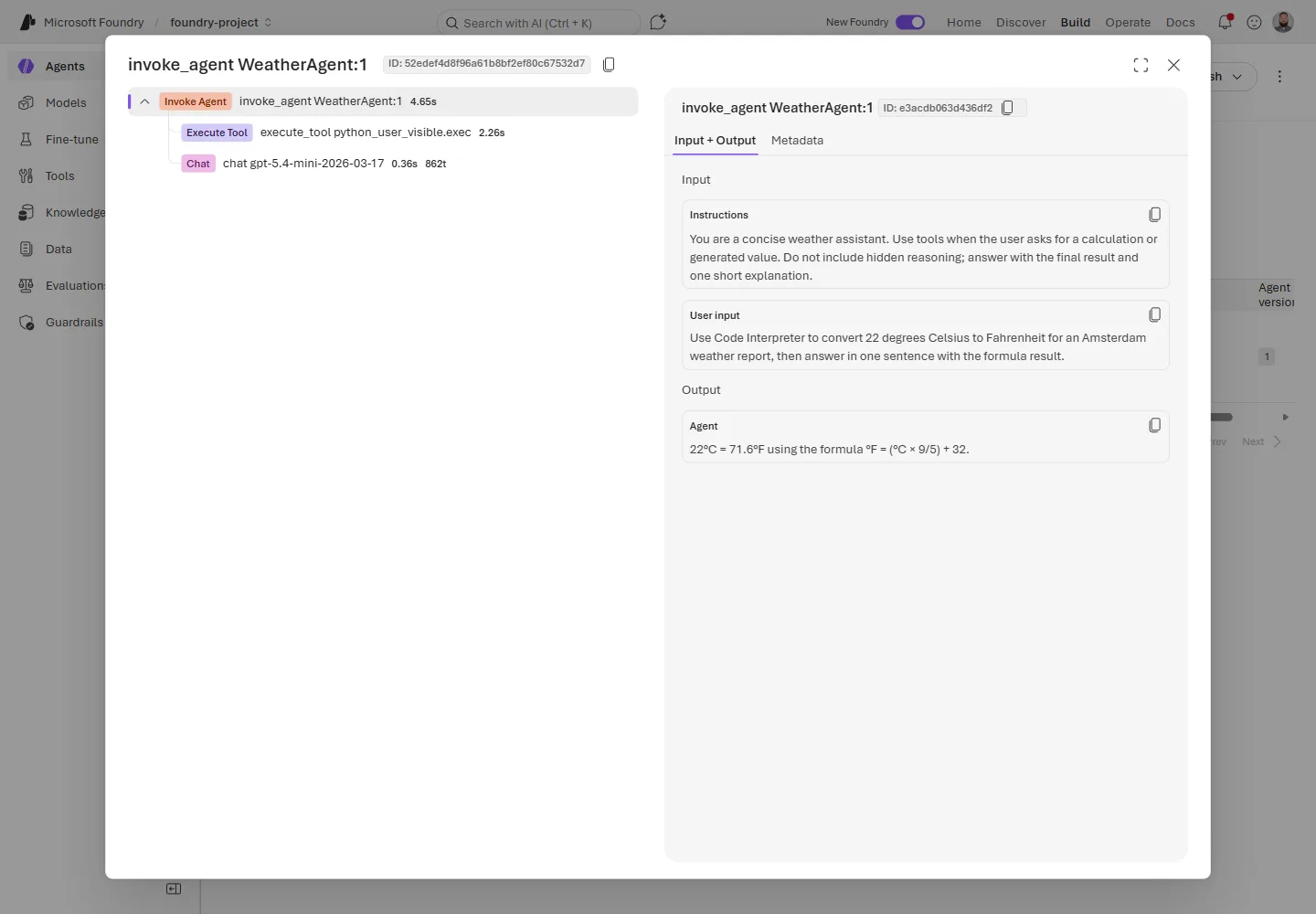
Tracing view for Agent Framework WeatherAgent demonstrating OpenTelemetry trace spans — image courtesy Microsoft Foundry blog
Key Technical Observations
-
Foundry Local GA Unlocks On-Device AI
Local inference is now production-ready on Windows, Apple Silicon macOS, and Linux x64, enabling developers to build latency-sensitive and privacy-preserving AI features without cloud dependencies. The Foundry Local SDK supports Python, JavaScript, C#, and Rust, allowing diverse client-side integrations. -
GPT-5.5 Limited to High-Tier Subscriptions with Regional Availability
The powerful GPT-5.5 model is restricted by default to Tier 5 and Tier 6 subscription customers, with specific regional deployments including East US 2, Sweden Central, South Central US, and Poland Central. This staged rollout helps balance capacity and access, signaling a cautious but scalable model launch strategy. -
Agent Framework Tracing with OpenTelemetry for Full Observability
Preview tracing for Python Agent Framework agents exposes detailed spans of agent runs, model API calls, tool interactions, and token usage, integrated with Azure Monitor Application Insights. This elevates debugging and monitoring to professional-grade telemetry using industry standards. -
Hosted-Agent Tracing in Preview Enables Server-Side Session Transparency
Tracing for hosted agents shows run steps and tool calls as ordered actions, improving post-mortem analysis and performance investigations across multi-tool workflows. Sensitive data redaction is emphasized for production telemetry hygiene. -
CodeAct & Hyperlight Alpha Introduces Sandboxed Python Execution
The alpha release of CodeAct integrates sandboxed Python code execution within a Hyperlight micro-VM, collapsing complex multi-tool chains into single safe execution blocks for lightweight data operations and report assembly, improving efficiency and safety. -
Enhanced Agent Monitoring and Continuous Evaluation with Custom Evaluators
New dashboards unify run metrics—token consumption, latency, success rates—with evaluation results, while continuous evaluation gains support for custom code or prompt-based evaluators tailored to specific application quality criteria. -
Subscription-Level Agent Inventory in Foundry Control Plane
A centralized asset management capability indexes Foundry agents, Azure SRE agents, Logic Apps loops, and custom registered agents, streamlining lifecycle and troubleshooting workflows across large deployments.
How It Works
Foundry Local: Production-Ready On-Device Inference
Foundry Local enables development and deployment of AI workloads fully on-device, removing the cloud dependency in the inference path. After installing the foundry-local-sdk and optionally enabling Windows ML acceleration on Windows, developers can instantiate models from the SDK’s local catalog:
from foundry_local_sdk import Configuration, FoundryLocalManager

config = Configuration(app_name="foundry_local_quickstart")
FoundryLocalManager.initialize(config)
manager = FoundryLocalManager.instance

model = manager.catalog.get_model("qwen2.5-0.5b")
model.download()
model.load()

try:
    client = model.get_chat_client()
    response = client.complete_chat(
        [{"role": "user", "content": "Write one sentence about local AI."}]
    )
    print(response.choices[0].message.content)
finally:
    model.unload()
The response might say:
Local AI refers to machine learning models and algorithms that can run on devices within the same physical location as they were trained.
This local execution reduces latency, keeps user data on-device for privacy compliance, and enables fast prototyping cycles before migration to cloud-hosted Foundry models.
Agent Framework Tracing for Debugging & Production Monitoring
The Agent Framework tracing feature uses OpenTelemetry spans to instrument detailed step-by-step traces of agent execution flows, including model API calls, tool invocations, token counts, latency, and payloads. Developers install the Python agent package along with OpenTelemetry support:
pip install agent-framework-foundry azure-identity azure-monitor-opentelemetry aiohttp pydantic
Next, a minimal example sets environment flags to enable semantic and sensitive data tracing, initializes a Foundry chat client connected to Azure Monitor, and runs an illustrative weather agent:
from typing import Annotated
# Enable GenAI semantic tracing
os.environ.setdefault("AZURE_EXPERIMENTAL_ENABLE_GENAI_TRACING", "true")
os.environ.setdefault("ENABLE_INSTRUMENTATION", "true")
os.environ.setdefault("ENABLE_SENSITIVE_DATA", "true")
os.environ.setdefault("OTEL_SERVICE_NAME", "weather-agent-demo")

from agent_framework import Agent, tool
from agent_framework.foundry import FoundryChatClient
from agent_framework.observability import get_tracer
from azure.identity import AzureCliCredential
from opentelemetry.trace import SpanKind
from opentelemetry.trace.span import format_trace_id
from pydantic import Field

@tool(approval_mode="never_require")
async def get_weather(
    location: Annotated[str, Field(description="The city or region to get weather for.")]
) -> str:
    await asyncio.sleep(0.2)
    return f"The weather in {location} is sunny with a high of 22C."

async def main():
    client = FoundryChatClient(
        project_endpoint=os.environ["FOUNDRY_PROJECT_ENDPOINT"],
        model=os.environ["FOUNDRY_MODEL"],
        credential=AzureCliCredential(),
    )
    try:
        await client.configure_azure_monitor(enable_sensitive_data=True)

        agent = Agent(
            client=client,
            tools=[get_weather],
            name="WeatherAgent",
            id="weather-agent",
            default_options={
                "tool_choice": "required",
                "reasoning": {"effort": "low", "summary": "auto"},
            },
            instructions=(
                "You are a weather assistant. For every weather question, call the "
                "get_weather tool before answering. Do not guess or use memorized weather."
            ),
        )

        with get_tracer().start_as_current_span("Weather Agent Chat", kind=SpanKind.CLIENT) as span:
            print(f"Trace ID: {format_trace_id(span.get_span_context().trace_id)}")
            session = agent.create_session()
            result = await agent.run("What's the weather in Amsterdam?", session=session)
            print(result)
    finally:
        await client.project_client.close()
        await client.client.close()

if __name__ == "__main__":
    asyncio.run(main())
This generates a detailed trace tree visible in Foundry's portal tracing tab that captures every key step—from tool call to model response—facilitating fine-grained troubleshooting and performance tuning.
CodeAct with Hyperlight: Safe, Sandboxed Code Execution
CodeAct condenses multi-step tool invocations into a single Python script block executed inside a lightweight Hyperlight micro-VM sandbox. This isolated environment ensures computations and data lookups stay hermetic, lowering risk and improving efficiency by reducing model round trips.
Developers use CodeAct for read-heavy tasks or report generation chains and gate side-effectful operations like email or writes behind direct tool approvals.
Continuous Evaluation & Agent Monitoring
The continuous evaluation framework now accepts custom evaluators, enabling teams to automate domain-specific quality gates using prompt or code-based checks—whether format validations or subjective criteria like tone and helpfulness.
Alongside, the Agent Monitoring Dashboard consolidates telemetry and evaluation scores, making model drift and operational anomalies easy to spot.
Agent Inventory Management
The Foundry Control Plane’s Agent inventory lets administrators view all registered agents—including Foundry-managed, Azure SRE agents, Logic Apps loops, and custom agents—across subscriptions. It centralizes metadata, versioning, run statistics, and health metrics, streamlining governance and troubleshooting at scale.
Quick Tips & Tricks
-
Check Your Subscription Tier Before Using GPT-5.5
Use the Azure CLI or Microsoft Cognitive Services quota tier API to determine your subscription tier. Only Tier 5 and 6 have default GPT-5.5 quota. Submit a quota request if you are below Tier 5. -
Use Foundry Local to Develop Offline or Privacy-First AI Features
Foundry Local supports multiple platforms and languages. It’s ideal for prototypes requiring fast iteration or solutions that cannot rely on cloud latency or data transfer. -
Enable Agent Framework Tracing Judiciously
SetENABLE_SENSITIVE_DATA=trueonly during debugging to avoid exposing sensitive information in production traces. Use Application Insights to monitor agent telemetry efficiently. -
Leverage CodeAct for Multi-Step Tool Chains
Use sandboxed Python execution in CodeAct to collapse read-heavy and chainable tool workflows, reducing model calls and improving runtime performance. -
Incorporate Custom Evaluators into Continuous Evaluation
Automate checks tailored to your agent’s domain logic to detect quality regressions early, combining deterministic tests with prompt-based subjective scoring. -
Register Custom Agents for Unified Monitoring
For agents running outside Foundry (e.g., LangGraph or HTTP-based), register them in Control Plane and route telemetry through AI Gateway for consistent observability.
Conclusion
The April 2026 Microsoft Foundry update marks a significant maturation of the platform, with Foundry Local’s GA providing developers on-device inferencing capabilities critical for latency-sensitive and privacy-aware applications. GPT-5.5’s launch to higher subscription tiers reflects Microsoft’s measured approach to scaling model availability responsibly.
The integration of rich OpenTelemetry tracing for both Agent Framework and hosted agents elevates production observability to an enterprise-grade standard, enabling rapid debugging, monitoring, and lifecycle management of AI-driven workflows. Complemented by sandboxed Python execution with CodeAct and enhanced evaluation tooling, Foundry now offers a comprehensive toolkit to build, deploy, and govern sophisticated AI agents robustly.
Looking forward, these advancements drive a future where hybrid AI deployments seamlessly blend local execution and cloud intelligence with full transparency and governance—empowering developers to deliver next-generation AI applications at scale.
References
- What’s new in Microsoft Foundry | April 2026 | Microsoft Foundry Blog — Official release notes and detailed feature overview by Nick Brady.
- Foundry Local GA Announcement — Deep dive into Foundry Local production readiness.
- Microsoft Agent Framework Tracing Documentation — Guide to enable and use agent telemetry features.
- CodeAct with Hyperlight Alpha — Explanation and usage of sandboxed Python execution.
- Microsoft Build 2026 Session Catalog — Related technical sessions and walkthroughs.
- Azure Cognitive Services Quota Tiers API — Check and request quota for GPT-5.5.