Unveiling November 2025 Updates in Microsoft Copilot Studio: GPT-5 Chat, Agent Governance, and More
Unveiling November 2025 Updates in Microsoft Copilot Studio: GPT-5 Chat, Agent Governance, and More
Date: 2026-03-17
Discover how Microsoft Copilot Studio’s November 2025 update unlocks next-gen AI agents with GPT-5 Chat, human-in-the-loop workflows, and governance tools for enterprise-scale AI transformation.
Tags: ["Microsoft Copilot Studio", "GPT-5 Chat", "AI Agents", "Agent Governance", "Automation"]
November 2025 marked a pivotal moment for Microsoft Copilot Studio, ushering in a wave of enhancements that push the boundaries of AI-powered enterprise automation. As organizations shift from simple automation to intelligent, agent-driven workflows, Microsoft’s platform delivers new capabilities enabling makers, developers, and IT administrators to build scalable, governable AI agents confidently.
At the heart of these updates is the production-ready release of GPT-5 Chat, now available in the EU and US, promising sharper responsiveness and enhanced instruction-following. Complementing this are innovations like human-in-the-loop workflows, new integration tool groups for Outlook and SharePoint, upgraded knowledge source handling, and a unified governance framework delivering real-time agent oversight.
This post dives deep into the November 2025 Copilot Studio update, unpacking its architecture, key technical observations, and practical tips for makers eager to accelerate intelligent automation within their organizations.
Image: Abstraction depicting major new features in Copilot Studio November 2025 — Microsoft
Architecture Overview
┌────────────────────────────────────────────┐
│Architecture                                │
├────────────────────────────────────────────┤
│• Enterprise data sources                   │
│• Foundry platform                          │
│• AI applications                           │
└────────────────────────────────────────────┘
Key Technical Observations
-
Production-Ready GPT-5 Chat Integration — The rollout of GPT-5 Chat in Copilot Studio and Microsoft 365 Copilot introduces substantial gains in responsiveness and instruction-following accuracy, enabling mission-critical workloads like high-volume support and process guidance.
-
Model Context Protocol (MCP) Extensibility — MCP enables deep integration with over 1,400 systems, allowing agents to draw from rich contextual data dynamically, reducing context switching and bridging data silos seamlessly in agent workflows.
-
Human-in-the-Loop (HITL) Workflow Support — The new HITL capability empowers agents to pause automation, generate structured requests for human input via Outlook forms, and resume processing with human-verified parameters, delivering trustworthy, flexible automation critical for approval and sensitive decision scenarios.
-
Unified Governance via Microsoft Agent 365 — Microsoft Agent 365 acts as a central control plane, combining real-time threat protection powered by Microsoft Defender, analytics, and policy enforcement. This architecture provides IT teams with end-to-end visibility and confidence to scale enterprise AI safely.
-
Declarative Knowledge Sources Including People and OneNote — Expanding knowledge source options to trusted human directory data and dynamic OneNote pages enables agents to ground responses in live organizational context and evolving project notes, significantly enhancing accuracy and relevancy.
-
Action Groups for Streamlined Tooling — Grouping Outlook and SharePoint actions into curated tool groups reduces setup overhead and improves consistency, enabling makers to add complex capabilities with a single selection and automatic context filling.
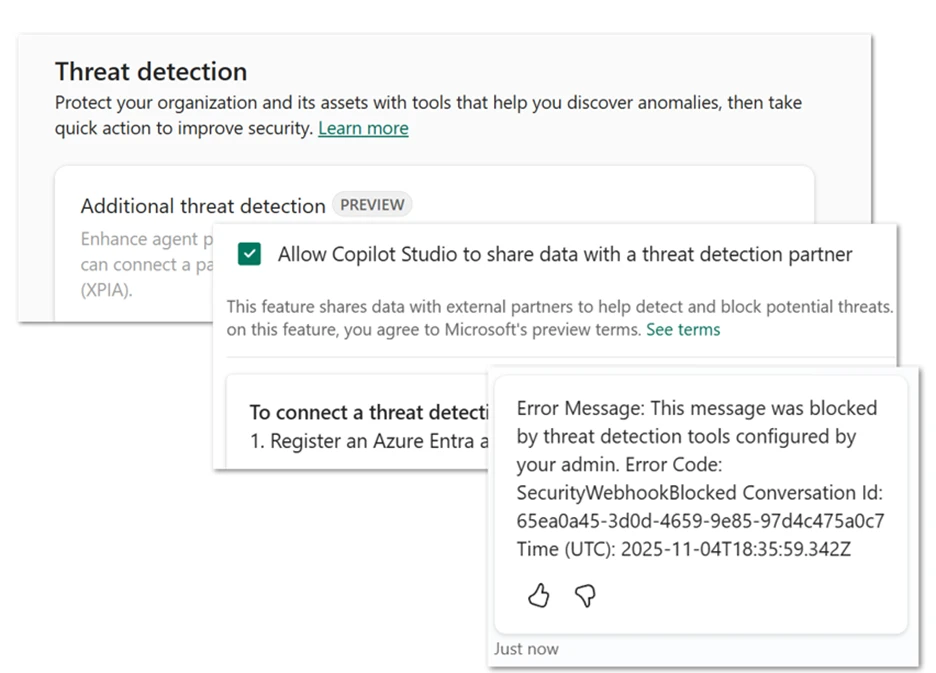
Image: Real-time threat detection in Copilot Studio utilizing Microsoft Defender and Microsoft Entra Agent ID — Microsoft
How It Works: Building Smarter Agents in Copilot Studio
Conversational Authoring with GPT-5 Chat
Makers begin by choosing GPT-5 Chat as the primary model for their agent via the agent overview page. This choice unlocks faster, more accurate interpretations of natural language prompts and instructions. The model's robust instruction-following capabilities ensure agents comply with complex business logic and provide nuanced, context-aware responses.
{
  "model": "GPT-5 Chat",
  "temperature": 0.7,
  "max_tokens": 2048,
  "top_p": 0.9
}
This configuration balances creativity with determinism, ideal for process automation and interactive support agents.
Integrating External Knowledge via MCP and Connectors
Agents dynamically query data from Microsoft Graph, SharePoint, Outlook, Power Platform, and third-party APIs through the Model Context Protocol. For example, SharePoint grounding now supports metadata filtering by filename, owner, and modification date, enabling precise document retrieval inside workflows.
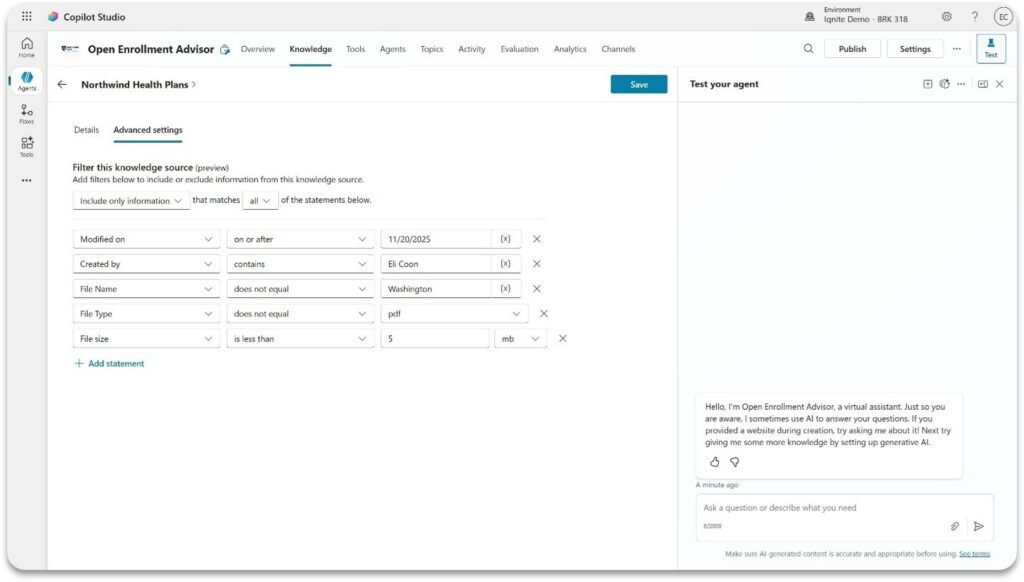
Image: Filtering SharePoint content by metadata to improve agent grounding — Microsoft
Human-in-the-Loop for Critical Decision Points
When workflows require human validation, agents issue structured requests as Outlook forms, pausing automation until reviewers provide inputs. This HITL pattern minimizes automation risks in sensitive scenarios like financial reporting or complex procurement.
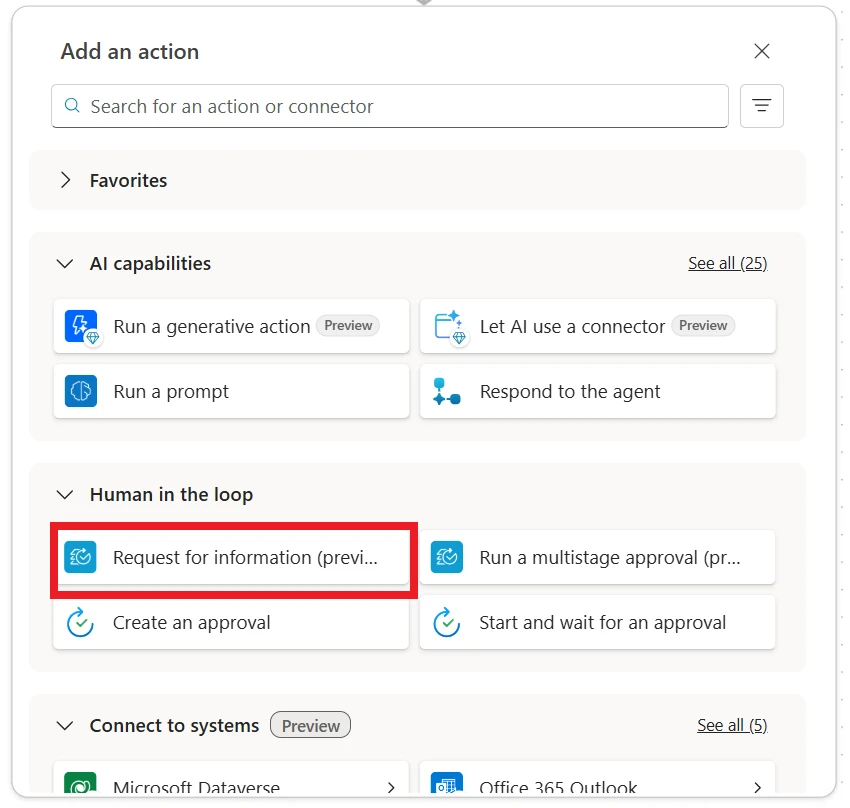
Image: The human-in-the-loop “request for information” interface enabling seamless human-agent collaboration — Microsoft
Seamless Lifecycle from Agent Builder to Copilot Studio
Starting prototypes in Microsoft 365 Copilot Agent Builder is now effortless, with a “Copy to Copilot Studio” feature to upgrade prototypes to enterprise-grade agents. This preserves initial work and accelerates scaling while unlocking advanced governance, analytics, and publishing capabilities.
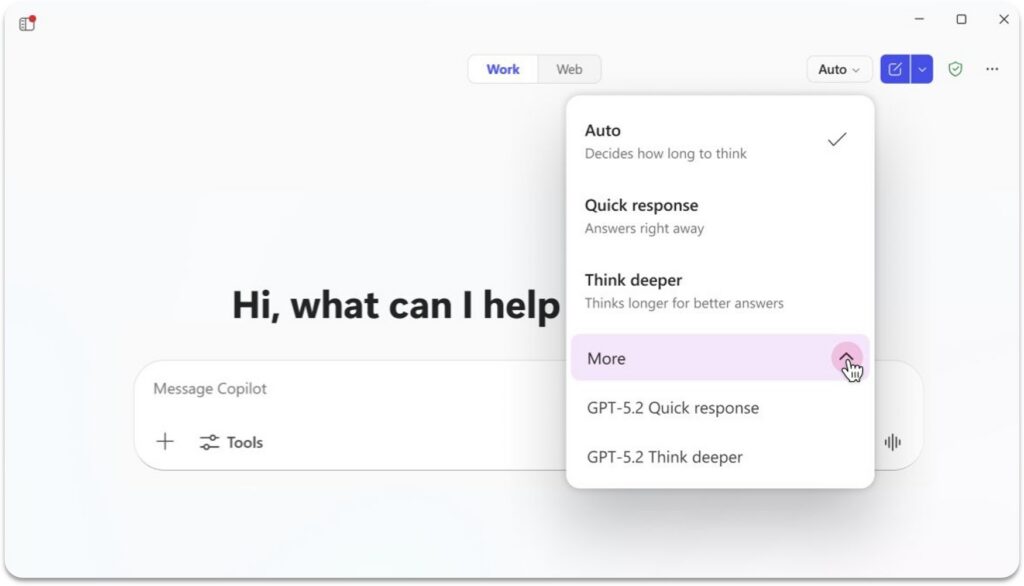
Image: GPT-5.2 model selection available in Microsoft 365 Copilot Agent Builder — Microsoft
Document Generation and Employee Support Agents
Agents now use enhanced document skills to produce Word, Excel, and PowerPoint outputs with formatting, visuals, and charts—all generated through natural language commands. The Employee Self-Service Agent centralizes HR and IT queries, tightly integrated with systems like Workday and ServiceNow to reduce ticket backlogs and speed resolutions.
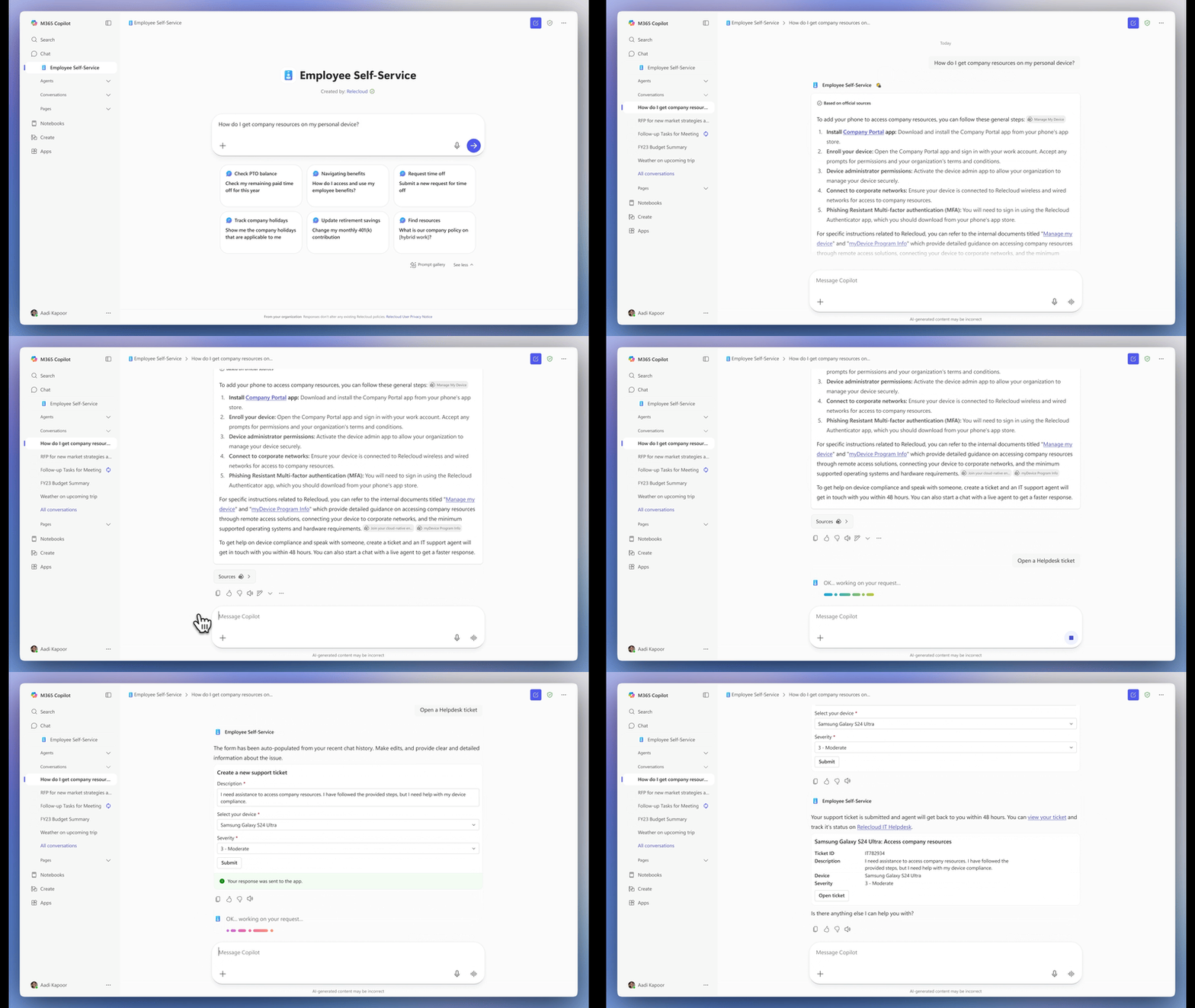
Image: Conversing with the Employee Self-Service Agent to expedite employee inquiries — Microsoft
Quick Tips & Tricks
-
Leverage Human-in-the-Loop for Risk Mitigation
Enable HITL when automating sensitive processes requiring approvals. Configure structured input requests via Outlook to retain workflow momentum while ensuring compliance and accuracy. -
Use Action Groups to Speed Agent Configuration
Instead of adding individual tools, import curated Outlook or SharePoint action groups to minimize setup time and ensure consistent behavior across agents. -
Filter Knowledge Sources by Metadata
Apply SharePoint metadata filters such as filename, owner, and modification date to focus agent responses on relevant documents and improve answer precision. -
Start Prototypes in Agent Builder, Then Scale to Copilot Studio
Utilize the “Copy to Copilot Studio” action to migrate simple agents to the full platform for governance and broader deployment without losing your initial work. -
Include People and OneNote as Dynamic Knowledge Bases
Ground agents in live organizational data and ongoing OneNote content to enable rich, context-aware responses that evolve with your business. -
Prioritize GPT-5 Chat and Experiment with GPT-5.2
Use GPT-5 Chat for production-grade agents now, and test GPT-5.2 experimental models for advanced multilingual or coding tasks in development environments.
Conclusion
Microsoft Copilot Studio’s November 2025 enhancements represent a leap forward in how enterprises design intelligent work systems. By combining advanced AI models like GPT-5 Chat with comprehensive governance, deep enterprise integrations, and human-in-the-loop workflows, Copilot Studio empowers organizations to automate complexity while augmenting human judgment.
This update signals a broader shift from automation as isolated tasks to AI-powered ecosystems where agents operate collaboratively with people, enabling faster decisions and more resilient business processes. As these capabilities mature, Copilot Studio sets the foundation for an era of truly agentic business transformation.
References
- What’s New in Microsoft Copilot Studio: November 2025 — Official Microsoft blog post detailing November 2025 updates
- Model Context Protocol (MCP) in Copilot Studio — Documentation on integrating contextual systems
- Employee Self-Service Agent Announcement — Overview of prebuilt employee support agents
- Copilot Studio Agent Builder Documentation — Guidance for building and scaling AI agents
- Microsoft Ignite 2025 Recap: Agentic Business Transformation — Deep dive on Ignite 2025 announcements related to Copilot Studio
- Microsoft Defender for AI Agents — Security tooling integrated for agent governance
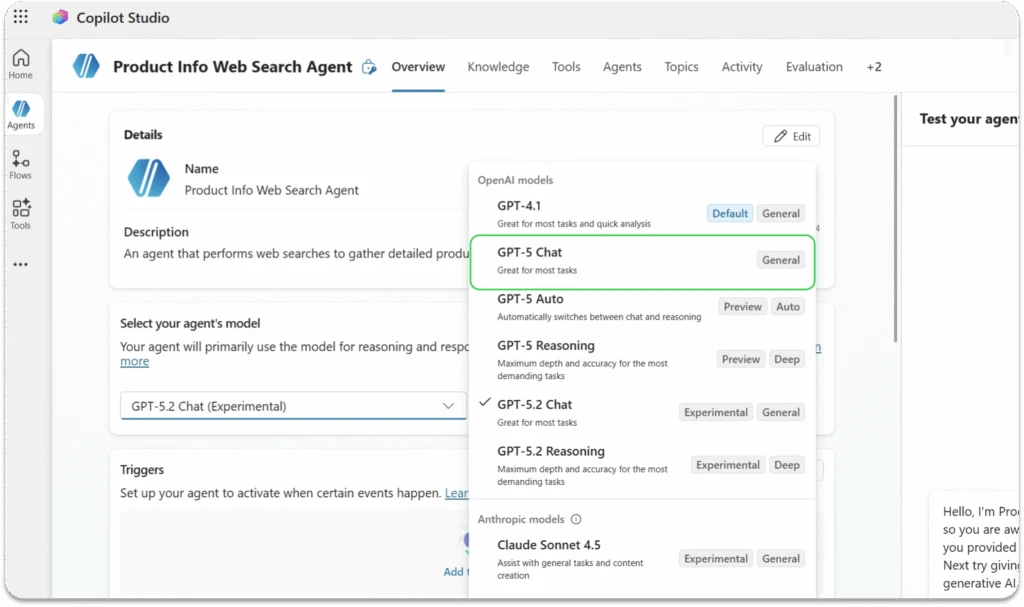
Image: GPT-5 Chat illustrating conversational AI responsiveness inside Copilot Studio — Microsoft