Microsoft Copilot Studio: The Foundation for Agentic Business Transformation
Microsoft Copilot Studio: The Foundation for Agentic Business Transformation
Date: 2026-03-17
Discover how Microsoft Copilot Studio empowers organizations to build scalable, secure AI agents that automate workflows, enforce governance, and transform business productivity.
Tags: ["AI Foundry", "Microsoft 365", "Copilot Studio", "Agentic Transformation"]
Organizations today face immense pressure to accelerate digital transformation with measurable impact. The promise of AI is no longer just an experiment or concept—it must drive real business outcomes by automating workflows and empowering new modes of productivity. However, delivering this at scale while maintaining security, governance, and control remains a challenge.
Enter Microsoft Copilot Studio, the managed AI agent platform that establishes a robust foundation for agentic business transformation. Copilot Studio equips enterprises to build, manage, and govern AI agents that automate specific functions or complex workflows, all while integrating deeply with Microsoft 365 and enterprise systems. It bridges the gap between advanced AI capabilities and IT governance, enabling organizations to move rapidly from AI ideas to scalable solutions with clear ROI.
In this article, we’ll explore the architecture and technical nuances behind Copilot Studio, outline key recent improvements for end users, makers, and administrators, and explain how Copilot Studio accelerates the shift to agent-driven business processes. You’ll also find practical tips to get started building your own AI-powered agents and workflows accessible to everyone, from professional developers to business users.
Architecture Overview
┌─────────────────────────────┐
│  Enterprise Data Sources     │
├─────────────────────────────┤
│ • Microsoft 365             │
│ • Dynamics 365 CRM          │
│ • Power Platform Connectors │
│ • External Databases & APIs │
└─────────────────────────────┘
              ↓
┌─────────────────────────────┐
│  Microsoft Copilot Studio    │
├─────────────────────────────┤
│ • Agent Builder & Workflow  │
│ • Model Context Protocol    │
│ • Model Selection (GPT-5,   │
│   Anthropic Sonnet, Opus)   │
│ • Security & Governance     │
│ • Agent Evaluations & ROI   │
└─────────────────────────────┘
              ↓
┌─────────────────────────────┐
│     Microsoft 365 Copilot   │
├─────────────────────────────┤
│ • End-User Agent Interaction│
│ • Natural Language Commands │
│ • File Generation & Workflow│
│ • Seamless Agent Upgrade    │
└─────────────────────────────┘
              ↓
┌─────────────────────────────┐
│        Agent 365 Platform    │
├─────────────────────────────┤
│ • Unified Agent Control      │
│ • Compliance & Audit Trail   │
│ • Connector Policies         │
│ • Zoned Environment Mgmt    │
└─────────────────────────────┘
This layered architecture ensures that data from diverse enterprise systems flows securely into Copilot Studio, where AI models and workflows are combined and governed. Agents built in this environment power user productivity through Microsoft 365 Copilot and are centrally managed via Agent 365 for compliant scale-out.

Collaborative agent design in Microsoft Copilot Studio
Key Technical Observations
-
Multi-Model Flexibility Enhances Customization
Copilot Studio supports selecting from leading AI models like OpenAI’s GPT-5, Anthropic Sonnet 4.5, and Opus 4.1. This enables makers to optimize agent performance and behavior for their business scenario, rather than relying on a single black-box model. -
Model Context Protocol (MCP) Enables Seamless Data Integration
By adhering to MCP standards, agents connect and act across 1,400+ systems via Microsoft Graph and Power Platform connectors. This protocol ensures consistent, secure access to organizational data, empowering agents with rich context without reinventing connectivity. -
Built-in Agent Evaluations Provide Continuous Quality Assurance
Copilot Studio incorporates evaluation tools that test agents against real-world scenarios and compare versions. This fosters confidence that agent behaviors remain effective and non-regressive as workflows evolve. -
Real-Time Threat Protection via Microsoft Defender Integration
The platform integrates with Defender and security systems to monitor agents against risks like prompt injection attacks. This real-time protection safeguards autonomous agents operating at scale, essential for enterprise compliance. -
Agent 365 Provides Unified Management with Compliance Controls
Agent 365 serves as a control plane exposing governance capabilities including sharing controls, zoned environments, and advanced connector policies. Agents built in Copilot Studio can be centrally monitored and audited, critical for regulated industries. -
Computer Use Capability Enables Automation Across Apps and Web
Agents can automate tasks in hosted browsers and managed Cloud PCs through Windows 365, allowing workflows that span web data extraction, app interaction, and enterprise desktop environments without complex scripting.
How It Works: Powering Agentic Business Transformation
Building Agents with Copilot Studio
Copilot Studio offers a code-free interface where professional makers design AI agents by combining AI models, connected data sources, and workflow logic. The expanded conversational builder guides users to define agent goals, integrate tools, and upload relevant organizational knowledge to enrich agent context.
Agent Setup: "Create Project Horizon Tracker"
 → Add tools: Microsoft Teams, Dynamics 365, Outlook
 → Configure capabilities: File generation, meeting scheduling
 → Upload content sources: Internal docs, databases
This modular design lets businesses target discrete tasks (e.g., invoice processing) or complex multi-agent ecosystems that collaborate for end-to-end automation.
Leveraging Microsoft 365 Copilot for User Interaction
End users engage agents embedded within Microsoft 365 apps through natural language chat interfaces. They can effortlessly instruct agents to generate Word and Excel files, manage emails, or trigger multi-step workflows in Teams or Outlook.
User: "Generate Q1 sales report in Excel."
Agent: "Creating report... Done! Here’s the file."
Copilot Studio also enables users to build lightweight workflows directly via chat — no coding needed — to automate mundane daily tasks such as triaging emails or approving requests.
Governing at Scale with Agent 365
Agent 365 offers a unified control plane that aggregates managing thousands of agents across enterprise units. It provides detailed analytics dashboards showing active sessions, security alerts, credit consumption, and compliance statuses.
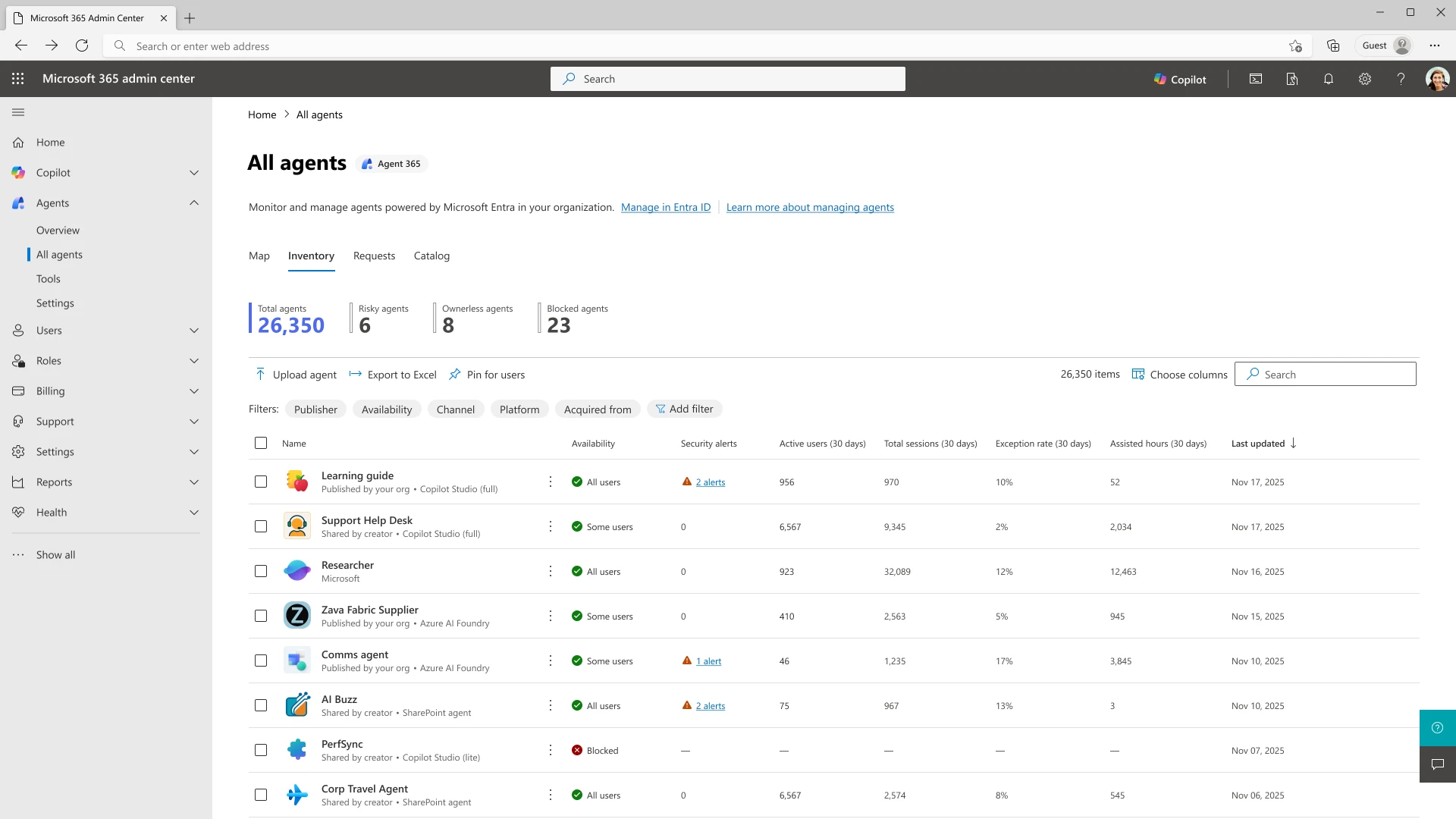
Agent 365 unified monitoring in Microsoft 365 Admin Center
Security features like unique Entra Agent IDs and native integration with Defender protect agent fleets from threats and ensure policy enforcement. Audit logs and zoned environment controls enable strict compliance standards.
Quick Tips & Tricks
-
Leverage Multi-Model Selection to Tailor Agent Behavior
Experiment with different supported AI models to find the best fit for your domain-specific tasks or performance requirements. -
Use Built-in Evaluations Before Agent Deployment
Validate agent workflows and behaviors against real-world scenarios using Copilot Studio’s evaluation capabilities to avoid regressions. -
Integrate Agents with Microsoft Graph and Power Platform
Connect agents to your existing systems of record for richer context and action capability while maintaining security boundaries. -
Monitor Agent Fleet Health via Agent 365 Dashboards
Regularly review analytics to track usage patterns, detect anomalies, and ensure compliance across your agent ecosystem. -
Automate Complex Desktop & Web Tasks with Computer Use
Utilize hosted browsers and Cloud PCs for agents to operate seamlessly across apps and web interfaces without manual scripting. -
Use the Seamless Upgrade Path from Microsoft 365 Copilot
Quickly port lightweight agents created by end users in Microsoft 365 Copilot to Copilot Studio for advanced customization and scaling.
Conclusion
Microsoft Copilot Studio represents a major evolution in how organizations implement AI-driven automation. By providing a secure, scalable agent platform integrated tightly with enterprise systems and governance tools, it enables effective agentic business transformation. Makers gain flexible tooling, IT teams maintain oversight, and end users experience seamless productivity enhancements powered by AI.
As AI agents become core to driving innovation and operational efficiency, Copilot Studio’s multi-model support, rigorous evaluation, and unified management will be indispensable. The platform’s ability to scale agent automation while enforcing compliance reduces risk and accelerates measurable ROI. This positions Copilot Studio as a key technology for enterprises ready to embrace the next wave of intelligent automation.
References
- Microsoft Copilot Studio: Powering agentic business transformation — Official Microsoft blog detailing Copilot Studio’s capabilities and recent updates
- Microsoft 365 Copilot — Explore Microsoft 365’s AI productivity integration for end users
- Agent 365 Platform Overview — Information on the agent control plane and governance tools
- Microsoft Defender — Security solutions integrated with Copilot Studio for agent protection
- Microsoft Graph — API gateway for accessing Microsoft 365 data and services
- Power Platform Connectors — Connectivity options for automating workflows through Copilot agents
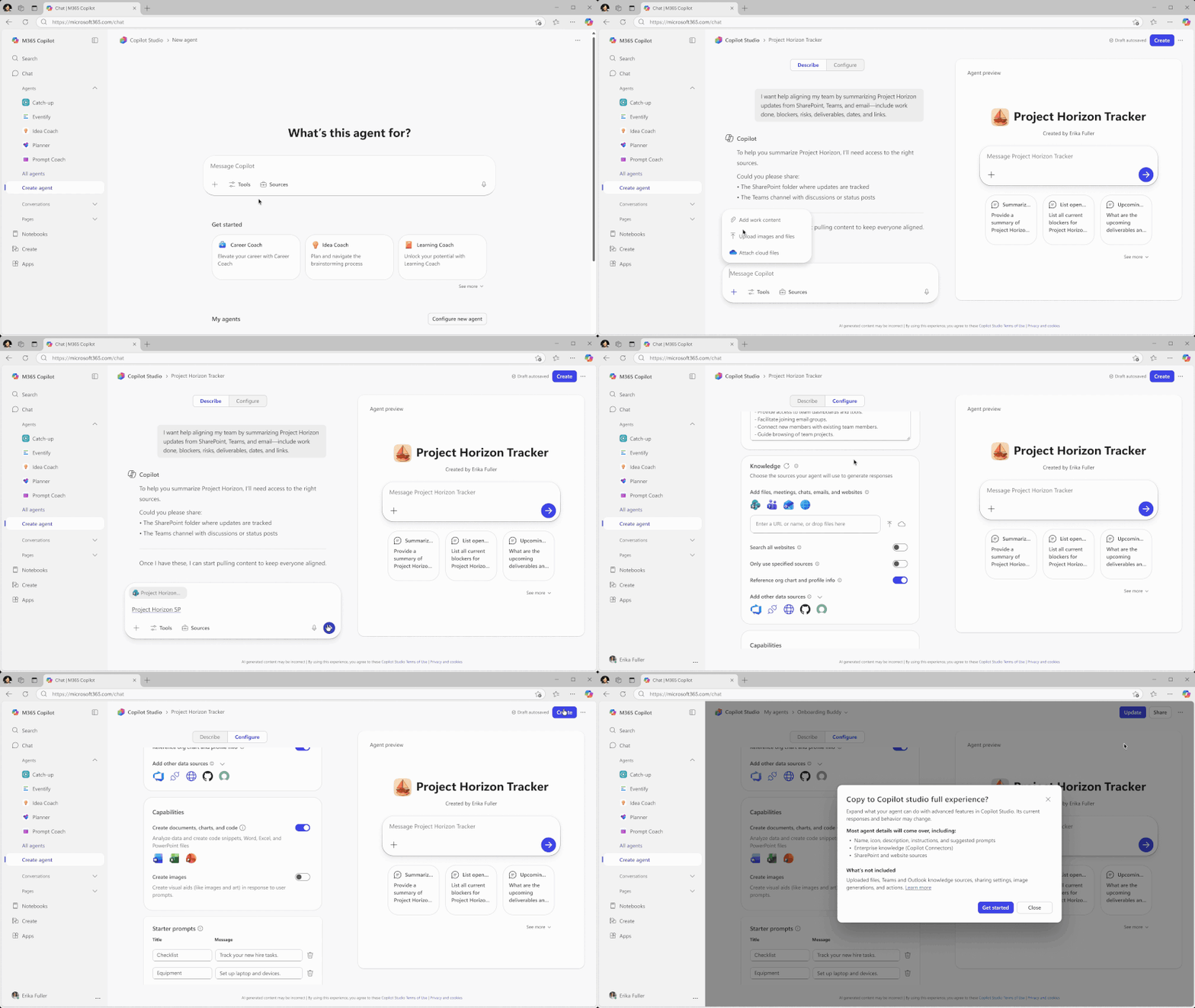
Creating and configuring agents with a guided studio interface

Integrated real-time threat detection in Copilot Studio to ensure safe agent operation

AI-assisted data analysis and automation inside Excel powered by Copilot agents
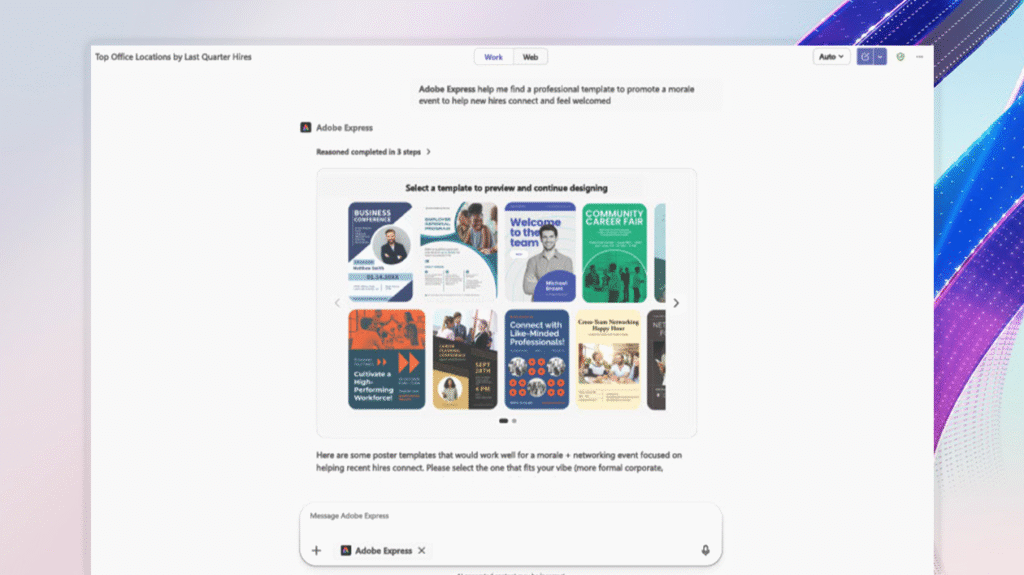
Natural language-driven workflows and file generation within Microsoft 365 Copilot chat experience
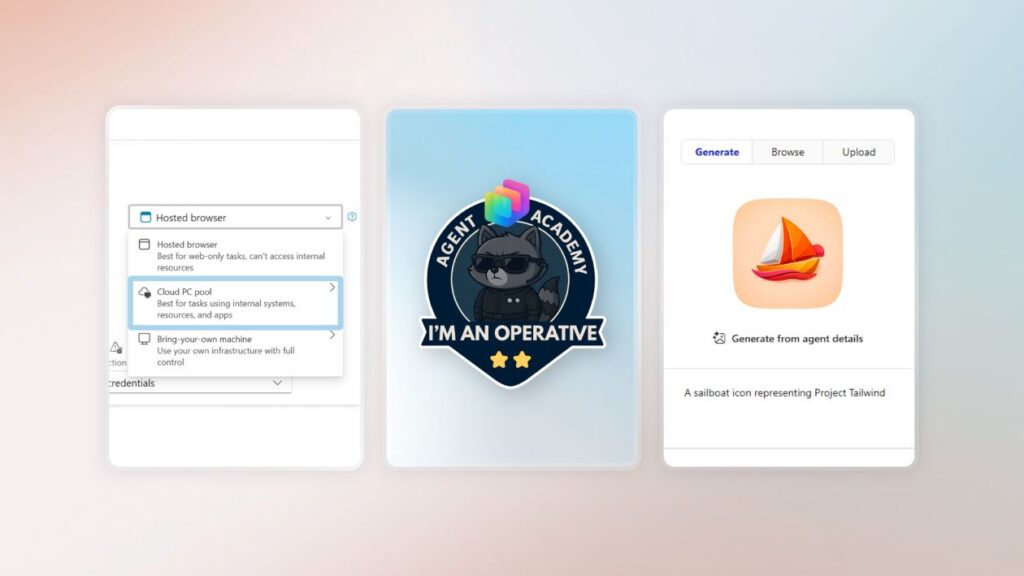
Latest Copilot Studio improvements focus on user experience, training, and AI-powered suggestions

Dan Lewis, Microsoft Copilot Blog contributor

Practical adoption of Copilot Studio agents driving real-world business impact