Microsoft Copilot on Samsung TVs: A Voice-First AI Revolution for Your Living Room
Microsoft Copilot on Samsung TVs: A Voice-First AI Revolution for Your Living Room
Date: 2026-03-17
Discover how Microsoft Copilot transforms Samsung TVs into voice-powered, AI-driven companions, making your biggest screen smarter, more personal, and social.
Tags: ["Microsoft Copilot", "AI Voice Assistant", "Samsung TVs", "Smart Home", "AI Experience"]
Voice interfaces have steadily become a staple of our daily technology interactions, from smartphones to cars, and now, the living room TV. Yet, the biggest screen in most homes has often lagged behind in delivering a natural, intelligent, and conversational experience. Microsoft’s recent launch of Copilot on select Samsung TVs and monitors changes that, turning the TV into a truly voice-powered AI companion designed for social, entertainment, and everyday moments.
This integration brings together Microsoft’s advanced conversational AI with Samsung’s leading display technology to create a seamless experience that is both visual and vocal. You no longer have to scramble for your phone or remote to find shows, get answers, or plan your day—Copilot is there, right on your TV, ready to assist in a way that’s natural, accessible, and fun.
In this post, we’ll explore key technical insights behind this innovation, how the experience unfolds for users, and actionable developer tips for voice-first AI on large screens.
Key Technical Observations
-
Voice Activation via Samsung Remote
Copilot is accessible through the mic button on the Samsung remote control, enabling natural voice interactions. -
Multi-modal UI Design Optimized for TVs
The use of animated, expressive avatars combined with glanceable visual cards leverages TV screen real estate effectively. This tackles the challenge of displaying AI responses without overwhelming viewers, maintaining attention, and supporting social viewing scenarios. -
Personalization via Account Linking with QR Codes
Copilot enables identity linking through a quick QR code scan on another device, unlocking memory, preferences, and personalized content recommendations—showcasing a user-centric design that extends AI personalization beyond just voice commands. -
Group-Friendly Recommendations
The assistant supports group scenarios by aggregating preferences from multiple users to help decide what to watch together, enhancing the social experience on the TV. -
Cloud-Powered Content Retrieval and Spoiler-Free Recaps
Advanced natural language understanding paired with filtered content summarization enables users to quickly catch up on series without spoilers. -
AI as a Social Catalyst
Positioning Copilot as a "shared space for curiosity and connection" shifts the AI from a mere tool to a social facilitator, supporting communal device use.
How It Works
Activation and Interaction
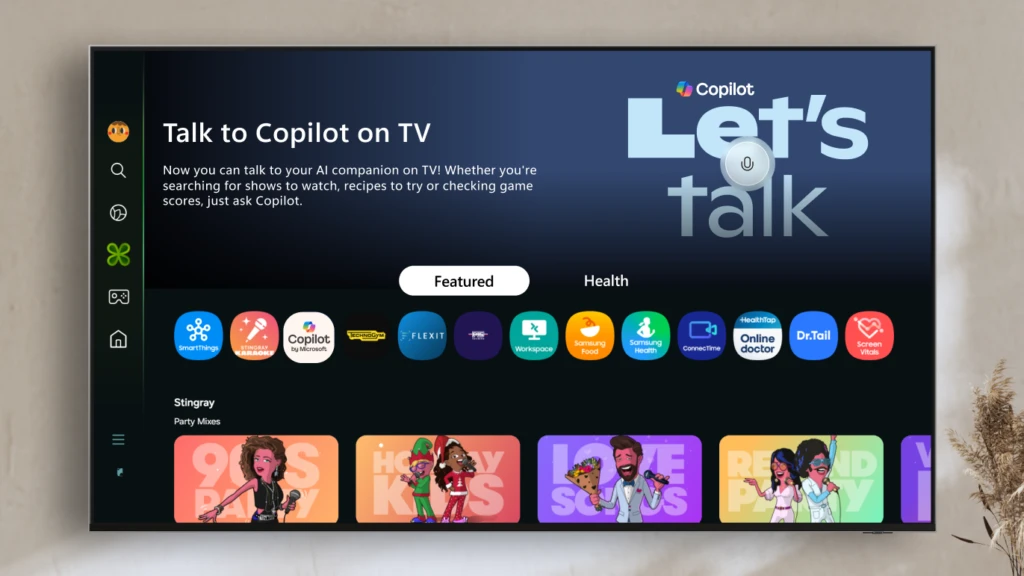
Copilot is pre-installed and accessible through the Samsung Tizen OS home screen under the Apps Tab or Samsung Daily+. It activates through the mic button on the Samsung remote. Users can speak naturally, addressing a broad spectrum of requests from entertainment queries to everyday advice.
User: "I want to continue watching The Crown. What happened up to Season 3, Episode 4?"
Copilot: (Animated avatar lip-syncs) "Here’s a spoiler-free recap of Season 3 so far..." + Display visual cards with key episode highlights
This natural conversational interface is powered by voice commands relayed to Microsoft’s cloud AI backend.
Optional Personalization with Quick QR Code Sign-In
To personalize Copilot’s responses, users can link their Microsoft account by scanning a QR code displayed on the TV screen with their phone. This step enables memory of preferences, watch history, and user-specific recommendations, seamlessly syncing with Microsoft 365 and Bing personalization layers.
Intelligent Content Discovery and Group Recommendations
Copilot smartly handles nuanced requests like mixed-genre group preferences. For example, “Hannah likes rom-coms, David likes sci-fi, Mark likes thrillers. What should we watch together?” It aggregates preferences and filters available titles, blending recommendation algorithms with business rules about content suitability and runtime constraints.
Visual and Vocal Response Presentation
Answers from Copilot use a hybrid response model: the animated AI avatar speaks the reply while rich visual cards present metadata like movie posters, ratings, trivia, weather maps, or photos relevant to the query.
Source: Microsoft Copilot Blog
This multi-sensory approach maximizes comprehension and engagement on the large screen, allowing viewers to glance at detailed info while continuing conversation.
Quick Tips & Tricks
-
Leverage Voice Activation on Samsung Remote
Use the mic button for seamless voice input in your voice-first designs. -
Design for Multi-User Contexts
When building AI for shared devices, consider session management that captures and respects multiple users’ preferences, enabling group-aware recommendations. -
Implement QR Code Based Account Linking
Simplify account sign-in flows on devices with limited input methods by offering a QR code scan option that connects mobile and large-screen experiences. -
Use Visual Cards Strategically
Create glanceable, multimedia-rich visual components optimized for big displays to complement voice responses and reduce cognitive load. -
Apply Spoiler-Free Summaries Using AI
Train models on content metadata and narrative arcs to produce filtered recaps or summaries that engage viewers without spoiling plot points. -
Prioritize Privacy and Transparency
Make personalization optional and communicate clearly which data is used and how, building trust especially when AI runs on shared home devices.
Conclusion
Microsoft Copilot’s deployment on Samsung TVs redefines what voice assistants can do on big screens. By tightly integrating AI conversational capabilities with an adaptive visual design and personalized cloud intelligence, it transforms the TV into an engaging communal hub that goes beyond passive content consumption.
This launch exemplifies the next wave of intelligent, voice-driven interfaces designed from the ground up for social entertainment and daily life assistance. As voice AI models evolve and device ecosystems mature, expect this kind of immersive, multi-modal AI companion to become the new standard in smart home technology.
The partnership between Microsoft and Samsung sets a compelling precedent, demonstrating how collaboration across hardware and software can deliver truly novel user experiences. For developers and architects, this initiative underscores the growing importance of blending conversational AI, personalization, and multi-user awareness on emerging platforms.
References
This post is based on the Microsoft Copilot Blog announcement published on August 27, 2025.

The Copilot Team — Source: Microsoft Copilot Blog