Microsoft Agent 365: The Unified Control Plane for Managing AI Agent Fleets
Microsoft Agent 365: The Unified Control Plane for Managing AI Agent Fleets
Date: 2026-03-17
Discover how Microsoft Agent 365 empowers organizations to securely deploy, monitor, and govern AI agents at scale through a centralized control plane with rich observability and access controls.
Tags: ["Microsoft 365", "AI Agents", "Security", "Azure", "Enterprise AI"]
AI agents are increasingly becoming critical components of modern enterprise workflows—from automating routine tasks to augmenting knowledge work with Copilot-powered assistants. Yet managing a diverse fleet of AI agents across an organization, built with a blend of Microsoft platforms, open-source frameworks, and third-party solutions, has posed significant operational challenges. How do you gain unified visibility and control without sacrificing agility or security?
Enter Microsoft Agent 365: a control plane designed to address this challenge. Launched in late 2025, Agent 365 provides a centralized platform within Microsoft 365 that enables IT admins and developers to register, manage, and secure AI agents fleet-wide through telemetry dashboards, role-based access, and interoperability features. This helps organizations scale AI agent deployments while maintaining governance and operational insight.
In this post, we'll explore how Microsoft Agent 365 works under the hood, its key architectural components, and practical tips to get the most out of this control plane for AI agents in your enterprise.
Architecture Overview
Key Technical Observations
-
Comprehensive Agent Registry: Agent 365’s centralized registry catalogs each AI agent with detailed metadata including version, owner, and security classification. This enables inventory control at scale.
-
Granular Access Control: Leveraging Microsoft’s robust identity and access management (IAM), Agent 365 enforces fine-grained permissions at the agent level. This approach enhances security by minimizing over-permissioning often seen in distributed AI deployments.
-
Unified Telemetry & Alerting: By aggregating telemetry across all agents into centralized dashboards, Agent 365 facilitates proactive monitoring and rapid incident response. The telemetry spans usage metrics, performance health, and security anomalies.
-
Ecosystem Interoperability: Agent 365 supports AI agents built on Microsoft platforms as well as open-source and third-party frameworks. This design helps organizations avoid vendor lock-in.
-
Security-Centric Governance: Security is integrated into the platform's architecture—from agent registration validation to continuous guardrails enforced via monitoring and telemetry, ensuring compliance and risk mitigation.
-
Seamless Microsoft 365 Integration: Embedding Agent 365 within the Microsoft 365 Admin Center aligns agent management with existing enterprise IT workflows, reducing friction and accelerating adoption.
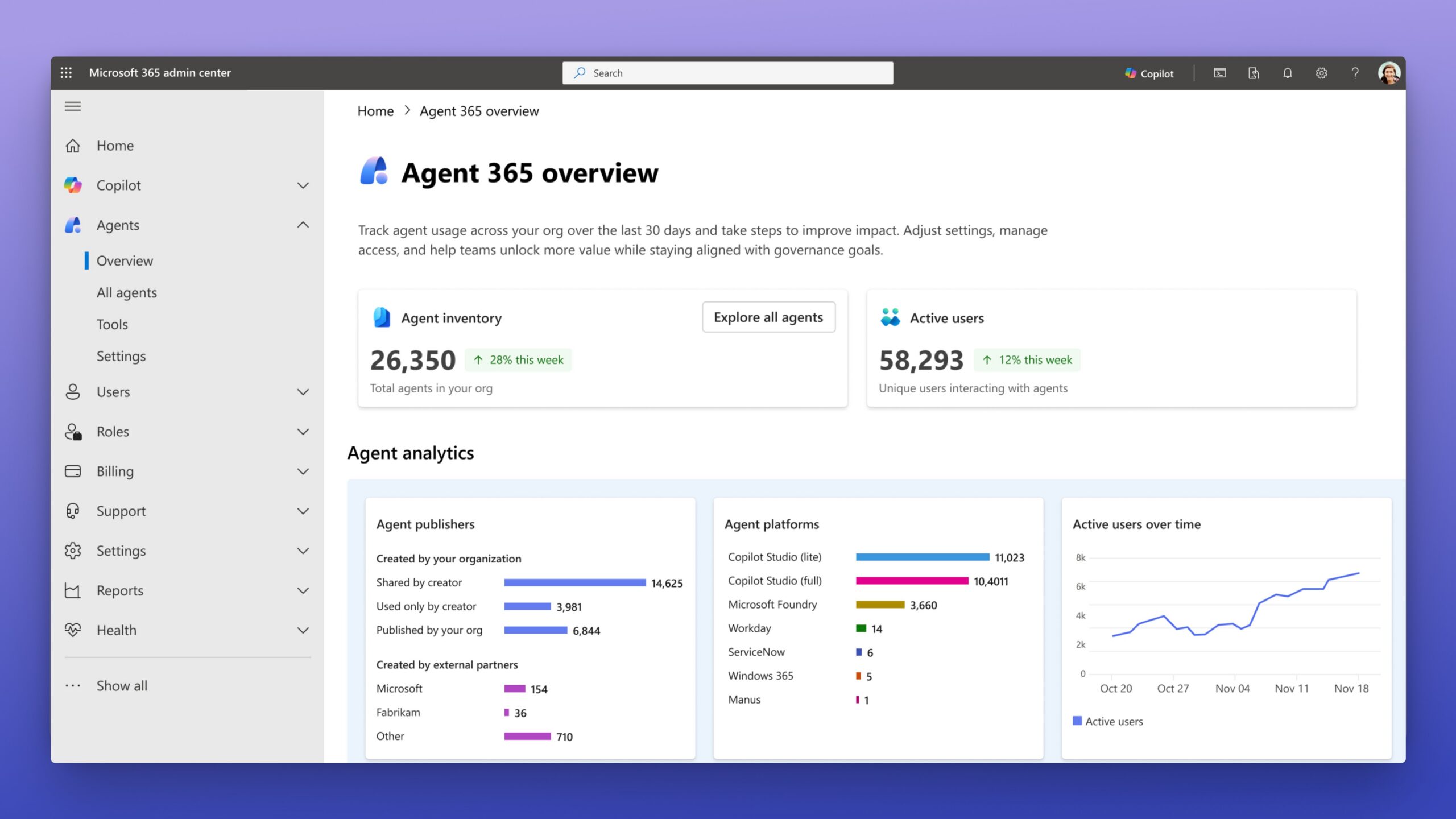
Agent 365 overview showing inventory, usage insights, and management controls — source: Microsoft 365 Blog
How It Works: Deep Dive into Microsoft Agent 365
1. Agent Registration and Inventory
When organizations deploy AI agents—whether custom-built, Copilot-powered, or from partners—they register these agents with Agent 365’s centralized registry. This registration captures the agent’s identity, capabilities, responsible owners, and security posture. This single source of truth enables inventory management and governance.
The registry also maintains metadata like versioning and compliance tags. This structure supports lifecycle management including deprecations and updates, critical for enterprise-scale operations.
2. Access Control and Policy Enforcement
Agent 365 integrates with Microsoft’s identity platform to assign role-based permissions on a per-agent basis. This means admins can restrict or grant agent usage based on user roles or groups, helping enforce least privilege principles.
The platform also supports multi-tenant and partner scenarios, where agents operated by different business units or external providers can be governed distinctly, preserving security boundaries.
3. Telemetry Collection and Visualization
Once agents start running, they send telemetry data—usage metrics, error rates, performance stats, and security events—to the Agent 365 platform. This is presented in intuitive dashboards within the Microsoft 365 Admin Center, enabling IT teams to monitor agent health and troubleshoot issues in real-time.
The alerting system helps detect anomalous behavior such as suspicious access or usage spikes, providing early warning of potential breaches or operational issues.
4. Interoperability and Ecosystem Integration
Recognizing that enterprises use diverse AI agent frameworks, Agent 365 supports integrations beyond Microsoft’s native solutions. This openness is realized through standardized APIs and partner integrations, allowing seamless onboarding and governance of agents built on any popular platforms.
This flexibility encourages innovation and adoption, while preserving centralized control.
Quick Tips & Tricks
-
Leverage the Agent Registry Early — Populate your registry as soon as agents are deployed. This creates a foundation for governance and monitoring from day one.
-
Enforce Role-based Access Controls (RBAC) — Use Microsoft’s IAM integration to assign precise permissions per agent, reducing risk by following least privilege.
-
Monitor Telemetry Dashboards Regularly — Set up alerts and review usage trends to catch operational or security issues before they impact business processes.
-
Utilize Ecosystem Connectors — Take advantage of Agent 365’s interoperability to consolidate management across in-house, partner, and open-source AI agents.
-
Integrate Agent Management into IT Workflows — Use the Microsoft 365 Admin Center embedding to tie AI agent governance into your existing IT operations.
-
Plan for Agent Lifecycle Management — Use the registry’s metadata features to manage updates, versioning, and retirements proactively.
Conclusion
As AI agents proliferate across complex enterprises, managing them effectively requires a unified, secure, and observable control plane. Microsoft Agent 365 meets this challenge by providing a centralized hub for registering, securing, and tracking every AI agent in your organization. By consolidating telemetry and enforcing granular access controls, it reduces complexity and risk in expanding AI deployments.
Looking ahead, Microsoft Agent 365’s ecosystem openness and tight integration with Microsoft 365 position it as a critical platform for scalable, secure AI agent adoption. Enterprises embracing Agent 365 will find themselves well-equipped to harness AI assistants confidently and efficiently as these technologies become indispensable to the modern workplace.
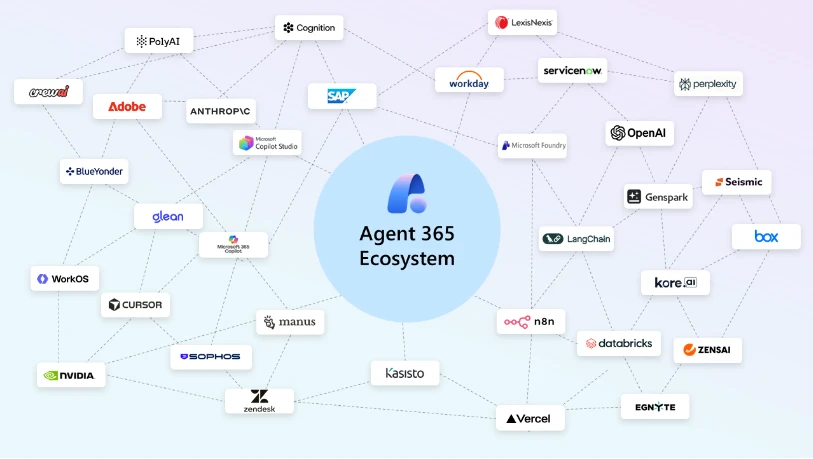
Agent 365 ecosystem connectivity highlighting diverse partner integrations — source: Microsoft 365 Blog
References
- Microsoft Agent 365: The control plane for AI agents | Microsoft 365 Blog — Official announcement and detailed overview by Charles Lamanna
- Microsoft 365 Admin Center — Portal for managing Microsoft 365 services including Agent 365 integration
- Meet Copilot — Explore Microsoft 365 Copilot AI assistants that leverage Agent 365
- AI Agents — Learn about various AI agents supported and the Agent 365 management capabilities
- Microsoft Identity Platform — Documentation on identity and access management leveraged by Agent 365
This blog post is based on the original Microsoft 365 Blog article available at Microsoft Agent 365: The control plane for AI agents.