Microsoft 365 Copilot Business: Empowering Small Businesses with AI at Work
Microsoft 365 Copilot Business: Empowering Small Businesses with AI at Work
Date: 2026-03-17
Discover how Microsoft 365 Copilot Business delivers enterprise-grade AI tailored for small businesses, revolutionizing productivity and security at an SMB-friendly price.
Tags: ["Microsoft 365", "AI", "Small Business", "Productivity", "Security"]
Microsoft 365 Copilot Business is redefining how small and medium-sized businesses (SMBs) harness artificial intelligence to streamline work and drive productivity. Designed with SMBs in mind, this new AI-powered solution brings the robust capabilities of enterprise-grade AI into an accessible, cost-effective package. As AI technologies reshape workplace dynamics, Microsoft is offering a tailored toolset for smaller organizations to compete and innovate with confidence.
This blog post explores Microsoft 365 Copilot Business—the product, its core capabilities, underlying architecture, and its approach to security and ease of use. We’ll examine how it integrates with familiar Microsoft 365 apps and empowers businesses with intelligent assistants, driving a new era of “Work IQ” that extends beyond automation.
By the end, you’ll understand why Microsoft 365 Copilot Business is a pivotal AI companion for SMBs looking for scalable, secure, and intelligent productivity tools—and practical tips for getting the most out of it.
Architecture Overview
┌────────────────────────────────────────────┐
│Architecture                                │
├────────────────────────────────────────────┤
│• Enterprise data sources                   │
│• AI applications                           │
└────────────────────────────────────────────┘
Key Technical Observations
-
Enterprise-Quality AI for SMBs — Microsoft 365 Copilot Business leverages the same sophisticated large language models powering enterprise solutions but tailors them to SMB needs with simplified management and cost efficiency.
-
Deep Integration with Microsoft 365 Apps — Rather than siloed AI tools, Copilot embeds intelligence into apps like Word, Excel, Teams, and Outlook, enabling context-aware assistance right where users work.
-
Work IQ: AI That Understands Workflows — Copilot Business goes beyond text generation to analyze business data and workflows, offering insights and automations that elevate team productivity and decision-making.
-
Built-In Security and Compliance — Microsoft integrates Defender and Purview as part of the security approach for SMBs to ensure data protection, governance, and regulatory compliance, which are often challenging for smaller organizations.
-
Multi-Modal Content Support — Copilot assists across various content types such as documents, spreadsheets, presentations, emails, and chats, enabling broad applicability across different business functions.
-
Conversational AI Agents for Productivity — The solution includes advanced AI Agents that coordinate tasks and workflows through conversational interaction, significantly simplifying complex multi-step activities.
How It Works
Intelligent Assistance Embedded Across Apps
Microsoft 365 Copilot Business deeply weaves AI into the fabric of Microsoft 365 apps. For example:
- In Word, Copilot can draft, summarize, and refine documents based on simple prompts.
- In Excel, it analyzes data patterns and generates insights or creates complex formulas on request.
- PowerPoint users receive generated presentations or speaker notes tailored from existing content.
- In Outlook and Teams, Copilot automates email responses, meeting summaries, and task tracking.
This context-sensitive integration ensures minimal workflow interruption and maximizes AI usefulness.
Work IQ: Analytics and Automation
Copilot collects and analyzes operational data across integrated apps, generating actionable insights—e.g., identifying project bottlenecks or highlighting key email action items. These insights empower SMBs to streamline workflows and make informed decisions quickly.
Conversational AI Agents
Beyond passive assistance, Copilot Business introduces AI agents capable of proactive task management. Through natural language chat, users can delegate multi-step processes like preparing reports, coordinating meetings, or compiling cross-team information.
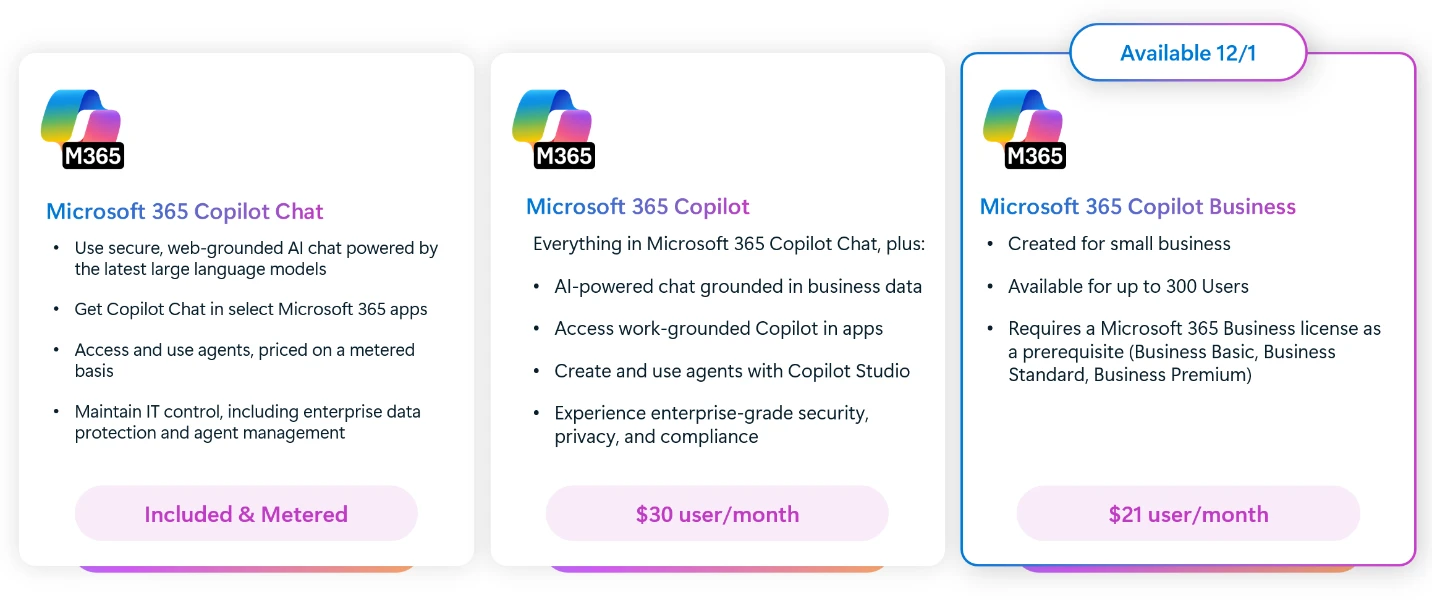
The Copilot Chat interface streamlines interaction across Microsoft 365 Copilot variants — Image from Microsoft 365 Blog
Security Built In
To address SMB-specific security challenges, Microsoft integrates its Defender and Purview services as part of Copilot Business’s security framework. This approach safeguards data privacy, monitors threats, and ensures regulatory compliance without introducing complexity for smaller teams.
Quick Tips & Tricks
-
Leverage Copilot Templates for Fast Document Creation
Use built-in Microsoft Word and PowerPoint Copilot templates as starting points to speed up content creation while maintaining professional standards. -
Enable Work IQ Analytics Early
Activating Work IQ lets Copilot analyze your productivity data from day one, surfacing insights that help optimize team workflows and uncover hidden inefficiencies. -
Integrate Copilot with Teams for Smooth Collaboration
Use Copilot’s AI agents inside Microsoft Teams to automate meeting notes, track action items, and facilitate project updates without leaving the chat interface. -
Use Copilot’s Data Analysis in Excel to Unlock Insights
Save time by asking Copilot to automatically generate charts, pivot tables, or forecasts based on your data instead of manual setup. -
Take Advantage of Built-In Security Features
Review your Copilot Business security settings incorporating Microsoft Defender and Purview to adapt governance policies aligned with your company’s risk profile. -
Train Your Team with Microsoft's Daily Prompt Guide
Empower your users by encouraging exploration with Microsoft’s Daily Prompt Guide, which helps uncover creative ways to harness Copilot’s AI capabilities.
Conclusion
Microsoft 365 Copilot Business is a transformative leap forward for SMBs, delivering enterprise-level AI seamlessly embedded within trusted productivity tools. It empowers businesses to automate routine work, surface meaningful insights, and collaborate securely—all without steep learning curves or infrastructure investment. With Work IQ and AI-powered agents steering intelligent workflows, small businesses gain a powerful ally to innovate and compete in today’s fast-evolving digital landscape.
As AI continues to mature, solutions like Microsoft 365 Copilot Business signal a future where AI augmentation is accessible not just to large enterprises but to every team, leveling the playing field and accelerating productivity at scale. SMBs prepared to adopt these intelligent tools stand to unlock new growth and resilience through smarter, AI-driven work.
References
- Microsoft 365 Copilot Business: The future of work for small businesses | Microsoft 365 Blog — official announcement and overview of Copilot Business
- Meet Microsoft 365 Copilot — product page with feature details and demos
- Microsoft Defender for SMBs — Microsoft’s security solution details
- Microsoft Purview Compliance — Information governance and compliance services explanation
- Microsoft 365 Productivity Apps — overview of apps seamlessly integrated with Copilot