Microsoft 365 Copilot Business: AI-Powered Productivity Tailored for Small Businesses
Microsoft 365 Copilot Business: AI-Powered Productivity Tailored for Small Businesses
Date: 2026-03-17
Discover how Microsoft 365 Copilot Business brings enterprise AI capabilities to small businesses, transforming workflows with security, integration, and ease of use.
Tags: ["Microsoft 365", "AI", "Small Business", "Productivity", "Security"]
Small businesses often face the challenge of adopting cutting-edge technology that can transform productivity without overwhelming complexity or breaking the budget. Microsoft’s latest offering, Microsoft 365 Copilot Business, aims to change that narrative by delivering powerful, enterprise-grade AI assistance tailored specifically for the needs and scale of SMBs. It’s not just AI—it's AI thoughtfully built for work, helping small teams automate tasks, generate meaningful content, and keep workflows secure and compliant.
In this post, we will unpack what makes Microsoft 365 Copilot Business a game-changer for small businesses. From its deep integration with familiar Microsoft 365 apps, to security features designed with SMBs in mind, and intuitive AI-driven work intelligence, this is a deep dive for developers, IT professionals, and small business leaders who want to understand how AI can boost their daily operations. We'll also detail the architecture, technical insights, and practical tips for getting started with this technology.
Architecture Overview
┌────────────────────────────────────────────┐
│Architecture                                │
├────────────────────────────────────────────┤
│• Enterprise data sources                   │
│• Foundry platform                          │
│• AI applications                           │
└────────────────────────────────────────────┘
Key Technical Observations
-
Seamless Integration Across Microsoft 365 Apps — Copilot Business does not exist as a siloed product; it is embedded in core apps like Word, Excel, Outlook, Teams, and SharePoint, enabling AI-powered capabilities natively where work happens, reducing context-switching friction.
-
Work IQ for Actionable Business Insights — Beyond content generation, Copilot Business uses Work IQ to surface actionable insights by analyzing communication patterns, deadlines, and priorities across the Microsoft 365 ecosystem, helping SMBs identify risks, opportunities, and trends.
-
Copilot Chat and AI Agents as New Productivity Paradigms — The conversational interface and customizable AI Agents let users interact naturally with their data and workflows, automating repetitive tasks, generating reports, and managing projects with minimal friction.
-
Security and Compliance Built for SMBs — Leveraging Microsoft Defender and Microsoft Purview technologies, Copilot Business ensures that AI-powered operations remain compliant and secure, addressing SMBs’ concerns about data governance and privacy without complicated setups.
-
SMB-Friendly Pricing without Enterprise Complexity — Microsoft has managed to align full-featured AI capabilities with pricing and licensing models designed to be accessible to small business budgets, amplifying the democratization of AI.
-
Extensibility Through Copilot Business SDK and APIs — While details are emerging, the architecture suggests future extensibility points allowing businesses to customize Copilot Agents and integrate third-party data sources, critical for bespoke business workflows.
How It Works
AI-Driven Contextual Assistance
Microsoft 365 Copilot Business combines large language models (LLMs) with contextual data from a user’s Microsoft 365 environment. For example, when drafting an email in Outlook, Copilot can suggest relevant attachments from SharePoint, summarize recent project updates from Teams chats, and dynamically propose next steps based on Planner tasks.
Conversational Interfaces with Copilot Chat
Users interact with Copilot Chat via natural language prompts to execute complex tasks like creating detailed PowerPoint presentations or generating Excel data analyses. This chat interface serves as an intuitive command center for getting AI-generated work done, eliminating the need to memorize commands or formulas.
User: "Summarize last week’s sales performance and highlight top 3 clients"
Copilot Chat: "Generating summary from Excel and Outlook data..."
[Returns a concise report for review or direct email]
This approach lowers the barrier for business users who may not be data-savvy but need insights fast.
Agent-Based Automation
AI Agents extend Copilot’s capabilities further by automating repetitive workflows or managing data workflows end-to-end. For instance, a “Sales Follow-up Agent” may monitor interactions with clients and schedule reminders or send follow-up messages automatically.
Built-In Security and Compliance
Copilot Business integrates Microsoft Defender threat protection and Purview data governance services at its core, providing automated detection of anomalies and compliance checks on AI-generated content. This ensures AI usage in SMBs not only enhances productivity but adheres to security best practices and regulatory norms without additional overhead for IT admins.
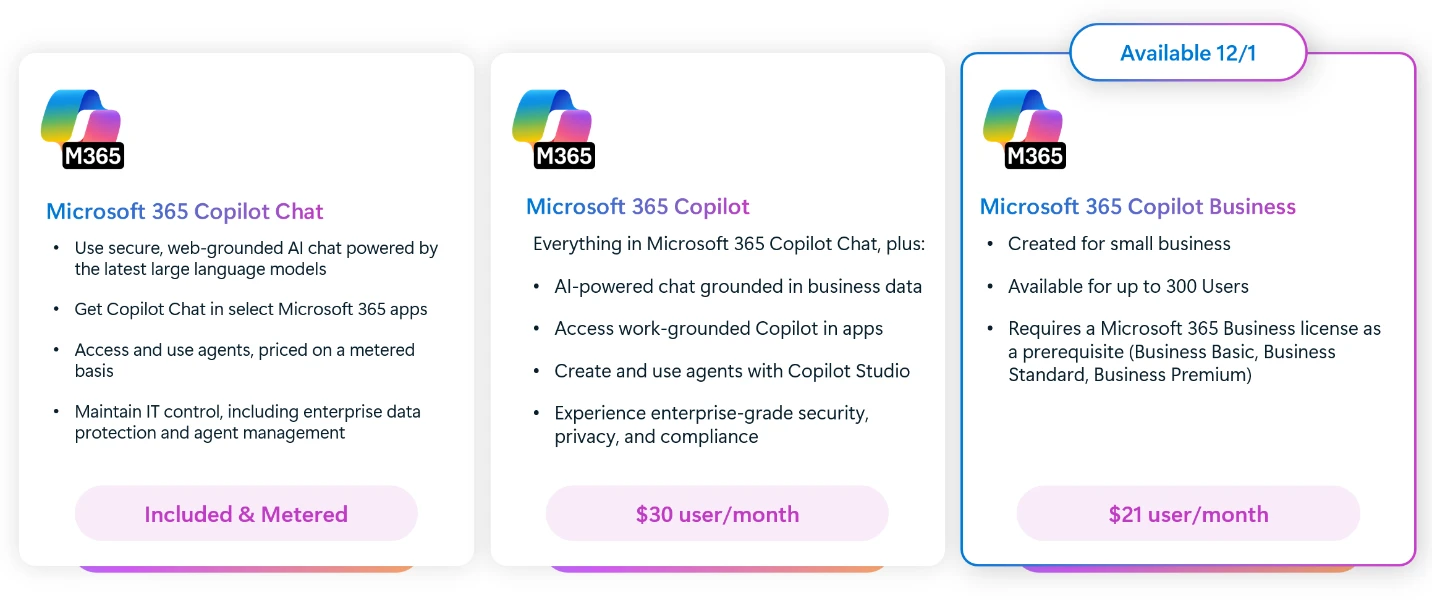
Copilot Chat and Business interface differences, courtesy Microsoft 365 Blog
Quick Tips & Tricks
-
Leverage Copilot directly in Excel for data analysis — Use built-in natural language queries in Excel to generate pivot tables or visualize data trends without manual formula writing.
-
Use Copilot Chat for cross-app task automation — Instead of toggling between apps, ask Copilot Chat to compile data from Outlook, Teams, and Planner, or draft status updates, streamlining multitasking.
-
Customize AI Agents for repetitive workflows — Use customizable AI Agents to automate follow-ups, report generation, or data validation tasks, freeing time for strategic work.
-
Enable Microsoft Defender integration early — Activate Defender and Purview monitoring to ensure AI-driven processes comply with your business’s security policies from day one.
-
Train your team with Microsoft’s Daily Prompt Guide — Encourage adoption by sharing Copilot prompt best practices and templates to get meaningful results faster.
-
Keep data organized with SharePoint and OneDrive — Copilot performs best when underlying data is well-structured; utilize SharePoint workspaces and OneDrive folders effectively to maximize AI relevance.
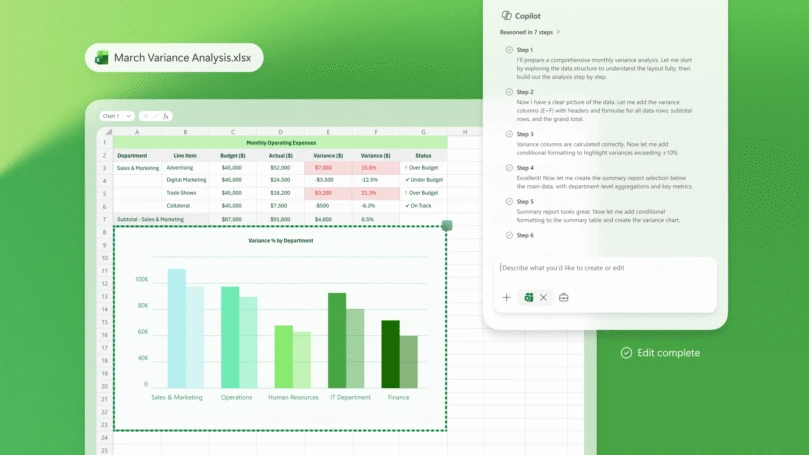
Copilot analyzing business data inside Excel, courtesy Microsoft 365 Blog
Conclusion
Microsoft 365 Copilot Business marks a pivotal moment in the democratization of AI for productivity, tailored specifically for small businesses. By embedding enterprise-grade AI features directly into familiar Microsoft 365 apps and aligning them with stringent security and compliance standards, Microsoft empowers SMBs to compete and innovate at scale without added complexity or expense.
As AI continues to evolve, the seamless integration of intelligent assistance into daily workflows will be a game-changer. Small businesses that adopt Copilot Business can expect smarter, faster, and more secure work processes that unlock the full potential of their teams. The future of work for SMBs is not just digital—it's AI-infused.
References
- Microsoft 365 Copilot Business: The future of work for small businesses | Microsoft 365 Blog — Official announcement and detailed overview
- Meet Copilot — Microsoft’s centralized hub for Copilot AI offerings
- Microsoft Defender — Security backbone integrated with Copilot Business
- Microsoft Purview — Data governance platform securing Copilot workflows
- Microsoft 365 Apps and Services — Explore the apps integrated with Copilot
- Copilot Chat & AI Agents — Advanced conversational AI and automation agents
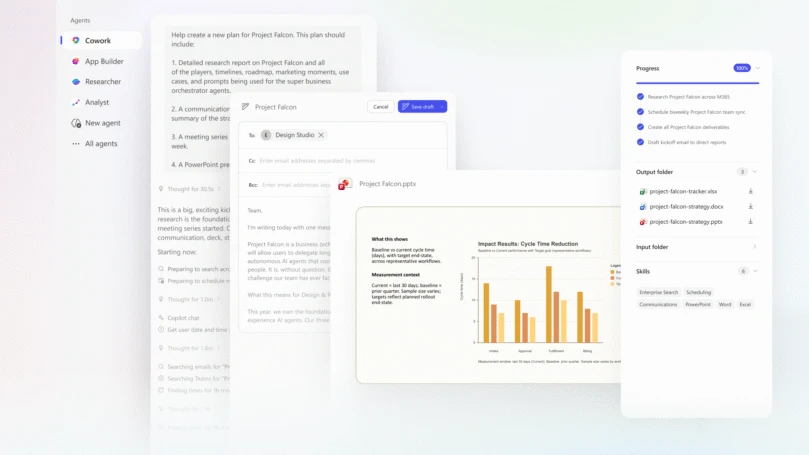
Copilot Cowork multi-output collaboration screenshots, courtesy Microsoft 365 Blog
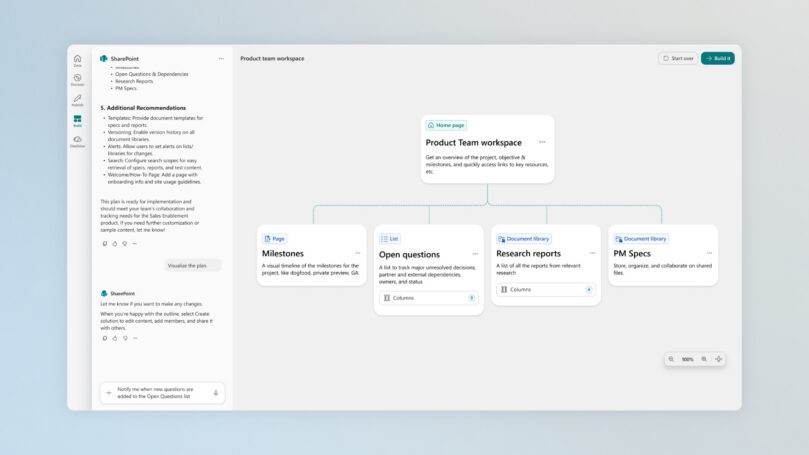
SharePoint workspace driving team knowledge and collaboration in the AI era, courtesy Microsoft 365 Blog

Jared Spataro, Chief Marketing Officer, AI at Work, Microsoft