Building a Robust Microservices CI/CD Pipeline on Kubernetes with Azure DevOps and Helm
Building a Robust Microservices CI/CD Pipeline on Kubernetes with Azure DevOps and Helm
Date: 2026-08-08
Unlock reliable and efficient microservices deployment by mastering CI/CD pipelines on AKS using Azure DevOps and Helm.
Tags: ["Azure Kubernetes Service", "CI/CD", "Azure DevOps", "Helm", "Microservices"]
Creating a reliable continuous integration and continuous delivery (CI/CD) process for microservices architectures is critical but complex. Different teams must rapidly deliver updates independently without destabilizing the overall system. Kubernetes adds flexibility but also complexity, requiring careful pipeline design and deployment strategies.
This post explores a detailed example CI/CD pipeline that deploys microservices to Azure Kubernetes Service (AKS) using Azure DevOps and Helm. It highlights key design decisions to enable isolated development, automated quality gates, and controlled promotions to production. While no single approach fits all teams, this serves as a practical baseline to build upon.
You'll learn about the end-to-end workflow, branching strategies, container best practices, secret handling, pipeline security, environment isolation, and how Helm streamlines Kubernetes package management. By the end, you'll have clarity on creating scalable, secure, and maintainable microservice pipelines on AKS.
Architecture Overview
┌────────────────────────────────────────────┐
│Architecture                                │
├────────────────────────────────────────────┤
│• Enterprise data sources                   │
│• Foundry platform                          │
│• AI applications                           │
└────────────────────────────────────────────┘
Key Technical Observations
-
Monorepo with Scoped Pipelines: The source code uses a monorepo organized by microservice folders, allowing isolated pipeline triggers based on path filters. This minimizes build overhead and enforces modular team ownership.
-
Branching Strategy Supports Independent Releases: Trunk-based development with release branches per microservice enables continuous integration and controlled promotion of versions, helping teams deliver fast without cross-service interference.
-
Push Deployment Model with Azure Pipelines: Direct deployment from pipelines to AKS clusters allows deterministic control with manual approvals, preserving safety while maintaining delivery velocity.
-
Helm as Kubernetes Package Manager: Helm charts package multiple Kubernetes manifests for each microservice, supporting versioning, templating, and ease of deployment or rollback.
-
Secretless Authentication and Workload Identity: Integration with Microsoft Entra ID workload identity for pipelines and deployed workloads eliminates credential sprawl, improving security posture.
-
Environment Isolation Design: Logical isolation within dev/test clusters uses namespaces, network policies, and resource quotas, while production is placed in a dedicated cluster. This balances cost and security.
How It Works: End-to-End Pipeline Walkthrough
Validation Builds on Feature Branches
When a developer works on a new feature in a branch like feature/delivery/*, a validation build pipeline triggers on each commit. This CI pipeline runs:
- Code compilation
- Unit testing
The goal is rapid feedback; these builds use filters to scope which microservice code triggers builds, reducing noise.
trigger:
  batch: true
  branches:
    include:
      - release/delivery/v*
      - refs/release/delivery/v*
      - main
      - feature/delivery/*
      - topic/delivery/*
  paths:
    include:
      - /src/shipping/delivery/
This YAML snippet filters pipeline triggers by branch name and repo paths to scope builds effectively.
Opening a pull request triggers a broader CI validation pipeline that additionally runs:
- Static application security testing (SAST)
- Container image build
- Vulnerability scanning of the image
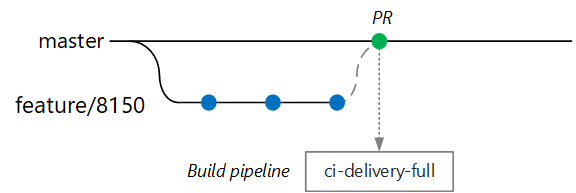
CI full build triggered on PR to main branch (source: Microsoft Learn)
Full CI/CD Build on Release Branches
When ready to ship, a release branch such as release/delivery/v1.0.2 is created from main. This triggers:
- Full CI build with tests and security scans
- Container image pushed to Azure Container Registry tagged with release version
- Helm chart packaged and pushed to Container Registry
A release pipeline then deploys the chart to a QA environment. After manual approval, it:
- Retags container images for production namespace
- Deploys the Helm chart to production AKS cluster
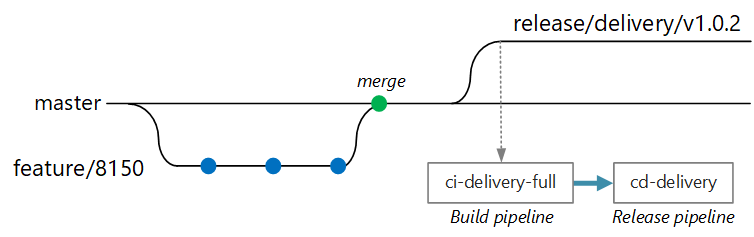
Release branch deployment triggering build and release pipelines (source: Microsoft Learn)
Manual controls like PR approvals and deployment sign-offs maintain guardrails while automating as much as possible.
Container Build and Test Best Practices
The Dockerfile exemplifies multistage builds and non-root containers:
FROM mcr.microsoft.com/dotnet/aspnet:10.0 AS base
USER app
WORKDIR /app
EXPOSE 8080

FROM mcr.microsoft.com/dotnet/sdk:10.0 AS build
WORKDIR /src/Fabrikam.Workflow.Service

COPY Fabrikam.Workflow.Service/Fabrikam.Workflow.Service.csproj .
RUN dotnet restore Fabrikam.Workflow.Service.csproj

COPY Fabrikam.Workflow.Service/. .
RUN dotnet build Fabrikam.Workflow.Service.csproj -c Release -o /app/build --no-restore

FROM build AS testrunner
WORKDIR /src/tests

COPY Fabrikam.Workflow.Service.Tests/*.csproj .
RUN dotnet restore Fabrikam.Workflow.Service.Tests.csproj

COPY Fabrikam.Workflow.Service.Tests/. .
ENTRYPOINT ["dotnet", "test", "--logger:trx"]

FROM build AS publish
RUN dotnet publish Fabrikam.Workflow.Service.csproj -c Release -o /app/publish

FROM base AS final
WORKDIR /app
COPY --from=publish /app/publish .
ENTRYPOINT ["dotnet", "Fabrikam.Workflow.Service.dll"]
Here, tests run in an isolated build stage (testrunner). Developers can build and run tests locally with:
docker build . -t delivery-test:1 --target=testrunner
docker run delivery-test:1
Tests are opt-in via ENTRYPOINT so test failures are distinct from build failures, improving diagnostics.
Helm Charts for Kubernetes Deployment
Helm simplifies deploying and managing multiple Kubernetes manifests as versioned charts. Chart templates use Go templating syntax:
apiVersion: apps/v1
kind: Deployment
metadata:
  name: {{ include "package.fullname" . | replace "." "" }}
  labels:
    app.kubernetes.io/name: {{ include "package.name" . }}
    app.kubernetes.io/instance: {{ .Release.Name }}
  annotations:
    kubernetes.io/change-cause: {{ .Values.reason }}
spec:
  template:
    spec:
      containers:
      - name: &package-container_name fabrikam-package
        image: {{ .Values.dockerregistry }}/{{ .Values.image.repository }}:{{ .Values.image.tag }}
        imagePullPolicy: {{ .Values.image.pullPolicy }}
Using Helm commands like:
helm install <release-name> oci://<registry>/<repository>/<package-chart-name> --version <desiredVersion> \
     --set image.tag=0.1.0 \
     --set image.repository=package \
     --set dockerregistry=$ACR_SERVER \
     --namespace backend
teams can deploy specific chart versions to environments, seamlessly rolling back or promoting releases.
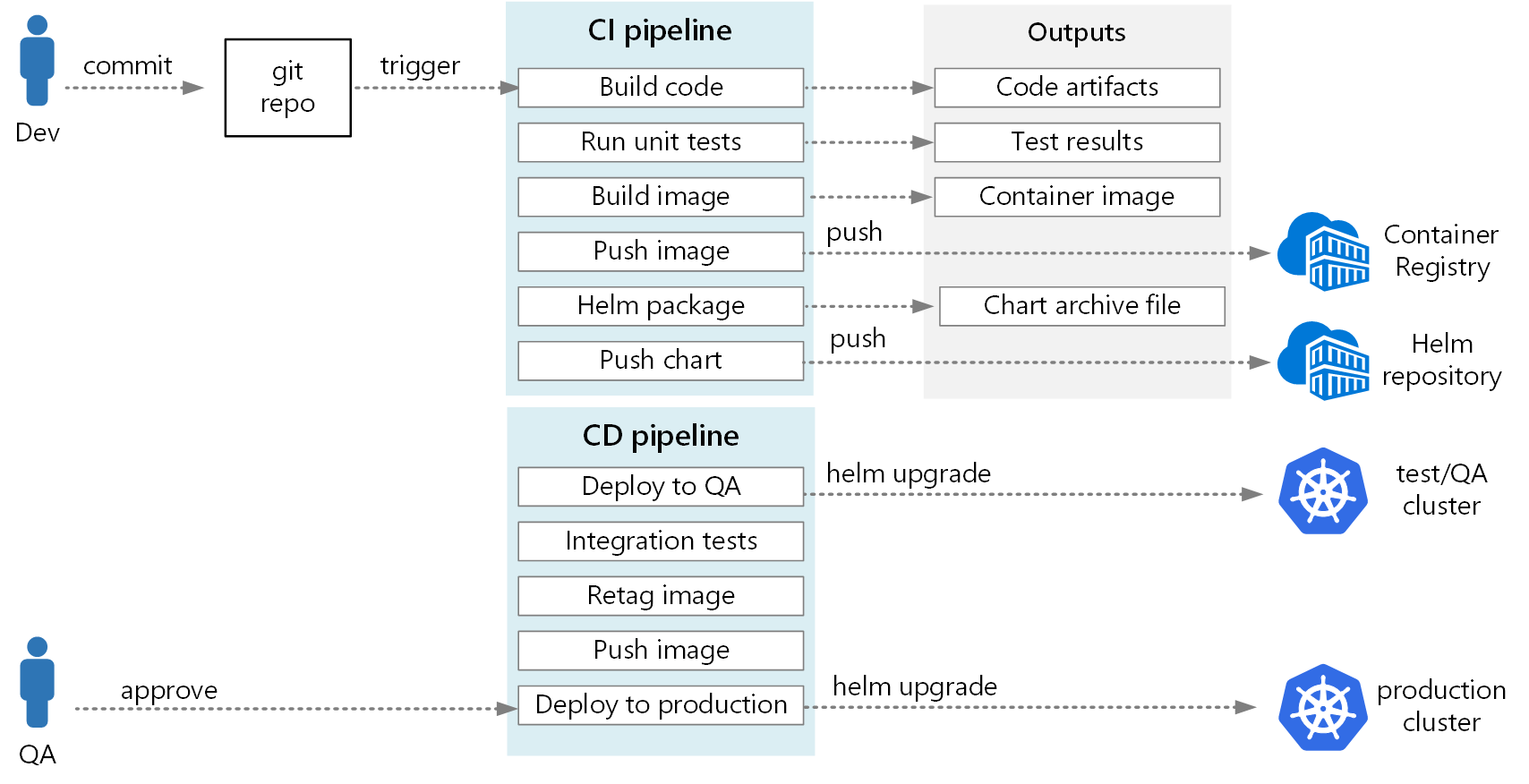
End-to-end CI/CD pipeline overview (source: Microsoft Learn)
Quick Tips & Tricks
-
Scope CI triggers per microservice paths — Use path filters in pipeline triggers to limit builds only to impacted microservices and reduce unnecessary pipeline runs.
-
Adopt secretless authentication with workload identity — Use Azure Pipelines workload identity federation and Microsoft Entra workload IDs to avoid managing secrets and improve security.
-
Use multistage Dockerfiles with non-root users — Build and test images using multistage Dockerfiles and run runtime containers as a nonprivileged user to minimize attack surface.
-
Avoid deploying
latestcontainer tags — Always deploy explicitly versioned images and move them to production namespaces only after QA approval to prevent accidental rollouts. -
Isolate environments logically in shared clusters — Use Kubernetes namespaces with network policies and resource quotas to provide strong multi-tenancy without expensive separate clusters.
-
Incorporate manual approvals for production deployments — Automate as much as possible but require release managers’ explicit sign-off before deploying to production to reduce risk.
Conclusion
Designing a CI/CD pipeline for microservices on AKS demands balancing autonomy, security, and operational excellence. The approach demonstrated here — combining monorepo source control, scoped Azure DevOps pipelines, Helm packaging, secretless authentication, and environment isolation — offers a practical yet flexible baseline.
As Kubernetes and cloud-native tooling evolve, patterns like GitOps pull deployment and robust workload identities will continue gaining traction. Embracing these practices now enables teams to deliver microservices rapidly and reliably while maintaining strong governance, security, and observability.
References
-
Microservices CI/CD Pipeline on Kubernetes with Azure DevOps and Helm - Microsoft Learn — Official Microsoft documentation detailing the CI/CD pipeline architecture
-
CI/CD for microservices architectures — Guidance on continuous integration and delivery patterns for microservices
-
Azure Pipelines documentation — Comprehensive reference for Azure DevOps Pipelines
-
Use Container Registry as a Helm repository — Instructions on storing and using Helm charts in Azure Container Registry
-
Microsoft Entra Workload Identity overview — Details about secure identity federation for Kubernetes workloads
-
GitOps with Argo CD and Flux — Explanation of GitOps deployment models as an alternative to push deployments