Mastering Microsoft Foundry: July–August 2026 Updates on Hosted Agents, Claude, and Model Router
Mastering Microsoft Foundry: July–August 2026 Updates on Hosted Agents, Claude, and Model Router
Date: 2026-09-09
Discover how Microsoft Foundry’s July-August 2026 updates empower developers with Hosted Agents GA, Claude on Azure, expanded Model Router, and powerful tooling for building AI solutions.
Tags: ["Microsoft Foundry", "Hosted Agents", "Claude", "Model Router", "AI Development"]
Microsoft Foundry continues to evolve rapidly, and the summer of 2026 was no exception. With Hosted Agents, Voice Live integration, and Toolboxes now generally available, developers have new capabilities to build, deploy, and manage intelligent agents more easily and securely. The integration of Anthropic’s Claude models on Azure further expands Foundry’s AI model options, while the Model Router update enhances workload routing with a broader geographic footprint and updated model pools.
This post dives into the key July and August 2026 updates for Microsoft Foundry, highlighting how these advancements simplify agent creation, voice interaction, secure tool integration, and model deployment. Whether you’re just starting with Foundry or upgrading existing projects, this overview and technical deep dive illuminate what’s new and how you can leverage these features today.
Architecture Overview
┌────────────────────────────────────────────┐
│Architecture                                │
├────────────────────────────────────────────┤
│• Enterprise data sources                   │
│• Foundry platform                          │
│• AI applications                           │
└────────────────────────────────────────────┘
Key Technical Observations
-
Hosted Agents GA Enables Flexible Agent Development and Deployment — Developers can build agents with any preferred framework, scaffold quickly with Azure Developer CLI extensions, and deploy to Foundry’s managed runtime. Local testing with routing to Model Router is supported before publishing.
-
Toolboxes Decouple Tool Authentication from Agent Code — By offloading tool credential management to MCP-compatible Toolboxes, teams gain centralized governance for tools shared across agents, enabling versioning and runtime tool search to reduce token bloat and increase context relevance.
-
Claude Hosted on Azure Bridges Capabilities Gap — Anthropic’s Claude models hosted on Azure now support structured JSON outputs, web search and fetch, MCP connectors (beta), and tool search, closing many gaps with Anthropic-hosted deployments and ensuring data residency and compliance within Azure.
-
Model Router Scaling & Refresh Improve Global Coverage and Model Currency — With expansions to 28 global regions and an updated routing pool featuring the GPT-5.6 and Claude Opus 4.8 series, Model Router refines cost/quality tradeoffs and agentic routing capabilities across open-source and Anthropic models.
-
Voice Live Integration Delivers Natural Conversational UX — Beyond supporting 600+ neural voices, Voice Live’s real-time audio processing includes server-side voice activity detection, echo cancellation, and deep noise suppression, allowing natural turn-taking even in noisy interactive scenarios like vehicle assistants or field service.
-
Foundry Local Extends AI to On-Premises and Azure Local Deployments — Preview features like multi-GPU parallel inference and model evaluation using vLLM bring performance tuning and scalability to teams running Foundry workloads in private or regulated environments.
How It Works: Step-by-Step with Hosted Agents and Voice Live
Creating and Deploying a Hosted Agent
Using the OpenAI Agents SDK and the Azure Developer CLI (azd), you start by scaffolding a new agent project with a manifest referencing your Foundry project and model-router deployment:
azd extension install azure.ai.agents --version 1.0.0-beta.13

azd ai agent init openai-agents-hosted \
  --manifest https://github.com/microsoft-foundry/foundry-samples/blob/main/samples/python/hosted-agents/bring-your-own/responses/openai-agents-sdk/azure.yaml \
  --project-id "/subscriptions/<subscription-id>/resourceGroups/my-foundry-rg/providers/Microsoft.CognitiveServices/accounts/my-foundry-resource/projects/my-foundry-project" \
  --model-deployment model-router \
  --agent-name openai-agents-router-demo \
  --deploy-mode code
After local testing with azd ai agent run --no-client, you invoke it locally to validate responses, incurring model routing costs for the prompts sent:
azd ai agent invoke --local --new-session \
  "Give a developer a two-sentence checklist for validating an AI agent before deployment."
When satisfied, use azd deploy to publish the agent in Foundry and invoke it remotely to serve real workloads.
Adding Real-Time Voice via Voice Live
Voice Live integration allows turning your hosted agent into a voice-interactive assistant. After installing the necessary audio dependencies — for example, on Linux:
sudo apt-get install -y portaudio19-dev libasound2-dev

pip install --pre "azure-ai-voicelive[aiohttp]" azure-identity pyaudio
Use the provided Python async sample to connect, configure audio formats, neural voice, and real-time audio processing such as echo cancellation and noise suppression:
from azure.ai.voicelive.aio import connect
from azure.identity.aio import DefaultAzureCredential
from voicelive_client import AudioProcessor

async def main():
    async with DefaultAzureCredential() as credential:
        async with connect(
            endpoint="https://<resource-name>.services.ai.azure.com",
            credential=credential,
            agent_config={"agent_name": "openai-agents-router-demo", "project_name": "<project-name>"},
        ) as connection:
            audio = AudioProcessor(connection)
            audio.start_playback()
            try:
                await connection.session.update(
                    session=... # Session config with Text, Audio, Voice, VAD, Echo Cancellation
                )
                async for event in connection:
                    # Handle audio playback, capture, errors, response completion
                    pass
            finally:
                audio.shutdown()

asyncio.run(main())
This sample shows how to enable full-duplex conversational voice AI clients on Foundry agents with advanced features for natural turn-taking even in noisy environments.

Sample audio demonstrating the live voice interaction (courtesy Microsoft Foundry blog).
Leveraging Structured Outputs with Claude on Azure
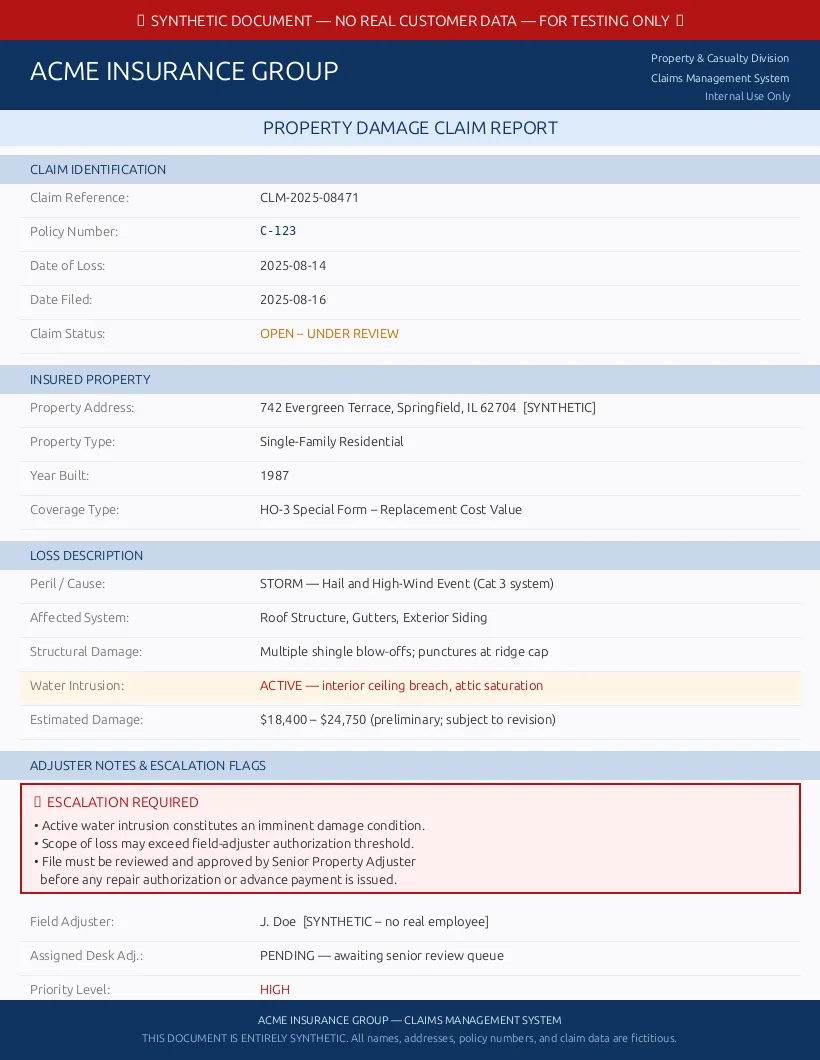
Using the structured JSON output feature improves application reliability by enforcing schema validation on AI outputs. The example below parses an insurance claim image extracting policy data, loss type, and escalation flags:
from pathlib import Path
from anthropic import AnthropicFoundry
from azure.identity import DefaultAzureCredential, get_bearer_token_provider
from pydantic import BaseModel, ConfigDict

class ClaimIntake(BaseModel):
    model_config = ConfigDict(extra="forbid")
    policy_number: str
    loss_type: str
    escalate_to_adjuster: bool

client = AnthropicFoundry(
    resource="your-foundry-resource",
    azure_ad_token_provider=get_bearer_token_provider(DefaultAzureCredential(), "https://ai.azure.com/.default"),
)

response = client.beta.messages.parse(
    model="claude-haiku-4-5",
    max_tokens=128,
    messages=[{
        "role": "user",
        "content": [
            {"type": "image", "source": {"type": "base64", "media_type": "image/png",
                                        "data": base64.b64encode(Path("synthetic-claim.png").read_bytes()).decode()}},
            {"type": "text", "text": "Extract the policy number, loss type, and adjuster escalation decision from this insurance claim."},
        ],
    }],
    output_config={
        "format": {"type": "json_schema", "schema": ClaimIntake.model_json_schema()},
    },
)

claim = ClaimIntake.model_validate_json(response.content[0].text)
print(claim.model_dump())
The structured output replaces complex text parsing with reliable JSON, enabling straightforward integration into business rules and workflows.
Quick Tips & Tricks
-
Use Azure Developer CLI Extensions for Rapid Agent Scaffolding
Ensure you install the latestazure.ai.agentsextension to leverage pre-built templates and command flows for quick agent iterations. -
Apply Toolboxes to Externalize Tool Credential Management
By delegating authentication and access outside agent code, you enhance security and streamline version management—an essential practice for enterprise AI governance. -
Prefer Structured Outputs for Reliable Downstream Processing
When parsing complex documents or claims, validate with JSON schema and libraries like Pydantic to reduce errors from free-form text interpretation. -
Test Agents Locally Before Deployment
Useazd ai agent run --no-clientand local invocation commands to simulate workload and debug before incurring cloud hosting costs. -
Choose the Right Voice Live Neural Voice for Your UX
Explore over 600 voices including HD and custom options; select ones that align with scenario tone—be it customer support or field assistants. -
Monitor Model Router Routing Pools When Upgrading
Model deprecations and additions may affect your workload cost and latency. Run test suites after upgrades to ensure routing decisions align with expectations.
Conclusion
Microsoft Foundry’s mid-2026 updates mark a significant leap forward in simplifying AI agent development, deployment, and operation. Hosted Agents’ GA status with flexible runtime support lets you build sophisticated agents on your terms, while Voice Live usher in immersive conversational experiences. The addition of Claude on Azure and the expanded Model Router bolster model diversity, enabling fine-grained quality and cost targeting globally.
Toolboxes modernize tool management and security, removing common pitfalls in agent tooling authentication. Foundry Local’s extension into edge GPU inference makes Foundry’s capabilities accessible even in highly regulated or disconnected environments.
As AI workloads scale and diversify, these continuous platform investments position Microsoft Foundry as a comprehensive and agile foundation for enterprise AI solutions. Developers empowered with these tools can focus more on innovation and less on infrastructure, accelerating AI adoption confidently and securely.
References
- Microsoft Foundry updates: July and August 2026 — official Foundry blog post with full update details
- Hosted Agents GA announcement — insights from Tina Schuchman on hosted agents
- Foundry Model Router documentation — guides on configuring and managing Model Router
- Voice Live Python quickstart — tutorial for voice integration with hosted agents
- Toolbox architecture and integration — details on reusable tool management
- Anthropic Claude on Azure — feature comparison and capabilities chart
Author Nick Brady showcasing sample structured output from Claude on Azure (Microsoft Foundry Blog)