Mastering Instance Mix for Azure Virtual Machine Scale Sets
Mastering Instance Mix for Azure Virtual Machine Scale Sets
Date: 2026-05-25
Unlock flexible scaling with Azure VM Scale Sets using Instance Mix—scale smarter by leveraging multiple VM sizes and optimized allocation strategies.
Tags: ["Azure", "Virtual Machine Scale Sets", "Instance Mix", "Cloud Infrastructure"]
When scaling out infrastructure using Azure Virtual Machine Scale Sets (VMSS), the traditional approach is to choose one VM size (SKU) for all instances. While straightforward, this single-size limitation often runs into challenges such as regional capacity constraints, quota limits, or cost inefficiencies. What if your scale set could dynamically choose from multiple compatible VM sizes?
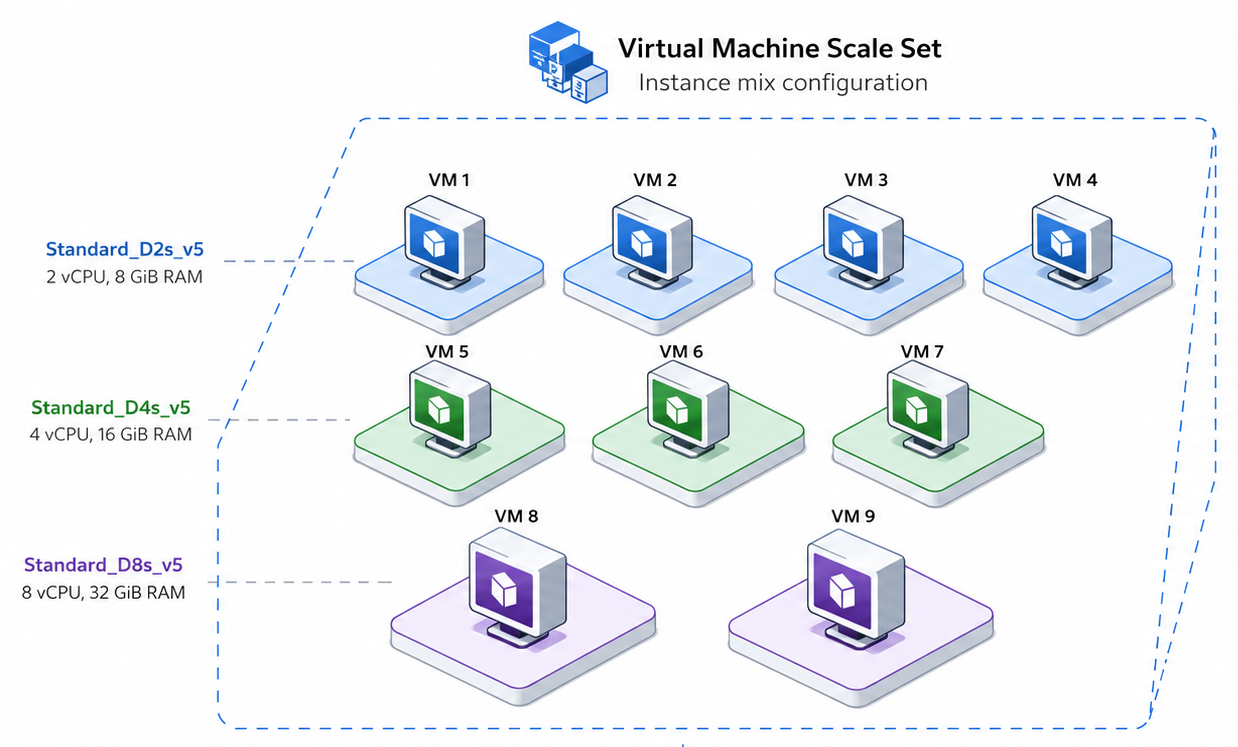
Azure's Instance Mix feature for VMSS resolves this exact issue. It enables you to define up to five different VM sizes within a single scale set configured with Flexible orchestration mode. This empowers Azure to select the most appropriate VM size at provisioning based on your allocation strategy—whether that’s prioritizing cost savings, capacity availability, or predictable size ordering.
This post unpacks Instance Mix’s architecture, key design considerations, and practical steps to implement it in your Azure environment. You'll learn how to prepare prerequisite checks, create and manage mixed VM scale sets, and optimize results with autoscale and allocation strategies. Whether you want to improve availability, reduce costs, or simplify operations, Instance Mix is a powerful evolution in VM scale set design.
Architecture Overview
┌─────────────────────────────────────────────┐
│           Azure Compute Infrastructure       │
├─────────────────────────────────────────────┤
│  • Physical Datacenters & Hardware           │
│  • Regional Capacity & Resource Quotas       │
└─────────────────────────────────────────────┘
                   ↓
┌─────────────────────────────────────────────┐
│       Virtual Machine Scale Sets Platform     │
├─────────────────────────────────────────────┤
│  • Flexible Orchestration Mode                │
│  • vmSizes List Configuration (Instance Mix) │
│  • Allocation Strategies (LowestPrice, etc.) │
│  • VM Provisioning & Lifecycle Management     │
└─────────────────────────────────────────────┘
                   ↓
┌─────────────────────────────────────────────┐
│              Customer Workloads              │
├─────────────────────────────────────────────┤
│  • Mixed VM Size Scale Set Instances          │
│  • Autoscaling Based on Demand                 │
│  • Application Services Running on VMs        │
└─────────────────────────────────────────────┘
This layered setup shows how Instance Mix leverages Azure's underlying compute capacity in datacenters and couples it with smarter VMSS provisioning through Flexible orchestration. By defining multiple VM sizes and a strategic allocation policy, you gain flexibility and resilience across capacity and pricing dimensions, all transparently managed under one scale set abstraction.
Image courtesy Microsoft Community Hub
Key Technical Observations
-
Flexible Orchestration Mode Requirement — Instance Mix is only available when using the Flexible orchestration mode, enabling more granular control over VM lifecycle and capacity management than the default Uniform mode.
-
Multi-VM Size SKU Profile — You can specify from one to five VM sizes within the
skuProfile.vmSizesproperty. Azure then dynamically provisions the instances based on availability and allocation strategy during scale-out events. -
Allocation Strategies Enable Tailored Scale-Out Behavior — Azure offers three allocation options:
LowestPrice(cost-optimized),CapacityOptimized(availability-focused), andPrioritized(user-defined ordering). This flexibility caters to cost sensitivity, production reliability, or reservation and savings plan alignment. -
Architecture and Storage Compatibility Constraints — Mixing VM sizes requires compatibility, such as avoiding mixed CPU architectures (e.g., x64 with Arm64) and uniform storage interfaces (SCSI or NVMe). This avoids deployment failures or unpredictable behavior in scale set operations.
-
Quota Checks Are Crucial — Although Instance Mix improves VM size flexibility, regional vCPU quotas and family quotas remain binding constraints. Proactively checking available quotas per VM family and region ensures scale-out success.
-
Real-Time VM Size Allocation Visibility — Azure CLI commands let you list deployed VM sizes in a scale set, helping validate Instance Mix effectiveness and troubleshoot sizing or allocation issues post-deployment.
How It Works: Step-by-Step Guide
Preparing Your Environment
Ensure your CLI tools are up to date:
az version --query '"azure-cli"' --output tsv
Log into your Azure account and select the subscription:
az login
az account set --subscription "<subscription-id-or-name>"
Define parameters such as resource group, region, and administrative user for your scale set:
RG="rg-vmss-instancemix-demo"
LOCATION="australiaeast"
VMSS="vmss-instancemix-demo"
ADMIN_USER="azureuser"
Step 1: Validate VM Size Availability
List VM SKUs compatible with your region and desired size family:
az vm list-skus \
  --location "$LOCATION" \
  --resource-type virtualMachines \
  --size Standard_D \
  --all \
  --output table
Step 2: Check Regional Quota
Confirm your vCPU quota and usage to avoid deployment errors:
az vm list-usage \
  --location "$LOCATION" \
  --output table
Step 3: Create the Resource Group
az group create \
  --name "$RG" \
  --location "$LOCATION"
Step 4: Create the VM Scale Set with Instance Mix
Define your set of VM sizes and the allocation strategy (CapacityOptimized recommended for production workloads):
az vmss create \
  --resource-group "$RG" \
  --name "$VMSS" \
  --location "$LOCATION" \
  --orchestration-mode Flexible \
  --image Ubuntu2204 \
  --vm-sku Mix \
  --skuprofile-vmsizes Standard_D2s_v5 Standard_D2as_v5 Standard_D2s_v4 \
  --skuprofile-allocation-strategy CapacityOptimized \
  --instance-count 2 \
  --admin-username "$ADMIN_USER" \
  --generate-ssh-keys
Step 5: Verify the Instance Mix Setup
Check the VM sizes configured in the scale set:
az vmss show \
  --resource-group "$RG" \
  --name "$VMSS" \
  --query "skuProfile.vmSizes[].name" \
  --output tsv
Confirm the allocation strategy:
az vmss show \
  --resource-group "$RG" \
  --name "$VMSS" \
  --query "skuProfile.allocationStrategy" \
  --output tsv
Step 6: Scale Out and Observe VM Allocation
Increase the instance count and query the size of each provisioned VM:
az vmss scale \
  --resource-group "$RG" \
  --name "$VMSS" \
  --new-capacity 5
VMSS_ID=$(az vmss show \
  --resource-group "$RG" \
  --name "$VMSS" \
  --query id \
  --output tsv)

az vm list \
  --resource-group "$RG" \
  --query "[?virtualMachineScaleSet.id=='$VMSS_ID'].{Name:name, VMSize:hardwareProfile.vmSize, ProvisioningState:provisioningState}" \
  --output table
Step 7: Autoscale Integration
Add autoscaling rules to automatically adjust capacity based on workload metrics, leveraging the backend Instance Mix flexibility.
Step 8 & 9: Update VM Sizes and Allocation Strategy
You can modify the VM sizes or switch between allocation strategies (e.g., from CapacityOptimized to Prioritized) on an existing scale set with Azure CLI commands or ARM templates, enabling operational agility.
Step 10: Enable Instance Mix on Existing Scale Sets
Azure supports focusing flexible orchestration with an existing scale set by updating its SKU name to Mix and applying the skuProfile attributes.
Quick Tips & Tricks
-
Use Similar VM Sizes for Predictability
Choose sizes within the same VM family to ensure consistent network performance, storage type, and application behavior without surprises. -
Avoid Relying on Instance Mix to Bypass Quota Limits
Instance Mix improves scale set flexibility but does not override subscription or regional quotas—plan capacity and quotas accordingly. -
Align Allocation Strategy with Your Savings Plans and Reservations
If using Reserved Instances or Savings Plans, prefer thePrioritizedstrategy and rank VM sizes to maximize cost benefits predictably. -
Use Spot Priority Mix When Combining Spot and Standard VMs
Spot VMs can be integrated smoothly alongside standard instances, with Azure preferring lower-priced capacity when usingLowestPriceallocation. -
Be Cautious with Unsupported Properties
Mixing VM sizes with incompatible properties or orchestration modes like Uniform is not supported and can cause deployment failures. -
Leverage Azure CLI for Quick Diagnostics
Regularly use CLI commands to check VM size distribution and allocation strategy to monitor and troubleshoot your scale set deployments.
Conclusion
Azure's Instance Mix capability for Virtual Machine Scale Sets marks a significant evolution in cloud infrastructure scaling. By enabling multiple VM sizes under a single Flexible orchestration scale set, Azure empowers operators with greater resilience against capacity shortages, improved cost optimization, and consolidated scale set management. Understanding your workload needs and alignment with allocation strategies is essential to fully capitalize on Instance Mix’s potential.
As cloud demands evolve, features such as Instance Mix reflect the industry’s shift toward more adaptable, cost-effective infrastructure strategies. Expect further enhancements around smarter provisioning algorithms, expanded VM family support, and integration with Azure’s broader Autoscale and capacity planning tools.
References
- How to use Instance Mix with Azure Virtual Machine Scale Sets | Microsoft Community Hub — Original detailed walkthrough and guidance
- Use multiple Virtual Machine sizes with instance mix - Azure Documentation — Official overview of Instance Mix features
- Create a scale set using instance mix - Azure Documentation — Step-by-step create and configure Instance Mix
- Instance Mix FAQ and Troubleshooting - Azure Documentation — Troubleshooting and common errors detail
- Spot Priority Mix - Azure Virtual Machine Scale Sets — Guidance on mixing Spot and standard VM instances
- Orchestration modes for Virtual Machine Scale Sets — Insight into Flexible vs Uniform mode features