Mastering Azure Event Hubs with Azure Functions: Scalable Serverless Event Processing
Mastering Azure Event Hubs with Azure Functions: Scalable Serverless Event Processing
Date: 2026-08-11
Unlock the power of Azure Event Hubs integrated with Azure Functions for scalable, cost-effective, near real-time event processing. Learn architecture, scaling patterns, and best practices.
Tags: ["Azure", "Serverless", "Event Hubs", "Azure Functions"]
Serverless architectures are revolutionizing how we build scalable, event-driven applications without the burden of managing infrastructure. Among many Azure services, Azure Event Hubs combined with Azure Functions offer a compelling platform to ingest and process millions of events per second with near real-time responsiveness. Yet, this integration involves nuances in scaling, partition management, and checkpointing that are crucial to understand for building robust solutions.
This post dives deep into how these two Azure services work together. We’ll explore core concepts of Event Hubs like partitions and consumer groups, reveal the inner mechanisms of Azure Functions triggers on Event Hubs, and discuss scaling behaviors and processing guarantees. Whether you’re designing telemetry ingestion, clickstream analytics, or any high-throughput data pipeline, mastering this integration is essential.
By the end, you'll gain a clear mental model of how event data flows from producers through Event Hubs into serverless function instances, and practical insights for designing efficient, resilient event processing solutions on Azure.
Architecture Overview
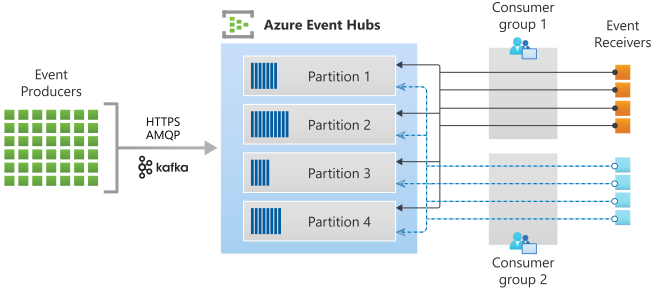
The following diagram captures the key components and data flow between event producers, Azure Event Hubs, and Azure Functions consumers:
┌─────────────────────────────┐
│       Event Producers       │
│  • IoT devices, Apps, etc.  │
│  • Ingest via HTTPS, AMQP,  │
│    Kafka protocols          │
└─────────────┬───────────────┘
              ↓
┌─────────────────────────────┐
│      Azure Event Hubs       │
├─────────────────────────────┤
│ • Scalable event ingestion  │
│ • Multiple partitions (log) │
│ • Consumer groups           │
└─────────────┬───────────────┘
              ↓
┌─────────────────────────────┐
│      Azure Functions        │
├─────────────────────────────┤
│ • EventProcessorHost leases │
│ • Partition load balancing  │
│ • Dynamic, event-driven     │
│   scaling                  │
└─────────────────────────────┘
This architecture highlights how events produced by various sources enter Event Hubs through supported protocols, are distributed across ordered partitions, and are then consumed by Azure Functions instances that dynamically scale to handle processing load. The EventProcessorHost component ensures exclusive consumption per partition within each consumer group, providing concurrency control and checkpointing for fault tolerance.
Source: Microsoft Learn
Key Technical Observations
-
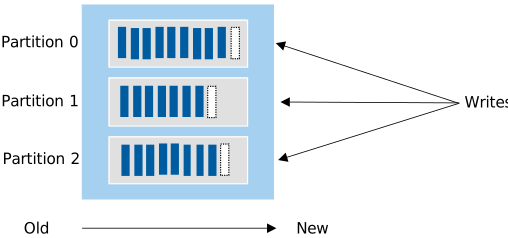
Event Hubs partitions act like immutable logs: Each partition stores events in an append-only sequence, guaranteeing ordered delivery within that partition. This design enables parallelism by splitting event streams into independent partitions for concurrent consumption.
-
Single-consumer lease model per partition: Only one Azure Functions
EventProcessorHostinstance can hold a lease on a given partition at a time, which prevents duplicate processing and ensures consistent offset management. -
Dynamic load balancing of partition leases among function instances: As more Azure Functions instances spin up due to scaling triggers, Event Hubs reassign partitions evenly across them to spread the workload and avoid hot partitions.
-
Checkpointing with storage integration enhances reliability: After processing batches of events, functions checkpoint their progress to associated storage accounts. This allows resuming from the last known event on restarts or failures, guaranteeing at-least-once processing semantics.
-
Event-driven scaling supports near real-time elasticity: Consumption, Premium, and Flex Consumption plans, alongside KEDA for Kubernetes-hosted functions, enable automatic scaling based on event load, minimizing latency and cost. Dedicated app plans lack this event-driven autoscale.
-
Multi-consumer scenarios enabled by consumer groups: Different applications or components can independently read the same event stream without interfering with each other by subscribing with distinct consumer groups.
How It Works: Event Processing Lifecycle with Azure Functions
Event Production and Partitioning
Event producers send data into the Event Hub via protocols like HTTPS, AMQP, or Kafka. If no specific partition is specified, Event Hubs distributes incoming events evenly across multiple partitions. Each partition is essentially a commit log storing events in chronological order.
Source: Microsoft Learn
This partitioning balances the load and improves throughput, enabling downstream consumers to process events concurrently.
Consumer Groups & Azure Functions Trigger Binding
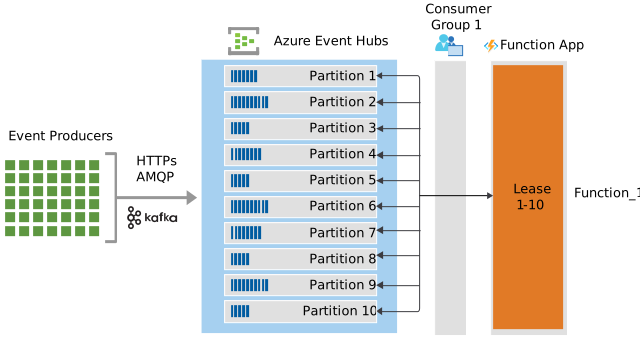
Azure Functions use the Event Hubs trigger binding to consume event data. Functions belong to a consumer group, which represents a separate, independent view of the event stream. Each Functions app instance contains an EventProcessorHost responsible for maintaining leases on assigned partitions.
Multiple Azure Functions instances coordinate through Event Hubs to acquire lease ownership of partitions. Only one instance reads from a partition at a time, ensuring orderly processing.
Single Function Instance Scenario
At startup, if there is only one function instance (Function_1) and the event hub has, for example, 10 partitions, that instance holds leases on all partitions and processes all events.
Source: Microsoft Learn
Scaling Out with Multiple Functions Instances
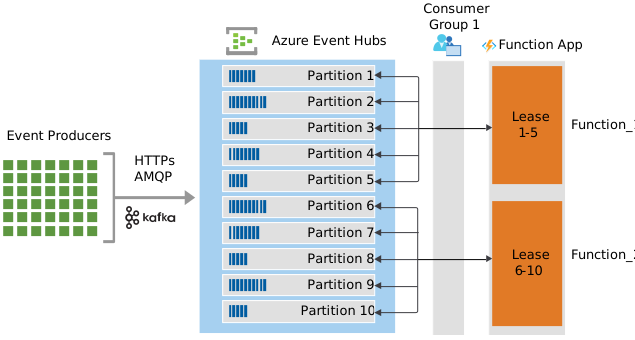
When event traffic increases beyond the capacity of a single instance, Azure Functions scales out with additional instances (Function_2, Function_N, etc.), each obtaining leases on subsets of partitions. Event Hubs rebalances partition ownership across functions.
Source: Microsoft Learn
Eventually, the number of function instances may reach or exceed the number of partitions, allowing near-optimal parallel processing.
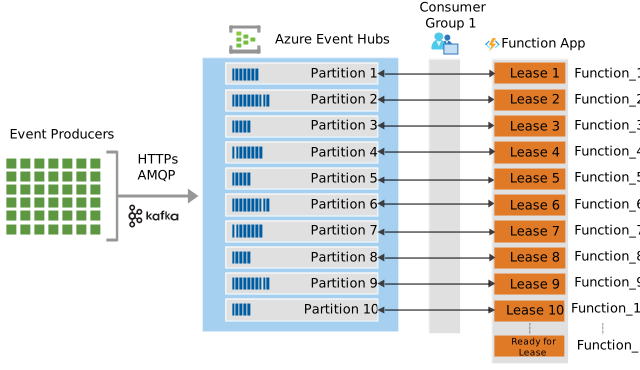
Source: Microsoft Learn
Checkpointing for Reliable Processing
After a batch of events is processed, Azure Functions checkpoint the position in the partition stream to Azure Storage. This checkpoint marks all preceding events as successfully processed so that, on failure or restart, functions continue from the correct offset.
By decoupling event processing through checkpointing, the system achieves resilience and at-least-once delivery semantics.
Scaling Plans and Hosting Considerations
- Consumption, Flex Consumption, and Premium plans natively support event-triggered scaling based on active event loads.
- Kubernetes-hosted function apps leverage the KEDA scaler to monitor Event Hub metrics for scale decisions.
- Dedicated (App Service) plans require manual or custom autoscaling logic since they lack event-driven scale.
For detailed information, see the Azure Event Hubs bindings for Azure Functions documentation.
Quick Tips & Tricks
-
Align partitions with scaling targets — Match your Event Hub partition count to your expected maximum Azure Functions instances to maximize parallelism and throughput.
-
Use consumer groups for isolation — Create separate consumer groups for different applications or processing workflows to independently read the event stream.
-
Enable checkpointing with durable storage — Always configure checkpointing to Azure Blob Storage or similar durable storage to achieve reliable at-least-once processing.
-
Monitor partition load and lag — Use Azure Monitor or custom tooling to identify hot partitions or processing delays that could impact performance.
-
Leverage event-driven scaling plans — Prefer Consumption, Premium, or Flex plans for automatic scaling. Use KEDA for Kubernetes environments to achieve reactive scaling based on event volume.
-
Avoid over-provisioning function instances — Scaling out beyond the number of partitions won't increase throughput; it only causes idle instances waiting for leases.
Conclusion
Azure Event Hubs combined with Azure Functions forms a powerful foundation for building scalable, resilient serverless event processing pipelines. By understanding Event Hubs’ partitioned commit log model, consumer groups, and lease management, developers can architect solutions that process millions of events reliably with dynamic, event-driven autoscaling.
The exclusive lease model and checkpointing mechanisms ensure strong processing guarantees while enabling smooth partition load balancing across function instances. Choosing appropriate hosting plans and aligning partition counts to intended scale are key design decisions affecting performance and cost efficiency.
As event-driven architectures continue evolving, this integration will remain central to handling big data ingestion, telemetry, and streaming scenarios on Azure, with new scaling and observability improvements continually enhancing developer experience.
References
- Azure Event Hubs with Azure Functions - Microsoft Learn — Official architecture and guide on integrating Event Hubs with Azure Functions.
- Azure Event Hubs Features and Terminology — Understanding partitions, consumer groups, and event processing.
- Azure Event Hubs bindings for Azure Functions — Reference for trigger and output binding configuration.
- KEDA scaler for Azure Event Hubs — How Kubernetes event-driven autoscaling integrates with Event Hubs.
- Azure Event Hubs trigger for Azure Functions — Detailed explanation of the event-driven trigger lifecycle.