Enhancing Customer AI Agent Experiences with Microsoft Copilot Studio's Topic Variables
Enhancing Customer AI Agent Experiences with Microsoft Copilot Studio's Topic Variables
Date: 2026-03-17
Discover how Microsoft Copilot Studio's input and output topic variables transform AI agents into intuitive, natural conversational partners, streamlining customer interactions.
Tags: ["Microsoft 365", "Copilot Studio", "AI Agents", "Conversational AI"]
At iThink 365, teams have been building AI agents leveraging Microsoft Copilot Studio alongside Azure AI Foundry. Microsoft Copilot Studio continually evolves, unlocking capabilities that significantly improve how agents interact with users. Yet, many developers and users remain unaware of key features that can transform these agents from rigid querying tools into fluid conversational partners.
One of the most powerful features enabling this leap in experience design is the use of topic variables — specifically input and output variables that shape how an agent understands user requests and crafts responses. These variables allow the agent’s underlying language model (LLM) to detect, extract, and manage information naturally, removing clunky question-and-answer dialogs and delivering seamless interactions.
In this post, we explore how input variables can be harnessed to parse natural user input into structured data, and how output variables enable controlled, user-friendly responses. You’ll gain insights on configuring these features in Copilot Studio to build AI agents that feel truly conversational, intuitive, and aligned with your customers’ needs.
Architecture Overview
┌─────────────────────────────────────────────┐
│           User Interactions                  │
│ • Natural language requests                  │
│ • Conversational queries                      │
└─────────────────────────────────────────────┘
                ↓
┌─────────────────────────────────────────────┐
│         Microsoft Copilot Studio             │
├─────────────────────────────────────────────┤
│ • Topic Variables (Input & Output)           │
│ • Large Language Model Integration           │
│ • Topic Configuration & Management            │
└─────────────────────────────────────────────┘
                ↓
┌─────────────────────────────────────────────┐
│           AI Agent Responses                  │
│ • Structured data from inputs                 │
│ • Context-aware, formatted outputs            │
│ • Conversational text generation              │
└─────────────────────────────────────────────┘
This architecture shows how user input travels through Copilot Studio, where topic input variables parse and transform raw natural language into meaningful data, empowering the AI agent to respond effectively using output variables.

Image credit: Simon Doy’s Microsoft 365 and Azure Dev Blog
Key Technical Observations
- Topic-Level Input Variables Empower Natural Language Processing — By scoping inputs to the topic, Copilot Studio’s LLM can intelligently identify and fill variables from conversational context, avoiding rigid prompts.
- Slot Filling Eliminates Multi-Step Questionnaires — Instead of forcing users into repetitive Q&A flows, input variables parse free-form sentences, improving UX with smooth, human-like dialogues.
- Output Variables Enable Controlled, Meaningful Responses — Rather than spitting raw data, output variables package key results that the LLM uses to generate user-friendly, context-sensitive replies.
- Separation of Input and Output Logic Supports Maintainability — Defining variables within the topic details ensures clear delineation between data capture (input) and response generation (output), simplifying debugging and enhancements.
- Flexible Feedback on Missing Data Ensures Better User Guidance — Input variables can be configured to prompt users when crucial information is missing, improving completion rates and agent reliability.
How It Works
Configuring Input Variables for Natural Language Slot Filling
Within Copilot Studio, each topic has a Details tab where input variables are defined under the Input section. For example, a leave request topic might require:
- Leave start date
- Leave end date
- Holiday comments
The LLM is instructed to recognize these variables in the user’s free-form message. Instead of asking separate, formulaic questions for each piece of data, the agent parses user input such as:
“I would like to go on holiday with my family from the 1st August to 14th August.”
The LLM populates the input variables as:
Leave start date => 1st August 2025
Leave end date => 14th August 2025
Holiday comments => Taking a holiday with family.
This approach eliminates rigid, multiple-step prompts, enabling a fluid conversational experience that respects natural human expression.
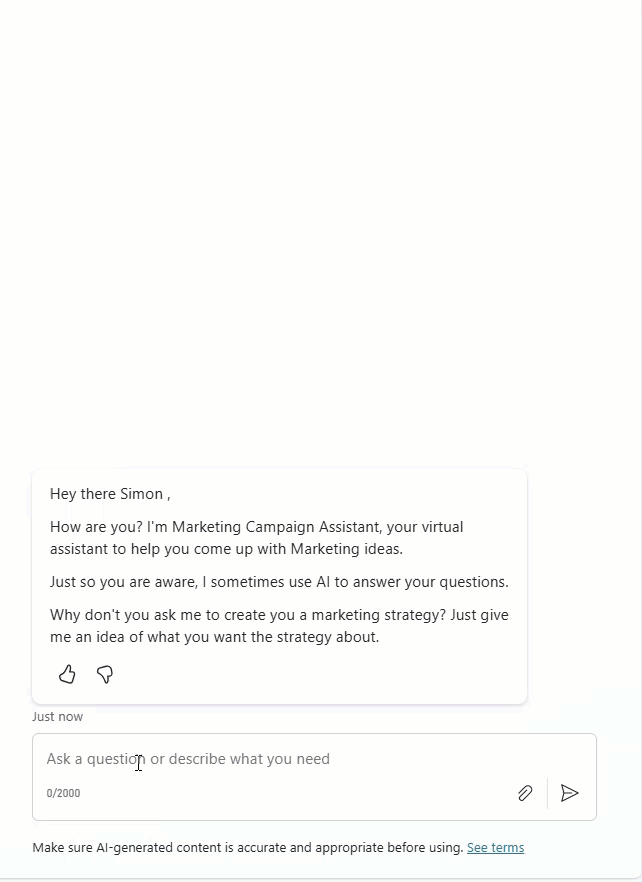
Visual contrast of question-based input gathering versus variable-driven natural input parsing. Credit: Simon Doy
Using Output Variables for Polished Agent Responses
Similarly, output variables are defined in the Output tab of the same topic’s details page. These variables hold the processed results or key data points that the AI’s LLM uses to tailor responses.
For instance, after processing a leave request, output variables might include:
- Approved leave dates
- Leave status
- Manager information
Instead of returning a bulk dump of raw data, this structured output enables the LLM to deliver a concise, reader-friendly response:
“Your leave from August 1st to August 14th has been submitted for approval. Your manager, Jane Doe, will review your request shortly.”
By controlling the output through variables, the agent avoids confusing or overwhelming users with extraneous data, preserving a smooth, conversational tone.
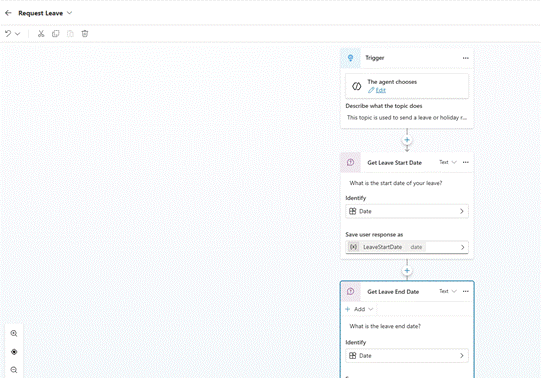
Using output variables to shape AI-generated marketing campaign suggestions without dumping raw data. Credit: Simon Doy
Quick Tips & Tricks
- Define Clear, Descriptive Variable Names — Use meaningful names in both input and output sections to improve maintainability and self-documentation.
- Leverage the LLM’s Natural Language Understanding for Input Discovery — Configure input variables with example phrases and context clues to maximize accurate slot filling.
- Configure User Feedback for Missing Variables — Setup validation messages guiding users when required inputs are absent or ambiguous, enhancing completion.
- Use Output Variables to Abstract Raw Data — Avoid directly outputting full datasets; instead, summarize or format data for a cleaner conversational experience.
- Iterate Topic Configurations Based on User Interactions — Monitor conversations and refine input/output variables to capture common user patterns and edge cases.
- Test with Realistic User Inputs — Simulate natural dialogue variants to ensure input variables correctly parse dates, comments, and other entities.
Conclusion
Microsoft Copilot Studio’s topic variables — meticulously designed input and output constructs — empower developers to build AI agents that converse naturally and effectively. By shifting the heavy lifting of input parsing and response formatting to the LLM guided by these variables, agents avoid clunky scripts and deliver elegant, human-like dialogues.
As AI-powered agents become central to customer engagement, mastering these features will be key to building intuitive solutions that delight users while reducing development complexity. Looking ahead, as Copilot Studio evolves further, expect even deeper integration of contextual understanding that amplifies the impact of topic variables in delivering seamless AI conversations.
References
- Build Better Agent Experiences for your Customers with Copilot Studio and Topic Variables — Original detailed blog post by Simon Doy