Deploying Azure SRE Agent for AKS and Drasi: A Hands-On Operational Blueprint
Deploying Azure SRE Agent for AKS and Drasi: A Hands-On Operational Blueprint
Date: 2026-05-09
Explore a practical walkthrough of deploying Azure SRE Agent for AKS and Drasi with AZD—custom agents, response plans, fault injection, and how it untangles complex reliability issues.
Tags: ["Azure SRE Agent", "AKS", "Drasi", "Azure Developer CLI", "Reliability", "Incident Response"]
Managing reliability across complex cloud-native architectures like Azure Kubernetes Service (AKS) and application workloads such as Drasi requires not only monitoring but also structured, automated incident response. Traditional portal-based troubleshooting can be fragmented and reactive. What if you could deploy an operations platform that autonomously triages issues, collects targeted evidence, reasons through root causes, and carefully proposes or enacts remediation—all governed by scoped permissions and rigorous review gates?
In this post, we dive deep into the deployment and operation of an Azure SRE Agent tailored for AKS and Drasi workloads, driven entirely by the Azure Developer CLI (azd). This blueprint integrates custom agents, specialized skills, response plans, scheduled health probes, and synthetic failure injections. It showcases how to operationalize SRE principles with automation, yet maintain safety and contextual awareness to avoid the classic trap of "restart everything" automation.
You’ll learn how this setup tackles the ambiguous boundary between platform-level Kubernetes issues and application runtime faults in Drasi, the lessons learned from real-world incident testing, and how to iterate your SRE Agents toward deeper operational excellence.
Architecture Overview
┌─────────────────────────────────────────────┐
│             Azure Kubernetes Service (AKS) │
├─────────────────────────────────────────────┤
│  • Cluster Nodes & Workloads                 │
│  • Metrics & Logs Collection (DCR, DCRA)    │
│  • Admission Webhooks & Autoscaler           │
└─────────────────────────────────────────────┘
                  ↓
┌─────────────────────────────────────────────┐
│                Drasi Application             │
├─────────────────────────────────────────────┤
│  • Change-Driven Architecture Runtime        │
│  • Sources, Continuous Queries, Reactions    │
│  • Dapr sidecar, Redis, Mongo connectivity   │
└─────────────────────────────────────────────┘
                  ↓
┌─────────────────────────────────────────────┐
│                Azure SRE Agent Platform      │
├─────────────────────────────────────────────┤
│  • Custom Agents (Triage, AKS, Drasi, Review)│
│  • Skills & Evidence Bundles                  │
│  • Azure Monitor Integration & Response Plans│
│  • Scheduled Tasks & Fault Injection         │
│  • Managed Identities & Scoped RBAC           │
└─────────────────────────────────────────────┘
                  ↓
┌─────────────────────────────────────────────┐
│                Operators & Incident Response │
├─────────────────────────────────────────────┤
│  • Portal Session Insights & Telemetry       │
│  • Autonomous Actions & Manual Approvals      │
│  • Runbook Version Control & Continuous Tune │
└─────────────────────────────────────────────┘
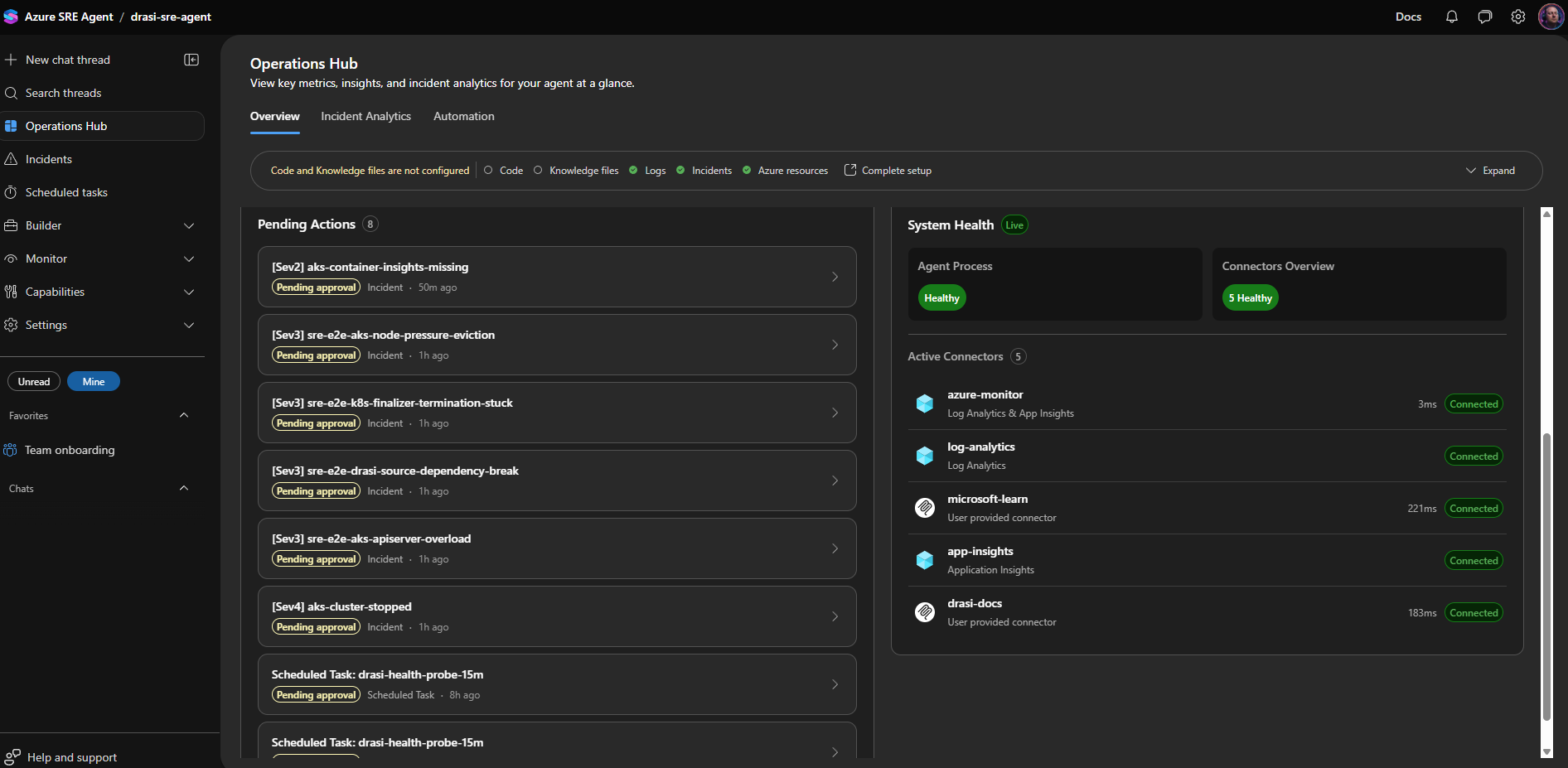
Operations Hub showing the integrated AZD workflow and agent interactions. Source: luke.geek.nz
Key Technical Observations
-
Phase-Based Incident Routing — Incidents route first by failure phase before product domain, isolating platform issues (e.g., pod scheduling) from application runtime faults (e.g., Drasi query staleness). This reduces noise and increases accuracy of diagnostics.
-
Custom Multi-Agent Design — Four distinct custom agents specialize in triage, AKS platform diagnostics, Drasi runtime diagnostics, and remediation review. This separation ensures no agent overreaches and context-specific expertise guides remediation decisions.
-
Safe Autonomy with Scoped Permissions — Autonomous remediation is selectively enabled only for low-risk operations like starting a stopped AKS cluster, preserving guardrails and manual review for complex or risky changes (e.g., cluster upgrades or network changes).
-
Evidence-Driven Skills and Runbooks — Custom skills have narrowly scoped evidence bundles, improving diagnostic precision and reducing tooling overhead. For example, the Drasi runtime skill always validates source connection health before evaluating continuous query status.
-
Connector Configuration Nuance — MCP connectors can show as healthy but remain disabled for tool assignment. Explicitly enabling agent tools for Microsoft Learn and Drasi docs connectors is necessary for live documentation lookup during investigations.
-
Fault Injection and Synthetic Alerting — Deploying synthetic metric alerts allows validation of response plans and routing logic without harming production workloads, but they must be carefully controlled to avoid excessive run costs and alert fatigue.
How It Works
1. Deployment with Azure Developer CLI (azd)
The entire infrastructure plus SRE Agent configuration is deployed using an AVM-style Bicep module and PowerShell scripts triggered by azd up. The project repo structure is modular:
drasi-aks-sre-agent/
├── infra/
│   ├── main.bicep
│   ├── drasi-sre-agent.bicep
│   └── drasi-sre-agent-rbac.bicep
├── avm/
│   └── res/app/agent/main.bicep
├── scripts/
│   └── setup-sre-agent.ps1
├── sre-config/
│   ├── agents/
│   ├── skills/
│   ├── response-plans/
│   ├── scheduled-tasks/
│   └── testing/
└── azure.yaml
The deployment flow:
git clone https://github.com/lukemurraynz/drasi-aks-sre-agent.git
cd drasi-aks-sre-agent
azd auth login
az login
azd env new drasi-sre-dev
azd env set DRASI_RESOURCE_GROUP_NAME <drasi-resource-group>
azd env set DRASI_AKS_CLUSTER_NAME <aks-cluster-name>
azd env set DRASI_LOG_ANALYTICS_WORKSPACE_NAME <workspace-name>
azd env set AZURE_RESOURCE_GROUP <agent-resource-group>
azd env set AZURE_SRE_AGENT_NAME <agent-name>
azd up
After provisioning core resources such as managed identities, Application Insights, Log Analytics, and the Azure SRE Agent infrastructure, the setup script applies the data-plane configuration via the SRE Agent API. This step provision custom agents, attach skills, enable connectors, and apply response plans.
This two-step approach copes with current platform API portability limitations and keeps infrastructure and operational content versioned and repeatable.
2. Incident Handling and Routing
On Azure Monitor incident detection, alerts with embedded route IDs trigger the Azure SRE Agent. The first responder agent (drasi-incident-triage) classifies the alert by failure phase and reroutes it to the appropriate specialist agent:
| Failure Phase | Preferred Route |
|---|---|
| Pod creation fails | Admission webhook, workload identity, policy, API server |
| Pod is pending | Scheduler, node capacity, autoscaler, subnet, resource quota |
| HPA/KEDA metrics blindness | Metrics API or external metrics API |
Broad kubectl or controller timeouts |
API server, konnectivity tunnel, node/network health |
| Only Drasi resources unhealthy after changes | Drasi lifecycle diagnostics |
Example response plan snippet enabling autonomy for cluster start:
{
  "id": "aks-cluster-stopped",
  "handlingAgent": "aks-platform-diagnostics",
  "agentMode": "autonomous"
}
Autonomous remediation limits prevent risky actions such as scaling node pools or upgrading clusters without human review.
3. Skills and Evidence Gathering
Skills codify runbook logic. Examples include:
| Skill | Attached To | Evidence Bundle |
|---|---|---|
| aks-platform-diagnostics | aks-platform-diagnostics agent | Node status, pod events, admission webhook, metrics API health, konnectivity, SNAT stats |
| drasi-runtime-diagnostics | drasi-runtime-diagnostics agent | Drasi source and query status, Dapr sidecar health, Redis/Mongo connectivity, logs |
| drasi-remediation-review | drasi-remediation-review agent | Checklist of evidence completeness, risk classification, rollback path, validations |
Narrow evidence bundles allow quick reasoning and focused troubleshooting steps. For instance, the Drasi runtime skill always verifies source connectivity prior to analyzing query anomalies, optimizing response time and accuracy.
4. Observability & Session Insights
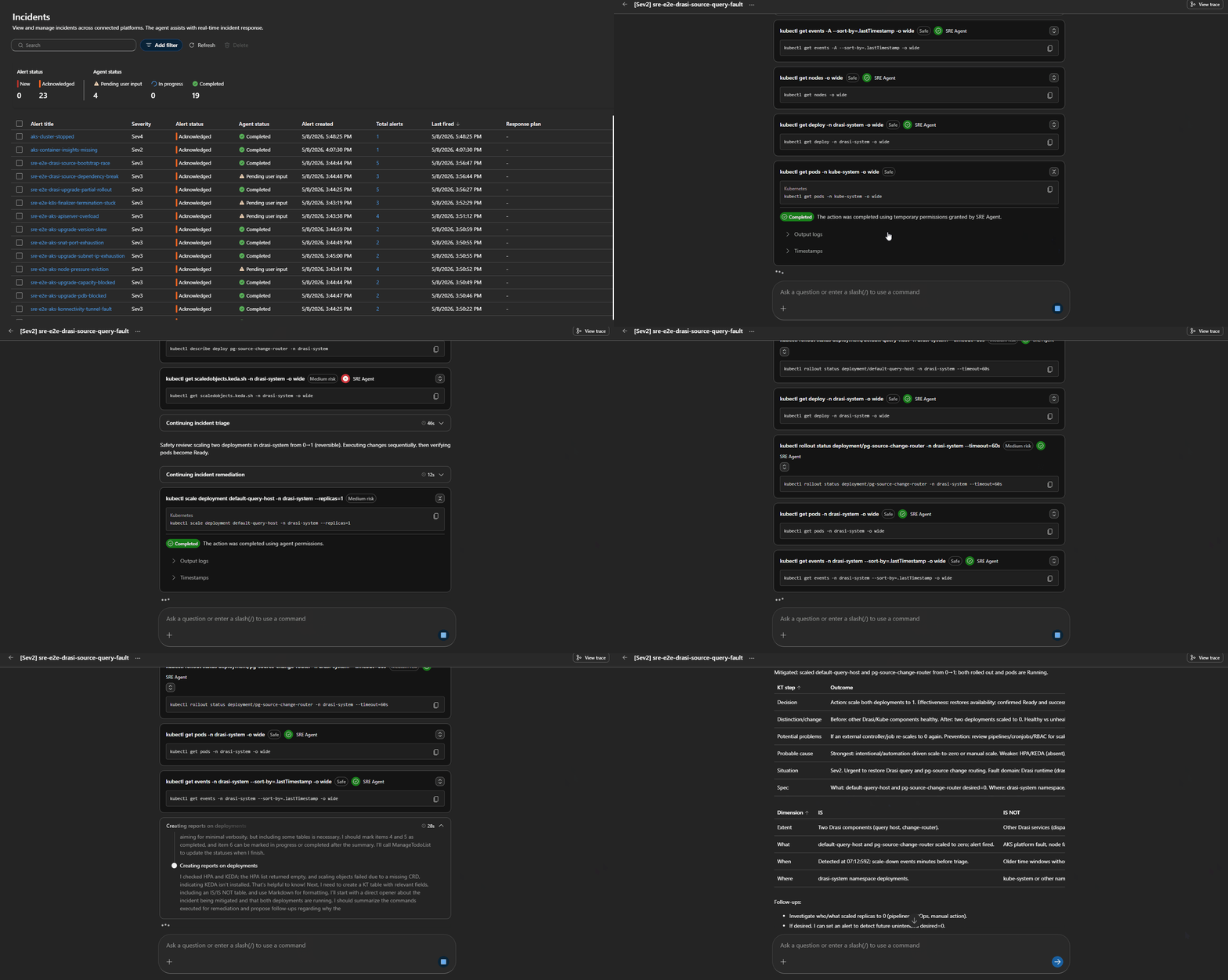
Every investigation is recorded as a session in the Azure portal. The session details include:
- Alert metadata and triggering conditions
- Response plan and agent sequence
- Detailed tool calls (
kubectl, Log Analytics queries, REST API calls) - Collected evidence and reasoning trace
- Proposed or enacted remediation steps
- Structured Kepner-Tregoe IS/IS NOT problem tables forcing clarity on what is not faulty
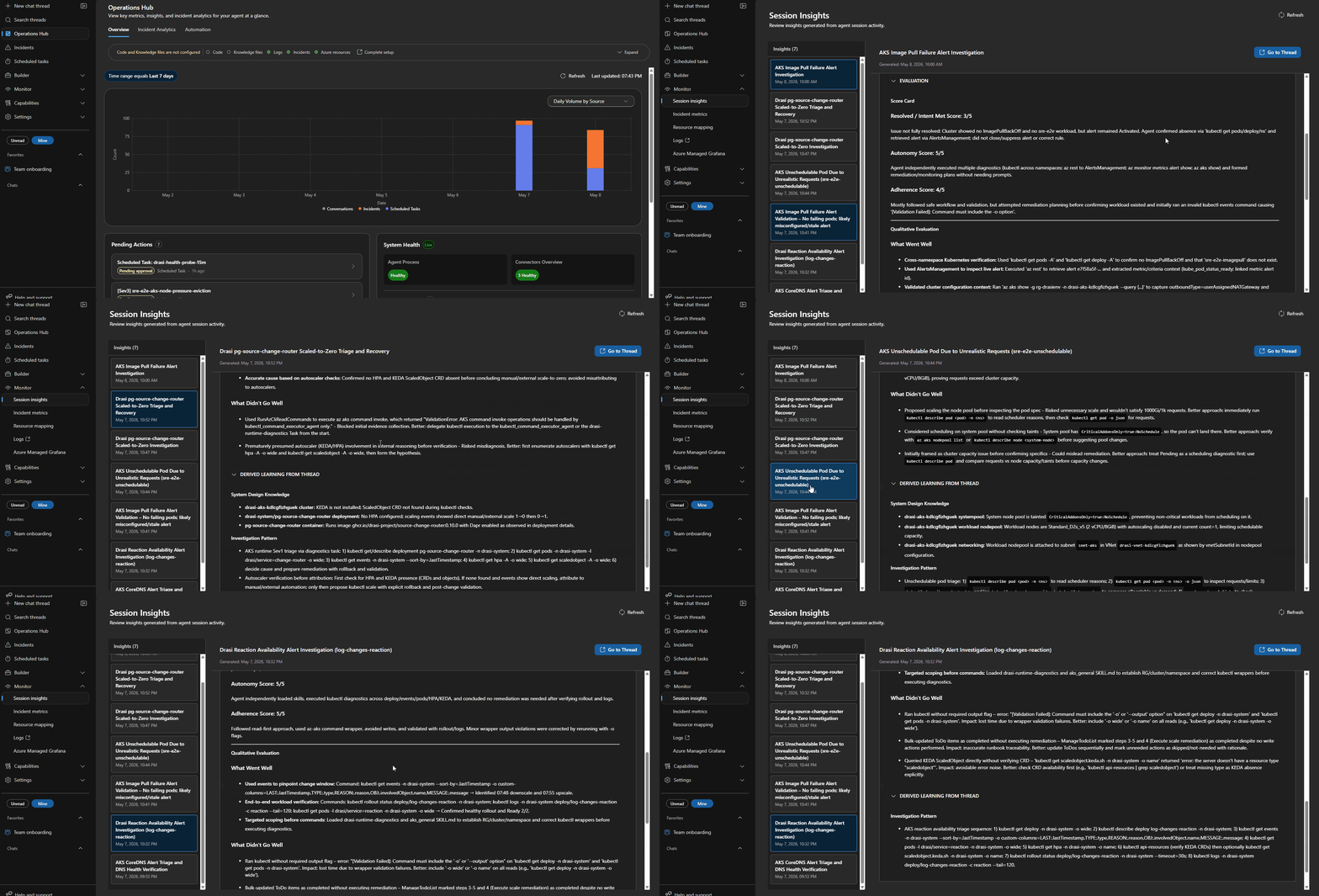
Session Insights help improve agent accuracy over time by uncovering gaps and redundant calls.
Querying the agent's own telemetry via Application Insights helps spot slow or failed skill invocations not obvious in session views:
dependencies
| where cloud_RoleName == "sre-agent"
| where timestamp > ago(1h)
| project timestamp, name, duration, success
| order by timestamp desc
5. Scheduled Health Checks and Fault Injection
Proactive monitoring through scheduled natural-language tasks automatically produces health summaries and resilience reports:
| Task | Purpose |
|---|---|
| drasi-health-probe-15m | Recurring AKS and Drasi health probe |
| drasi-daily-resilience-report | Daily operational risk and resilience summary |
Synthetic alerting validates response plan routes without causing real harm:
az monitor metrics alert create \
  --resource-group <resource-group> \
  --name sre-e2e-aks-admission-webhook-failure \
  --scopes <aks-cluster-resource-id> \
  --description "Synthetic route validation. Expected route: aks-admission-webhook-failure" \
  --severity 3 \
  --evaluation-frequency 1m \
  --window-size 5m \
  --condition "avg kube_node_status_allocatable_cpu_cores > 0" \
  --action <sre-agent-action-group-resource-id> \
  --auto-mitigate false
⚠️ Always disable synthetic alerts after validation to avoid burning tokens and increasing alert fatigue.
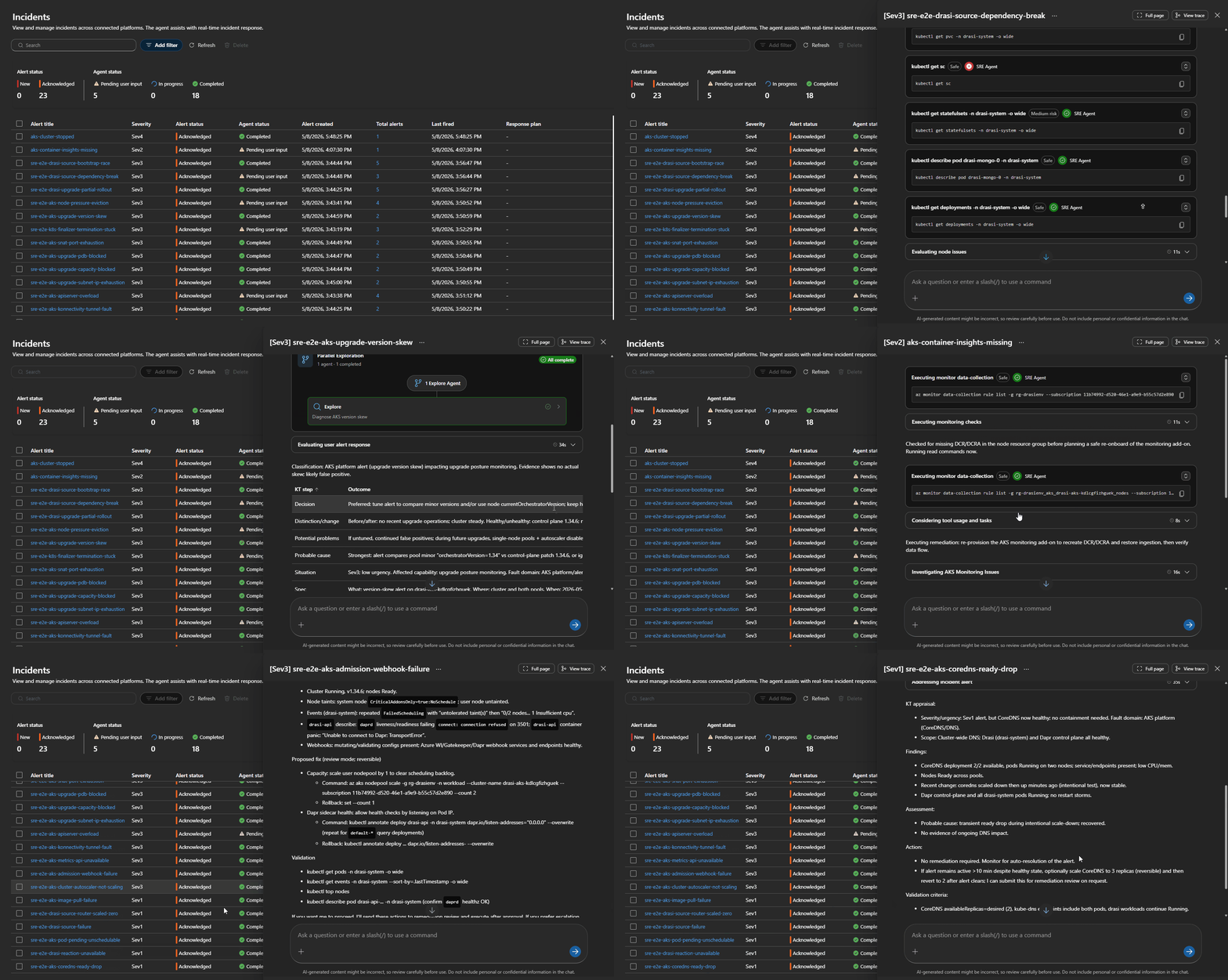
Simulated failure injections validate end-to-end routing and agent response.
6. Real Incident Discovery: Container Insights Pipeline Failure
Testing revealed a broken AKS telemetry pipeline: ama-logs pods ran, but no recent data arrived in crucial logs like KubePodInventory and ContainerLogV2. The root cause was missing Data Collection Rules (DCR) or DCR associations, resulting in blind monitoring.
Alert query detecting it:
KubePodInventory
| where TimeGenerated > ago(30m)
| summarize CurrentRows=count()
| where CurrentRows == 0
This routes to aks-monitoring-agent-fault, triggering human review before rerunning onboarding steps. It highlighted how platform-level diagnostics must precede application troubleshooting to avoid costly misdiagnosis.
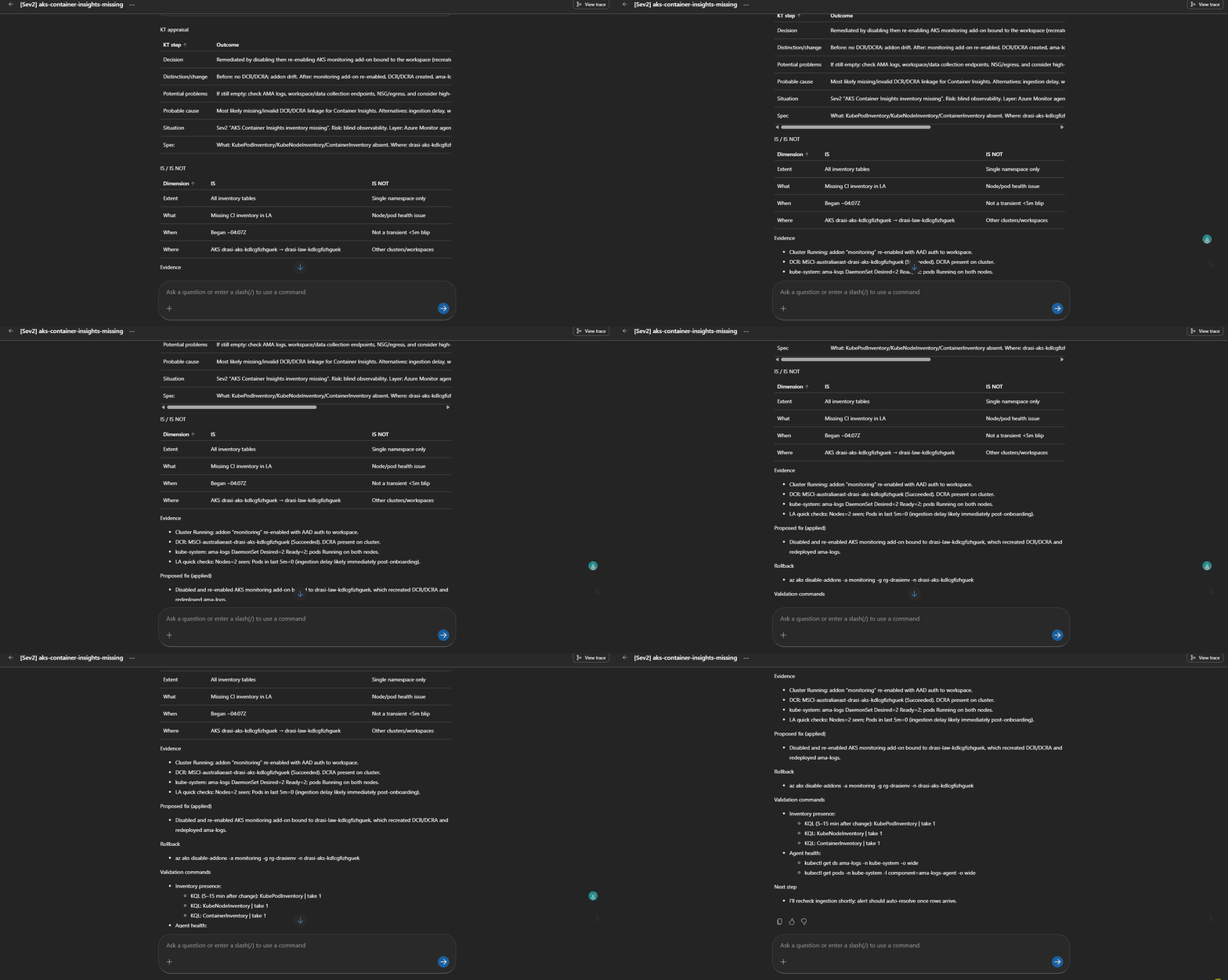
Agent diagnosing and proposing fix for missing Container Insights telemetry.
7. Drasi-Specific Failure Handling
Drasi has domain-specific failure modes, such as the drasi-source-bootstrap-race, where a Continuous Query is created before its Source connects properly. The remediation is narrowly scoped:
- Confirm Source health
- Inspect Continuous Query status and provider logs
- Delete and recreate the problematic Continuous Query only
No cluster restarts or broad changes are triggered.
Targeted remediation for Drasi source-bootstrap race condition.
Quick Tips & Tricks
-
Route Incidents by Failure Phase First
Establish routing logic that classifies alerts by lifecycle phase (creation, pending, metrics blind) before product-specific diagnosis to triage efficiently. -
Enable Agent Tools Explicitly for Connectors
Connector health alone does not enable tools. UseEnable-AgentToolsto assign tools to agents and ensure live documentation and code search is accessible during investigations. -
Limit Autonomous Actions to Low-Risk Remediations
Restrict autonomy to operations like cluster start/stop. Escalate complex or unsafe actions to human reviewers. -
Use Sessions to Continuously Improve Skills
Review session traces after incidents to identify wasted tool calls, unexpected routing, or missing evidence and update skills accordingly. -
Deploy Synthetic Alerts Temporarily for Validation
Use synthetic alerting to confirm routing and skill invocation without impacting production, then delete to prevent alert fatigue. -
Monitor Observability Pipelines Separately
Add explicit alerts for telemetry pipeline health to avoid blind spots that hamper incident resolution efforts.
Conclusion
This Azure SRE Agent blueprint for AKS and Drasi demonstrates how tightly integrated automation, structured runbooks, and scoped autonomy can improve reliability without compromising safety. By separating concerns between platform and application workloads, routing incidents by failure phase, and layering domain-specific diagnostics, the agent streamlines incident triage and response across complex containerized ecosystems.
Lessons from synthetic testing and real incident discovery reinforce the importance of observability pipeline health and careful management of connector tooling. The blueprint’s modular, versionable deployment with Azure Developer CLI provides a repeatable foundation for operational excellence.
The future of SRE Agents lies in embracing them as operational platforms with deliberate guardrails, continuous tuning via session insights, and controlled autonomous actions. This approach ensures they remain boring—in the best possible way—and reliable aides rather than black-box chatbots.
References
- Running Azure SRE Agent for AKS and Drasi Operations — Original detailed walkthrough by Luke Murray
- Azure SRE Agent Overview — Official Microsoft Documentation
- Azure Kubernetes Service (AKS) Monitoring — Monitoring and Diagnostics
- Azure Developer CLI (azd) azd up Workflow — Deploying cloud resources with azd
- Drasi Documentation — Change-Driven Architecture runtime reference
- Troubleshoot Container Log Collection — Diagnosing telemetry ingestion problems