Deduplicate Azure Bicep Parameter Files Using Extendable Parameters
Deduplicate Azure Bicep Parameter Files Using Extendable Parameters
Date: 2026-08-04
Learn how to eliminate duplication in Azure Bicep parameter files using extendable parameters, base inheritance, and overrides for efficient multi-environment deployments.
Tags: ["Azure", "Bicep", "Infrastructure-as-Code", "DevOps", "AgentSkill"]
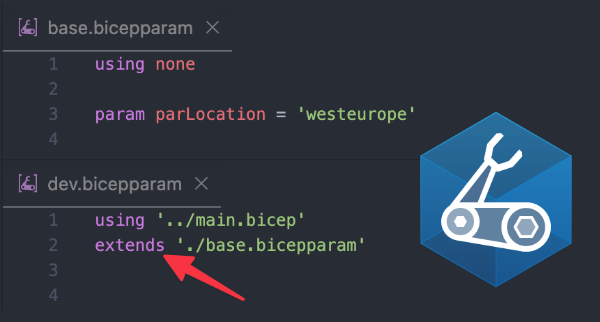
Illustration of extendable parameters in Azure Bicep (source: John Lokerse)
When managing Infrastructure as Code (IaC) with Azure Bicep, one common challenge is handling parameter files across multiple environments—development, testing, acceptance, and production. Typically, these environments share many parameter values but also require environment-specific overrides. Copy-pasting full parameter files for each environment leads to tedious duplication and risks that configurations go out of sync.
This post dives into the powerful capability introduced in Bicep CLI v0.44.1+: extendable parameter files. They let you cleanly inherit shared parameters from a central base parameter file, then override only the necessary values per environment. This approach dramatically reduces duplication and the chance of configuration drift.
We’ll start by exploring the concepts behind extendable parameter files, including the use of the extends and base keywords and how the precedence works. Then, we’ll walk through a real-world example demonstrating how to effectively apply these to deploy model workloads across environments. Finally, you’ll see a handy agent skill that automates deduplication of Bicep parameters for teams with many environments.
Architecture Overview
┌────────────────────────────────────────────┐
│Architecture                                │
├────────────────────────────────────────────┤
│• Enterprise data sources                   │
│• Foundry platform                          │
│• AI applications                           │
└────────────────────────────────────────────┘
Key Technical Observations
-
extendskeyword enables parameter inheritance — Environment-specific.bicepparamfiles can declareextends './base.bicepparam'to automatically incorporate shared values without manual copying. -
basekeyword grants selective parameter overrides — When overriding complex parameters like objects or arrays, you can usebase.<paramName>with the spread operator to modify only parts of the inherited parameter rather than re-defining it fully. -
Order of precedence follows environment → base → template defaults — If a parameter is defined in the extended file, it takes precedence; if not, the base file’s value is used; otherwise, the Bicep template’s default applies.
-
Complex arrays can be transformed safely in overrides — The production example shows iterating over an inherited array, spreading each object, and replacing the
capacityproperty without duplicating other fields. -
Chaining parameter files is supported — Multiple parameter files that use
using nonecan extend one another, enabling hierarchical inheritance e.g.base.bicepparam→dev-base.bicepparam→dev.bicepparam. -
Agent skill automates deduplication — The
deduplicate-bicep-parametersskill analyzes parameter files, extracts duplicates into base files and rewrites environment files to extend, saving manual effort and minimizing human error.
How It Works
What Are Extendable Parameter Files?
Deploying the same Bicep template across environments typically means replicating parameter files with many identical values and a few differences. For example:
// dev.bicepparam
using './main.bicep'

param parSkuName = 'Standard'
param parLocation = 'westeurope'
// prod.bicepparam
using './main.bicep'

param parSkuName = 'Premium'
param parLocation = 'westeurope'
Without extendable parameter files, the parLocation is repeated verbatim, risking outdated values or inconsistencies.
The solution is to create a base.bicepparam that holds shared values:
using none

param parLocation = 'westeurope'
param parSkuName = 'Standard'
Then environment files use:
using './main.bicep'

extends './base.bicepparam'

param parSkuName = 'Premium' // overrides only what's different
This simplifies maintenance dramatically.
The base Keyword and Spread Operator
For complex parameters (objects/arrays), re-assigning a parameter replaces the whole value, often requiring duplication.
To avoid this, Bicep exposes a base keyword in extended parameter files to access inherited values.
You can selectively override parts of an object:
param parAppConfiguration = {
  ...base.parAppConfiguration
  skuName: 'Premium'
}
Similarly, for arrays, you can extend the inherited list:
param parLocations = [
  ...base.parLocations
  'swedencentral'
]
This technique cleanly modifies inherited structures without repetition.
Order of Precedence
Bicep applies parameters in this order:
| Order | Description |
|---|---|
| 1. Value in extended file | Takes highest priority when defined |
| 2. Value in base file | Used if not overridden in extended file |
| 3. Default in Bicep template | Used if neither extended nor base define the value |
This precedence is visually explained in the following images from the source:
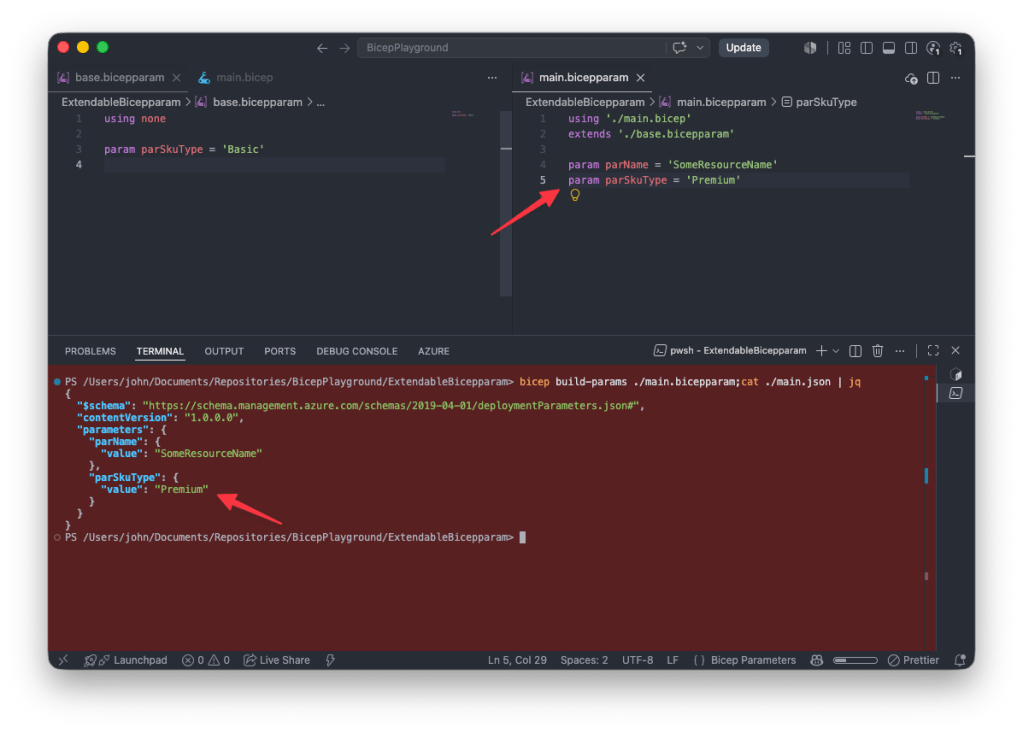
Extended parameter file overrides base parameter values (source: John Lokerse)
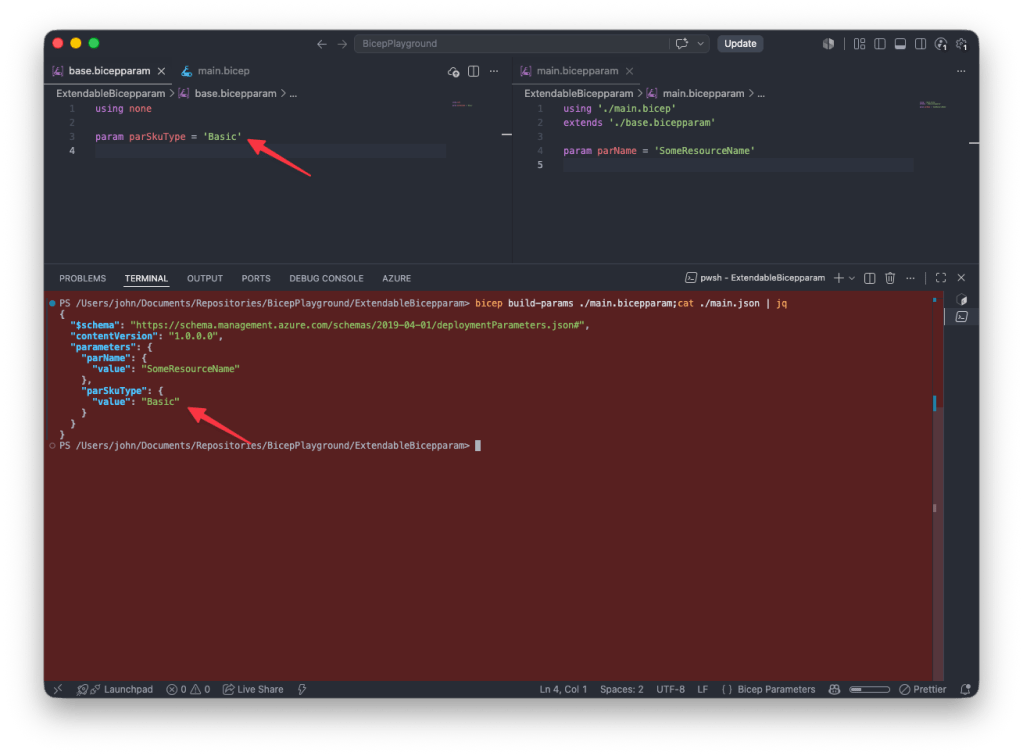
Base parameter file value used when no override in extended file (source: John Lokerse)

Template default applies if value is missing in both parameter files (source: John Lokerse)
Extendable Parameters in Action: Multi-Environment Model Deployment
Consider deploying AI model workloads defined as an array of objects:
param parModelDeployments modelDeploymentType[]

type modelDeploymentType = {
  name: string
  modelVersion: string
  skuName: string
  capacity: int
}
The base.bicepparam specifies common model configs:
using none

param parLocation = 'westeurope'

param parModelDeployments = [
  {
    name: 'gpt-5.4'
    modelVersion: '2026-03-05'
    skuName: 'DataZoneStandard'
    capacity: 1000
  }
  {
    name: 'gpt-5.1'
    modelVersion: '2025-11-13'
    skuName: 'DataZoneStandard'
    capacity: 1000
  }
]
The development file inherits all from base and only sets environment letter:
using './main.bicep'

extends './base.bicepparam'

param parEnvironmentLetter = 'd'
For production, only capacities change, so the prod.bicepparam uses a variable map and array comprehension to selectively override capacity without repeating other fields:
using './main.bicep'

extends './base.bicepparam'

var varCapacities = {
  'gpt-5.4': 3000
  'gpt-5.1': 3000
}

param parEnvironmentLetter = 'p'

param parModelDeployments = [
  for modelProperties in base.parModelDeployments: {
    ...modelProperties
    capacity: varCapacities[modelProperties.name]
  }
]
This approach keeps shared values in one place, minimizes error, and makes changes easier.
Inspecting the Fully Resolved Production Parameters
You can generate and inspect the resolved parameters as JSON:
bicep build-params prod.bicepparam
Resulting JSON shows inherited and overridden values combined:
{
  "parameters": {
    "parEnvironmentLetter": { "value": "p" },
    "parLocation": { "value": "westeurope" },
    "parModelDeployments": {
      "value": [
        {
          "name": "gpt-5.4",
          "modelVersion": "2026-03-05",
          "skuName": "DataZoneStandard",
          "capacity": 3000
        },
        {
          "name": "gpt-5.1",
          "modelVersion": "2025-11-13",
          "skuName": "DataZoneStandard",
          "capacity": 3000
        }
      ]
    }
  }
}
Quick Tips & Tricks
-
Ensure Bicep CLI v0.44.1 or newer — The extendable parameters feature requires this minimum version for compatibility.
-
Use
using nonein base parameter files — This detaches the base file from any specific template, making it usable as a universal base. -
Leverage the spread operator with
basekeyword — To avoid full redefinition, selectively override only fields that differ in objects and arrays. -
Chain multiple parameter files for complex hierarchies — You can create layered base files (e.g., global base → environment base → environment overrides) for greater modularity.
-
Remember: only one
extendsper parameter file — You cannot extend multiple base files directly; plan inheritance accordingly. -
Use the Deduplicate Bicep Parameters Agent Skill — Automate extracting common parameters into base files and updating environment files, saving time on large projects.
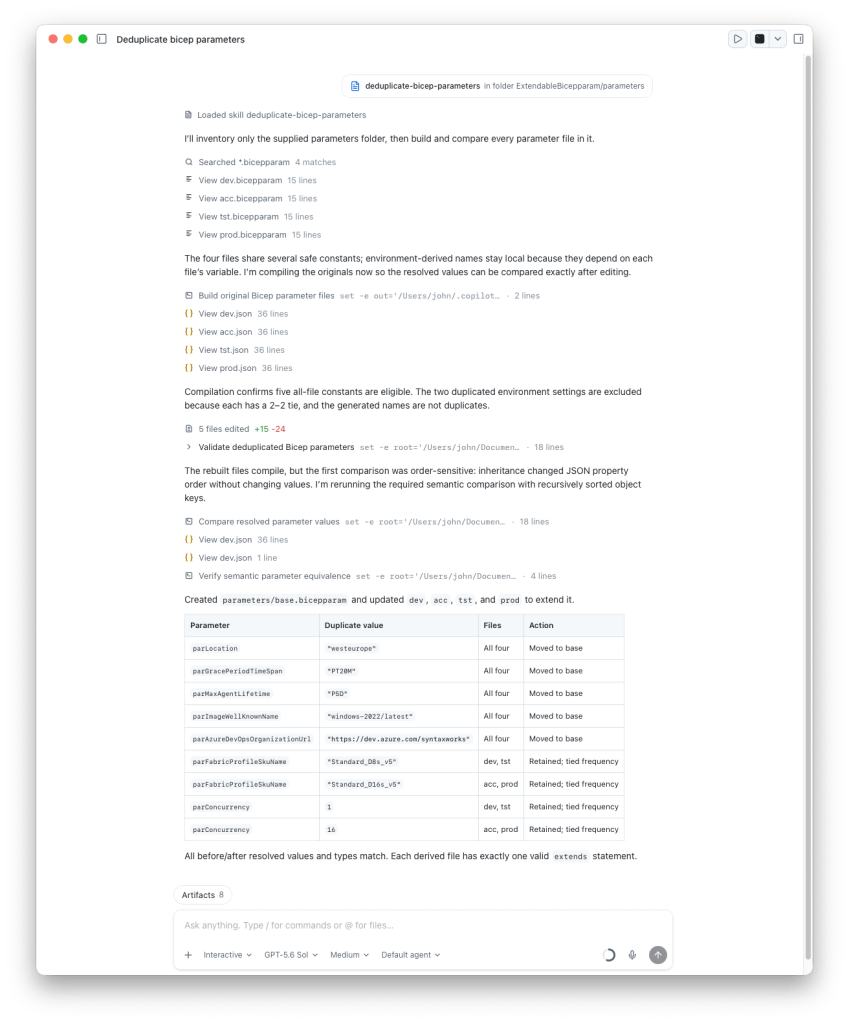
Agent skill automatically refactors Bicep parameter files (source: John Lokerse)
Conclusion
Extendable parameter files bring a crucial improvement to managing Azure Bicep deployments across multiple environments. By defining common parameters once in a base file and extending them with environment-specific overrides, you eliminate duplication and reduce maintenance overhead. The ability to selectively override parts of complex objects or arrays further enhances flexibility and keeps parameter files concise and coherent.
Combining these features with agent automation to deduplicate parameters allows teams to maintain large-scale IaC deployments with minimized risk of configuration drift and greater confidence in environment parity.
As Azure Bicep and its ecosystem continue to evolve, this inheritance model empowers infrastructure engineers to build more maintainable, scalable, and reliable deployment pipelines.