Deep Dive into Microsoft Copilot Studio’s April 2026 Update: Smarter Agent Governance, Intelligent Workflows, and Connected Apps
Deep Dive into Microsoft Copilot Studio’s April 2026 Update: Smarter Agent Governance, Intelligent Workflows, and Connected Apps
Date: 2026-05-14
Explore how the April 2026 update to Microsoft Copilot Studio elevates AI agent governance, workflow intelligence, and seamless app integration to empower scalable automation with confidence.
Tags: ["Microsoft Copilot Studio", "Agent Governance", "Intelligent Workflows", "Automation", "AI Integration"]
AI agents promise to revolutionize enterprise productivity by automating complex workflows and delivering actionable insights across business applications. Yet as organizations grow the number and scope of agents, IT teams often wrestle with maintaining clear visibility, governance, and cost predictability. Deploying powerful automation without sacrificing control is a challenge at the heart of scaling intelligent systems.
Microsoft’s April 2026 update to Copilot Studio directly addresses these challenges, introducing a rich set of improvements that help organizations build, govern, and scale AI-driven agents with renewed confidence. From enhanced agent performance visibility and centralized governance through the new Agent 365 platform, to embedding AI-powered agent nodes inside deterministic workflows, these updates strike a balance between flexibility and control.
In this post, we walk through the key new features unveiled in Copilot Studio’s latest release, illustrate how they enable better admin oversight and operational reliability, and explore how seamless integration with Microsoft 365 and partner apps transforms agents from isolated helpers to connected, actionable collaborators.
Architecture Overview
┌─────────────────────────────────────────────────────────┐
│               Enterprise Data & Business Apps           │
├─────────────────────────────────────────────────────────┤
│ • Microsoft 365 (Teams, Word, Excel, PowerPoint)        │
│ • Dynamics 365 (Sales, Customer Service)                 │
│ • Partner Apps (Adobe Express, Figma, Box, Monday.com)  │
└─────────────────────────────────────────────────────────┘
              ↓                     ↓                     ↓
┌─────────────────────────────────────────────────────────┐
│                 Microsoft Copilot Studio                │
├─────────────────────────────────────────────────────────┤
│ • Agent Authoring & Analytics Viewer Role               │
│ • Workflow Designer with Embedded Agent Nodes           │
│ • Agent Store & App Integrations                         │
│ • Agent Usage Estimator & Cost Visibility                │
└─────────────────────────────────────────────────────────┘
              ↓                     ↓                     ↓
┌─────────────────────────────────────────────────────────┐
│               Centralized Agent Governance              │
├─────────────────────────────────────────────────────────┤
│ • Microsoft Agent 365 Control Plane                      │
│ • Admin-Controlled Security Policies & DLP              │
│ • Cross-System Lifecycle & Audit Oversight              │
└─────────────────────────────────────────────────────────┘
This architecture highlights how Copilot Studio ties together enterprise data sources and user-facing business applications with an advanced authoring environment and centralized governance. The new Agent 365 platform acts as the control plane ensuring consistent policy enforcement and lifecycle management, crucial for scaling complex multi-agent ecosystems.

Copilot Studio April 2026 update overview — Microsoft
Key Technical Observations
-
Centralized Multi-Agent Governance with Agent 365 — This new control plane integrates agents across Microsoft 365 and partner ecosystems into a single management layer, allowing unified security, permissions, and monitoring policies. This represents a shift from isolated agent management toward platform-wide governance at scale.
-
Agent Analytics Viewer Role — Introducing fine-grained operational visibility that separates monitoring from agent modification rights reduces risk while enabling broader stakeholder involvement in performance oversight. This role-based access control model maintains strict production stability.
-
Embedded Agent Nodes in Deterministic Workflows — Instead of static logic-only automations, workflows can now dynamically delegate decision making to AI agents as embedded nodes. This hybrid design blends adaptability of AI with IT’s preference for predictable, auditable automation pipelines.
-
Integration of Model Context Protocol (MCP) with Workflows — Enabling workflows to securely connect with MCP server-enabled tools promotes cross-system orchestration within Microsoft compliance boundaries, facilitating robust, governed multi-system automation scenarios.
-
Apps-in-Agents Framework — Bringing rich app actions (e.g., Power Apps, Dynamics 365, Adobe Express) inside Copilot chat sessions empowers a seamless “insight-to-action” experience, reducing context switching and accelerating business process execution.
-
GPT-5.5 Model Inclusion and Work IQ Enhancements — The availability of GPT-5.5 Reasoning model and Work IQ API preview enhances agents’ analytical depth, multi-agent communication, and organizational intelligence integration, pushing forward Copilot’s AI capabilities.
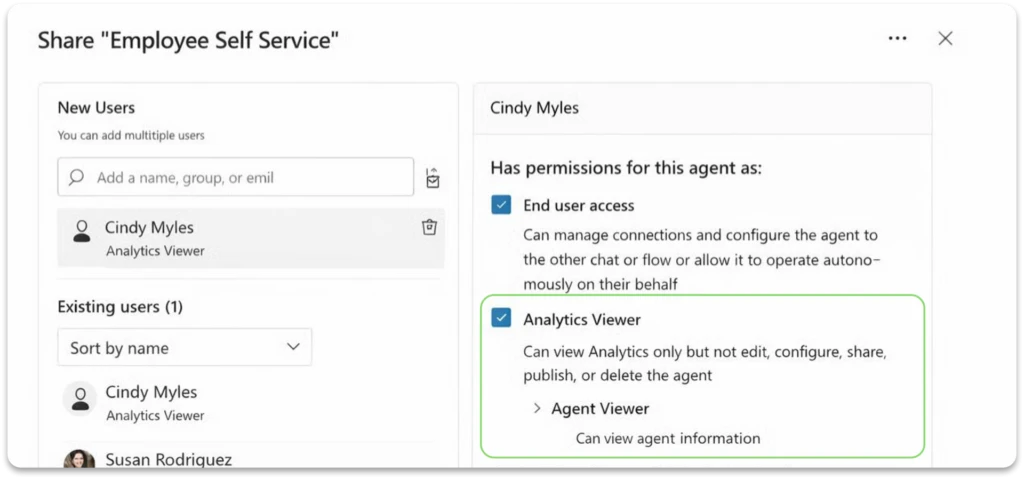
Analytics Viewer role enables read-only performance insights — Microsoft
How It Works: Intelligent Agent & Workflow Integration
Building and Monitoring Agents with Enhanced Visibility
Administrators start with the Copilot Studio authoring experience, where newly surfaced agent status indicators provide immediate security and performance insights. For example, if an agent has authentication gaps or conflicts with security policies, the system flags these issues instantly for remediation. This reduces guesswork and expedites problem resolution.
The Analytics Viewer role lets operational stakeholders access detailed, read-only analytics dashboards without risking misconfiguration. This clean separation supports collaborative monitoring while keeping production environments safe.
Designing Adaptive Workflows with Embedded Agents
Copilot Studio’s workflow designer now supports agent nodes that act as delegated reasoning or content-generation steps within a deterministic automation pipeline. Instead of relying solely on fixed logic, these nodes invoke AI agents to analyze inputs, make decisions, or generate outputs dynamically.
{
  "workflow": [
    { "step": "Extract Contract Data" },
    { "step": "Agent Node - Validate Terms", "agent": "ContractReviewAgent" },
    { "step": "Approval Routing" }
  ]
}
During development, teams can test individual workflow steps with sample inputs, allowing iterative debugging and ensuring behaviors align with requirements before deployment.
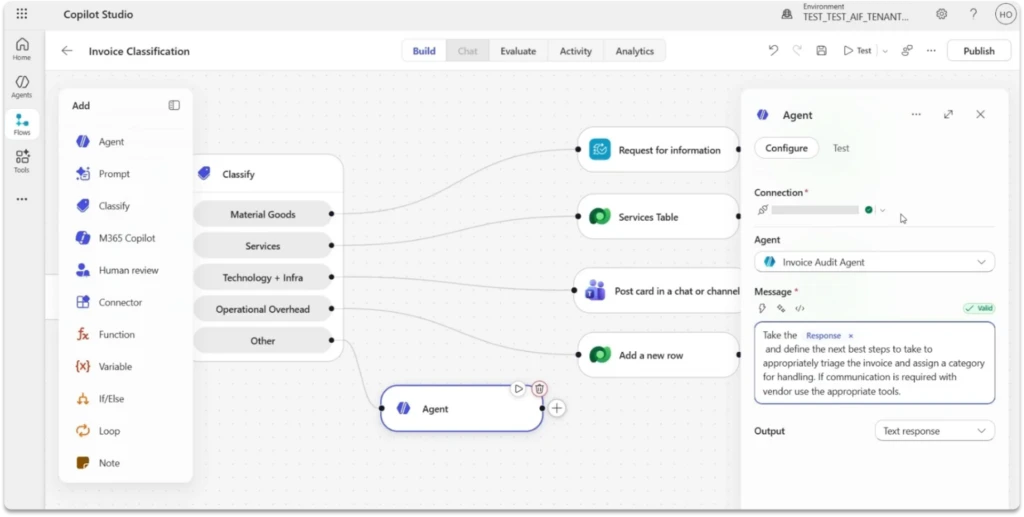
Agent nodes embedded in workflows enable dynamic AI reasoning — Microsoft
Scaling Automation with Governance and Security
Workflows integrate with MCP server-enabled tools to interact safely with diverse business systems under Microsoft’s compliance framework. Admins apply centralized policies such as Data Loss Prevention (DLP) consistently across all workflow agents, ensuring that expansion does not weaken security posture.
The Microsoft Agent 365 control plane monitors agent inventories, permissions, and activity across environments—spanning from Copilot Studio to partner agents—giving teams a comprehensive view and lifecycle oversight.
Enabling Seamless Action via Apps in Agents
The “apps in agents” capability brings interactive applications like Adobe Express, Power Apps, and Dynamics 365 directly into Copilot Chat. Users can review analytics, modify records, or approve workflows inline without leaving the conversational context.
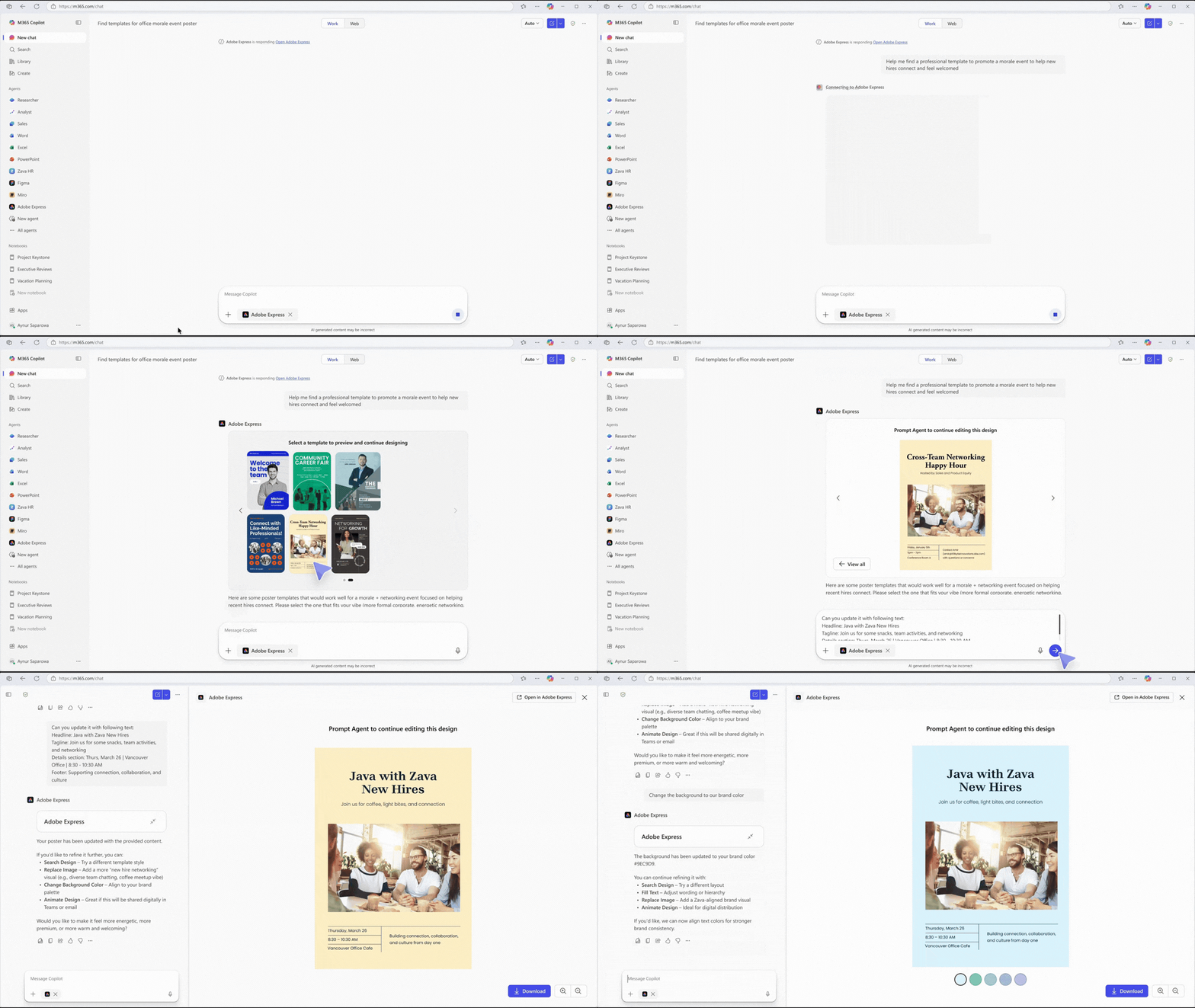
Embedded Adobe Express in Copilot Chat streamlines design workflow — Microsoft
This unified experience blends task execution with natural language interaction, reducing friction and enabling faster completion of business processes.
Quick Tips & Tricks
-
Leverage Analytics Viewer for Broad Stakeholder Buy-In — Use this read-only role to provide meaningful agent performance insights to business analysts and operations teams without risking production changes.
-
Embed Agents in Workflows to Balance Flexibility and Control — Replace rigid logic steps with agent nodes to handle nuanced decisions while maintaining auditability and predictability.
-
Plan Costs Early with the Expanded Agent Usage Estimator — Forecast consumption of both Copilot Studio and Dynamics 365 agents in one place to avoid unexpected cost overruns during scaling.
-
Adopt Agent 365 for Centralized Governance — Consolidate agent lifecycle, permission, and security policy management across your entire multi-agent environment for consistency and compliance.
-
Integrate Trusted Apps through the Agent Store — Enhance agent capabilities quickly by adding partner-built integrations like Box or Monday.com, while maintaining enterprise-grade control.
-
Experiment Early with GPT-5.5 Reasoning — Utilize the advanced analysis model available in early release cycles to boost agent intelligence where deeper reasoning is critical.
Conclusion
Microsoft Copilot Studio’s April 2026 update marks a significant milestone toward maturation of the agent ecosystem — transforming isolated AI automations into governed, intelligent workflows seamlessly integrated with business applications. The introduction of Agent 365 as a centralized governance plane and the embedding of AI agents directly inside workflows empower teams to scale automation while maintaining visibility, security, and cost control.
With expanded capabilities like apps in agents and the Work IQ API, Microsoft is positioning Copilot Studio as a robust platform not just for agent creation, but for operationalizing AI at enterprise scale. As AI agents become core to business processes, these advances help organizations build trust and confidence in complex, multi-agent automation systems.
The trajectory suggests deeper integration, richer AI reasoning, and broader cross-system orchestration in future releases. For organizations looking to harness AI agents responsibly at scale, Copilot Studio’s newest features offer a compelling foundation to achieve both innovation and governance.
References
- New and improved: Agent governance, intelligent workflows, and connected app experiences - Microsoft Copilot Blog — Official announcement of Copilot Studio’s April 2026 update.
- Agent 365 Overview — Learn about the centralized agent governance platform.
- Apps in Agents — Detailed info about integrating apps directly into agents.
- Workflows in Copilot Studio — Documentation on building workflows combining deterministic steps and AI agents.
- GPT-5.5 Reasoning Model — Early release insights on new AI model capabilities.
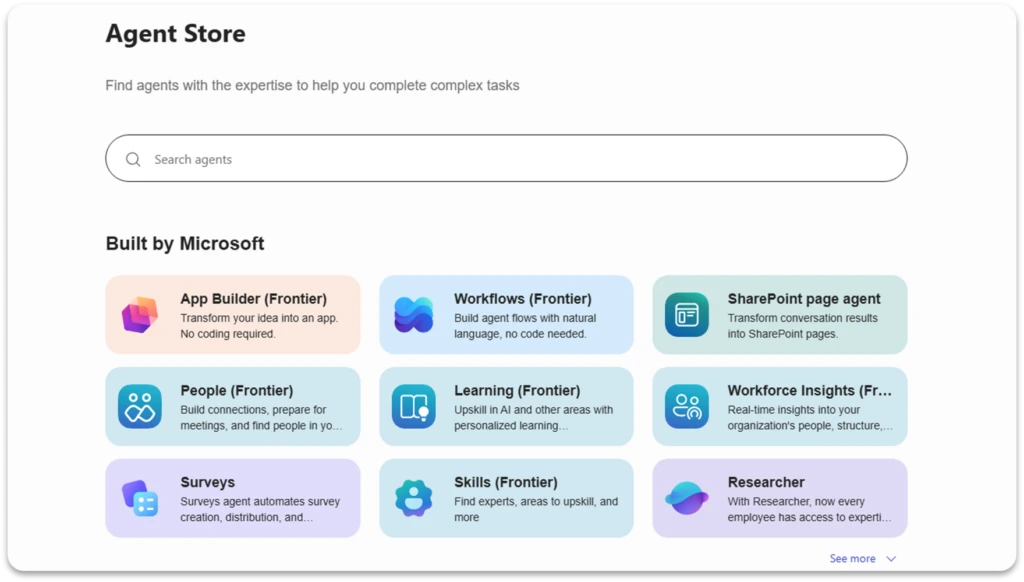
Agent Store allows extending agents with trusted partner integrations — Microsoft