Introducing Copilot Portraits: A More Immersive Voice-Driven AI Experience
Introducing Copilot Portraits: A More Immersive Voice-Driven AI Experience
Date: 2026-03-17
Discover how Microsoft’s new Copilot Portraits bring AI conversations to life with animated voices and stylized visuals for a natural, engaging interaction.
Tags: ["AI", "Microsoft Copilot", "Voice Interaction", "Generative AI"]
Voice interaction has transformed how we engage with technology, making conversations with AI feel more natural and intuitive. Microsoft's Copilot has long championed voice as a primary interface, allowing users to ask questions, brainstorm, and explore ideas fluidly. Yet, while voice alone is powerful, the experience can be taken much further by adding visual nuances that enhance engagement and connection.
With this in mind, Microsoft recently introduced Copilot Portraits—a vibrant expansion of the voice experience designed to add personality and emotional cues to AI conversations. These animated, stylized portraits sync in real time with Copilot’s voice, creating a richer, more immersive dialogue that feels less like text on a screen and more like interacting with a thoughtful companion.
This post dives into what Copilot Portraits are, how they enhance the AI conversation experience, and the thoughtful design decisions behind their safety, accessibility, and phased rollout strategy. If you rely on AI assistants for brainstorming, preparation, or curiosity-driven explorations, this evolution makes those interactions more engaging and relatable.
Architecture Overview
┌──────────────────────────────────────────────┐
│              Voice & Visual Layer             │
├──────────────────────────────────────────────┤
│ • Animated Portraits with Lip-syncing         │
│ • Real-time Voice Synthesis                    │
│ • Visual Diversity & Stylization               │
└──────────────────────────────────────────────┘
                     ↓
┌──────────────────────────────────────────────┐
│               Microsoft Copilot Core          │
├──────────────────────────────────────────────┤
│ • AI Language Understanding & Generation      │
│ • Contextual Conversation Management           │
│ • Safety Filters & Guardrails                   │
└──────────────────────────────────────────────┘
                     ↓
┌──────────────────────────────────────────────┐
│                User Interaction Layer          │
├──────────────────────────────────────────────┤
│ • Copilot Labs Portal for Portrait Selection   │
│ • Voice Input Controls                          │
│ • Usage Policies (Age Limits, Time Caps)        │
└──────────────────────────────────────────────┘
This architecture reflects a conceptual integration of animated visual elements with Copilot’s core AI capabilities, governed by user experience controls and safety mechanisms as described by Microsoft.
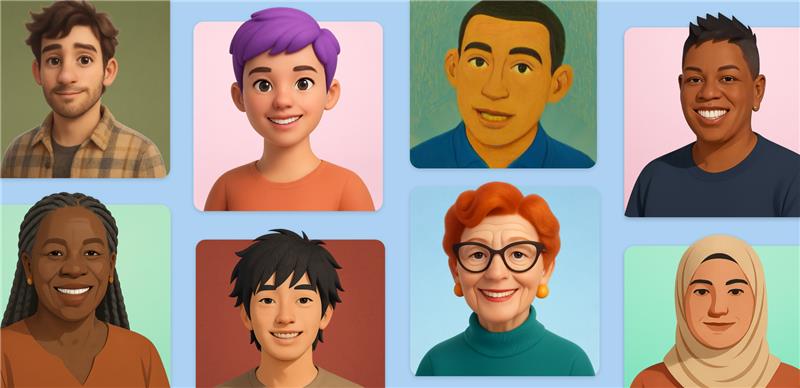
Stylized Copilot Portraits breathe life into conversations, adding unique visual cues to the voice interaction experience. — Source: Microsoft Copilot Blog
Key Technical Observations
-
Real-Time Audio-Visual Synchronization — Copilot Portraits employ advanced lip-sync and animation techniques that match voice output in real time, enabling a natural flow as if conversing with a person rather than a text box.
-
Stylized, Non-Photorealistic Design — The portraits emphasize artistic variety over photorealism, balancing engaging visuals with privacy and safety concerns by intentionally avoiding overly lifelike representations.
-
Integrated Safety and Usage Controls — Leveraging Copilot’s existing guardrails, the Portrait feature adds mechanisms such as daily time limits and age restrictions (18+) to promote healthy AI interactions and prevent misuse.
-
Phased Rollout via Copilot Labs — Microsoft’s limited initial availability in select countries lets users experiment within a controlled environment, enabling iterative feedback-driven improvements before broad release.
-
Voice as Central Interaction Pillar — Reinforcing voice as the preferred input, Copilot Portraits enrich the experience without replacing it, harnessing voice as the connective thread between user and AI intelligence.
-
Accessibility and Familiarity Focus — By offering visual cues and customizable voices, the feature aims to make AI interactions more relatable to diverse user preferences and use cases such as brainstorming or interview practice.
How It Works
Selecting and Engaging with a Portrait
Users begin by entering the Copilot Labs section dedicated to Portraits on the Microsoft Copilot platform. Here, they can browse a curated gallery of 40 animated portraits—each uniquely styled—and pick the one that resonates most personally or contextually. Next, users select a voice to pair with the portrait, allowing them to customize the persona’s tone and style.
Voice Input and Visual Feedback Loop
Once engaged, users interact with their chosen portrait primarily by voice. Copilot uses advanced natural language processing to understand and respond contextually. Simultaneously, the portrait animates in sync with the AI-generated speech via lip movement, facial expressions, and subtle gestures that mirror the tone and pace of the conversation.
This combined output creates a multidimensional interaction experience that aligns vocal cues with visual signals, supporting clearer communication and deeper engagement.
Safety and Guardrails in Action
The system integrates Microsoft's trusted content filters and AI guardrails to monitor conversational context, ensuring interactions remain appropriate and safe. Additionally, usage is throttled to enforce time limits per session and per day, promoting balanced and responsible AI usage.
Users are clearly informed when interacting with AI-powered avatars, reinforcing transparency. Furthermore, the feature is restricted to adults (18+) to comply with ethical AI deployment standards.
Quick Tips & Tricks
-
Explore Multiple Portrait Styles — Experiment with different portraits to find a visual style that boosts your comfort and creativity during brainstorming or practicing conversations.
-
Use Voice Input for Fluid Dialogue — Take advantage of voice rather than typing to maintain the natural conversational rhythm enhanced by the portrait’s animations.
-
Be Mindful of Session Limits — Track your session durations and daily usage to stay within time allotments and avoid disrupting your workflow.
-
Leverage Portraits for Interview Prep — Use the immersive experience to rehearse answers and receive instant, AI-generated feedback in a more engaging format.
-
Provide Feedback via Copilot Labs — Since this is a preview feature, contributing usage feedback helps improve the feature’s evolution and eventual broad availability.
-
Keep Updates Current — Ensure your Copilot app stays updated for the latest performance improvements and new portraits as they roll out.
Conclusion
Copilot Portraits represent a significant step forward in AI-human interaction, marrying voice with dynamic visual cues to create more engaging, natural conversations. By focusing on stylized animations instead of photorealism, Microsoft balances user immersion with privacy and safety considerations.
This deliberate, cautious rollout within Copilot Labs highlights Microsoft's commitment to responsible AI innovation, inviting user feedback while maintaining rigorous guardrails. As voice-driven AI companions continue evolving, features like animated avatars will no doubt deepen emotional connection and enhance productivity for everyday tasks.
For anyone eager to experience AI beyond text and speech alone, Copilot Portraits open a compelling new chapter in how conversational AI can feel alive and approachable.
References
-
Introducing a more immersive chat experience with Copilot Portraits | Microsoft Copilot Blog — Official announcement from Microsoft Copilot Team
-
Copilot Labs — Explore experimental Copilot features and provide feedback
-
Microsoft Copilot Features — Overview of core Copilot capabilities including voice interaction
-
How to Get Copilot — Guide for accessing Microsoft Copilot on various devices
-
Microsoft AI — Background on Microsoft’s investments and advancements in AI technology