The End of Copilot on WhatsApp: What’s Next for Your AI Companion
The End of Copilot on WhatsApp: What’s Next for Your AI Companion
Date: 2026-03-17
Copilot is leaving WhatsApp and other messaging apps due to platform policy changes. Discover how to smoothly transition to Copilot’s dedicated apps and keep enjoying AI-powered assistance.
Tags: ["Copilot", "AI Assistants", "Messaging Apps", "Microsoft"]
Since its launch in late 2024, Copilot on WhatsApp has connected millions of users with an AI companion right where they message every day. This integration brought AI assistance directly to familiar messaging environments, making AI-powered help accessible and convenient for millions worldwide.
However, a recent update to WhatsApp’s platform policies has put a stop to large language model (LLM) chatbots like Copilot on their app. Starting January 15, 2026, Copilot will no longer function on WhatsApp—and this applies to other third-party messaging apps as well.
In this post, we'll cover why this change is happening, what it means for Copilot users, and how to smoothly transition to Microsoft’s dedicated Copilot platforms across mobile, desktop, and web. We'll also explore the enhanced features you can leverage beyond messaging apps.
Architecture Overview
┌─────────────────────────────┐
│  Third-Party Messaging Apps │
├─────────────────────────────┤
│  • WhatsApp                │
│  • Other third-party apps  │
└─────────────────────────────┘
             ↓ (Access Ending Jan 15, 2026)
┌─────────────────────────────┐
│  Microsoft Copilot Platform  │
├─────────────────────────────┤
│  • AI Language Models        │
│  • Conversation Management   │
│  • Voice & Vision Integration│
│  • Multi-Device Sync         │
└─────────────────────────────┘
             ↓
┌─────────────────────────────┐
│  Official Copilot Apps & Web │
├─────────────────────────────┤
│  • Mobile app (iOS, Android) │
│  • Web interface             │
│  • Desktop apps (Windows, Mac) │
│  • GroupMe integration        │
└─────────────────────────────┘
This architecture shows the transition from third-party messaging apps—which are now closing their doors to Copilot—to Microsoft’s own Copilot ecosystem with richer AI capabilities and broader functionality.

Copilot on WhatsApp brought AI chat to everyday messaging (source: Microsoft Copilot Blog)
Key Technical Observations
-
Platform Policy Impact on AI Integration — WhatsApp’s update restricts all LLM chatbots, highlighting how platform policies can heavily influence AI companion availability and mode of deployment.
-
Unauthenticated Sessions on Messaging Apps — Copilot’s interaction on third-party apps lacks account-level authentication, which limits data continuity and chat history transferability when switching platforms.
-
Enhanced Features in Official Copilot Platforms — The dedicated apps and web client offer advanced functionality like Copilot Voice, Vision, and Mico (a companion presence), which exceed the capabilities previously found in messaging app integrations.
-
Data Privacy and Temporary Retention — Conversations on third-party platforms are deleted after roughly 30 days, aligning with privacy commitments but also urging users to export conversations pre-transition.
-
Multi-Platform Availability Strategy — Microsoft’s Copilot now spans iOS, Android, Windows, Mac, and GroupMe, demonstrating a diversified, cross-device AI strategy beyond just chat integration.
-
User Transition Facilitation — Clear instructions for exporting chat histories and deleting accounts underscore Microsoft’s commitment to a responsible and user-centric deprecation process.
How It Works: Transitioning Your AI Companion Seamlessly
Why Is Copilot Leaving WhatsApp?
WhatsApp updated its platform policies to prohibit large language model chatbots effective January 15, 2026. This change forced Microsoft to discontinue Copilot support on WhatsApp and all other third-party messaging apps.
These messaging apps do not provide the level of control needed for advanced Copilot features or authenticated user experience, making dedicated apps the logical future.
Step 1: Continue Using Copilot Until January 15, 2026
Copilot remains fully functional on WhatsApp and other messaging platforms until the cutoff date. Users should take this time to export any important chat history using each app’s built-in export tools, as chat logs cannot be migrated automatically to Copilot apps or web.
Step 2: Download Official Copilot Apps or Use the Web
Microsoft offers several official Copilot surfaces:
- Mobile apps on iOS and Android deliver enhanced conversational AI, voice, and vision features.
- Web access at copilot.microsoft.com
- Desktop apps for Windows and Mac
- GroupMe integration, providing a familiar group chat environment with AI assist capabilities.
These platforms support authenticated sessions, richer AI functionalities, data sync, and user control over privacy.
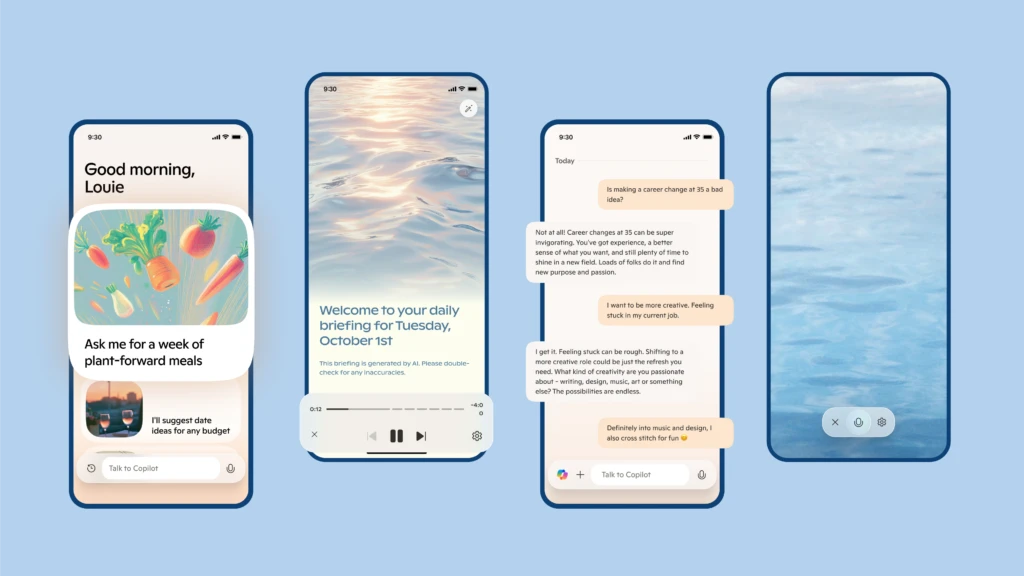
Dedicated Copilot mobile apps unlock advanced AI features (source: Microsoft Copilot Blog)
Step 3: Export Your Chat History
Because sessions on existing third-party apps are unauthenticated, Copilot cannot migrate chat conversations to official apps or web clients. Users need to export their chat history prior to January 15, 2026 using the respective messaging app’s export tools.
Step 4: Delete Accounts and Chat History on Third-Party Apps
For privacy, users can delete Copilot conversations and accounts on these apps through in-app help commands, ensuring control over their data even after the service ends on those platforms.
Quick Tips & Tricks
-
Export Chat History Early — Don’t wait until the final day. Export your conversations well before January 15, 2026, to avoid losing important data.
-
Leverage Voice and Vision on Official Apps — Take advantage of Copilot’s voice commands and vision capabilities on the mobile and desktop apps, which are not supported on third-party messaging apps.
-
Use Authenticated Sessions for Data Sync — Sign in with your Microsoft account on official platforms to keep your chat history and preferences across devices.
-
Try GroupMe for Casual AI Group Chats — If you miss messaging integrations, the Copilot on GroupMe app preserves group chat AI assistance with better feature support.
-
Stay Informed via Copilot Blog — Follow the Microsoft Copilot Blog for the latest feature updates and tips.
-
Explore Subscription Options for Extended Features — While basic access is free, certain premium AI capabilities require subscriptions; evaluate which features you need to optimize your workflow.
Conclusion
The departure of Copilot from WhatsApp and other messaging platforms marks a significant shift in how AI companions integrate into our daily communication tools. Changing platform policies are a reminder of the evolving landscape in AI deployment and data privacy.
Microsoft is steering users toward a dedicated, multi-platform Copilot ecosystem that unlocks a richer AI experience with more control, security, and features. Transitioning from third-party apps to official Copilot surfaces ensures smoother, more consistent AI assistance across devices.
Looking ahead, as Copilot expands its voice, vision, and AI-driven actions, users can expect more seamless, personalized, and powerful AI companions beyond messaging apps.
This post is based on the original announcement and FAQ from the Microsoft Copilot Blog.