Copilot Cowork: Revolutionizing Collaboration and Workflow Automation in Microsoft 365
Copilot Cowork: Revolutionizing Collaboration and Workflow Automation in Microsoft 365
Date: 2026-03-18
Discover how Copilot Cowork transforms Microsoft 365 into an execution engine, automating workflows and empowering teams to focus on what matters.
Tags: ["Microsoft 365", "AI", "Copilot", "Workflow Automation", "Enterprise Productivity"]

Copilot Cowork integrates multiple intelligent outputs for streamlined productivity — Microsoft
When juggling complex projects and ever-increasing workloads, coordinating across emails, meetings, documents, and teams can quickly become overwhelming. We’ve all experienced the friction between intent and execution — knowing what needs doing but spending precious hours aligning calendars, gathering data, or chasing follow-ups. Enter Copilot Cowork, Microsoft 365’s new capability aimed at closing this gap by automating coordination and task execution while keeping you firmly in control.
Copilot Cowork is the execution layer built on top of Microsoft 365’s AI capabilities — not just a passive assistant but a proactive collaborator. It moves beyond generating content to translating intent into concrete actions: rescheduling meetings, assembling briefing packets, compiling research, and building launch plans, all within familiar Microsoft apps. For enterprises focused on scaling productivity, this is an important development.
In this post, we’ll explore what Copilot Cowork delivers, dissect its architectural design, highlight key technical insights underpinning its power, and walk through its core workflows. Whether you’re an IT leader, developer, or productivity enthusiast, you’ll come away understanding how AI-driven collaboration is shaping the future of work.
Architecture Overview
┌────────────────────────────────────────────┐
│Architecture                                │
├────────────────────────────────────────────┤
│• Enterprise data sources                   │
│• Foundry platform                          │
│• AI applications                           │
└────────────────────────────────────────────┘
Key Technical Observations
-
Integrated AI Agents in Productivity Apps
Copilot Cowork leverages contextual AI agents embedded within Word, Excel, PowerPoint, Outlook, and Teams. These agents actively interpret user goals and intervene across app boundaries to automate multi-step workflows—turning static content generation into dynamic execution. -
Workflow Automation Across Communication & Content Layers
The platform combines calendar, email, document, and chat signals to proactively coordinate tasks like rescheduling meetings or generating briefing packets—eliminating manual coordination overhead. -
Declarative Intent-to-Action Pipeline
Copilot Cowork captures user intent through natural language prompts and infers task dependencies and deliverables. The automation engine translates these into sequences of actions executed across Microsoft 365 services. -
Enterprise-Scale Knowledge Integration via SharePoint & OneDrive
The system taps into organizational knowledge stored in SharePoint and OneDrive, permitting rapid research, document retrieval, and corporate insights aggregation to inform decision-making. -
User Control and Transparency Built In
While automation is proactive, users remain fully in control. Copilot surfaces its activities transparently with opportunities to adjust or override steps, maintaining trust in delegated tasks. -
Cross-Application Real-Time Synchronization
Copilot Cowork synchronizes data changes, meeting adjustments, and document edits in real time, reflecting updates immediately across the coworking experience and keeping teams aligned.
How It Works
Copilot Cowork transforms intent into action through a sophisticated orchestration of AI, data integration, and user interaction. Below we break down its capabilities as showcased by Microsoft in real workplace scenarios.
1. Clean Up Your Calendar: Reschedule Meetings and Protect Focus Time
Copilot analyzes your calendar and priorities, identifies conflicts or overload, and suggests rescheduling to optimize focus blocks. It automatically proposes new meeting times, respects team members’ availability, and sends updated invites through Outlook.
This automation minimizes the cognitive load of manual scheduling, balancing productivity with collaborative needs.
2. Build the Meeting Packet and Align the Team: Generate the Deck, Document, and Follow-Up
Instead of scrambling for slides, reports, and notes, Copilot Cowork generates cohesive meeting packets by compiling data from Excel analytics, Word summaries, and prior meeting transcripts. It assembles PowerPoint decks and drafts follow-up emails with actionable next steps.
# Example prompt flow within Copilot chat
> "Create a meeting packet with project progress, milestones, and open issues."
# Copilot retrieves relevant files, data, and past notes, then drafts:
- A PowerPoint deck summarizing progress
- Word report collating open questions
- An email template for follow-up
Automating these interlinked tasks frees up hours and ensures teams are always aligned with minimal effort.
3. Research a Company Fast: Pull Sources, Compile Analysis, and Package Results
By integrating SharePoint, OneDrive, and web sources, Copilot Cowork swiftly aggregates intelligence on competitors or partners. It synthesizes disparate reports into structured summaries and presents analysis in tailored documents ready for sharing.
This feature accelerates decision cycles by collapsing days of manual research into minutes, directly within Microsoft 365 apps.
4. Create the Launch Plan: Build Competitive Intel and Shareable Assets
Copilot assists marketing and product teams by building detailed launch plans that include competitive insights, timelines, and asset repositories. It generates project trackers, assigns tasks in Planner, and prepares communication templates for stakeholders.
This end-to-end automation covers the spectrum from strategic planning to tactical execution, streamlining complex initiatives.
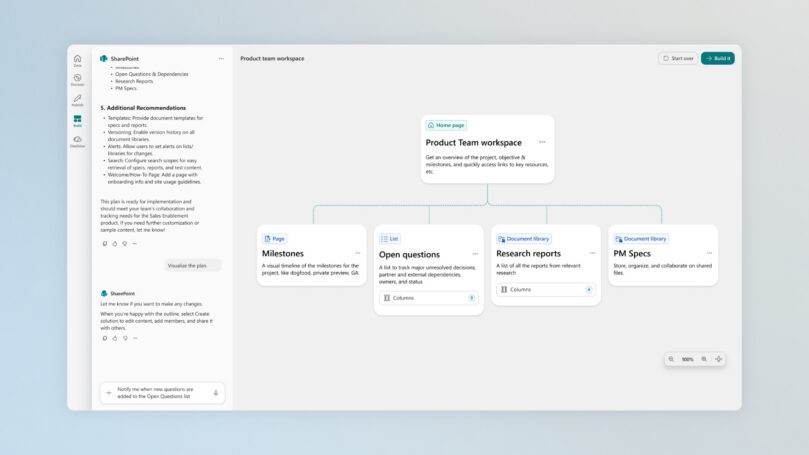
SharePoint workspace shows structured collaboration — Microsoft
Quick Tips & Tricks
-
Leverage Natural Language for Workflow Automation
Use conversational prompts in Copilot Chat to precisely delegate tasks. Clear, intent-driven commands yield more accurate automated actions. -
Combine Calendar and Email Contexts
Allow Copilot to access both your Outlook calendar and email threads for smarter scheduling decisions that respect real-world communication flows. -
Pin Key Documents in SharePoint for Faster Access
Curate relevant documents in dedicated SharePoint workspaces so Copilot can swiftly pull accurate intelligence without parsing irrelevant data. -
Review and Customize Automated Outputs
While Copilot Cowork automates aggressively, always review generated content and actions to ensure alignment with team nuances and compliance requirements. -
Use Copilot Integration Across Apps for Maximum Impact
Don’t silo AI usage in one app; combine Excel data analysis with PowerPoint presentations and Outlook communications for richer workflows. -
Maintain Focus Time by Enabling Automated Calendar Optimization
Trust Copilot to protect key focus blocks by intelligently rescheduling less-critical meetings, improving deep work time.
Conclusion
Copilot Cowork represents an important development in enterprise productivity by extending AI’s role from assistantship to execution. Its seamless integration across Microsoft 365 applications empowers individuals and teams to delegate routine coordination, research, and content creation tasks. This enables more focus on creative and strategic work, improving speed and quality of outcomes.
Looking ahead, as AI agents increasingly connect organizational data, workflows, and human intent, tools like Copilot Cowork will become essential pillars of the modern workplace. They promise not only to alleviate day-to-day drudgery but to fundamentally reshape how collaboration and project delivery happen at scale.
References
- Copilot Cowork: A new way of getting work done | Microsoft 365 Blog — Official announcement and detailed overview
- Meet Copilot Cowork: A New Way of Getting Work Done (Video) — Microsoft overview video
- Microsoft 365 Products & Apps — Comprehensive list of Microsoft 365 integrated services
- SharePoint Collaboration & Knowledge Management — Learn how SharePoint underpins enterprise knowledge in Microsoft 365
- Microsoft Planner — Task and project management tool integrated with Copilot workflows

Charles Lamanna, President, Business Applications & Agents, Microsoft
Content based on the official Microsoft 365 Blog article: Copilot Cowork: A new way of getting work done