Mastering Microsoft Entra Privileged Identity Management: Secure Just-in-Time Access
Mastering Microsoft Entra Privileged Identity Management: Secure Just-in-Time Access
Date: 2026-03-26
Discover how Microsoft Entra Privileged Identity Management delivers just-in-time privileged access with approval workflows and audit controls to secure enterprise resources.
Tags: ["Azure", "Security", "Identity Governance", "Microsoft Entra", "PIM"]
Privileged access management is a cornerstone of enterprise security, yet complexity often undermines enforcement. Organizations wrestle with granting necessary permissions for administrators to do their jobs while minimizing the risk of misuse or compromise. Overprovisioning privileges leads to expanded attack surfaces, and underprovisioning can slow business processes.
Enter Microsoft Entra Privileged Identity Management (PIM) — a powerful solution embedded into Microsoft Entra ID that enables organizations to manage, control, and monitor access to vital resources across Azure, Microsoft 365, and other Microsoft online services. PIM helps organizations embrace the principle of least privilege by delivering just-in-time (JIT) access, time-bound role assignments, and built-in approval workflows bolstered by multifactor authentication requirements.
In this blog post, we'll explore the architecture of Microsoft Entra PIM, delve into its key features and workflows, and share practical tips to help you maximize your secure privileged access management.
Architecture Overview
┌────────────────────────────────────────────┐
│Architecture                                │
├────────────────────────────────────────────┤
│• Enterprise data sources                   │
│• Foundry platform                          │
│• AI applications                           │
└────────────────────────────────────────────┘
Key Technical Observations
-
Just-in-Time (JIT) Privileged Access: PIM enables just-in-time access by making users eligible for roles rather than permanently assigned. Users activate their eligibility only when needed, significantly reducing the risk exposure window.
-
Time-Bound and Approval-Based Role Activation: Roles can be assigned with explicit start and end dates, combined with required approval for activation. This layering strengthens security by limiting privilege duration and adding oversight.
-
Multifactor Authentication Enforcement: Activation of privileged roles mandates an MFA challenge, aligning with zero trust principles and reducing the risk of credential misuse or theft.
-
Automated Notifications and Audit Trail: PIM systematically generates email alerts for role activation requests, role assignment updates, and approvals or denials, ensuring transparency and real-time awareness. An exhaustive audit log supports internal compliance and external audits.
-
Flexible Assignment Types and Scopes: Roles can be assigned to users, groups, managed identities, or service principals across Microsoft Entra roles, Azure resource roles, and groups, enabling granular and contextual access control.
-
API Integration via Microsoft Graph: PIM exposes robust Microsoft Graph APIs allowing organizations to automate role assignments and activation workflows, integrate with custom tooling, and embed privileged access governance into existing DevOps or ITSM pipelines.
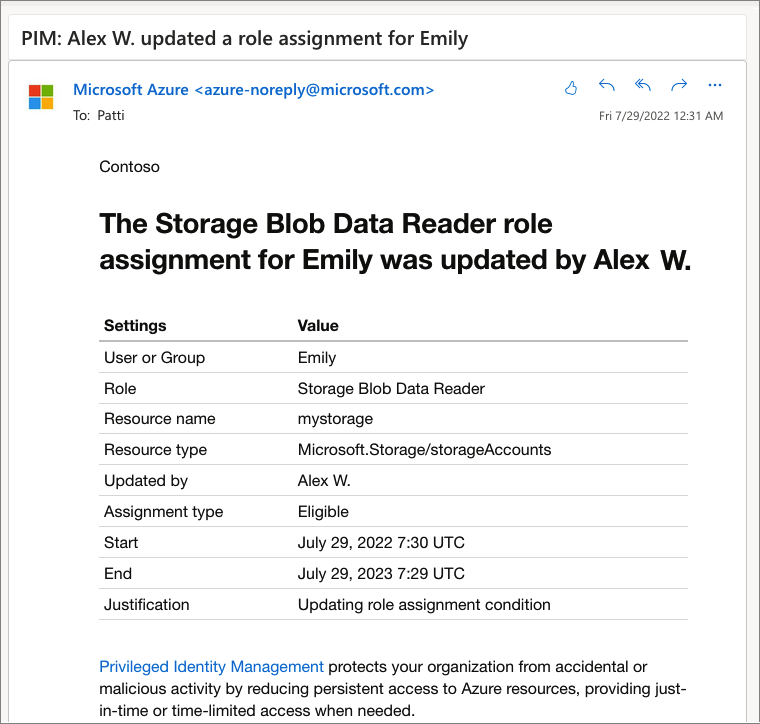
Example notification email for role assignment changes—source: Microsoft Learn
How It Works: Privileged Role Lifecycle in PIM
Assigning Roles
The privileged access journey starts with role assignment by administrators:
- An administrator assigns a role to a user, group, or service principal.
- The assignment includes the scope (resource boundaries), type (eligible or active), and duration (time-bound or permanent).
- Eligible assignments require explicit activation to use the role, whereas active assignments grant immediate access.
- These configurations allow organizations to implement the principle of least privilege by enabling access only when necessary and for limited durations.
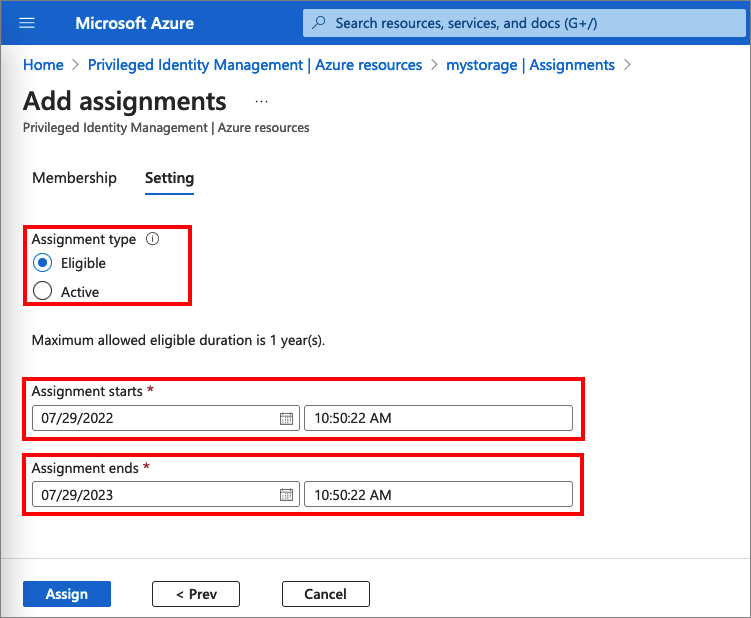
Role assignment interface, highlighting eligible and active role types—source: Microsoft Learn
Activating a Role
Users eligible for a role must activate it before performing privileged operations:
- During activation, users specify the activation duration within administrator-defined limits.
- Users provide justification for their activation, contributing to accountability.
- If configured, activation approval workflows notify designated approvers.
- Multifactor authentication is required, ensuring an additional layer of identity verification.
- Upon approval or if no approval is required, the user’s role status changes from eligible to activated for the specified time.
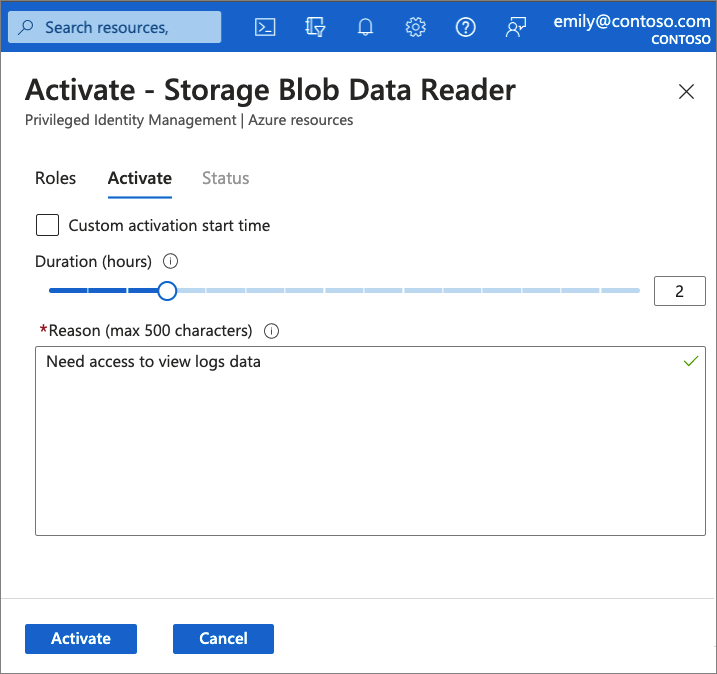
Role activation screen showing duration selection and justification input—source: Microsoft Learn
Approval and Denial Workflow
- Approvers receive email notifications about pending role activation requests.
- Approvers can review the justification and history before approving or denying.
- Approval results are communicated automatically to the requester.
- This process supports both single and bulk approval scenarios, improving operational efficiency.
Extending and Renewing Assignments
Dynamic business needs often require privileged assignment durations to be extended or renewed:
- Users can request extension or renewal of expiring role assignments.
- These requests undergo approval workflows similar to activation.
- Administrators are relieved from manual monitoring of assignment expirations, streamlining governance.
Quick Tips & Tricks
-
Prefer Eligible Assignments Over Permanent Active Roles
Assign users as eligible to roles with just-in-time activation, reducing standing administrative access and attack surface. -
Enforce Multifactor Authentication for All Role Activations
Enable MFA requirement in PIM to mitigate credential compromise risks during privileged sessions. -
Configure Appointment of Specific Approvers
Delegate approvers per role or scope to balance security and operational agility without central bottlenecks. -
Leverage Access Reviews Regularly
Automate access reviews to validate that only users who still require roles retain them, reducing privilege creep. -
Audit Everything and Use Alerts
Enable comprehensive audit logging and configure notification policies to stay informed of all privileged access activities. -
Use Microsoft Graph APIs to Automate PIM Workflows
Integrate PIM programmatically into your DevOps or ITSM tooling for scalable and repeatable privilege lifecycle management.
Conclusion
Microsoft Entra Privileged Identity Management offers a robust framework for balancing security and operational needs around privileged access. By combining just-in-time access models with approval workflows, multifactor authentication, and comprehensive audit capabilities, PIM aligns perfectly with zero trust principles and modern enterprise governance standards.
Effective use of PIM minimizes standing privileges and tightens control over critical identities, significantly reducing attack vectors while ensuring administrators can safely perform their duties. As organizations increasingly adopt hybrid and cloud environments, PIM’s native integration and extensibility via Microsoft Graph position it as a foundational tool in the privileged access security toolkit.
Looking ahead, tighter integration with compliance automation and AI-driven risk detection will enhance PIM’s capabilities, empowering security teams with predictive insights and more adaptive access controls.
References
- What is Microsoft Entra Privileged Identity Management? - Microsoft Learn — Official Microsoft documentation and overview.
- Assign Microsoft Entra roles — How to assign directory roles in PIM.
- Activate Microsoft Entra roles — Role activation guidance for eligible users.
- Approve or deny requests for Microsoft Entra roles — Workflow for role activation approval.
- Extend or renew Microsoft Entra role assignments — Instructions to handle assignment expirations.
- PIM for Microsoft Entra roles APIs — Explore Microsoft Graph APIs for automation and integration.