Meet Microsoft 365 Premium: Your Ultimate AI and Productivity Powerhouse
Meet Microsoft 365 Premium: Your Ultimate AI and Productivity Powerhouse
Date: 2026-03-17
Explore how Microsoft 365 Premium harnesses AI-powered Copilot and advanced security to redefine productivity for individuals and families.
Tags: ["Microsoft 365", "AI", "Copilot", "Productivity", "Security"]
Microsoft 365 has long been a cornerstone of productivity for millions worldwide, but the introduction of Microsoft 365 Premium raises the bar significantly. By combining enhanced AI capabilities, deeply integrated security features, and an all-in-one subscription plan, Microsoft 365 Premium transforms how users create, collaborate, and protect their digital lives.
This next-gen subscription focuses on empowering individuals and families with the Copilot AI platform, more generous usage limits, exclusive Copilot features like Researcher and Analyst agents, and seamless integration across familiar productivity applications. Beyond AI advancements, it also delivers robust security and privacy options critical in today’s threat landscape.
In this post, we’ll unpack the architecture behind Microsoft 365 Premium’s AI capabilities, highlight key innovations in its Copilot-powered experiences, and provide practical insights on how you can make the most of this comprehensive productivity suite.
Architecture Overview
┌────────────────────────────────────────────┐
│Architecture                                │
├────────────────────────────────────────────┤
│• Enterprise data sources                   │
│• Foundry platform                          │
│• AI applications                           │
└────────────────────────────────────────────┘
Key Technical Observations
-
Integration of Specialized AI Agents — Microsoft 365 Premium introduces dedicated Copilot agents like Researcher and Analyst that extend the standard LLM experience with domain-specific capabilities, enabling sophisticated tasks such as data analysis and content research directly within Excel or Word.
-
Copilot Usage Tiering — The Premium plan offers the highest limits of Copilot usage, illustrating Microsoft’s strategy to differentiate subscription levels by AI capacity and feature access, optimizing resources and user experience simultaneously.
-
Privacy-First Contextual AI — The Copilot platform enforces strict privacy and secure access guardrails when ingesting documents and communications, balancing AI utility with enterprise-grade data governance, crucial for sensitive personal and family information.
-
Seamless AI Integration in Productivity Apps — Copilot’s AI features appear embedded within familiar Microsoft apps (Word, Excel, Outlook), reducing friction and learning curves for users while enabling contextual, real-time assistance.
-
Experimental Frontier Program — Microsoft allows Premium subscribers to access pre-release Copilot features through the Frontier program, reflecting an agile approach to iterating AI capabilities with direct user feedback.
-
Cross-Device and Collaboration Focus — Enhanced AI-powered collaboration tools like Copilot Cowork within Teams and shared documents emphasize Microsoft’s vision of AI as a facilitator for collective productivity, not just individual tasks.
How It Works
AI Agents Powering Intelligent Assistance
Microsoft 365 Premium builds on the core Copilot architecture by deploying specialized agents:
-
The Researcher agent helps users quickly gather and synthesize information from documents, emails, and trusted web sources to craft well-informed reports or presentations.
-
The Analyst agent specializes in Excel, automatically identifying trends, generating insights, and creating visualizations from data sets without requiring advanced user input.
-
The upcoming Photos Agent and Actions Agent promise to automate content curation and task automation respectively, enhancing creative workflows and productivity automation.
These agents run on Microsoft's secure cloud infrastructure, continuously learning from aggregate usage patterns while honoring strict privacy protocols.
Contextual Data Ingestion and Privacy Controls
Copilot ingests user data context—documents, emails, calendar events—on demand to tailor responses. However, this process is governed by layered privacy guardrails:
-
Data access is scoped strictly to authorized user content.
-
Context processing happens in isolated environments, preventing data leakage.
-
Users retain control over data permissions and AI interactions via transparent settings.
These measures ensure that AI assistance does not compromise user data security or privacy, a critical concern for Premium subscribers who frequently handle personal and sensitive information.
Integration Across Productivity Apps
Copilot features manifest as chat interactions, inline suggestions, and automated insights directly inside Word, Excel, Outlook, and Teams. For example:
-
In Word, Copilot can generate draft content based on brief instructions or research notes, cutting authoring time.
-
In Excel, users ask Copilot to analyze datasets or create visual reports with natural language commands, removing the need for complex formulas.
-
In Outlook and Teams, Copilot assists with drafting emails, summarizing meeting notes, and orchestrating tasks collaboratively.
These deeply embedded AI helpers reduce cognitive load and streamline workflows without disrupting familiar user experiences.
The Frontier Program: Early Access to Experimental Features
Microsoft 365 Premium subscribers gain early access to new Copilot features through the Frontier program. This initiative invites users to explore in-development AI tools and provide feedback, fueling rapid iteration cycles and innovation pipelines.
This strategy keeps Microsoft’s AI capabilities fresh and responsive to evolving user needs while balancing stability in production releases.

Image courtesy Microsoft 365 Blog
Quick Tips & Tricks
-
Leverage Copilot’s Specialized Agents — Use the Researcher agent for fast content gathering and the Analyst agent to get instant data insights in Excel without writing complex formulas.
-
Maximize AI Usage with Premium — Upgrade to Microsoft 365 Premium to unlock the highest Copilot usage limits and exclusive AI features for deeper productivity benefits.
-
Control Your AI Privacy Settings — Review and customize your Copilot data access permissions regularly to ensure your privacy preferences align with AI assistance levels.
-
Use Copilot Chat for Collaborative Workflows — Utilize Copilot Chat within Teams for real-time research, summarization, and task automation, boosting team productivity.
-
Try Experimental Features via Frontier — Join the Frontier program for a sneak peek at emerging Copilot capabilities and contribute feedback that shapes future updates.
-
Stay Updated on New App Icons & Experiences — Microsoft 365 Premium also introduces new AI-era app icons and refreshed user experiences—explore these visual updates for an enhanced UI.
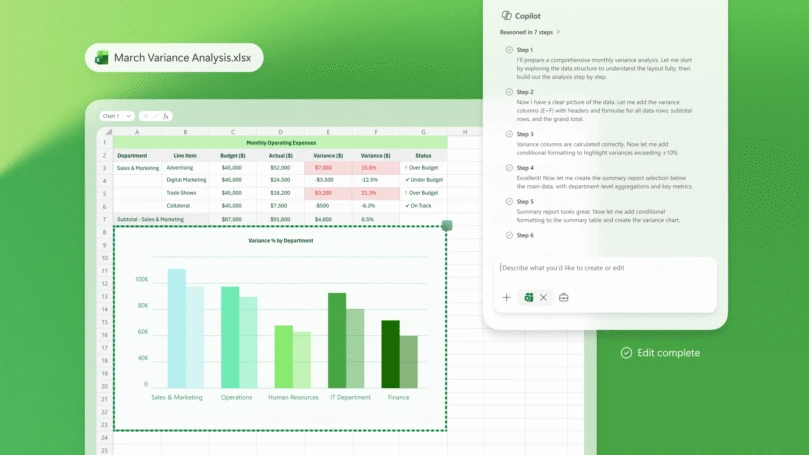
Copilot’s Analyst agent visualizing business data in Excel — image credit Microsoft 365 Blog
Conclusion
Microsoft 365 Premium represents a bold stride forward in personal and family productivity, tightly integrating artificial intelligence with staple Office applications. Its combination of advanced AI agents, generous usage tiers, and privacy-conscious architecture establishes a new standard for productivity suites in the AI era.
By embedding AI helpers directly into everyday tools, Microsoft not only reduces friction but also unlocks powerful creative and analytical capabilities accessible to users regardless of expertise. As AI features continue evolving through programs like Frontier, Microsoft 365 Premium will likely remain at the forefront of innovation, shaping how we work and collaborate in the future.
This subscription signals a shift where productivity and security go hand-in-hand with AI-driven assistance — offering a compelling vision for empowered, secure digital workspaces.
References
- Meet Microsoft 365 Premium: Your AI and productivity powerhouse | Microsoft 365 Blog
- Microsoft 365 Copilot official page
- Microsoft 365 Personal and Family plans
- Microsoft 365 Pricing for premium users
- Copilot Chat overview