Enhancing Trust: Security and Governance Innovations for Microsoft 365 Copilot at Ignite 2025
Enhancing Trust: Security and Governance Innovations for Microsoft 365 Copilot at Ignite 2025
Date: 2026-03-17
Explore the latest security and governance enhancements for Microsoft 365 Copilot unveiled at Ignite 2025, empowering admins to safeguard sensitive data and manage AI agents with confidence.
Tags: ["Microsoft 365 Copilot", "Security", "Governance", "AI", "Ignite2025"]
Microsoft 365 Copilot has redefined productivity by integrating AI directly into familiar work environments. But powerful AI also demands equally powerful trust foundations. At Ignite 2025, Microsoft showcased new security and governance innovations crafted to help organizations confidently adopt Copilot without compromising data protection or compliance standards.
This post dives into those innovations—highlighting how Microsoft now offers a unified security management experience that blocks sensitive data from AI processing, automates detection and remediation of oversharing, and introduces a baseline security mode fine-tuned for AI scenarios. Whether you're an IT admin, security professional, or governance lead, understanding these controls is critical to unlocking AI’s potential safely.
Expect a detailed architectural overview, key technical insights, a breakdown of core features, practical tips, and pointers to essential resources. Let’s explore how Microsoft 365 Copilot’s security fabric is evolving alongside AI capabilities to foster trust and transparency.
Architecture Overview
┌─────────────────────────────────────────────┐
│           Enterprise Data & Content          │
├─────────────────────────────────────────────┤
│ • SharePoint, OneDrive, Exchange             │
│ • Sensitive Documents & Knowledge Base       │
│ • User Access and Permissions                 │
└─────────────────────────────────────────────┘
                 ↓ Data access & control
┌─────────────────────────────────────────────┐
│      Microsoft 365 Copilot Control System    │
├─────────────────────────────────────────────┤
│ • Unified Security & Governance Dashboard    │
│ • Purview Data Loss Prevention & Risk Assessments  │
│ • SharePoint Advanced Management (SAM)       │
│ • Baseline Security Mode                      │
│ • Automation & Insights to Prevent Oversharing │
└─────────────────────────────────────────────┘
                 ↓ Governance & enforcement
┌─────────────────────────────────────────────┐
│     Microsoft 365 AI Assistants & Agents     │
├─────────────────────────────────────────────┤
│ • Copilot Processing & Query Handling        │
│ • Agent Interactions with SharePoint & Exchange│
│ • Prompt Filtering & Sensitive Data Blocking  │
└─────────────────────────────────────────────┘
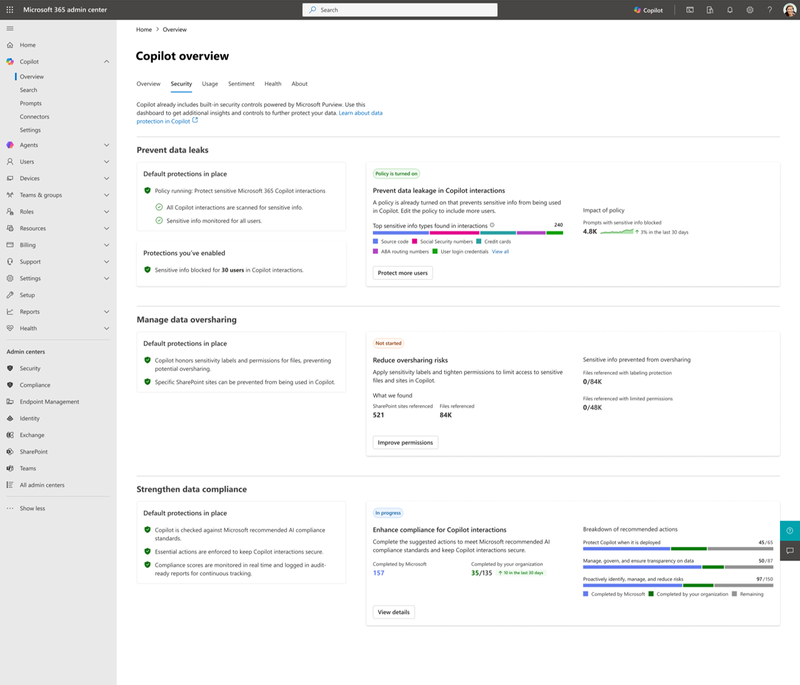
This layered architecture shows how Microsoft integrates Purview risk management, SharePoint Advanced Management, and baseline security controls within a scalable governance system that feeds security policies and monitoring directly into Copilot agents and AI workflows.
Microsoft 365 Copilot Security & Governance Architecture — Source: Microsoft Tech Community
Key Technical Observations
-
Unified Security and Admin Experience: The Copilot Control System consolidates security features into a centralized admin dashboard, simplifying oversight and reducing configuration complexity across multiple data sources like SharePoint and Exchange.
-
Contextual Data Blocking for AI Processing: Sensitive data is actively blocked from both Copilot processing and outward web queries, leveraging Purview Data Loss Prevention (DLP) policies tailored specifically for AI prompt inputs.
-
Advanced Oversharing Detection and Automation: Leveraging SharePoint Advanced Management (SAM) reports, the system automates identification of risky permissions and agent interactions, enabling admins to remediate oversharing before data leaks occur.
-
Baseline Security Mode (BSM) for AI Scenarios: A new security baseline, optimized for AI workloads, incorporates preconfigured defaults that protect against emerging AI threats, legacy vulnerabilities, and misconfigurations—complete with simulation mode allowing safe testing before rollout.
-
Agent Interaction Visibility: Detailed agent insight reports provide granular visibility into how AI agents interact with SharePoint sites and OneDrive accounts, enabling precise governance and compliance enforcement.
-
Delegated Site Admin Control: The system supports delegating restricted access control (RAC) and restricted content discovery (RCD) management directly to site administrators, balancing security with operational agility in large organizations.
How It Works: Securing Microsoft 365 Copilot AI Agents
1. Blocking Sensitive Data Processing
To protect privacy, Microsoft enforces Purview Data Loss Prevention policies directly on Copilot prompts. When a user query or document contains sensitive content flagged by these policies (e.g., PII, financial data), the system blocks this data from being sent to the AI engine or external web queries.
This is achieved by integrating Purview’s DLP engine within the Copilot ingestion pipeline, ensuring risks are mitigated before processing or external communication can occur.
# Example: Policy to block sensitive info extraction in Copilot
New-DlpComplianceRule -Name "BlockSensitiveCopilotData" -ContentContainsSensitiveInformation @{Name="Credit Card Number"} -Action Block
2. Visibility Into Agent Access and Permissions
SharePoint Advanced Management (SAM) generates detailed reports showing:
- Which AI agents access specific SharePoint or OneDrive content
- Permissions users hold that might expose sensitive data
- Potential oversharing indicators, such as broadly scoped permissions or external sharing
Administrators use these insights to identify risky configurations and apply governance controls or revoke risky access rapidly.
3. Automation to Address Oversharing
With risk signals from SAM and Purview, automated workflows trigger alerts or remediation. For example, if an agent accesses content it shouldn’t or a sensitive file is overshared, admins receive guiding recommendations to fix permissions or adjust DLP policies.
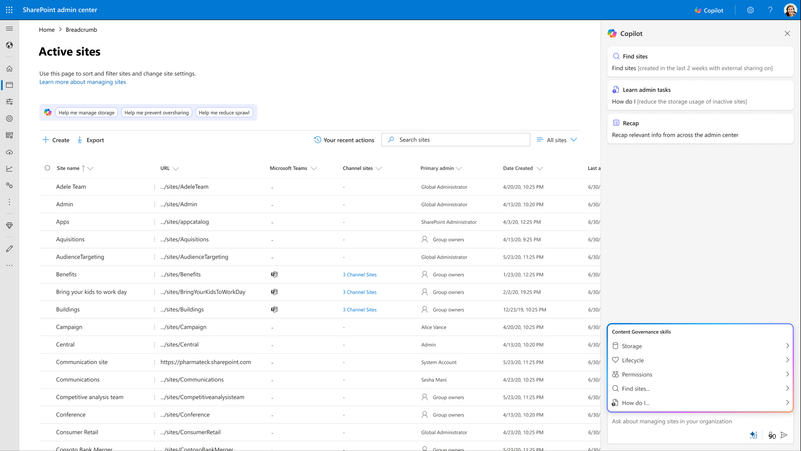
4. Baseline Security Mode (BSM) Tailored for AI
A purpose-built baseline security profile now available allows organizations to adopt a security posture optimized for Copilot and other AI workloads. BSM includes:
- Hardened default settings preventing known AI exploitation vectors
- Adaptive controls updated regularly as AI threats evolve
- Simulation mode for testing policy changes without immediate impact
Administrators can safely roll out complex security profiles with confidence.
Baseline Security Mode interface with AI-focused security settings — Source: Microsoft Tech Community
5. Delegated Security Governance
Organizations can delegate management of restricted access and content discovery policies directly to SharePoint site admins. This decentralizes governance, empowering local teams to enforce security policies while maintaining centralized oversight.
Quick Tips & Tricks
-
Leverage Purview DLP for AI Inputs
Extend existing DLP policies to cover AI prompts and communications specifically to block sensitive data before it reaches Copilot’s processing. -
Use SAM Reports Regularly
Schedule SharePoint Advanced Management permission and agent insight reports frequently to catch oversharing risks early. -
Test Baseline Security Mode with Simulation
Use BSM’s simulation mode to evaluate the impact of new AI-focused security baselines without disrupting user workflows. -
Delegate with Precision
Apply delegated site admin controls after thorough training to balance security with agility, ensuring site admins understand RAC and RCD concepts. -
Integrate Copilot Control Dashboard with Existing Security Operations
Link Copilot’s governance insights with your broader Microsoft 365 or Azure Sentinel monitoring to streamline incident response. -
Stay Updated on AI Security Best Practices from Ignite
Follow official Ignite session recordings such as “From Oversharing to Oversight” to keep abreast of evolving Microsoft 365 Copilot security features.
Conclusion
Microsoft 365 Copilot continues to push the boundaries of productivity through AI, but true adoption hinges on sturdy security and governance. The innovations unveiled at Ignite 2025 substantially elevate control and visibility—empowering admins to block sensitive data exposure, automatically detect oversharing, and enforce tailored security baselines optimized for AI workloads.
As AI integration deepens across enterprise applications, frameworks like Purview, SAM, and the Copilot Control System will be instrumental in maintaining compliance and building user trust. Staying proactive with these updated tools ensures organizations can harness AI’s power while safeguarding their most vital assets.
The future promises continuous improvements as Microsoft refines security postures aligned with AI evolution, offering ever more granular and automated governance. Embracing this wave now positions your organization to confidently lead in AI-driven productivity at scale.
References
-
Security and governance innovations for Microsoft 365 Copilot and agents from Ignite 2025 | Microsoft Community Hub — Original source detailing the latest security advancements for Microsoft 365 Copilot.
-
Purview Data Loss Prevention for Microsoft 365 Copilot — Blueprint guidance on preventing data oversharing with Copilot.
-
SharePoint Advanced Management (SAM) documentation — Overview of SAM capabilities including permission reports and agent insights.
-
Microsoft Baseline Security Mode — Learn how BSM safeguards AI workloads with preconfigured security profiles.
-
Ignite Session BRK 293 - From Oversharing to Oversight — Deep dive session on Copilot security and governance controls.
-
Copilot Control System Security and Governance Pillar — Technical details on integrated governance frameworks for Microsoft 365 Copilot.