Azure Translator: Enhancing Translation Quality with Adaptive Datasets and Few-Shot Learning
Azure Translator: Enhancing Translation Quality with Adaptive Datasets and Few-Shot Learning
Date: 2026-06-02
Unlock precise, domain-aware translations effortlessly with Azure Translator's adaptive datasets and few-shot learning—perfect for healthcare, legal, and specialized applications.
Tags: ["Azure", "AI Foundry", "Machine Learning", "Translation", "NLP"]
Your healthcare app should say “La médica”, not the generic “El médico.” Legal agreements require pinpoint terminology, not vague translations. When domain-specific language is crucial, conventional large language model (LLM) translations often fall short.
Azure Translator introduces adaptive translation, which lets you tailor translations using just a handful of examples—no retraining necessary. In this post, we'll explore how you can create adaptive datasets in the Microsoft Foundry playground, compare baseline and adapted translations side-by-side, and see firsthand the impact of domain context on translation quality.
Whether you're building a healthcare assistant, legal document translator, or specialized customer support bot, adaptive translation offers a practical way to inject domain knowledge and consistency into generated text. We’ll walk through the core workflow, best practices, and how to move from experimentation to production integration.
Architecture Overview
┌─────────────────────────────────────────────┐
│             Enterprise Domain Data          │
├─────────────────────────────────────────────┤
│  • Domain-specific bilingual corpora        │
│  • Glossaries and terminology lists          │
│  • High-quality aligned translation pairs    │
└─────────────────────────────────────────────┘
                   ↓
┌─────────────────────────────────────────────┐
│            Azure Translator Service          │
├─────────────────────────────────────────────┤
│  • Large Language Model translation engine   │
│  • Adaptive dataset ingestion and management │
│  • Few-shot learning with reference pairs    │
└─────────────────────────────────────────────┘
                   ↓
┌─────────────────────────────────────────────┐
│          Applications & Integration          │
├─────────────────────────────────────────────┤
│  • Translator Text API calls                   │
│  • AdaptiveDatasetId and referenceTextPairs   │
│  • Domain-aware customer-facing apps           │
└─────────────────────────────────────────────┘
This architecture revolves around leveraging domain-aligned example pairs to adapt Azure Translator's LLM at inference time. The service ingests adaptive datasets or reference examples to bias translations towards preferred terminology and style, feeding improved output back to downstream applications.
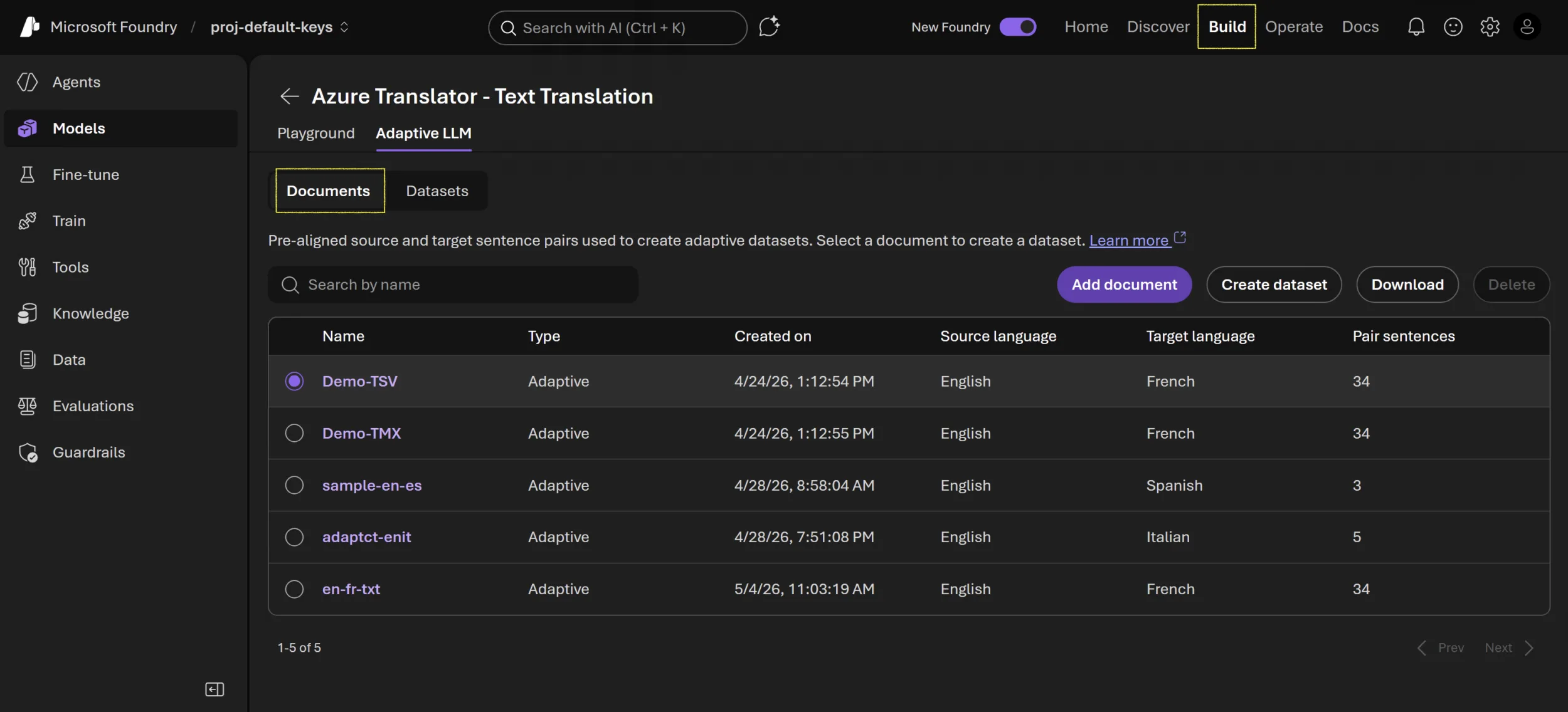
Screenshot: Adaptive translation playground in Microsoft Foundry — image credit Microsoft Foundry Blog
Key Technical Observations
-
Adaptive translation requires no model retraining or fine-tuning. Instead, it relies on domain-specific examples at inference time, significantly accelerating workflow iterations.
-
High-quality, aligned translation pairs yield the greatest gains. Clean examples with consistent terminology outperform larger, noisy datasets, making data curation critical.
-
Few-shot learning (reference pairs) offers rapid experimentation. By feeding up to five example pairs during an API call, you can quickly assess impact on tone and terminology before creating larger adaptive datasets.
-
Adaptive datasets enable reusable domain customization. Dataset IDs can be applied across multiple API calls and sessions, supporting consistent terminology in production.
-
The translation evaluation checklist emphasizes not just accuracy, but fluency, style, and terminology consistency. Maintaining alignment across multiple new texts reduces the risk of mixed messaging.
-
Microsoft Foundry’s playground simplifies model exploration. Developers can iterate interactively on datasets, run side-by-side baselines vs. adapted results, and export configurations to code.
How It Works
Setting Up the Baseline
First, open the Azure Translator Text translation model in the Microsoft Foundry playground. Choose your source and target languages as well as the LLM deployment. Translate sample sentences without adaptation to establish a baseline. This provides a reference point and highlights areas where default terminology or tone may miss your domain nuances.
Few-Shot Translation with Reference Pairs
To quickly test domain influence, add up to five reference translation pairs during translation calls: short, high-quality aligned examples relevant to your domain. The service uses these pairs as implicit prompts, biasing the model output without permanent dataset creation.
Enable the adaptive customization toggle and input your reference pairs in the UI or API. Run the translation again and directly compare output to baseline. Examine fluency, terminology use, and how closely new translation aligns with sample pairs.
Creating Adaptive Datasets
When you have a reusable corpus of domain examples—up to 10,000 segment pairs supported—you can create a formal adaptive dataset in the playground.
- Prepare your dataset as a TSV or TMX file with one source sentence and one target sentence per row, keeping each under 250 characters.
- Upload the file, assign a descriptive name (e.g.,
en-es-healthcare), and save it. - Enable "Use adaptive dataset ID" in the playground, select your dataset, and run tests.
The service references your dataset during translation requests, consistently applying your style and terminology preferences across new inputs.
Evaluation and Comparison
Use a structured approach to compare outputs:
| Test Type | Output Type | What to Check |
|---|---|---|
| Baseline LLM | No adaptation | Fluency, correctness, default terminology |
| Reference pairs | Direct examples | Alignment with provided examples |
| Adaptive dataset | Dataset-based | Consistent terminology across new texts |
Assess outputs on adequacy (meaning preservation), fluency (natural text), terminology (domain accuracy), style, and consistency to ensure translations meet your standards.
From Playground to Production
Once satisfied, integrate adaptive translation into your application by sending POST requests to the Translator API, including either the adaptiveDatasetId or referenceTextPairs parameters. This carries over your customization without additional model maintenance.
Here’s a glimpse of how to inspect available models programmatically with Python:
url = "https://api.cognitive.microsofttranslator.com/languages"
params = {
    "api-version": "2026-06-06",
    "scope": "models",
}

response = requests.get(url, params=params)
response.raise_for_status()

print(response.json())
Quick Tips & Tricks
-
Curate high-quality examples over quantity. A handful of clean, domain-specific sentence pairs will impact translation quality far more than hundreds of noisy entries.
-
Keep source and target sentences aligned and concise. Sentences longer than 250 characters are unsupported and may degrade adaptation quality.
-
Separate adaptive datasets by domain and language pair. Mixing styles or domains within one dataset can confuse the model and reduce consistency.
-
Test adaptation incrementally. Use the playground's few-shot reference feature before investing in larger adaptive datasets.
-
Maintain a human review loop. Adaptive translation improves precision but human oversight is essential for content with high compliance or brand impact.
-
Monitor operational costs. Adaptive datasets and few-shot translation may impact latency and billing—track usage during experimentation.
Conclusion
Azure Translator's adaptive translation—powered by adaptive datasets and few-shot reference pairs—empowers developers to inject domain-specific terminology and style into powerful LLM translations without retraining models. This approach bridges the gap between generic translations and domain-accurate, fluent outputs.
By starting with a baseline, iteratively experimenting with reference pairs, and progressing to reusable adaptive datasets, you can achieve remarkable improvements in accuracy and consistency across your specialized translation needs.
As AI-powered translation technologies evolve, adaptive methods like these will become vital tools for developers building trustworthy, nuanced language solutions in healthcare, legal, finance, and beyond.
References
- Azure Translator: Improving Translation Quality with Adaptive Datasets and Few-Shot Learning | Microsoft Foundry Blog — Original source article describing adaptive translation features and workflow.
- Microsoft Foundry Documentation — Explore platform capabilities including AI model management and playground usage.
- Azure Translator Text API Reference (2026-06-06) — Official API specs for production integration.
- Azure AI Community — Community support for Azure AI services including Translator.
- Microsoft Translator Service Overview — Service details and pricing.