Azure Files Entra-Only Identities: Revolutionizing Cloud-Native SMB Security
Azure Files Entra-Only Identities: Revolutionizing Cloud-Native SMB Security
Date: 2026-05-20
Discover how Azure Files Entra-Only identities eliminate on-prem dependencies and deliver seamless, secure, cloud-native SMB file access for modern enterprises.
Tags: ["Azure Files", "Entra ID", "Cloud Security", "SMB", "VDI"]
Accessing corporate file shares has long been tethered to complex on-premises Active Directory infrastructure, hybrid syncs, and domain controllers. This reliance complicates cloud migration, elevates operational overhead, and creates security challenges for organizations striving for a fully cloud-native future. But what if you could remove these constraints altogether, yet retain the trusted SMB protocol and seamless user experience?
Enter Azure Files Entra-Only identities—a transformative capability that leverages native Microsoft Entra ID authentication to grant secure, identity-based access to Azure Files SMB shares using cloud-only identities. This new paradigm eliminates the need for traditional Active Directory or hybrid identity dependencies, simplifying architecture while boosting security and scalability.
In this post, we'll explore the motivations behind Entra-Only identities, how the technology modernizes SMB authentication for Azure Files, and why this solution is a game-changer for workloads like virtual desktop infrastructure (VDI), remote workforce collaboration, and cloud-native application access. We'll also look ahead at what’s next for this advancing cloud-native identity approach.
Architecture Overview
┌────────────────────────────────────────────┐
│Architecture                                │
├────────────────────────────────────────────┤
│• Enterprise data sources                   │
│• Foundry platform                          │
│• AI applications                           │
└────────────────────────────────────────────┘
Key Technical Observations
-
Cloud-Native Kerberos Authentication
Microsoft Entra ID serves as the Kerberos KDC, issuing tickets that comply fully with the SMB protocol while eliminating on-premises Active Directory or sync infrastructure. This innovation preserves security and compatibility but shifts identity control entirely to the cloud. -
Simplified Architecture with No Domain Controllers
Removing Active Directory dependencies significantly reduces infrastructure complexity, management overhead, and networking requirements like VPNs or domain trust configurations, making Azure Files easier to deploy and maintain. -
Granular NTFS ACLs Managed via Portal
Administrators can configure file and directory-level access control lists (ACLs) for Entra-Only identities directly from the Azure portal. This cloud-native management approach replaces traditional client tools and domain joined permissions editing workflows. -
Seamless Co-existence with Hybrid Identity
Entra-Only identities can run side-by-side with hybrid identity environments during migration, enabling gradual adoption without disrupting existing domain-joined workloads. -
B2B External Access for VDI Scenarios
Built-in Business-to-Business (B2B) support in Azure Virtual Desktop (AVD) lets external partners use their existing identities securely via FSLogix profile containers on Azure Files, expanding collaborative VDI use cases without duplicating accounts. -
Managed Identities Integration for Applications
Applications and services, including Azure Kubernetes Service (AKS), can authenticate to Azure Files via Entra-issued OAuth tokens through Managed Identities—eliminating shared keys and boosting DevOps friendliness and security.
How It Works
Authentication Flow with Entra ID as Kerberos KDC
When a user or device attempts to access an Azure Files SMB share:
-
The client requests a Kerberos ticket from Microsoft Entra ID for the Azure Files service principal.
-
Entra ID issues a Kerberos ticket embedding cloud-native security identifiers (SIDs) corresponding to the user or group.
-
The client presents this ticket during the SMB session setup phase to Azure Files.
-
Azure Files validates the ticket against Entra ID's authentication claims.
-
Access is granted or denied based on NTFS ACLs enforced natively by Azure Files, with permissions configurable via the Azure portal for Entra users and groups.
This entire workflow preserves the SMB protocol's Kerberos-based security model but re-teams it with Microsoft Entra ID's cloud-native identity management capabilities—eliminating on-prem synchronization, domain controllers, and related infrastructure.
# Example PowerShell snippet demonstrating enabling Entra Kerberos auth
Set-AzStorageAccountAzureFilesIdentityBasedAuthentication `
  -ResourceGroupName "RG1" `
  -AccountName "myazurefilesaccount" `
  -AzureFilesIdentityBasedAuthenticationState "Enabled"
Modernizing VDI Profile Management
In Azure Virtual Desktop environments:
- FSLogix profile containers are stored on Azure Files Premium shares.
- Users authenticate with Entra-Only identities via Kerberos tickets.
- External partners can seamlessly access desktops with their own Entra B2B accounts.
- This enables end-to-end cloud-native identity, compute, and storage stack without legacy domain controllers.
Cross-Platform Support & Remote Workforce Enablement
- MacOS clients are supported via Platform Single Sign-On (SSO) in a limited preview, expanding cross-OS usability.
- Remote field teams in sectors like energy can securely access critical data without VPNs or complex multi-domain setups—boosting operational agility in low-connectivity scenarios.
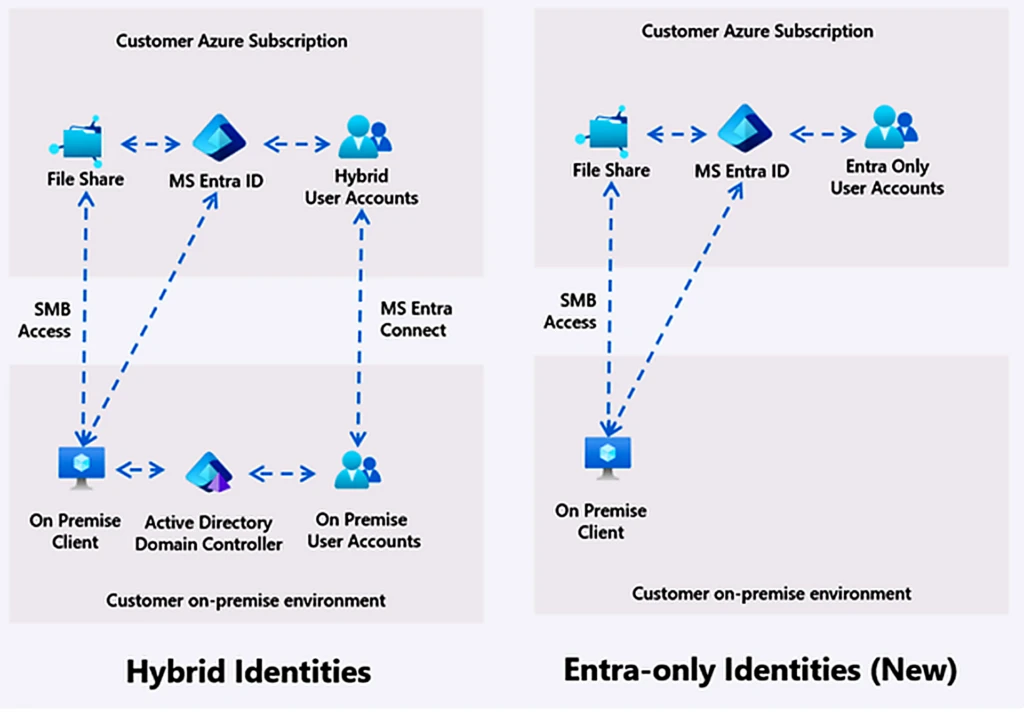
Image credit: Microsoft Azure Blog
Quick Tips & Tricks
-
Enable Entra-Only Identity-Based Authentication Early
Switch your storage account to use Entra-Only identities to reduce dependency on Active Directory and simplify hybrid migration. -
Leverage Azure Portal for NTFS ACL Management
Use the Azure Storage Explorer or portal-based controls to set fine-grained file permissions without requiring domain-joined machines. -
Adopt Managed Identities for Application Access
Authenticate services like AKS or Azure VMs to Azure Files with Managed Identities to avoid secrets management and improve security posture. -
Plan Hybrid-Coexistence During Migration
Use Entra-Only identities alongside traditional domain identities to stage a phased migration without downtime or disruption. -
Test MacOS Client Support via Limited Preview
For cross-platform teams, register for the limited preview to enable seamless SMB file share access on MacOS with full Entra authentication. -
Use B2B for External VDI Users
Simplify partner access to Azure Virtual Desktop by enabling Azure B2B allowing external users to access FSLogix profiles securely using their existing identities.
Conclusion
Azure Files Entra-Only identities represent a major leap toward fully cloud-native file storage authentication for SMB shares. By integrating Kerberos authentication directly with Microsoft Entra ID, this innovation removes longstanding dependence on complex on-prem Active Directory infrastructure, enabling simplified deployment, stronger security, and seamless hybrid-cloud coexistence.
For enterprise VDI, remote workforce productivity, and cross-platform collaboration scenarios, Entra-Only identities modernize how users and applications securely access shared files in Azure. With granular permissions manageable in the portal, Managed Identities support, and ongoing expansion including MacOS and sovereign clouds, Azure Files continues to evolve as a best-in-class solution for cloud-native SMB workloads.
As organizations accelerate cloud adoption and Zero Trust security models, adopting Entra-Only identities with Azure Files SMB will be a foundational enabler — simplifying file access while strengthening security posture across hybrid and cloud-native architectures.
References
- Azure Files Entra-Only Identities: Advancing cloud-native identity and security | Microsoft Azure Blog — Official Microsoft announcement and deep dive.
- Azure Files Authentication and Authorization documentation — Technical reference on Azure Files identity options.
- Azure Virtual Desktop FSLogix profile container deployment with Azure Files — How Azure Files integrates with VDI profile management.
- Microsoft Entra ID documentation — Overview of Entra ID capabilities and identity management.
- Entra Managed Identities — Secure service-to-service authentication using Azure AD Managed Identities.
- Azure Files SMB support for MacOS (limited preview) — Registration details and preview features for MacOS support.