6 Core Capabilities to Scale AI Agent Adoption with Microsoft Copilot Studio in 2026
6 Core Capabilities to Scale AI Agent Adoption with Microsoft Copilot Studio in 2026
Date: 2026-03-17
Unlock the future of work by operationalizing AI agents at scale with Microsoft Copilot Studio’s six essential capabilities for 2026.
Tags: ["Microsoft Copilot Studio", "AI Agents", "Automation", "Enterprise AI", "Microsoft 365"]
Adopting AI agents in the enterprise has rapidly shifted from pilot experiments to operational imperatives. While earlier AI agents were narrow, manual, and siloed, 2025 marked a turning point—agents evolved from simple assistants into automated workflow owners capable of impacting whole organizations. Now, in 2026, the challenge is no longer whether to leverage AI agents but how to scale them with control, flexibility, and clear business value.
Microsoft Copilot Studio emerged at the heart of this transformation, empowering organizations to systematically build, govern, and expand agent capabilities across diverse workflows. This post breaks down the six core capabilities businesses need for durable agent adoption in 2026. We’ll also dive into how Copilot Studio enables these capabilities and what it means for your team’s AI strategy.
You’ll come away with a concrete understanding of how agents move beyond simple productivity boosts to reliable workflow automation, multi-agent coordination, and enterprise-grade controls—turning AI curiosity into measurable business impact.
Architecture Overview
┌──────────────────────────────────────────────┐
│              Enterprise Workflows             │
├──────────────────────────────────────────────┤
│ • Sales pipeline management                    │
│ • HR onboarding & reimbursement processes      │
│ • Supply chain and operations                   │
└──────────────────────────────────────────────┘
                    ↓
┌──────────────────────────────────────────────┐
│          Microsoft Copilot Studio Platform     │
├──────────────────────────────────────────────┤
│ • Natural language agent creation interface    │
│ • Multi-agent coordination (Agent2Agent protocol) │
│ • Model choice & lifecycle governance          │
│ • Model Context Protocol & system integrations │
│ • Agent evaluation and lifecycle controls      │
└──────────────────────────────────────────────┘
                    ↓
┌──────────────────────────────────────────────┐
│             Automated Agent Execution          │
├──────────────────────────────────────────────┤
│ • Cross-application data access & actions      │
│ • Real-time workflow ownership & escalation    │
│ • Autonomous system navigation (computer use) │
└──────────────────────────────────────────────┘
This layered structure empowers organizations to build agents accessible to all roles, coordinate complex workflows spanning systems, and control agent behaviors and costs—all while maintaining compliance and security.
Source: Microsoft Copilot Blog
Key Technical Observations
-
Conversational Agent Creation Lowers Barriers: Copilot Studio’s natural language interface enables non-technical users—such as sales operations managers or HR officials—to create agents by simply describing intent in plain English. This drastically accelerates agent development cycles and broadens enterprise participation.
-
End-to-End Workflow Ownership Enables Automation: Agents can now own entire workflows, from initial trigger through routing, validation, and escalation. This reduces handoffs, minimizes bottlenecks, and optimizes throughput while delegating only judgment calls to humans.
-
Multi-Agent Collaboration via Agent2Agent Protocol: Instead of monolithic agents, Copilot Studio supports orchestrating multiple specialized agents that coordinate seamlessly—mirroring real-world team dynamics and complex workflows, reducing mental overhead on users.
-
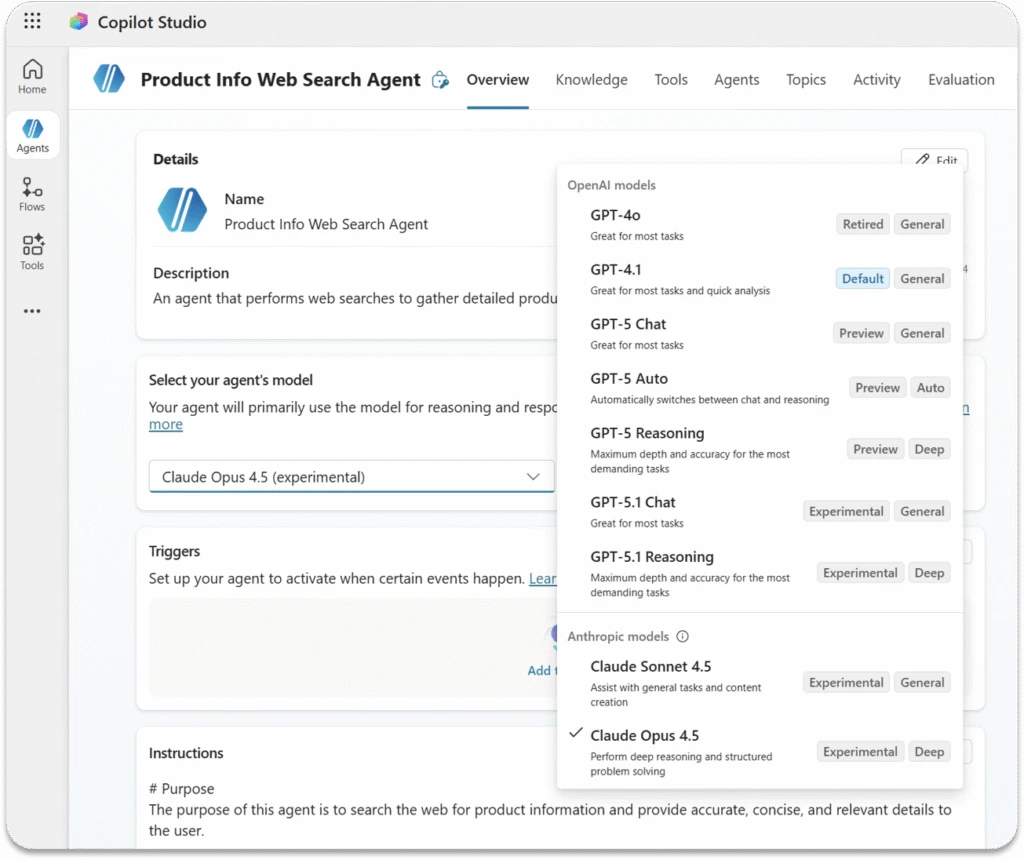
Flexible Model Management Across Workloads: Organizations can select from Anthropic models, chat-optimized models, thousands via Microsoft Foundry, or bring their own model. This flexibility allows workloads to balance reasoning complexity, performance, and compliance demands without fragmenting the agent experience.
-
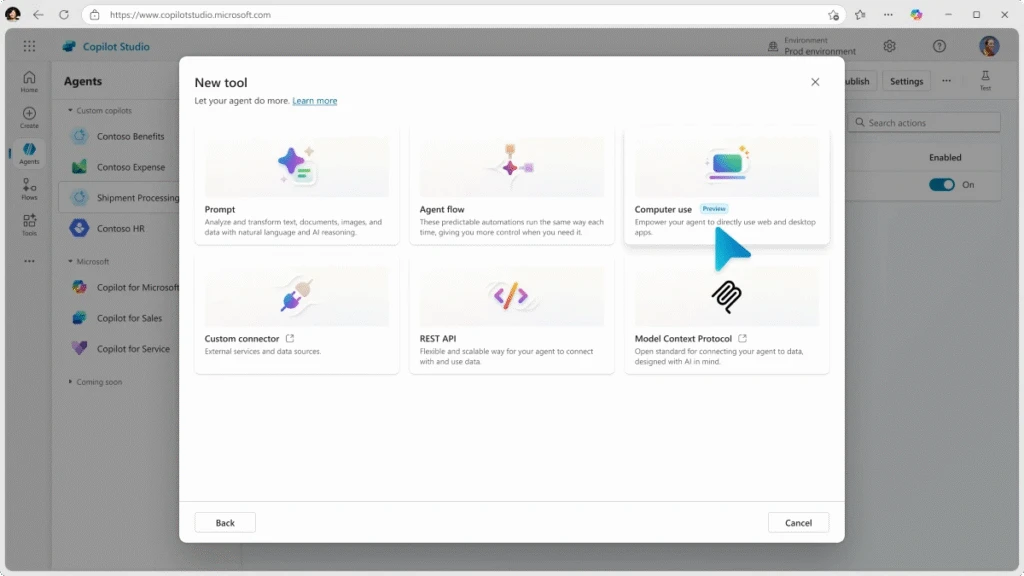
Model Context Protocol (MCP) and Computer Use Enable Real Actions: Agents don't just recommend actions—they interact directly with SaaS tools, internal databases, and systems, autonomously performing multi-step tasks and updates that previously required human intervention.
-
Integrated Governance and Lifecycle Controls: With built-in agent evaluations, usage monitoring, cost insights, and Microsoft Agent 365 integration, enterprises maintain security and oversight at scale, preventing runaway costs or compliance violations as adoption spreads.
How It Works: Under the Hood of Scaling AI Agents with Copilot Studio
1. Intent to Agent via Natural Language
Copilot Studio transforms business intent into agent logic using a conversational prompt interface:
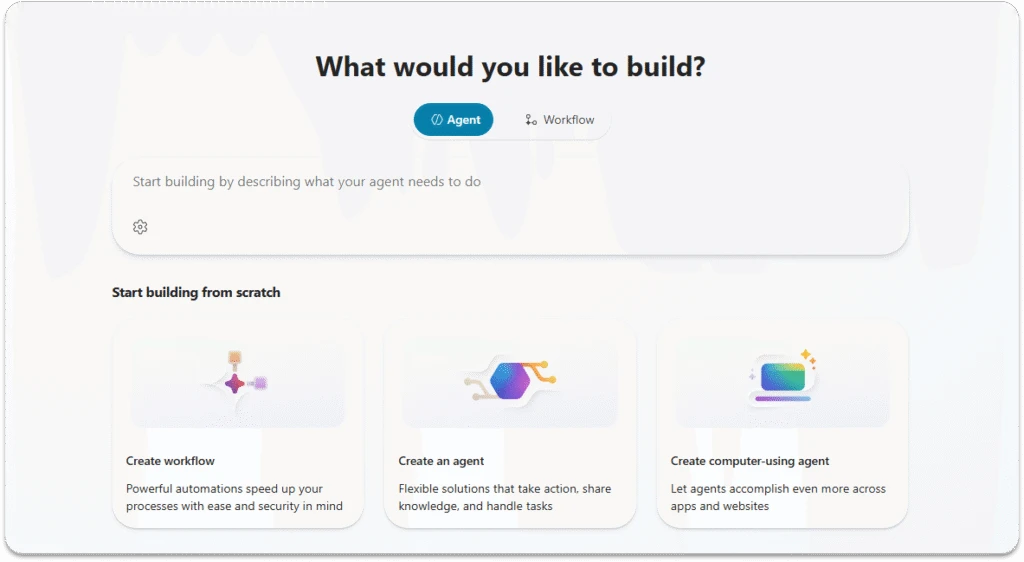
What would you like to build?
Users enter task descriptions like:
"Monitor deals in our sales pipeline and notify account owners when at-risk opportunities lack activity for over 30 days."
Behind the scenes, the platform leverages LLMs trained on organizational knowledge and policies to interpret intent, contextualize goals, and assemble an agent flow that automates monitoring, flagging, and notifying—without traditional coding.
2. Workflow Ownership with Automated Flows
Agents manage repeatable processes end-to-end:
- Trigger: Employee submits an expense claim.
- Guided interaction: Agent directs the user through form completion.
- Validation: Rules enforce policy compliance and regional standards.
- System integration: Agent routes requests through multiple SaaS and HR systems.
- Exception handling: Humans are engaged only if validation fails.
This workflow is built visually or conversationally within Copilot Studio, as illustrated by Workflows Agent automating bug email responses:
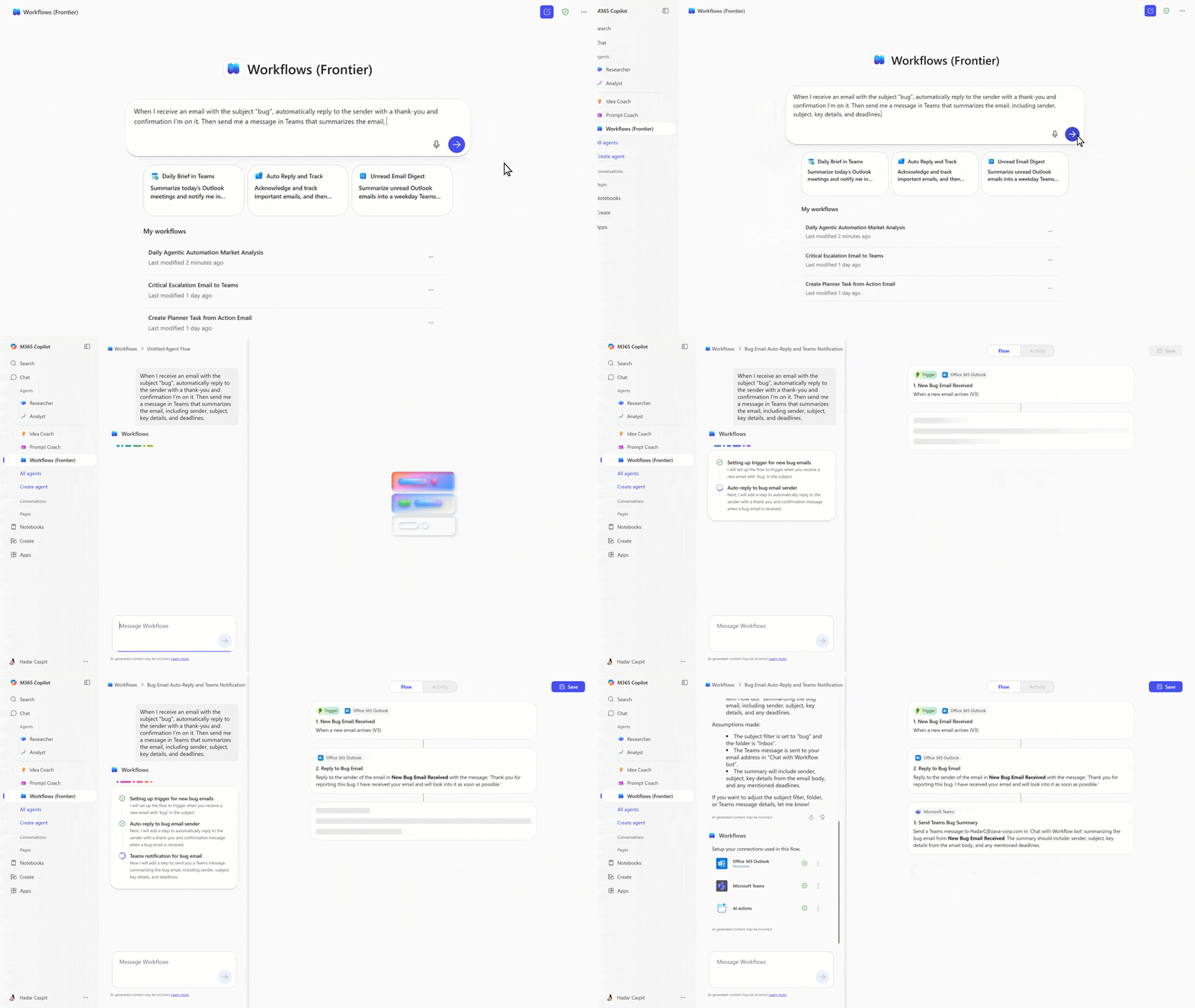
Automation eliminates manual handoffs, reduces errors, and speeds resolution.
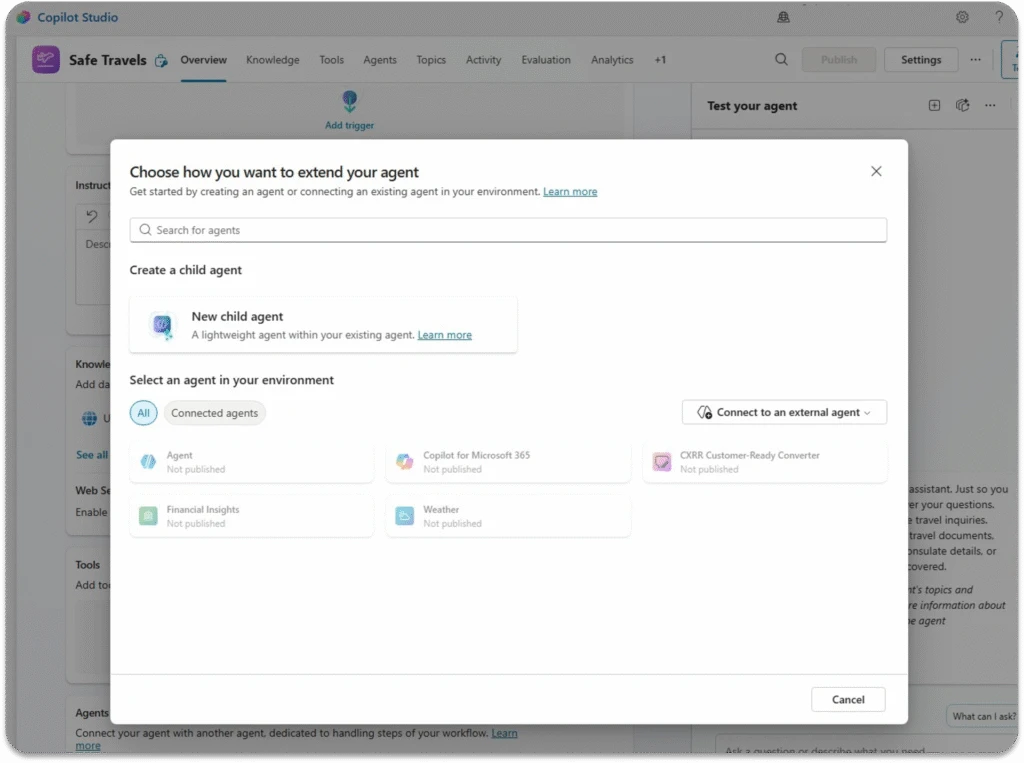
3. Multi-Agent Coordination
Industries with complex knowledge silos use multi-agent systems:
- Policy Agent: Interprets compliance rules.
- Equipment Agent: Handles technical manuals.
- Supplier Agent: Accesses external documentation.
- Coordinator Agent: Routes user queries to the right specialist agents dynamically.
This approach reflects existing team collaboration patterns and enables scalable expertise aggregation.
4. Model Choice and Customization
In regulated or specialized environments, Copilot Studio allows picking the exact model per workload:
- Anthropic for safety and complex reasoning.
- Cost-efficient OpenAI models for high volume tasks.
- Bring-your-own models for proprietary IP.
All models are centrally governed to ensure alignment with policy and data residency requirements.
5. Agents Acting Across Systems via MCP and Computer Use
Model Context Protocol (MCP) standardizes how agents interact with external systems. Copilot Studio equips agents with "computer use" skills:
- Navigating web UIs.
- Filling forms.
- Updating records in CRMs or ERP systems.
For example, an operations agent can autonomously identify a supply chain issue, update the tracking system, submit remediation tickets, and notify stakeholders—all without manual input.
6. Scaling with Governance and Insight
Copilot Studio’s lifecycle tools provide:
- Agent usage dashboards.
- Performance tracking and evaluation test scores.
- Cost monitoring.
- Integrated administration controls ensuring agents behave as intended.
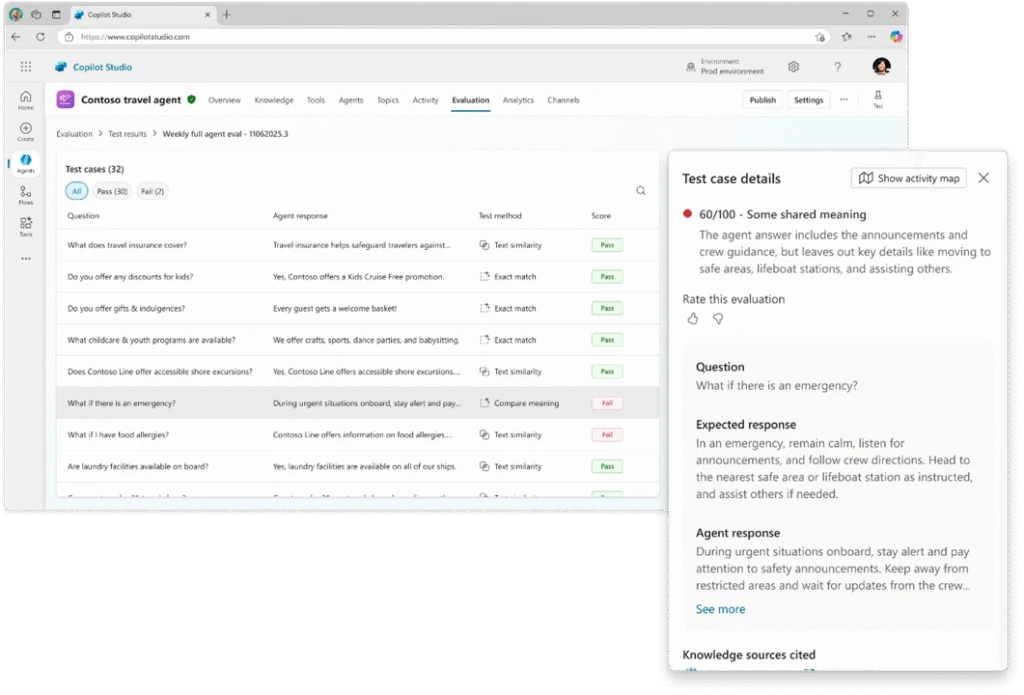
Microsoft Agent 365 consolidates these controls across Copilot Studio and Microsoft 365 Copilot environments, enabling IT leaders to safely accelerate agent production.
Quick Tips & Tricks
-
Empower Business Users with Natural Language: Encourage sales, HR, and operations teams to build agents themselves using Copilot Studio’s conversational interface—for broader adoption and faster time to value.
-
Design Agents to Own Workflows End-to-End: Build agents that handle complete processes rather than discrete tasks to minimize manual handoffs and eliminate bottlenecks.
-
Leverage Multi-Agent Coordination for Complex Scenarios: Break down systems into specialized agents and use the Agent2Agent protocol to orchestrate smoothly, mirroring real-world team dynamics.
-
Choose Models Based on Requirements: Use Anthropic models for compliance-critical reasoning, cost-optimized models for bulk tasks, and bring-your-own models when proprietary knowledge is a factor.
-
Enable Agents to Act in Real Systems: Activate Model Context Protocol and computer use features to empower agents with real action capabilities across SaaS and legacy platforms.
-
Monitor Agent Usage, Quality, and Costs: Regularly use Copilot Studio’s evaluation tools and Agent 365 dashboards to inform governance decisions and secure executive buy-in.
Conclusion
Microsoft Copilot Studio establishes the foundation for scalable, controlled AI agent adoption in 2026. The six core capabilities—from conversational agent creation and workflow ownership to flexible model control and multi-agent collaboration—provide a blueprint for turning experimental bots into central business assets.
By empowering all team members, automating end-to-end processes, and orchestrating agents at scale, organizations can speed up workflows while ensuring governance and cost-efficiency. As agentic momentum grows, success depends on close collaboration between business and IT teams, ongoing measurement, and thoughtful sharing of agent patterns.
The future of work increasingly depends on operationalizing AI agents, and Copilot Studio offers the tools to convert innovation into sustained impact. The path to transformative productivity is now open—2026 is the year to build, adopt, and scale with confidence.